Solved Replace Taskmanager with Resource Monitor?

Programie

New member
Local time
3:20 PM
Messages
9
Hi,

I'm new to Seven Forums and this is my first post. ;)

Is there a way to replace the standard Windows Taskmanager with the Resource Monitor?
Is it safe to just replace the taskmgr.exe?
 

My Computer My Computer

Computer Manufacturer/Model Number
Self Build
OS
Windows 7 Ultimate x64
CPU
Intel i7 2600
Motherboard
ASUS Maximus IV Extreme-Z
Memory
Corsair XMS DDR3-1333 DIMM CL9 (4x4 GB)
Graphics Card(s)
NVidia Geforce GTX 570
Sound Card
Onboard
Monitor(s) Displays
Samsung 40", Medion 19"
Screen Resolution
1920x1080, 1280x1024
Hard Drives
OCZ RevoDrive 3 (240 GB)
Network Share on QNAP TS-459 Pro+
Case
Lian Li PC-A77FA Big-Tower
Keyboard
Cherry Clean Desktop
Mouse
Logitech Optical Mouse
Internet Speed
DSL-2000
If you tell me the exact names and locations I will try it out for you. :)
 

My Computer My Computer

Computer type
PC/Desktop
Computer Manufacturer/Model Number
Custom Built PC
OS
Windows 7 Ultimate 64 bit SP1
CPU
Intel(R) Core(TM) i5-2500K
Motherboard
Gigabyte Technology Co., Ltd. Z68X-UD3-B3
Memory
12GB Kingston Hyperx 1600MHz
Graphics Card(s)
Asus GTS 450
PSU
500W Coolink
Other Info
Genius G-Pen F610 (PenPad)
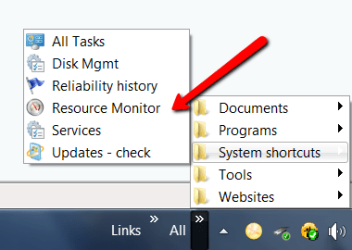
I never thought of it. I just made a shortcut of the Resource Monitor and put it into a Toolbar. That is just as easily accessible from the taskbar.
 

Attachments

  • 2011-08-07_1300.png
    2011-08-07_1300.png
    12 KB · Views: 9

My Computer My Computer

Computer Manufacturer/Model Number
HP, Dell, Gateway, Toshiba - 4 laptops and 2 desktops
OS
Vista, Windows7, Mint Mate, Zorin, Windows 8
CPU
from 1.6GHz Duo to i7
Monitor(s) Displays
2x HP w2207
Hard Drives
5x HDD, 7x SSD, 12x Externals
Keyboard
with trackball - no mices
Mouse
Trackball mice
Internet Speed
DSL 6000
Yes, I've forgotten to say that u can create shortcuts of both utilites on the desktop or the taskbar for better accesibility, so there's no need for replacing.
 

My Computer My Computer

Computer type
PC/Desktop
Computer Manufacturer/Model Number
Custom Built PC
OS
Windows 7 Ultimate 64 bit SP1
CPU
Intel(R) Core(TM) i5-2500K
Motherboard
Gigabyte Technology Co., Ltd. Z68X-UD3-B3
Memory
12GB Kingston Hyperx 1600MHz
Graphics Card(s)
Asus GTS 450
PSU
500W Coolink
Other Info
Genius G-Pen F610 (PenPad)
Thanks for the fast replies!

File path to Resource Monitor is "%SYSTEMROOT%\System32\perfmon.exe".
Another good replacement for the default Taskmanager is Process Explorer by Sysinternals. But if I try to replace the Taskmanager with Process Explorer, Windows shows me the error message "Windows cannot find 'C:\Windows\system32\taskmgr.exe'. Make sure you typed the name correctly, and then try again.".
 

My Computer My Computer

Computer Manufacturer/Model Number
Self Build
OS
Windows 7 Ultimate x64
CPU
Intel i7 2600
Motherboard
ASUS Maximus IV Extreme-Z
Memory
Corsair XMS DDR3-1333 DIMM CL9 (4x4 GB)
Graphics Card(s)
NVidia Geforce GTX 570
Sound Card
Onboard
Monitor(s) Displays
Samsung 40", Medion 19"
Screen Resolution
1920x1080, 1280x1024
Hard Drives
OCZ RevoDrive 3 (240 GB)
Network Share on QNAP TS-459 Pro+
Case
Lian Li PC-A77FA Big-Tower
Keyboard
Cherry Clean Desktop
Mouse
Logitech Optical Mouse
Internet Speed
DSL-2000
But if I try to replace the Taskmanager with Process Explorer, Windows shows me the error message "Windows cannot find 'C:\Windows\system32\taskmgr.exe'. Make sure you typed the name correctly, and then try again.".
You get that message when you move procexp.exe to a different location after you substituted it for Task Manager in Process Explorer's Options menu.
Open procexp.exe from the directory it's going to stay in (Program files would be a good spot), untick Replace Task manager, close Process Explorer, open again and tick Replace Task Manager again and you should be OK now.
 

My Computer My Computer

OS
Windows 7
You won't be able to replace Task Manager with the Resource Monitor because Resource Monitor needs Administrator rights to run and (as far as I know) it won't run without them. If you do replace it, however, you'll just get an error message saying "This requested application requires elevation.".

As for being safe... it depends on what you mean by safe. If you replace it with Process Explorer, yeah, it's safe.
 

My Computer My Computer

OS
Windows 7 Enterprise x64 SP1
Open procexp.exe from the directory it's going to stay in (Program files would be a good spot), untick Replace Task manager, close Process Explorer, open again and tick Replace Task Manager again and you should be OK now.
I tried it, but I still get the same error message...
 

My Computer My Computer

Computer Manufacturer/Model Number
Self Build
OS
Windows 7 Ultimate x64
CPU
Intel i7 2600
Motherboard
ASUS Maximus IV Extreme-Z
Memory
Corsair XMS DDR3-1333 DIMM CL9 (4x4 GB)
Graphics Card(s)
NVidia Geforce GTX 570
Sound Card
Onboard
Monitor(s) Displays
Samsung 40", Medion 19"
Screen Resolution
1920x1080, 1280x1024
Hard Drives
OCZ RevoDrive 3 (240 GB)
Network Share on QNAP TS-459 Pro+
Case
Lian Li PC-A77FA Big-Tower
Keyboard
Cherry Clean Desktop
Mouse
Logitech Optical Mouse
Internet Speed
DSL-2000
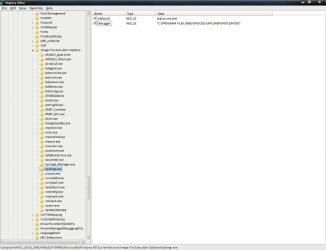
Open registry editor.
Navigate to: [HKEY_LOCAL_MACHINE\SOFTWARE\Microsoft\Windows NT\CurrentVersion\Image File Execution Options\taskmgr.exe]

Modify (or create) a new string value named "Debugger" (no quotes), double click it and set the value data to the path + procexp.exe (with quotes).
(don't use the procexp64.exe process, use the procexp.exe one instead)
 

Attachments

  • aaa.jpg
    aaa.jpg
    74 KB · Views: 56

My Computer My Computer

OS
Windows 7 Enterprise x64 SP1
Open registry editor.
Navigate to: [HKEY_LOCAL_MACHINE\SOFTWARE\Microsoft\Windows NT\CurrentVersion\Image File Execution Options\taskmgr.exe]

Modify (or create) a new string value named "Debugger" (no quotes), double click it and set the value data to the path + procexp.exe (with quotes).
(don't use the procexp64.exe process, use the procexp.exe one instead)
OK, that works! Thanks! :)

But one question: Why can't you use the procexp64.exe?
 

My Computer My Computer

Computer Manufacturer/Model Number
Self Build
OS
Windows 7 Ultimate x64
CPU
Intel i7 2600
Motherboard
ASUS Maximus IV Extreme-Z
Memory
Corsair XMS DDR3-1333 DIMM CL9 (4x4 GB)
Graphics Card(s)
NVidia Geforce GTX 570
Sound Card
Onboard
Monitor(s) Displays
Samsung 40", Medion 19"
Screen Resolution
1920x1080, 1280x1024
Hard Drives
OCZ RevoDrive 3 (240 GB)
Network Share on QNAP TS-459 Pro+
Case
Lian Li PC-A77FA Big-Tower
Keyboard
Cherry Clean Desktop
Mouse
Logitech Optical Mouse
Internet Speed
DSL-2000
I might have misunderstood the question but on my Task Manager - Performance Tab - at the bottom - is a Resource Monitor Button
 

My Computer My Computer

Computer type
PC/Desktop
Computer Manufacturer/Model Number
PC SPECIALIST
OS
Windows 7 - Home Premium - 64 bit
CPU
Intel® Core™i7 Quad Core
Motherboard
ASUS® P6X58D-E: DDR3, USB 3.0, SATA 6.0GB/s, 3-Way SLI
Memory
12GB SAMSUNG DDR3 TRI-DDR3 1333MHz (3 x 4GB)
Graphics Card(s)
1GB NVIDIA GEFORCE GT 430 - DVI,HDMI,VGA
Sound Card
Sound Blaster® Audigy™ SE (£19)
Monitor(s) Displays
Samsung SyncMaster 913 TM
Screen Resolution
1281 x 1024
Hard Drives
C: 500GB SERIAL ATA 3-Gb/s

D: 500GB SERIAL ATA 3-Gb/s
PSU
450W Quiet 80 PLUS Dual Rail PSU
Case
PIANO BLACK ENIGMA CASE + 2 FRONT USB
Cooling
?SUPER QUIET 22dBA TRIPLE COPPER HEATPIPE CPU COOLER
Keyboard
Standard PS/2 Keyboard
Mouse
Microsoft USB IntelliMouse Optical (IntelliPoint)
Internet Speed
6.6 Mbps
Antivirus
Norton
Browser
IE 11
I might have misunderstood the question but on my Task Manager - Performance Tab - at the bottom - is a Resource Monitor Button

The question was, how to REPLACE the Taskmanager with Resource Monitor (or Process Explorer)
 

My Computer My Computer

Computer Manufacturer/Model Number
Self Build
OS
Windows 7 Ultimate x64
CPU
Intel i7 2600
Motherboard
ASUS Maximus IV Extreme-Z
Memory
Corsair XMS DDR3-1333 DIMM CL9 (4x4 GB)
Graphics Card(s)
NVidia Geforce GTX 570
Sound Card
Onboard
Monitor(s) Displays
Samsung 40", Medion 19"
Screen Resolution
1920x1080, 1280x1024
Hard Drives
OCZ RevoDrive 3 (240 GB)
Network Share on QNAP TS-459 Pro+
Case
Lian Li PC-A77FA Big-Tower
Keyboard
Cherry Clean Desktop
Mouse
Logitech Optical Mouse
Internet Speed
DSL-2000
But one question: Why can't you use the procexp64.exe?

It exists only when procexp.exe is running. Outside of that timeframe, the file isn't there. (you'll notice it disappears when you close Process Explorer).
Don't worry about it tho. On x64 systems, it's automatically loaded into system memory.
 

My Computer My Computer

OS
Windows 7 Enterprise x64 SP1
  • Like
Reactions: whs
Back
Top