Replacing my C drive with a SSD in windows 7

My Computer My Computer

At a glance

Vista, Windows7, Mint Mate, Zorin, Windows 8from 1.6GHz Duo to i7
Computer Manufacturer/Model Number
HP, Dell, Gateway, Toshiba - 4 laptops and 2 desktops
OS
Vista, Windows7, Mint Mate, Zorin, Windows 8
CPU
from 1.6GHz Duo to i7
Monitor(s) Displays
2x HP w2207
Hard Drives
5x HDD, 7x SSD, 12x Externals
Keyboard
with trackball - no mices
Mouse
Trackball mice
Internet Speed
DSL 6000
This is getting more complicated all the time,I'm getting my doubts about this project.Maybe I should catch the next plane out to you,And on the other hand it might dissapear.
I'll think very hard about this method that you have just said.
Thanks Very sunny here over the last few days.
David.Not to simple as one thought.

David:

It's not really complicated. Don't let it intimidate you.

The 2 steps WHS mentioned in post 19 are optional if you find them intimidating.

Rather than transfering the boot manager to C with Easy BCD, you can instead image your system reserved partition to the SSD, along with the C partition.

Alignment is important for best performance, but as far as I know it can be corrected (if improperly aligned) AFTER the SSD is up and running with Windows. The PC would still operate with improper alignment---you just wouldn't be getting the maximum performance from the SSD. But it's correctable.
 

My Computer My Computer

At a glance

Windows 7 Home Premium SP1, 64-bitIntel Skylake i5-6600K, not overclocked8 GB HyperX DDR4-2666 (2 x 4 GB)none; graphics are integrated on CPU
Computer type
PC/Desktop
Computer Manufacturer/Model Number
Ignatz Special; 4 speed manual gearbox; factory air conditioning; one of one
OS
Windows 7 Home Premium SP1, 64-bit
CPU
Intel Skylake i5-6600K, not overclocked
Motherboard
AsRock Z170M Extreme 4, micro ATX
Memory
8 GB HyperX DDR4-2666 (2 x 4 GB)
Graphics Card(s)
none; graphics are integrated on CPU
Sound Card
onboard: Realtek ALC1150; external: USB Behringer UF0-202
Monitor(s) Displays
Dell S2340M 23 inch IPS
Screen Resolution
1600 x 900
Hard Drives
System: Crucial MX100 series SSD, 128 GB;
Data: Samsung Spinpoint 103SJ, 1 TB;
Backup: WD Caviar Green WD30EZRX-00D8PB0, 3 TB
PSU
Rosewill SilentNight 500 watt fanless, semi-modular
Case
Antec Solo II
Cooling
Noctua NH-U12S; Noctua F12 intake, Noctua S12A exhaust
Keyboard
Microsoft 200 6JH-00001 USB
Mouse
Dell or Microsoft optical wired; USB
Antivirus
Microsoft Security Essentials and Malwarebytes Premium
Browser
Pale Moon
Other Info
All fans PWM; speeds at idle: CPU circa 500 rpm; intake circa 600 rpm; exhaust circa 600 rpm; CPU temps 27 idle and 47 C load in a warm room (27 C/81 F) when running Intel Extreme Tuning Utility stress test.
Thanks for the reply,Could you please explain a little further on your posting Please.
I'm not very pc clever.


Alignment is important for best performance, but as far as I know it can be corrected (if improperly aligned) AFTER the SSD is up and running with Windows. The PC would still operate with improper alignment---you just wouldn't be getting the maximum performance from the SSD. But it's correctable.

Thanks once again.

A pal of mine just dent me this info from another forum,Does it make sense to you?

I use Macrium Reflect free edition to make images of my computer hard drive.

If he does create an image make sure it includes ALL the partitions on his hard disk needed to reinstall Windows. On my various computers that is either 2 or 3 partitions. One of the options in Macrium is something like "backup all partitions needed to reinstall Windows" or words to that effect.

Assuming he has made an image and stored it on his external hard drive you do as follows:

Remove the old hard drive and put the new one in the computer.

UNPLUG the external hard drive and only plug it in AFTER Macrium has displayed.

Boot from the Macrium Reflect CD/DVD and wait for the Macrium Reflect program to display.

Plug in the External Hard Drive and wait a moment or two for the disk to spin up and for Macium to find it.

Navigate to the external hard drive and find the image and select on it. Note the drive letters may not be as normal so make sure you do select the external hard drive.

Tell Macrium to copy this image (all partitions) to the new drive. You may need to increase the size of a partition to make it fit the whole disk.

This will start and run for a while (depending on how large his original disk was and how much data was on it). For me it usually takes between 10 and 20 minutes but I only have Windows and a few programs on my disk.

When the restore has finished take out the CD/DVD and reboot the computer and Windows should start from the "new" image on his "new" hard disk.
 
Last edited:

My Computer My Computer

At a glance

Summary Operating System Windows 7 Home Premi...AMD Athlon II X2 250Total memory slots 4 Used memory slots 2 Free...Name Generic Non-PnP Monitor on NVIDIA GeForc...
Computer type
PC/Desktop
Computer Manufacturer/Model Number
Home Build windows 7 Home premium.Built by a local computer shop.
OS
Summary Operating System Windows 7 Home Premium 64-bit SP1 CPU AMD Athlon II X2 250 23 °C
CPU
AMD Athlon II X2 250
Motherboard
Manufacturer BIOSTAR Group Model N61PB-M2S (Socket AM2 )
Memory
Total memory slots 4 Used memory slots 2 Free memory slots 2
Graphics Card(s)
Name Generic Non-PnP Monitor on NVIDIA GeForce 6150SE nForce
Sound Card
Realtek High Definition Audio Playback Devices Realtek Dig
Monitor(s) Displays
Acer
Hard Drives
Main C drive is now a 120GB SSD With only operating system and programs.
Second HDD 1TB with all documents etc.
Keyboard
HID Keyboard Device Device Kind Keyboard Device Name HID K
Antivirus
Karsersky
Browser
Google
Other Info
Summary
Operating System
Windows 7 Home Premium 64-bit SP1
CPU
AMD Athlon II X2 250 23 °C
Regor 45nm Technology
RAM
4.00GB Dual-Channel DDR2 @ 401MHz (6-6-6-18)
Motherboard
BIOSTAR Group N61PB-M2S (Socket AM2 ) 40 °C
Graphics
Generic Non-PnP Monitor (1024x768@60Hz)
128MB NVIDIA GeForce 6150SE nForce 430 (Biostar Microtech Int'l)
Storage
1863GB West

My Computer My Computer

At a glance

Vista, Windows7, Mint Mate, Zorin, Windows 8from 1.6GHz Duo to i7
Computer Manufacturer/Model Number
HP, Dell, Gateway, Toshiba - 4 laptops and 2 desktops
OS
Vista, Windows7, Mint Mate, Zorin, Windows 8
CPU
from 1.6GHz Duo to i7
Monitor(s) Displays
2x HP w2207
Hard Drives
5x HDD, 7x SSD, 12x Externals
Keyboard
with trackball - no mices
Mouse
Trackball mice
Internet Speed
DSL 6000
wolfgang,looking at tutorials there are a lot of info about partitions on the ssd.Well if I do go ahead with this plan as you know by my posting the only items that are on my C drive is the operating software ''windows7''And program files.All my data is on another drive,so when I decide to attack this project the only items going on to the SSD will be OS and program files No data.
Does that make things a little simpler as there will be no need for any partitions on the new SSD.
Many thanks. I'm getting more confused.:confused::confused:
 

My Computer My Computer

At a glance

Summary Operating System Windows 7 Home Premi...AMD Athlon II X2 250Total memory slots 4 Used memory slots 2 Free...Name Generic Non-PnP Monitor on NVIDIA GeForc...
Computer type
PC/Desktop
Computer Manufacturer/Model Number
Home Build windows 7 Home premium.Built by a local computer shop.
OS
Summary Operating System Windows 7 Home Premium 64-bit SP1 CPU AMD Athlon II X2 250 23 °C
CPU
AMD Athlon II X2 250
Motherboard
Manufacturer BIOSTAR Group Model N61PB-M2S (Socket AM2 )
Memory
Total memory slots 4 Used memory slots 2 Free memory slots 2
Graphics Card(s)
Name Generic Non-PnP Monitor on NVIDIA GeForce 6150SE nForce
Sound Card
Realtek High Definition Audio Playback Devices Realtek Dig
Monitor(s) Displays
Acer
Hard Drives
Main C drive is now a 120GB SSD With only operating system and programs.
Second HDD 1TB with all documents etc.
Keyboard
HID Keyboard Device Device Kind Keyboard Device Name HID K
Antivirus
Karsersky
Browser
Google
Other Info
Summary
Operating System
Windows 7 Home Premium 64-bit SP1
CPU
AMD Athlon II X2 250 23 °C
Regor 45nm Technology
RAM
4.00GB Dual-Channel DDR2 @ 401MHz (6-6-6-18)
Motherboard
BIOSTAR Group N61PB-M2S (Socket AM2 ) 40 °C
Graphics
Generic Non-PnP Monitor (1024x768@60Hz)
128MB NVIDIA GeForce 6150SE nForce 430 (Biostar Microtech Int'l)
Storage
1863GB West
David:

I think the path of least confusion for you is to first make an image of BOTH your C drive and your "system reserved" partition. Probably in a single image file, although you could make a separate image file for each.

Get that done. Presumably you would store that image (or images) on an external hard drive.

If you do that, then you don't have to worry about using Easy BCD that WHS mentioned in post 19, numeral 1 "transfer the boot manager to C". You DON'T have to do that IF you include your "system reserved" partition in your image.

Do that first. I assume you've already confirmed that our boot disk works and will get you into Macrium.

THEN and ONLY THEN consider the alignment issue.

I'm sure we can walk you through WHS's instructions about alignment using Diskpart.

Worst case scenario if you can't figure out Diskpart: you restore the image and are not aligned correctly. It's correctable, but worry about it then, not now.

Get the image file made. With system reserved and C, in the same image file.
 

My Computer My Computer

At a glance

Windows 7 Home Premium SP1, 64-bitIntel Skylake i5-6600K, not overclocked8 GB HyperX DDR4-2666 (2 x 4 GB)none; graphics are integrated on CPU
Computer type
PC/Desktop
Computer Manufacturer/Model Number
Ignatz Special; 4 speed manual gearbox; factory air conditioning; one of one
OS
Windows 7 Home Premium SP1, 64-bit
CPU
Intel Skylake i5-6600K, not overclocked
Motherboard
AsRock Z170M Extreme 4, micro ATX
Memory
8 GB HyperX DDR4-2666 (2 x 4 GB)
Graphics Card(s)
none; graphics are integrated on CPU
Sound Card
onboard: Realtek ALC1150; external: USB Behringer UF0-202
Monitor(s) Displays
Dell S2340M 23 inch IPS
Screen Resolution
1600 x 900
Hard Drives
System: Crucial MX100 series SSD, 128 GB;
Data: Samsung Spinpoint 103SJ, 1 TB;
Backup: WD Caviar Green WD30EZRX-00D8PB0, 3 TB
PSU
Rosewill SilentNight 500 watt fanless, semi-modular
Case
Antec Solo II
Cooling
Noctua NH-U12S; Noctua F12 intake, Noctua S12A exhaust
Keyboard
Microsoft 200 6JH-00001 USB
Mouse
Dell or Microsoft optical wired; USB
Antivirus
Microsoft Security Essentials and Malwarebytes Premium
Browser
Pale Moon
Other Info
All fans PWM; speeds at idle: CPU circa 500 rpm; intake circa 600 rpm; exhaust circa 600 rpm; CPU temps 27 idle and 47 C load in a warm room (27 C/81 F) when running Intel Extreme Tuning Utility stress test.
wolfgang,looking at tutorials there are a lot of info about partitions on the ssd.Well if I do go ahead with this plan as you know by my posting the only items that are on my C drive is the operating software ''windows7''And program files.All my data is on another drive,so when I decide to attack this project the only items going on to the SSD will be OS and program files No data.
Does that make things a little simpler as there will be no need for any partitions on the new SSD.
Many thanks. I'm getting more confused.:confused::confused:

Time to confirm some things.

How many partitions do you have on the hard drive that contains Windows?

Name them.

C and what else?

You probably have a very small one named system or system reserved.

Correct???

Are you familiar with Windows Disk Management?
 

My Computer My Computer

At a glance

Windows 7 Home Premium SP1, 64-bitIntel Skylake i5-6600K, not overclocked8 GB HyperX DDR4-2666 (2 x 4 GB)none; graphics are integrated on CPU
Computer type
PC/Desktop
Computer Manufacturer/Model Number
Ignatz Special; 4 speed manual gearbox; factory air conditioning; one of one
OS
Windows 7 Home Premium SP1, 64-bit
CPU
Intel Skylake i5-6600K, not overclocked
Motherboard
AsRock Z170M Extreme 4, micro ATX
Memory
8 GB HyperX DDR4-2666 (2 x 4 GB)
Graphics Card(s)
none; graphics are integrated on CPU
Sound Card
onboard: Realtek ALC1150; external: USB Behringer UF0-202
Monitor(s) Displays
Dell S2340M 23 inch IPS
Screen Resolution
1600 x 900
Hard Drives
System: Crucial MX100 series SSD, 128 GB;
Data: Samsung Spinpoint 103SJ, 1 TB;
Backup: WD Caviar Green WD30EZRX-00D8PB0, 3 TB
PSU
Rosewill SilentNight 500 watt fanless, semi-modular
Case
Antec Solo II
Cooling
Noctua NH-U12S; Noctua F12 intake, Noctua S12A exhaust
Keyboard
Microsoft 200 6JH-00001 USB
Mouse
Dell or Microsoft optical wired; USB
Antivirus
Microsoft Security Essentials and Malwarebytes Premium
Browser
Pale Moon
Other Info
All fans PWM; speeds at idle: CPU circa 500 rpm; intake circa 600 rpm; exhaust circa 600 rpm; CPU temps 27 idle and 47 C load in a warm room (27 C/81 F) when running Intel Extreme Tuning Utility stress test.
Time to confirm some things.

How many partitions do you have on the hard drive that contains Windows?

Name them.

C and what else?

You probably have a very small one named system or system reserved.

Correct???

Are you familiar with Windows Disk Management?

On C drive Only Operating system and all program files Nothing else,All my data is on a seperate internal hdd.
I have made a backup of the C drive on an external hdd.
Yes I have done a bit with Disk Management

Thank You for your time and patience.
 

My Computer My Computer

At a glance

Summary Operating System Windows 7 Home Premi...AMD Athlon II X2 250Total memory slots 4 Used memory slots 2 Free...Name Generic Non-PnP Monitor on NVIDIA GeForc...
Computer type
PC/Desktop
Computer Manufacturer/Model Number
Home Build windows 7 Home premium.Built by a local computer shop.
OS
Summary Operating System Windows 7 Home Premium 64-bit SP1 CPU AMD Athlon II X2 250 23 °C
CPU
AMD Athlon II X2 250
Motherboard
Manufacturer BIOSTAR Group Model N61PB-M2S (Socket AM2 )
Memory
Total memory slots 4 Used memory slots 2 Free memory slots 2
Graphics Card(s)
Name Generic Non-PnP Monitor on NVIDIA GeForce 6150SE nForce
Sound Card
Realtek High Definition Audio Playback Devices Realtek Dig
Monitor(s) Displays
Acer
Hard Drives
Main C drive is now a 120GB SSD With only operating system and programs.
Second HDD 1TB with all documents etc.
Keyboard
HID Keyboard Device Device Kind Keyboard Device Name HID K
Antivirus
Karsersky
Browser
Google
Other Info
Summary
Operating System
Windows 7 Home Premium 64-bit SP1
CPU
AMD Athlon II X2 250 23 °C
Regor 45nm Technology
RAM
4.00GB Dual-Channel DDR2 @ 401MHz (6-6-6-18)
Motherboard
BIOSTAR Group N61PB-M2S (Socket AM2 ) 40 °C
Graphics
Generic Non-PnP Monitor (1024x768@60Hz)
128MB NVIDIA GeForce 6150SE nForce 430 (Biostar Microtech Int'l)
Storage
1863GB West
David, the method that Ignatz descibed is as good as any. I just always get rid of the 100MB system partition, but that may be only me.

The very easiest would be to if you used the Paragon Migration tool. Then you have to worry about nothing.

Make sure you post back once the OS is running on the SSD because there are a few things that should be done at that point. But there is no need to confuse you with that now. It's all easy stuff.
 

My Computer My Computer

At a glance

Vista, Windows7, Mint Mate, Zorin, Windows 8from 1.6GHz Duo to i7
Computer Manufacturer/Model Number
HP, Dell, Gateway, Toshiba - 4 laptops and 2 desktops
OS
Vista, Windows7, Mint Mate, Zorin, Windows 8
CPU
from 1.6GHz Duo to i7
Monitor(s) Displays
2x HP w2207
Hard Drives
5x HDD, 7x SSD, 12x Externals
Keyboard
with trackball - no mices
Mouse
Trackball mice
Internet Speed
DSL 6000
I aint got the new ssd yet.
 

My Computer My Computer

At a glance

Summary Operating System Windows 7 Home Premi...AMD Athlon II X2 250Total memory slots 4 Used memory slots 2 Free...Name Generic Non-PnP Monitor on NVIDIA GeForc...
Computer type
PC/Desktop
Computer Manufacturer/Model Number
Home Build windows 7 Home premium.Built by a local computer shop.
OS
Summary Operating System Windows 7 Home Premium 64-bit SP1 CPU AMD Athlon II X2 250 23 °C
CPU
AMD Athlon II X2 250
Motherboard
Manufacturer BIOSTAR Group Model N61PB-M2S (Socket AM2 )
Memory
Total memory slots 4 Used memory slots 2 Free memory slots 2
Graphics Card(s)
Name Generic Non-PnP Monitor on NVIDIA GeForce 6150SE nForce
Sound Card
Realtek High Definition Audio Playback Devices Realtek Dig
Monitor(s) Displays
Acer
Hard Drives
Main C drive is now a 120GB SSD With only operating system and programs.
Second HDD 1TB with all documents etc.
Keyboard
HID Keyboard Device Device Kind Keyboard Device Name HID K
Antivirus
Karsersky
Browser
Google
Other Info
Summary
Operating System
Windows 7 Home Premium 64-bit SP1
CPU
AMD Athlon II X2 250 23 °C
Regor 45nm Technology
RAM
4.00GB Dual-Channel DDR2 @ 401MHz (6-6-6-18)
Motherboard
BIOSTAR Group N61PB-M2S (Socket AM2 ) 40 °C
Graphics
Generic Non-PnP Monitor (1024x768@60Hz)
128MB NVIDIA GeForce 6150SE nForce 430 (Biostar Microtech Int'l)
Storage
1863GB West
Time to confirm some things.

How many partitions do you have on the hard drive that contains Windows?

Name them.

C and what else?

You probably have a very small one named system or system reserved.

Correct???

Are you familiar with Windows Disk Management?

On C drive Only Operating system and all program files Nothing else,All my data is on a seperate internal hdd.
I have made a backup of the C drive on an external hdd.
Yes I have done a bit with Disk Management

Thank You for your time and patience.

C is a partition. It is not a drive. We need to know about PARTITIONS.

Look at your Disk Management by typing those 2 words in the Windows start box search.

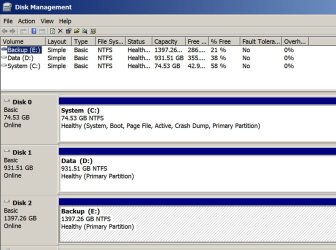
Attached is a picture of my Disk Management. Note you see 3 drives in the lower portion, shown as disk 0, disk 1, and disc 2. Those are physical objects you can hold in your hand. They are DRIVES. Each drive has one or more partitions.

My drive 0 has just 1 partition: C, named system

My drive 1 has just 1 partition: D, named data

My drive 2 has just 1 partition: E, named backup.

Note that my C partition states the following info: system, boot, page file, active, crash dump, primary partition.

You most likely have a drive with more than 1 partition: C and at least one other. We need to know as much detail as you can provide about them: names, which ones are marked "active", "system", and so forth.
 

Attachments

  • Untitled-1.jpg
    Untitled-1.jpg
    153.7 KB · Views: 0

My Computer My Computer

At a glance

Windows 7 Home Premium SP1, 64-bitIntel Skylake i5-6600K, not overclocked8 GB HyperX DDR4-2666 (2 x 4 GB)none; graphics are integrated on CPU
Computer type
PC/Desktop
Computer Manufacturer/Model Number
Ignatz Special; 4 speed manual gearbox; factory air conditioning; one of one
OS
Windows 7 Home Premium SP1, 64-bit
CPU
Intel Skylake i5-6600K, not overclocked
Motherboard
AsRock Z170M Extreme 4, micro ATX
Memory
8 GB HyperX DDR4-2666 (2 x 4 GB)
Graphics Card(s)
none; graphics are integrated on CPU
Sound Card
onboard: Realtek ALC1150; external: USB Behringer UF0-202
Monitor(s) Displays
Dell S2340M 23 inch IPS
Screen Resolution
1600 x 900
Hard Drives
System: Crucial MX100 series SSD, 128 GB;
Data: Samsung Spinpoint 103SJ, 1 TB;
Backup: WD Caviar Green WD30EZRX-00D8PB0, 3 TB
PSU
Rosewill SilentNight 500 watt fanless, semi-modular
Case
Antec Solo II
Cooling
Noctua NH-U12S; Noctua F12 intake, Noctua S12A exhaust
Keyboard
Microsoft 200 6JH-00001 USB
Mouse
Dell or Microsoft optical wired; USB
Antivirus
Microsoft Security Essentials and Malwarebytes Premium
Browser
Pale Moon
Other Info
All fans PWM; speeds at idle: CPU circa 500 rpm; intake circa 600 rpm; exhaust circa 600 rpm; CPU temps 27 idle and 47 C load in a warm room (27 C/81 F) when running Intel Extreme Tuning Utility stress test.
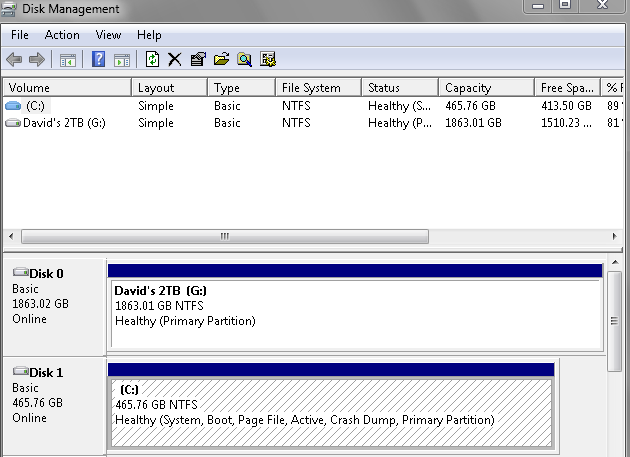
Here is Mine.

KhiXawp.png
 

My Computer My Computer

At a glance

Summary Operating System Windows 7 Home Premi...AMD Athlon II X2 250Total memory slots 4 Used memory slots 2 Free...Name Generic Non-PnP Monitor on NVIDIA GeForc...
Computer type
PC/Desktop
Computer Manufacturer/Model Number
Home Build windows 7 Home premium.Built by a local computer shop.
OS
Summary Operating System Windows 7 Home Premium 64-bit SP1 CPU AMD Athlon II X2 250 23 °C
CPU
AMD Athlon II X2 250
Motherboard
Manufacturer BIOSTAR Group Model N61PB-M2S (Socket AM2 )
Memory
Total memory slots 4 Used memory slots 2 Free memory slots 2
Graphics Card(s)
Name Generic Non-PnP Monitor on NVIDIA GeForce 6150SE nForce
Sound Card
Realtek High Definition Audio Playback Devices Realtek Dig
Monitor(s) Displays
Acer
Hard Drives
Main C drive is now a 120GB SSD With only operating system and programs.
Second HDD 1TB with all documents etc.
Keyboard
HID Keyboard Device Device Kind Keyboard Device Name HID K
Antivirus
Karsersky
Browser
Google
Other Info
Summary
Operating System
Windows 7 Home Premium 64-bit SP1
CPU
AMD Athlon II X2 250 23 °C
Regor 45nm Technology
RAM
4.00GB Dual-Channel DDR2 @ 401MHz (6-6-6-18)
Motherboard
BIOSTAR Group N61PB-M2S (Socket AM2 ) 40 °C
Graphics
Generic Non-PnP Monitor (1024x768@60Hz)
128MB NVIDIA GeForce 6150SE nForce 430 (Biostar Microtech Int'l)
Storage
1863GB West
Looks good. You do NOT have a system reserved. All boot files are on C. You don't need to use Easy BCD.

C is the only partition you need to make an image of and I guess you've already done that?

All you need to worry about is:

1: Will the image restoration actually work? You've got a 99 percent chance it will.

2: Alignment.

Worry about alignment when the SSD is actually in your hands.

But you can at least familiarize yourself with Diskpart while waiting for the SSD.

Are you familiar with working at a command prompt?

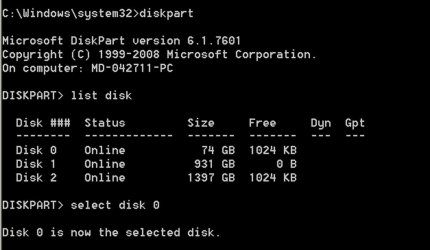
Here is diskpart on my PC. I got there by typing diskpart at a command prompt and hitting the enter key.

I then typed list disk and hit the enter key

Notice it shows all 3 of my disks (0, 1, and 2).


Your C partition will be shown as Disk 1, not Disk 0.

So you'd have to type "select disk 1", NOT NOT NOT "select disk 0".

I can tell that disk 0 is my SSD because I know it is a small disk, only 74 gb.

See WHS's post 19 for the rest of the steps that you'd use when you get the SSD.

Type "exit" and hit the enter key to leave diskpart at any time.
 

Attachments

  • Untitled-1.jpg
    Untitled-1.jpg
    51.7 KB · Views: 0

My Computer My Computer

At a glance

Windows 7 Home Premium SP1, 64-bitIntel Skylake i5-6600K, not overclocked8 GB HyperX DDR4-2666 (2 x 4 GB)none; graphics are integrated on CPU
Computer type
PC/Desktop
Computer Manufacturer/Model Number
Ignatz Special; 4 speed manual gearbox; factory air conditioning; one of one
OS
Windows 7 Home Premium SP1, 64-bit
CPU
Intel Skylake i5-6600K, not overclocked
Motherboard
AsRock Z170M Extreme 4, micro ATX
Memory
8 GB HyperX DDR4-2666 (2 x 4 GB)
Graphics Card(s)
none; graphics are integrated on CPU
Sound Card
onboard: Realtek ALC1150; external: USB Behringer UF0-202
Monitor(s) Displays
Dell S2340M 23 inch IPS
Screen Resolution
1600 x 900
Hard Drives
System: Crucial MX100 series SSD, 128 GB;
Data: Samsung Spinpoint 103SJ, 1 TB;
Backup: WD Caviar Green WD30EZRX-00D8PB0, 3 TB
PSU
Rosewill SilentNight 500 watt fanless, semi-modular
Case
Antec Solo II
Cooling
Noctua NH-U12S; Noctua F12 intake, Noctua S12A exhaust
Keyboard
Microsoft 200 6JH-00001 USB
Mouse
Dell or Microsoft optical wired; USB
Antivirus
Microsoft Security Essentials and Malwarebytes Premium
Browser
Pale Moon
Other Info
All fans PWM; speeds at idle: CPU circa 500 rpm; intake circa 600 rpm; exhaust circa 600 rpm; CPU temps 27 idle and 47 C load in a warm room (27 C/81 F) when running Intel Extreme Tuning Utility stress test.
Fair enough, we'll be here.
 

My Computer My Computer

At a glance

Vista, Windows7, Mint Mate, Zorin, Windows 8from 1.6GHz Duo to i7
Computer Manufacturer/Model Number
HP, Dell, Gateway, Toshiba - 4 laptops and 2 desktops
OS
Vista, Windows7, Mint Mate, Zorin, Windows 8
CPU
from 1.6GHz Duo to i7
Monitor(s) Displays
2x HP w2207
Hard Drives
5x HDD, 7x SSD, 12x Externals
Keyboard
with trackball - no mices
Mouse
Trackball mice
Internet Speed
DSL 6000
I must say you have been a brilliant help here on this project of mine,But it looks more complicated all the time.
Would it have been so complicated if I decided to put a smaller sata drive in not a ssd one?
Thanks.
 

My Computer My Computer

At a glance

Summary Operating System Windows 7 Home Premi...AMD Athlon II X2 250Total memory slots 4 Used memory slots 2 Free...Name Generic Non-PnP Monitor on NVIDIA GeForc...
Computer type
PC/Desktop
Computer Manufacturer/Model Number
Home Build windows 7 Home premium.Built by a local computer shop.
OS
Summary Operating System Windows 7 Home Premium 64-bit SP1 CPU AMD Athlon II X2 250 23 °C
CPU
AMD Athlon II X2 250
Motherboard
Manufacturer BIOSTAR Group Model N61PB-M2S (Socket AM2 )
Memory
Total memory slots 4 Used memory slots 2 Free memory slots 2
Graphics Card(s)
Name Generic Non-PnP Monitor on NVIDIA GeForce 6150SE nForce
Sound Card
Realtek High Definition Audio Playback Devices Realtek Dig
Monitor(s) Displays
Acer
Hard Drives
Main C drive is now a 120GB SSD With only operating system and programs.
Second HDD 1TB with all documents etc.
Keyboard
HID Keyboard Device Device Kind Keyboard Device Name HID K
Antivirus
Karsersky
Browser
Google
Other Info
Summary
Operating System
Windows 7 Home Premium 64-bit SP1
CPU
AMD Athlon II X2 250 23 °C
Regor 45nm Technology
RAM
4.00GB Dual-Channel DDR2 @ 401MHz (6-6-6-18)
Motherboard
BIOSTAR Group N61PB-M2S (Socket AM2 ) 40 °C
Graphics
Generic Non-PnP Monitor (1024x768@60Hz)
128MB NVIDIA GeForce 6150SE nForce 430 (Biostar Microtech Int'l)
Storage
1863GB West
I must say you have been a brilliant help here on this project of mine,But it looks more complicated all the time.
Would it have been so complicated if I decided to put a smaller sata drive in not a ssd one?
Thanks.

no difference
 

My Computer My Computer

At a glance

Windows 7 Home Premium SP1, 64-bitIntel Skylake i5-6600K, not overclocked8 GB HyperX DDR4-2666 (2 x 4 GB)none; graphics are integrated on CPU
Computer type
PC/Desktop
Computer Manufacturer/Model Number
Ignatz Special; 4 speed manual gearbox; factory air conditioning; one of one
OS
Windows 7 Home Premium SP1, 64-bit
CPU
Intel Skylake i5-6600K, not overclocked
Motherboard
AsRock Z170M Extreme 4, micro ATX
Memory
8 GB HyperX DDR4-2666 (2 x 4 GB)
Graphics Card(s)
none; graphics are integrated on CPU
Sound Card
onboard: Realtek ALC1150; external: USB Behringer UF0-202
Monitor(s) Displays
Dell S2340M 23 inch IPS
Screen Resolution
1600 x 900
Hard Drives
System: Crucial MX100 series SSD, 128 GB;
Data: Samsung Spinpoint 103SJ, 1 TB;
Backup: WD Caviar Green WD30EZRX-00D8PB0, 3 TB
PSU
Rosewill SilentNight 500 watt fanless, semi-modular
Case
Antec Solo II
Cooling
Noctua NH-U12S; Noctua F12 intake, Noctua S12A exhaust
Keyboard
Microsoft 200 6JH-00001 USB
Mouse
Dell or Microsoft optical wired; USB
Antivirus
Microsoft Security Essentials and Malwarebytes Premium
Browser
Pale Moon
Other Info
All fans PWM; speeds at idle: CPU circa 500 rpm; intake circa 600 rpm; exhaust circa 600 rpm; CPU temps 27 idle and 47 C load in a warm room (27 C/81 F) when running Intel Extreme Tuning Utility stress test.
The only difference with a sata drive is that you need no alignment.

But why don't you bite the bullet and get the Paragon Migration Tool. That does everything for you automatically. You just do 3 clicks.
 

My Computer My Computer

At a glance

Vista, Windows7, Mint Mate, Zorin, Windows 8from 1.6GHz Duo to i7
Computer Manufacturer/Model Number
HP, Dell, Gateway, Toshiba - 4 laptops and 2 desktops
OS
Vista, Windows7, Mint Mate, Zorin, Windows 8
CPU
from 1.6GHz Duo to i7
Monitor(s) Displays
2x HP w2207
Hard Drives
5x HDD, 7x SSD, 12x Externals
Keyboard
with trackball - no mices
Mouse
Trackball mice
Internet Speed
DSL 6000
wolfgang.Thanks once again for the into.
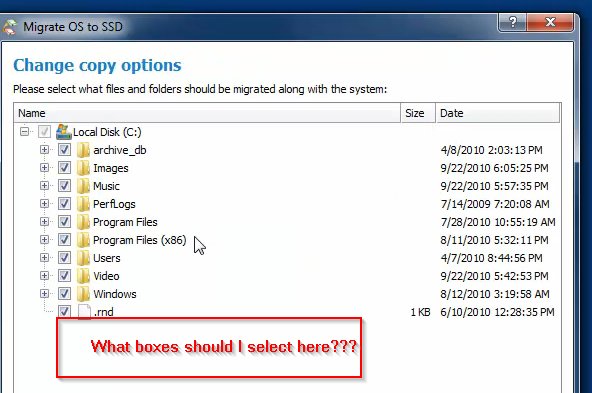
Been looking hard at the link you gave regarding the Paragon set up I must say it looks easy,Regardin the secon screenshot in the video as you know that on my C drive I only have the OS and program files.So on that part of the set up should I only select
WINDOWS
PROGRAM FILES
PROGRAM FILES (x86)
PERFLOGS
USERS.rnd ??
archive_db ??

Paragon Link..Paragon Migrate OS to SSD - System migration to Solid State Drives (SSD) - Overview

Am I correct there.
So far if that job is as easy as the video in that paragon link you gave,I would say YES the job is on.
But I want to clear the point of what I should select in that screen shot.I dont want any data as all data is on another drive.

Thanks Once again.

1ev78ac.png
 

My Computer My Computer

At a glance

Summary Operating System Windows 7 Home Premi...AMD Athlon II X2 250Total memory slots 4 Used memory slots 2 Free...Name Generic Non-PnP Monitor on NVIDIA GeForc...
Computer type
PC/Desktop
Computer Manufacturer/Model Number
Home Build windows 7 Home premium.Built by a local computer shop.
OS
Summary Operating System Windows 7 Home Premium 64-bit SP1 CPU AMD Athlon II X2 250 23 °C
CPU
AMD Athlon II X2 250
Motherboard
Manufacturer BIOSTAR Group Model N61PB-M2S (Socket AM2 )
Memory
Total memory slots 4 Used memory slots 2 Free memory slots 2
Graphics Card(s)
Name Generic Non-PnP Monitor on NVIDIA GeForce 6150SE nForce
Sound Card
Realtek High Definition Audio Playback Devices Realtek Dig
Monitor(s) Displays
Acer
Hard Drives
Main C drive is now a 120GB SSD With only operating system and programs.
Second HDD 1TB with all documents etc.
Keyboard
HID Keyboard Device Device Kind Keyboard Device Name HID K
Antivirus
Karsersky
Browser
Google
Other Info
Summary
Operating System
Windows 7 Home Premium 64-bit SP1
CPU
AMD Athlon II X2 250 23 °C
Regor 45nm Technology
RAM
4.00GB Dual-Channel DDR2 @ 401MHz (6-6-6-18)
Motherboard
BIOSTAR Group N61PB-M2S (Socket AM2 ) 40 °C
Graphics
Generic Non-PnP Monitor (1024x768@60Hz)
128MB NVIDIA GeForce 6150SE nForce 430 (Biostar Microtech Int'l)
Storage
1863GB West
wolfgang.
Update for the above.I have ordered the SSD disc from Amazon should be here next week,Also downloaded the paragon software from the link you gave.Software cost was £12.95p. english pounds.
Thanks.I do hope that you will be available next week when the SSD arrives.
 

My Computer My Computer

At a glance

Summary Operating System Windows 7 Home Premi...AMD Athlon II X2 250Total memory slots 4 Used memory slots 2 Free...Name Generic Non-PnP Monitor on NVIDIA GeForc...
Computer type
PC/Desktop
Computer Manufacturer/Model Number
Home Build windows 7 Home premium.Built by a local computer shop.
OS
Summary Operating System Windows 7 Home Premium 64-bit SP1 CPU AMD Athlon II X2 250 23 °C
CPU
AMD Athlon II X2 250
Motherboard
Manufacturer BIOSTAR Group Model N61PB-M2S (Socket AM2 )
Memory
Total memory slots 4 Used memory slots 2 Free memory slots 2
Graphics Card(s)
Name Generic Non-PnP Monitor on NVIDIA GeForce 6150SE nForce
Sound Card
Realtek High Definition Audio Playback Devices Realtek Dig
Monitor(s) Displays
Acer
Hard Drives
Main C drive is now a 120GB SSD With only operating system and programs.
Second HDD 1TB with all documents etc.
Keyboard
HID Keyboard Device Device Kind Keyboard Device Name HID K
Antivirus
Karsersky
Browser
Google
Other Info
Summary
Operating System
Windows 7 Home Premium 64-bit SP1
CPU
AMD Athlon II X2 250 23 °C
Regor 45nm Technology
RAM
4.00GB Dual-Channel DDR2 @ 401MHz (6-6-6-18)
Motherboard
BIOSTAR Group N61PB-M2S (Socket AM2 ) 40 °C
Graphics
Generic Non-PnP Monitor (1024x768@60Hz)
128MB NVIDIA GeForce 6150SE nForce 430 (Biostar Microtech Int'l)
Storage
1863GB West
1. Yes, you have the right link

2. No, you need not select anything. That facility is there for people to deselect user files in case they have too much stuff and the data in the C partition does not fit on the SSD

3. Note that Paragon does the SSD alignment, sets defrag off and also moves the 100MB system partition. All of that is automatic and you need not do anything. Just your 3 clicks.
 

My Computer My Computer

At a glance

Vista, Windows7, Mint Mate, Zorin, Windows 8from 1.6GHz Duo to i7
Computer Manufacturer/Model Number
HP, Dell, Gateway, Toshiba - 4 laptops and 2 desktops
OS
Vista, Windows7, Mint Mate, Zorin, Windows 8
CPU
from 1.6GHz Duo to i7
Monitor(s) Displays
2x HP w2207
Hard Drives
5x HDD, 7x SSD, 12x Externals
Keyboard
with trackball - no mices
Mouse
Trackball mice
Internet Speed
DSL 6000
Back
Top