
My Win7 setup used to be with a primary HD C drive (1.5TB) and a backup E drive (1TB). I then installed an SSD with a fresh install of Win7.
Now that the SSD has been running for a while, I'd like to repurpose the old C drive as a data drive (for backup) and move the backup data from the old backup drive (E) to the repurposed drive.
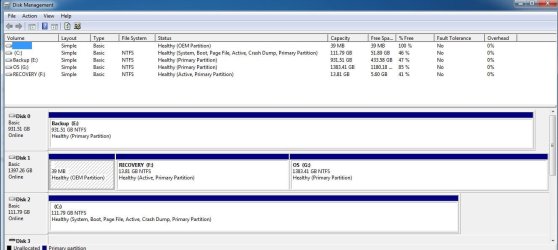
I'm attaching a screenshot of my current disk management. It shows 3 drives:
What I'd ideally like to do is this:
(Assigning the new single partition Disk 1 to E isn't necessary, it just makes things easier for me in terms of not having to redo the target drive for the various backup stuff I have. I can certainly reconfigure the automatic backups if it's difficult to reassign drive letters)
I do NOT need or want the RECOVERY partition currently on Disk 1.
I'm fairly handy with computers but my expertise is in Macs...this is my wife's machine so I'm not as proficient "under the hood" of a Win 7 machine.
How do I repartition Disk 1 into a single partition? And can the drive letters be easily reassigned?
[Yes, I will backup the current drive E on Disk 0 first and then copy it onto the newly partitioned Disk 1]
Thanks in advance for your help.
Now that the SSD has been running for a while, I'd like to repurpose the old C drive as a data drive (for backup) and move the backup data from the old backup drive (E) to the repurposed drive.
I'm attaching a screenshot of my current disk management. It shows 3 drives:
- Disk 2 as current C boot drive (on the new SSD)
- Disk 0 as my Backup E drive (1TB)
- Disk 1 as my old boot drive with 3 partitions: OEM, RECOVERY (F) and OS (G)
What I'd ideally like to do is this:
- Blow away Disk 1 and repartition to a single partition and reformat and assign drive letter E
- Have Disk 0 take on a new drive letter
(Assigning the new single partition Disk 1 to E isn't necessary, it just makes things easier for me in terms of not having to redo the target drive for the various backup stuff I have. I can certainly reconfigure the automatic backups if it's difficult to reassign drive letters)
I do NOT need or want the RECOVERY partition currently on Disk 1.
I'm fairly handy with computers but my expertise is in Macs...this is my wife's machine so I'm not as proficient "under the hood" of a Win 7 machine.
How do I repartition Disk 1 into a single partition? And can the drive letters be easily reassigned?
[Yes, I will backup the current drive E on Disk 0 first and then copy it onto the newly partitioned Disk 1]
Thanks in advance for your help.
Attachments
My Computer
- Computer type
- PC/Desktop
- Computer Manufacturer/Model Number
- Dell Inspiron 620
- OS
- Windows 7 Pro (64 bit)
- CPU
- i5
- Memory
- 8GB


