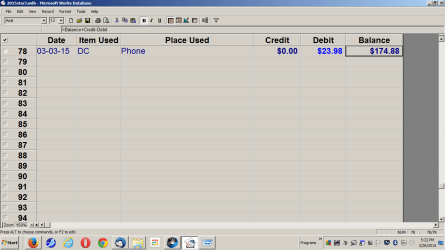
I know how to do most of the settings.
Date|Item Used|Place Used|Credit|Debit|Balance
01-10-15 | DC| Walmart |0.00 | $25.10 | $1408.45 (Sample)
Those are my columns in Microsoft Works Database.
When I first created the custom checking account in Microsoft Database the last column I put this in =Balance+Credit-Debit then I locked the column. How do I do that in LibreOffice 4.4 or Open Office 4.1.1? I don't want to worry about having to keep Microsoft Works installed.
Date|Item Used|Place Used|Credit|Debit|Balance
01-10-15 | DC| Walmart |0.00 | $25.10 | $1408.45 (Sample)
Those are my columns in Microsoft Works Database.
When I first created the custom checking account in Microsoft Database the last column I put this in =Balance+Credit-Debit then I locked the column. How do I do that in LibreOffice 4.4 or Open Office 4.1.1? I don't want to worry about having to keep Microsoft Works installed.
My Computer
At a glance
W10 32 bit, XUbuntu 18.xx 64 bitIntel(R) Celeron(R) CPU G1620T @ 2.40GHz, 240...4GBIntel HD graphics
- Computer type
- PC/Desktop
- Computer Manufacturer/Model Number
- Dell All in one Inspiron 2020
- OS
- W10 32 bit, XUbuntu 18.xx 64 bit
- CPU
- Intel(R) Celeron(R) CPU G1620T @ 2.40GHz, 2400 Mhz
- Motherboard
- Dell
- Memory
- 4GB
- Graphics Card(s)
- Intel HD graphics
- Sound Card
- High Definition Audio Device
- Monitor(s) Displays
- 20 inch Screen
- Screen Resolution
- W7=1280 x 720 & Linux Mint Xfce=1360 x 768
- Hard Drives
- 500 GB hard drive
- Keyboard
- Usb
- Mouse
- Usb
- Internet Speed
- High-Speed
- Antivirus
- MSE
- Browser
- Main Browser Firefox
- Other Info
- I have done a clean install of Windows 7 using Dell re-installation disk (Dell sent me one). I also use Free Macrium reflect backup and restore.