
Guys, I'm having problems with the screen resolution of my PC. It can't properly detect the resolutions.
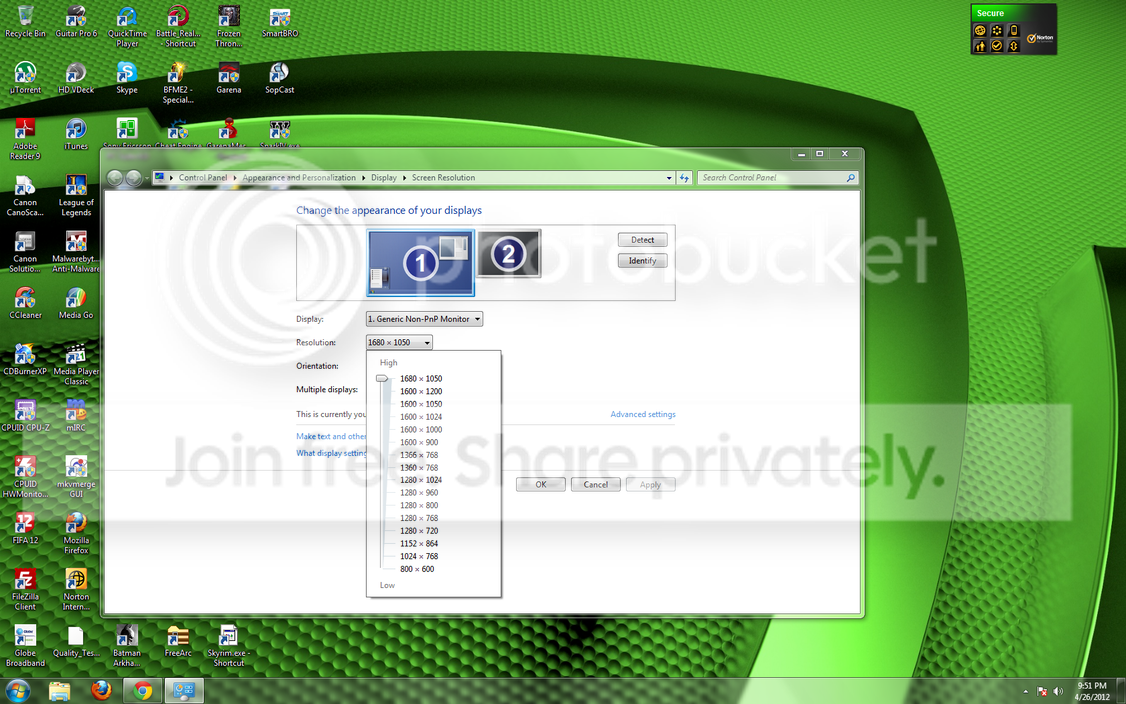
I mean, when I'm going to pick resolutions already, the 1680x1050 resolution is not initially available unlike when I use a friend's PC or when I go to computer cafes and check their settings, the 1680x1050 is usually there and sometimes my video card is better than theirs. I need to do a custom resolution in NVIDIA Control Panel before I can use the 1680x1050 setting. I don't know why it isn't initially available. This happened ever since I started using my PC (February 2010). I updated the drivers but still, this problem was never resolved. I'm using an ECS GTS 250 and my monitor is an HP L2208w. My video card only has a DVI output so I'm using a DVI-VGA adapter to connect it to my monitor because my monitor only has the VGA slot.
Is there anyway I can fix this problem? Because when I try to play games, the proper max resolution of my monitor, which is 1680x1050 is not available in the choices. It's usually 1600x1200 or 1600x1050 that are in the choices but not 1680x1050. If I pick 1600x1050, the game is a bit blurry. I mean not as good as 1680x1050. I can only use the 1680x1050 setting when the game allows you to change the resolution manually in the registry or in some settings file but 1680x1050 is not really there by default.
Please help me. Thanks!
I used moninfo.exe and here's the log file:
My monitor is not a Sanyo. It is an HP L2208w. When I go to NVIDIA Control Panel, it can only be detected as an Analog Display. In Device Manager, it is detected as Generic Non-PnP Monitor.
I mean, when I'm going to pick resolutions already, the 1680x1050 resolution is not initially available unlike when I use a friend's PC or when I go to computer cafes and check their settings, the 1680x1050 is usually there and sometimes my video card is better than theirs. I need to do a custom resolution in NVIDIA Control Panel before I can use the 1680x1050 setting. I don't know why it isn't initially available. This happened ever since I started using my PC (February 2010). I updated the drivers but still, this problem was never resolved. I'm using an ECS GTS 250 and my monitor is an HP L2208w. My video card only has a DVI output so I'm using a DVI-VGA adapter to connect it to my monitor because my monitor only has the VGA slot.
Is there anyway I can fix this problem? Because when I try to play games, the proper max resolution of my monitor, which is 1680x1050 is not available in the choices. It's usually 1600x1200 or 1600x1050 that are in the choices but not 1680x1050. If I pick 1600x1050, the game is a bit blurry. I mean not as good as 1680x1050. I can only use the 1680x1050 setting when the game allows you to change the resolution manually in the registry or in some settings file but 1680x1050 is not really there by default.
Please help me. Thanks!
I used moninfo.exe and here's the log file:
Code:
Monitor
  Model name............... 72AM
  Windows description...... Generic PnP Monitor 72AM
  Manufacturer............. Sanyo
  Plug and Play ID......... SAN07BE
  Data string.............. HD01058140242
  Serial number............ 1000253803
  Manufacture date......... 2007, ISO week 30
  Filter driver............ None
  -------------------------
  EDID revision............ 1.3
  Input signal type........ Digital
  Color bit depth.......... Undefined
  Display type............. RGB color
  Screen size.............. 320 x 240 mm (15.7 in)
  Power management......... Active off/sleep
  Extension blocs.......... None
  -------------------------
  DDC/CI................... n/a

Color characteristics
  Default color space...... Non-sRGB
  Display gamma............ 2.20
  Red chromaticity......... Rx 0.620 - Ry 0.330
  Green chromaticity....... Gx 0.300 - Gy 0.600
  Blue chromaticity........ Bx 0.150 - By 0.100
  White point (default).... Wx 0.310 - Wy 0.330
  Additional descriptors... None

Timing characteristics
  Horizontal scan range.... 31-80kHz
  Vertical scan range...... 60-75Hz
  Video bandwidth.......... 140MHz
  CVT standard............. Not supported
  GTF standard............. Not supported
  Additional descriptors... None
  Preferred timing......... Yes
  Native/preferred timing.. 1280x1024p at 75Hz
    Modeline............... "1280x1024" 135.000 1280 1296 1440 1688 1024 1025 1028 1066 +hsync +vsync

Standard timings supported
     720 x  400p at  70Hz - IBM VGA
     640 x  480p at  60Hz - IBM VGA
     640 x  480p at  72Hz - VESA
     640 x  480p at  75Hz - VESA
     800 x  600p at  60Hz - VESA
     800 x  600p at  72Hz - VESA
     800 x  600p at  75Hz - VESA
    1024 x  768p at  60Hz - VESA
    1024 x  768p at  70Hz - VESA
    1024 x  768p at  75Hz - VESA
    1280 x 1024p at  75Hz - VESA
    1280 x 1024p at  60Hz - VESA STD

Report information
  Date generated........... 4/29/2012
  Software revision........ 2.60.0.972
  Data source.............. Registry
  Operating system......... 6.1.7600.2

Raw data
  00,FF,FF,FF,FF,FF,FF,00,4C,2E,BE,07,6B,A9,9E,3B,1E,11,01,03,E8,20,18,78,2A,EE,A6,9E,54,4C,99,26,
  19,4F,54,AD,CF,00,81,80,01,01,01,01,01,01,01,01,01,01,01,01,01,01,BC,34,00,98,51,00,2A,40,10,90,
  13,00,5E,0E,11,00,00,1E,00,00,00,FD,00,3C,4B,1F,50,0E,00,0A,20,20,20,20,20,20,00,00,00,FC,00,37,
  32,41,4D,0A,20,20,20,20,20,20,20,20,00,00,00,FE,00,48,44,30,31,30,35,38,31,34,30,32,34,32,00,FF
My monitor is not a Sanyo. It is an HP L2208w. When I go to NVIDIA Control Panel, it can only be detected as an Analog Display. In Device Manager, it is detected as Generic Non-PnP Monitor.
My Computer
- Computer type
- PC/Desktop
- OS
- Windows 10 Pro 64-bit
- CPU
- AMD Ryzen 5 1600
- Motherboard
- ASRock AB350 Pro4
- Memory
- 2 x 8 GB G.Skill Ripjaws V DDR4 3000Mhz (F4-30000C15D)
- Graphics Card(s)
- EVGA GeForce GTX 1060 SSC GAMING ACX 3.0 6GB
- Monitor(s) Displays
- ViewSonic XG3202-C
- Screen Resolution
- 1920x1080 (144hz)
- Hard Drives
- Main: Crucial MX200 500 GB
Sub: Seagate Barracuda 1 TB
- PSU
- Corsair TX650M
- Case
- NZXT S340 Elite (Matte Black/Red)
- Keyboard
- Razer BlackWidow Ultimate 2016
- Mouse
- Razer DeathAdder Chroma
- Internet Speed
- 1000 Mbps
- Antivirus
- Norton Internet Security
- Browser
- Google Chrome, Mozilla Firefox


