Restart Computer Shortcut - Create

How to Create a "Restart Computer" Shortcut in Windows

   Information
This will show you how to create or download a Restart computer shortcut with or without a time-out delay and custom restart message before the computer restarts.

   Note
The time-out period can also be for how many seconds you have to use the Abort shortcut to abort the computer from restarting after using this Restart Computer shortcut.


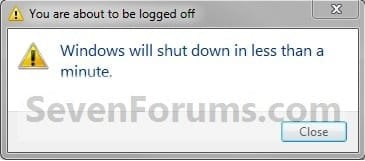
EXAMPLE: Restart Computer Time-Out Period Message
NOTE: This is with a 30 second time-out period. If you would like to have a custom restart message instead of the default message in the dialog box below, then you can use step 3 in OPTION TWO below to do so.
Shut_Down_Warning.jpg


OPTION ONE

To Download a "Restart Computer" Shortcut


1. For a Instant Restart Computer Shortcut
A) Click on the Download button below to download the file below.
Instant_Restart_Computer.zip

Download


2. For a Restart Computer Shortcut with a 30 Second Time-Out Period
NOTE: If you would like to use a different amount of time delay, then see OPTION TWO below for how.
A) Click on the Download button below to download the file below.
30-second_Restart_Computer.zip

Download


3. Click on Save, and save the .zip file to the desktop.

4. Open the .zip file and extract the Restart Computer shortcut to the desktop.

5. Right click on the Restart Computer shortcut, and click on Properties, General tab, and on the Unblock button. (See screenshot below)
NOTE: If you do not have a Unblock button under the General tab, then the shortcut is already unblocked and you can continue on to step 5.
Unblock.jpg
6. Go to step 6 in OPTION TWO below to add the icon you would like to use.

7. You can now Pin to Taskbar or Pin to Start Menu this shortcut, assign a keyboard shortcut to it, or move it where you like for easy use.

8. When done, you can delete the downloaded .zip file on the desktop if you like, or save it to use again.


OPTION TWO

To Manually Create a Custom "Restart Computer" Shortcut


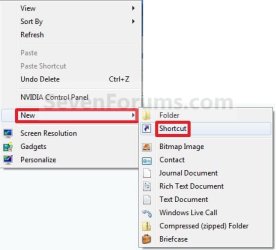
1. Right click on a empty area on desktop, and click on New and Shortcut.

2. For a Instant Restart Computer Shortcut
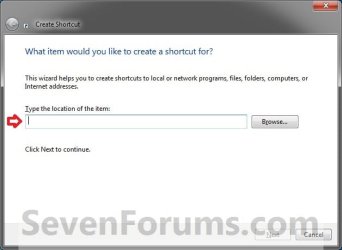
A) Copy and paste the location below into the location area, and click on the Next button. (See screenshot below)
shutdown.exe -r -t 00 -f
Step1.jpg
B) Go to step 4.
3. For a Restart Computer Shortcut with a Specified Time Delay and Message
A) Type the location below into the location area, and click on the Next button. (See screenshot above)
   Note
Subsitute ## in the command below with a number between 0-315360000 for how many seconds you want the time-out period to be before the computer restarts.

Subsitute Your message here in the command below with a restart message up to 512 characters within quotes that you would like to see in the pop-up dialog when using the restart shortcut. The message will only be seen for however long you set the time delay to be.


shutdown.exe -r -t ## -f -c "Your message here"

FOR EXAMPLE: I would type this below exactly to have a 30 second time delay with a Don't forget to quickly save everything message.

shutdown.exe -r -t 30 -f -c "Don't forget to quickly save everything"
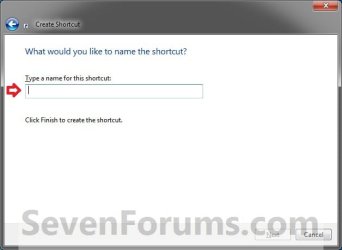
4. Type Restart Computer for the name, and click on the Finish button. (See screenshot below)
NOTE: You can name this anything you would like though.
Step2.jpg
5. Right click on the new Restart Computer shortcut on the Desktop and click on Properties.

6. Click on the Shortcut tab, then click on the Change Icon button. (See screenshot below)
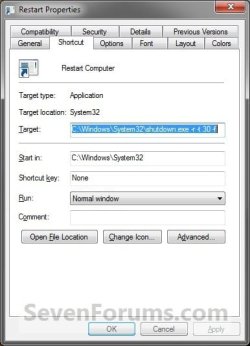
Restart3.jpg
7. Click on OK. (See screenshot below)
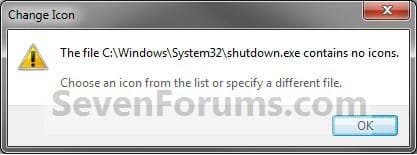
Restart4.jpg
8. To Download a Custom Icon to Use
A) Click on the Download button below to download a custom Restart.ico file in a ZIP file, and save it to your desktop.

Download


Restart.png
B) Open the downloaded ZIP file, extract (drag and drop) the Restart.ico file to your desktop.

C) Right click on the Restart.ico file, and click on Properties, General tab, and on the Unblock button. (see screenshot below)
NOTE: If you do not have a Unblock button under the General tab, then the shortcut is already unblocked and you can continue on.

D) Save the Restart.ico file to where you like to store it at on your Windows drive for use as the shortcut's icon.
NOTE: The icon will need to remain saved at the same location for the icon to continue to display on the shortcut.

E) Go to step 10 to select this Restart.ico file at the location you saved it at.
9. To Use Your Own Custom Icon
A) In the line under "Look for icons in this file", click on Browse and navigate to the location of the 256x256 pixel icon you want to use. (See screenshot below)
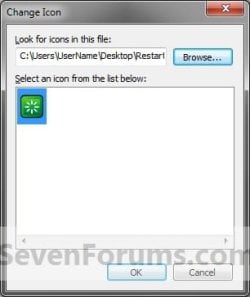
Restart5.jpg
10. Select the icon and click on OK. (See screenshot above)

11. Click on OK. (See screenshot below)
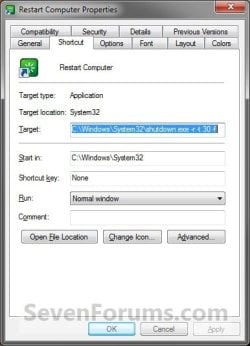
Restart6.jpg
12. You can now Pin to Taskbar or Pin to Start Menu this shortcut, assign a keyboard shortcut to it, or move it where you like for easy use.
That's it,
Shawn


Attachments

Last edited:
  • Like
Reactions: Dom
I've been looking for shutdown and restart shortcuts to go on my taskbar.
Yet another great tutorial!
Thanks Shawn!! :thumbsup:
 

My Computer

Computer type
PC/Desktop
Computer Manufacturer/Model Number
The Dominator?
OS
Windows Seven Ultimate
CPU
AMD Piledriver FX 8320 @ 3.5GHz
Motherboard
ASUS M5A97 EVO R2.0
Memory
Crucial Ballistix 8GB 1600 MHz DDR3
Graphics Card(s)
ASUS GeForce GTX 970 Strix Edition @ 1.114 GHz
Sound Card
Integrated
Monitor(s) Displays
LG 23EA63V 23" IPS 1080p Monitor
Screen Resolution
1920x1080
Hard Drives
Samsung SSD 840 EVO 120 GB
1x WD GreenPower 500GB 7200RPM
1 External HDD 1TB
PSU
Corsair CX500
Case
Zalman Z9 Plus
Cooling
CPU - Corsair Hydro H80i, Case - 3x Aerocool Shark Edition
Keyboard
Xenta Backlit Keyboard (Not very good!)
Mouse
Logitech G400
Internet Speed
Download: 7 mb/s Upload: 0.76 mb/s
Antivirus
Microsoft Security Essentials
Browser
Google Chrome
Other Info
Overclockers UK Desk Pad 89 x 45 cm
1200x730x600mm Desk
Using Virtual Audio Cable to split stereo sound into Audio Technica ATH-M50 headphones and Logitech X-530 speakers.
You're most welcome Dom. :)
 

My Computer

Computer type
PC/Desktop
Computer Manufacturer/Model Number
Self built custom
OS
64-bit Windows 11 Pro for Workstations
CPU
Intel i7-8700K OC'd to 5 GHz
Motherboard
ASUS ROG Maximus XI Formula Z390
Memory
64 GB (4x16GB) G.SKILL TridentZ RGB DDR4 3600 MHz
Graphics Card(s)
ASUS ROG-STRIX-GTX1080TI-O11G-GAMING
Sound Card
Integrated
Monitor(s) Displays
2 x Samsung Odyssey G7 27"
Screen Resolution
2560x1440
Hard Drives
1TB Samsung 990 PRO M.2,
4TB Samsung 990 PRO PRO M.2,
TerraMaster F8 SSD Plus NAS
PSU
Seasonic Prime Titanium 850W
Case
Thermaltake Core P3
Cooling
Corsair Hydro H115i
Keyboard
Logitech wireless K800
Mouse
Logitech MX Master 4
Internet Speed
2 Gb/s Download and 100 Mb/s Upload
Antivirus
Malwarebyte Anti-Malware Premium
Browser
Google Chrome
Other Info
Logitech Z625 speaker system,
Logitech BRIO 4K Pro webcam,
HP Color LaserJet Pro MFP M477fdn,
APC SMART-UPS RT 1000 XL - SURT1000XLI,
Galaxy S23 Plus phone
Just noticed your 1 gold pip! At this rate you'll get all the medals in no time!
 

My Computer

Computer type
PC/Desktop
Computer Manufacturer/Model Number
The Dominator?
OS
Windows Seven Ultimate
CPU
AMD Piledriver FX 8320 @ 3.5GHz
Motherboard
ASUS M5A97 EVO R2.0
Memory
Crucial Ballistix 8GB 1600 MHz DDR3
Graphics Card(s)
ASUS GeForce GTX 970 Strix Edition @ 1.114 GHz
Sound Card
Integrated
Monitor(s) Displays
LG 23EA63V 23" IPS 1080p Monitor
Screen Resolution
1920x1080
Hard Drives
Samsung SSD 840 EVO 120 GB
1x WD GreenPower 500GB 7200RPM
1 External HDD 1TB
PSU
Corsair CX500
Case
Zalman Z9 Plus
Cooling
CPU - Corsair Hydro H80i, Case - 3x Aerocool Shark Edition
Keyboard
Xenta Backlit Keyboard (Not very good!)
Mouse
Logitech G400
Internet Speed
Download: 7 mb/s Upload: 0.76 mb/s
Antivirus
Microsoft Security Essentials
Browser
Google Chrome
Other Info
Overclockers UK Desk Pad 89 x 45 cm
1200x730x600mm Desk
Using Virtual Audio Cable to split stereo sound into Audio Technica ATH-M50 headphones and Logitech X-530 speakers.
Thank YOU so much Shawn ~!!
HappyDance.gif


I was actually searching for how to change a DRIVE icon
when I ran across this FANTASTIC POST.

I snagged this shortcut right up.

I have this shortcut on my Windows XP and it has
helped me when my computer was locked up.

I could get to the shortcut via the Task Manager
and reboot so I'm really thrilled to have it again.

Again, Thanks so much for all the help you give us.

malasmiley2.gif
Jenn
 

My Computer

Computer type
Laptop
Computer Manufacturer/Model Number
HP Pavilion m7 Notebook PC
OS
Microsoft Windows 7 Home Premium, Service Pack 1 64-bit
CPU
Intel(R) Core(TM) CPU i7-3610QM CPU 2.30 GHz
Memory
8 GB Ram
Graphics Card(s)
Intel(R) HD Graphics 4000
Sound Card
IDT High Definition Audio CODEC
Hard Drives
Local Disk (C:) 697 GB Free of 909 GB
Recovery Disk (D:)
Antivirus
Webroot Secure/Anywhere 9.0.24.49
Browser
Firefox Quantum 65.0.2
You're most welcome Jenn. :)
 

My Computer

Computer type
PC/Desktop
Computer Manufacturer/Model Number
Self built custom
OS
64-bit Windows 11 Pro for Workstations
CPU
Intel i7-8700K OC'd to 5 GHz
Motherboard
ASUS ROG Maximus XI Formula Z390
Memory
64 GB (4x16GB) G.SKILL TridentZ RGB DDR4 3600 MHz
Graphics Card(s)
ASUS ROG-STRIX-GTX1080TI-O11G-GAMING
Sound Card
Integrated
Monitor(s) Displays
2 x Samsung Odyssey G7 27"
Screen Resolution
2560x1440
Hard Drives
1TB Samsung 990 PRO M.2,
4TB Samsung 990 PRO PRO M.2,
TerraMaster F8 SSD Plus NAS
PSU
Seasonic Prime Titanium 850W
Case
Thermaltake Core P3
Cooling
Corsair Hydro H115i
Keyboard
Logitech wireless K800
Mouse
Logitech MX Master 4
Internet Speed
2 Gb/s Download and 100 Mb/s Upload
Antivirus
Malwarebyte Anti-Malware Premium
Browser
Google Chrome
Other Info
Logitech Z625 speaker system,
Logitech BRIO 4K Pro webcam,
HP Color LaserJet Pro MFP M477fdn,
APC SMART-UPS RT 1000 XL - SURT1000XLI,
Galaxy S23 Plus phone
I've used shutdown.exe in both Windows XP and Windows 7 32-bit, but I now have a laptop machine (Dell 3750) that runs under Windows 7 Professional 64-bit. When I use shutdown.exe -r to reboot the computer, the power-on password text window shows up but the internal keyboard is not recognized. I have to shut the power off and restart.

An external keyboard is recognized, so Dell theorized that the problem was with the internal keyboard and they replaced it. No difference.

The technician thought to suggest that I try rebooting via the Start button option. To my surprise, the internal keyboard was recognized.

I've tried both the 32-bit and 64-bit versions of shutdown.exe in the laptop machine, but both produce the same problem. Apparently something else goes on in the reboot process when it's activated via the Start key option. Can anyone suggest how to create a shortcut to that?

Thank you.
 

My Computer

Computer Manufacturer/Model Number
Dell 3750
OS
Windows 7 Professional 64-bit
Hey Brink. Just saying a genuine Thank You! Look a really quite a bit of time to find a Win7 reboot method with no delay to avoid the usual "FORCE RESTART" etc. bit. Just Irks me to have to sit & wait for not much of any real good reason! Yours is it, and is SPECTACULAR! A no fuss no muss reboot. The sole lacking is to state that the "force restart" routine is by-passed.

Thank you truly SOoo SOoo Much. Keep up the Good Good work. Most appreciated, to be sure. Diligent
 

My Computer

Computer type
PC/Desktop
Computer Manufacturer/Model Number
Gateway SX2855
OS
Windows 7 Home premium 64bit
Antivirus
avast
Browser
firefos (main), IE11 (as needed only), GChrome (secondary)
I'm glad that it was helpful to you Diligent. :)
 

My Computer

Computer type
PC/Desktop
Computer Manufacturer/Model Number
Self built custom
OS
64-bit Windows 11 Pro for Workstations
CPU
Intel i7-8700K OC'd to 5 GHz
Motherboard
ASUS ROG Maximus XI Formula Z390
Memory
64 GB (4x16GB) G.SKILL TridentZ RGB DDR4 3600 MHz
Graphics Card(s)
ASUS ROG-STRIX-GTX1080TI-O11G-GAMING
Sound Card
Integrated
Monitor(s) Displays
2 x Samsung Odyssey G7 27"
Screen Resolution
2560x1440
Hard Drives
1TB Samsung 990 PRO M.2,
4TB Samsung 990 PRO PRO M.2,
TerraMaster F8 SSD Plus NAS
PSU
Seasonic Prime Titanium 850W
Case
Thermaltake Core P3
Cooling
Corsair Hydro H115i
Keyboard
Logitech wireless K800
Mouse
Logitech MX Master 4
Internet Speed
2 Gb/s Download and 100 Mb/s Upload
Antivirus
Malwarebyte Anti-Malware Premium
Browser
Google Chrome
Other Info
Logitech Z625 speaker system,
Logitech BRIO 4K Pro webcam,
HP Color LaserJet Pro MFP M477fdn,
APC SMART-UPS RT 1000 XL - SURT1000XLI,
Galaxy S23 Plus phone
I love all of these shortcuts, restart, shut down, sleep, etc.
Will we be able to use them, or will there be new ones, when Windows 10 is released?
Keep up the great work.
 

My Computer

Computer type
PC/Desktop
Computer Manufacturer/Model Number
Custom built
OS
windows 7 x64
CPU
i7-4930K
Motherboard
Asus X79 Deluxe
Memory
GSkill Ripjaws, 1866mhz, 16GB
Graphics Card(s)
EVGA GTX 980 ti SC ACX 2.0
Sound Card
on board
Monitor(s) Displays
Asus PB278Q
Screen Resolution
2560 x 1440
Hard Drives
(1) OCZ Vertex 4 128GB (OS)
(2) WD RE4 500GB RAID0 (Data)
(1) WD Caviar Black 2TB (Backup)
PSU
Corsair 1000watt
Case
Coolermaster HAF932 Blue
Cooling
CoolerMaster TPC812
Keyboard
Logitech G19
Mouse
Logitech G5
Antivirus
Norton
Hello Dwayne,

Yes, those will still work in Windows 10 as well. :)
 

My Computer

Computer type
PC/Desktop
Computer Manufacturer/Model Number
Self built custom
OS
64-bit Windows 11 Pro for Workstations
CPU
Intel i7-8700K OC'd to 5 GHz
Motherboard
ASUS ROG Maximus XI Formula Z390
Memory
64 GB (4x16GB) G.SKILL TridentZ RGB DDR4 3600 MHz
Graphics Card(s)
ASUS ROG-STRIX-GTX1080TI-O11G-GAMING
Sound Card
Integrated
Monitor(s) Displays
2 x Samsung Odyssey G7 27"
Screen Resolution
2560x1440
Hard Drives
1TB Samsung 990 PRO M.2,
4TB Samsung 990 PRO PRO M.2,
TerraMaster F8 SSD Plus NAS
PSU
Seasonic Prime Titanium 850W
Case
Thermaltake Core P3
Cooling
Corsair Hydro H115i
Keyboard
Logitech wireless K800
Mouse
Logitech MX Master 4
Internet Speed
2 Gb/s Download and 100 Mb/s Upload
Antivirus
Malwarebyte Anti-Malware Premium
Browser
Google Chrome
Other Info
Logitech Z625 speaker system,
Logitech BRIO 4K Pro webcam,
HP Color LaserJet Pro MFP M477fdn,
APC SMART-UPS RT 1000 XL - SURT1000XLI,
Galaxy S23 Plus phone
That's great news.
Thankyou
 

My Computer

Computer type
PC/Desktop
Computer Manufacturer/Model Number
Custom built
OS
windows 7 x64
CPU
i7-4930K
Motherboard
Asus X79 Deluxe
Memory
GSkill Ripjaws, 1866mhz, 16GB
Graphics Card(s)
EVGA GTX 980 ti SC ACX 2.0
Sound Card
on board
Monitor(s) Displays
Asus PB278Q
Screen Resolution
2560 x 1440
Hard Drives
(1) OCZ Vertex 4 128GB (OS)
(2) WD RE4 500GB RAID0 (Data)
(1) WD Caviar Black 2TB (Backup)
PSU
Corsair 1000watt
Case
Coolermaster HAF932 Blue
Cooling
CoolerMaster TPC812
Keyboard
Logitech G19
Mouse
Logitech G5
Antivirus
Norton
Re-boot system in safe mode?

I have a question regarding this topic.

Is there a way to re-boot the system to safe mode using a desktop icon shortcut? (shutdown.exe -r -t 00 -f)

Is there some kind of parameter that can be added to to have the system re-boot into safe mode?

I know about msconfig.exe, but was wondering if there was a way to have a desktop icon do this instead.

Scott
 

My Computer

Computer Manufacturer/Model Number
Custom Build
OS
Windows 7 64bit
CPU
AMD AthlonII X3 Triple-Core 3.3GHz
Motherboard
ASUS M4A87T AM3 AMD 870
Memory
Kingston 4GB (4x 1GB) Value Ram DDR3 1333MHz
Graphics Card(s)
ASUS ENGT430/DI/1GD3(LP) 1GB DDR3 1600MHz
Sound Card
On board audio
Monitor(s) Displays
ACER V173 17"
Hard Drives
WD 1TB Caviar Blue
PSU
Enermax 500w
Case
HEC Black Mid-Tower ATX
Internet Speed
56Lbs

My Computer

Computer type
PC/Desktop
Computer Manufacturer/Model Number
Self built custom
OS
64-bit Windows 11 Pro for Workstations
CPU
Intel i7-8700K OC'd to 5 GHz
Motherboard
ASUS ROG Maximus XI Formula Z390
Memory
64 GB (4x16GB) G.SKILL TridentZ RGB DDR4 3600 MHz
Graphics Card(s)
ASUS ROG-STRIX-GTX1080TI-O11G-GAMING
Sound Card
Integrated
Monitor(s) Displays
2 x Samsung Odyssey G7 27"
Screen Resolution
2560x1440
Hard Drives
1TB Samsung 990 PRO M.2,
4TB Samsung 990 PRO PRO M.2,
TerraMaster F8 SSD Plus NAS
PSU
Seasonic Prime Titanium 850W
Case
Thermaltake Core P3
Cooling
Corsair Hydro H115i
Keyboard
Logitech wireless K800
Mouse
Logitech MX Master 4
Internet Speed
2 Gb/s Download and 100 Mb/s Upload
Antivirus
Malwarebyte Anti-Malware Premium
Browser
Google Chrome
Other Info
Logitech Z625 speaker system,
Logitech BRIO 4K Pro webcam,
HP Color LaserJet Pro MFP M477fdn,
APC SMART-UPS RT 1000 XL - SURT1000XLI,
Galaxy S23 Plus phone
Back
Top