Restart Time

How to See What Your Windows Restart Time is


   Information
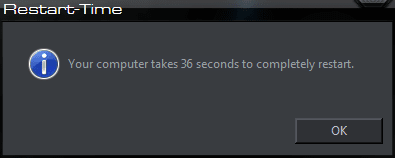
This will show you how to see how long in seconds it takes your Windows 7, Windows 8, or Windows 10 PC to restart back to the desktop.

You can also view the startup logs in Event Viewer (C:\Windows\system32\eventvwr.msc) under Applications and Services Logs, Microsoft, Windows, Diagnostics-Performance, and Operational. The logs will be in the middle to show you what ran at startup, how long it took, and more.
   Note
Credit completely belongs to sidney1st for writing this VBS script.
   Tip
For fun, post your restart time at this link.


Here's How:1. Click on the download button below to download the Restart-Time.bat or Restart-Time.vbs file, and save it to your desktop.
Restart-Time.bat

Download


OR

Restart-Time.vbs

Download


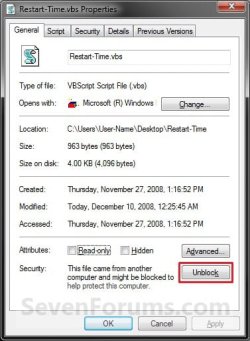
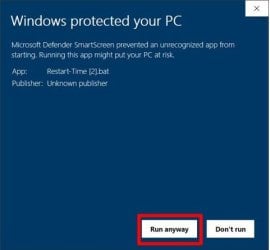
2. Right click on the downloaded Restart-Time.bat or Restart-Time.vbs file, click on Properties, click on the General tab, click on the Unblock button to unblock the Restart-Time.vbs file. (see screenshots below)

NOTE: If you do not have a Unblock button, then it is already unblocked. Continue to step 3.Unblock.jpg
Protect1.jpg Protect2.jpg

3. Run the Restart-Time.bat or Restart-Time.vbs file.

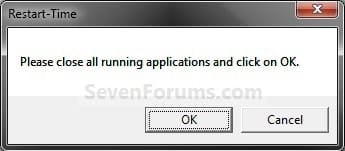
4. Click on OK to restart the computer. (see screenshot below)
WARNING: Close and save all windows first. This will immediately restart your computer.
1100d1227815274-restart-time-step1.jpg


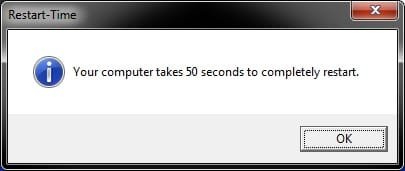
5. When the computer finishes restarting, you will see your Windows restart time. Click on OK when done. (see screenshot below)
169900d1313170395-restart-time-restart-time.jpg


6. You can now delete the downloaded Restart-Time.bat or Restart-Time.vbs file if you like, or save it somewhere to use again later.


That's it,
Shawn


Attachments

  • Step1.jpg
    Step1.jpg
    7.5 KB · Views: 148,033
  • Restart-Time.jpg
    Restart-Time.jpg
    17.1 KB · Views: 97,061
  • Restart-Time.vbs
    Restart-Time.vbs
    983 bytes · Views: 33,957
  • Restart-Time.bat
    Restart-Time.bat
    2.1 KB · Views: 56
Last edited:
:thumbsup:
 

My Computer

Computer type
PC/Desktop
Computer Manufacturer/Model Number
Self built custom
OS
64-bit Windows 11 Pro for Workstations
CPU
Intel i7-8700K OC'd to 5 GHz
Motherboard
ASUS ROG Maximus XI Formula Z390
Memory
64 GB (4x16GB) G.SKILL TridentZ RGB DDR4 3600 MHz
Graphics Card(s)
ASUS ROG-STRIX-GTX1080TI-O11G-GAMING
Sound Card
Integrated
Monitor(s) Displays
2 x Samsung Odyssey G7 27"
Screen Resolution
2560x1440
Hard Drives
1TB Samsung 990 PRO M.2,
4TB Samsung 990 PRO PRO M.2,
TerraMaster F8 SSD Plus NAS
PSU
Seasonic Prime Titanium 850W
Case
Thermaltake Core P3
Cooling
Corsair Hydro H115i
Keyboard
Logitech wireless K800
Mouse
Logitech MX Master 4
Internet Speed
2 Gb/s Download and 100 Mb/s Upload
Antivirus
Malwarebyte Anti-Malware Premium
Browser
Google Chrome
Other Info
Logitech Z625 speaker system,
Logitech BRIO 4K Pro webcam,
HP Color LaserJet Pro MFP M477fdn,
APC SMART-UPS RT 1000 XL - SURT1000XLI,
Galaxy S23 Plus phone
PCRestart_zps9717556d.png
 

My Computer

OS
Windows 7 Professional 64 bit
CPU
AMD FX-6300 3.5GHz
Motherboard
Gigabyte GA-990FXA-UD3
Memory
G.Skill Ripjaws X Series 16GB (2 x 8GB) DDR3-1600
Graphics Card(s)
HIS Radeon HD 7850 2GB
Hard Drives
Kingston HyperX 3K 240GB 2.5" SSD (OS and Programs drive)
Seagate Barracuda 2 TB 7200 RPM (Storage)
Western Digital 750 GB "Green" 5400 RPM (Secondary Storage)
PSU
SeaSonic 650W ATX12V / EPS12V
Case
Cooler Master Storm Enforcer ATX Mid Tower
Cooling
Cooler Master Hyper 212 Evo (CPU cooling)
I don't think this thing is reliable. It time stamped my PC time at 67 seconds, yet I stop watched it between 20-24 seconds consistently. I can't even count to 67 before my PC is back to the desktop.
 

My Computer

OS
Win7/8 64 bit/
CPU
Intel I7 3930k C2 3.2Ghz (4.4ghz)
Motherboard
Asus Sabertoothx79
Memory
G.skill Ripjaw X 16GB (4x4) 1866mhz (2133)
Graphics Card(s)
EVGA GTX 670, GTS 450 Dedicated Physx
Sound Card
onboard
Monitor(s) Displays
Asus 24"
Screen Resolution
1920x1080
Hard Drives
1TB Western Digital SSD cached Corsair Force GT 120 GB. win7 boot/media
1 Corsair Force GT 120 win8 boot.
PSU
Corsair GS800
Case
Antec Skeleton
Cooling
Thermaltake Contac 30
Keyboard
Some old emachine keyboard lol
Mouse
Logitech M510
Internet Speed
slow
Hello Jerlys,

The script in the tutorial measures the amount of seconds it takes to restart and boot the computer from the second you click on Restart. Thus "restart time" and not "boot time".

It sounds like you may be only measuring the cold boot time, and not the full restart time.

Hope this helps. :)
 

My Computer

Computer type
PC/Desktop
Computer Manufacturer/Model Number
Self built custom
OS
64-bit Windows 11 Pro for Workstations
CPU
Intel i7-8700K OC'd to 5 GHz
Motherboard
ASUS ROG Maximus XI Formula Z390
Memory
64 GB (4x16GB) G.SKILL TridentZ RGB DDR4 3600 MHz
Graphics Card(s)
ASUS ROG-STRIX-GTX1080TI-O11G-GAMING
Sound Card
Integrated
Monitor(s) Displays
2 x Samsung Odyssey G7 27"
Screen Resolution
2560x1440
Hard Drives
1TB Samsung 990 PRO M.2,
4TB Samsung 990 PRO PRO M.2,
TerraMaster F8 SSD Plus NAS
PSU
Seasonic Prime Titanium 850W
Case
Thermaltake Core P3
Cooling
Corsair Hydro H115i
Keyboard
Logitech wireless K800
Mouse
Logitech MX Master 4
Internet Speed
2 Gb/s Download and 100 Mb/s Upload
Antivirus
Malwarebyte Anti-Malware Premium
Browser
Google Chrome
Other Info
Logitech Z625 speaker system,
Logitech BRIO 4K Pro webcam,
HP Color LaserJet Pro MFP M477fdn,
APC SMART-UPS RT 1000 XL - SURT1000XLI,
Galaxy S23 Plus phone
Hello Jerlys,

The script in the tutorial measures the amount of seconds it takes to restart and boot the computer from the second you click on Restart. Thus "restart time" and not "boot time".

It sounds like you may be only measuring the cold boot time, and not the full restart time.

Hope this helps. :)

I stop watched them side to side. started the timer the same time I clicked the restart button. After 10 runs I have concluded that this script adds on average between 15 to 25 seconds to the actual restart time. on 2 of the runs, including the first one, the difference was drastic. I followed the tutorial on the first post, had nothing running in the background. I halted the stop watch as soon as my desktop was visible. The timer prompt would show some time later. So I think its still counting until it can show you the OK button.

Perhaps my PC just doesn't like this thing.
 

My Computer

OS
Win7/8 64 bit/
CPU
Intel I7 3930k C2 3.2Ghz (4.4ghz)
Motherboard
Asus Sabertoothx79
Memory
G.skill Ripjaw X 16GB (4x4) 1866mhz (2133)
Graphics Card(s)
EVGA GTX 670, GTS 450 Dedicated Physx
Sound Card
onboard
Monitor(s) Displays
Asus 24"
Screen Resolution
1920x1080
Hard Drives
1TB Western Digital SSD cached Corsair Force GT 120 GB. win7 boot/media
1 Corsair Force GT 120 win8 boot.
PSU
Corsair GS800
Case
Antec Skeleton
Cooling
Thermaltake Contac 30
Keyboard
Some old emachine keyboard lol
Mouse
Logitech M510
Internet Speed
slow
It may be the time it takes for all startup programs to finish loading for the time difference.
 

My Computer

Computer type
PC/Desktop
Computer Manufacturer/Model Number
Self built custom
OS
64-bit Windows 11 Pro for Workstations
CPU
Intel i7-8700K OC'd to 5 GHz
Motherboard
ASUS ROG Maximus XI Formula Z390
Memory
64 GB (4x16GB) G.SKILL TridentZ RGB DDR4 3600 MHz
Graphics Card(s)
ASUS ROG-STRIX-GTX1080TI-O11G-GAMING
Sound Card
Integrated
Monitor(s) Displays
2 x Samsung Odyssey G7 27"
Screen Resolution
2560x1440
Hard Drives
1TB Samsung 990 PRO M.2,
4TB Samsung 990 PRO PRO M.2,
TerraMaster F8 SSD Plus NAS
PSU
Seasonic Prime Titanium 850W
Case
Thermaltake Core P3
Cooling
Corsair Hydro H115i
Keyboard
Logitech wireless K800
Mouse
Logitech MX Master 4
Internet Speed
2 Gb/s Download and 100 Mb/s Upload
Antivirus
Malwarebyte Anti-Malware Premium
Browser
Google Chrome
Other Info
Logitech Z625 speaker system,
Logitech BRIO 4K Pro webcam,
HP Color LaserJet Pro MFP M477fdn,
APC SMART-UPS RT 1000 XL - SURT1000XLI,
Galaxy S23 Plus phone
It may be the time it takes for all startup programs to finish loading for the time difference.

Ill give it a try in a few killing all start up programs, oddly I only have 3. Nvidia control panel, EVGA precision and Intel rapid storage. I try to keep my computer as clean as possible. The only thing I know might slow things down is I have photo slide show for my desktop.
 

My Computer

OS
Win7/8 64 bit/
CPU
Intel I7 3930k C2 3.2Ghz (4.4ghz)
Motherboard
Asus Sabertoothx79
Memory
G.skill Ripjaw X 16GB (4x4) 1866mhz (2133)
Graphics Card(s)
EVGA GTX 670, GTS 450 Dedicated Physx
Sound Card
onboard
Monitor(s) Displays
Asus 24"
Screen Resolution
1920x1080
Hard Drives
1TB Western Digital SSD cached Corsair Force GT 120 GB. win7 boot/media
1 Corsair Force GT 120 win8 boot.
PSU
Corsair GS800
Case
Antec Skeleton
Cooling
Thermaltake Contac 30
Keyboard
Some old emachine keyboard lol
Mouse
Logitech M510
Internet Speed
slow
Here is mine
Reboot time.PNG
 

My Computer

Computer type
Laptop
Computer Manufacturer/Model Number
Dell Latitude E6410
OS
Windows 7 Home Premium (64 bit)
CPU
Intel I5 520m
Memory
8 GB
Graphics Card(s)
Intel integrated
Sound Card
IDT Digital Audio
Monitor(s) Displays
Dell ST2010
Screen Resolution
1600X900
Hard Drives
WD Scorpio Black 750GB
Keyboard
Microsoft Wireless Comfort Keyboard 5000
Mouse
Microsoft Wireless Mouse 5000
Internet Speed
350 mb/s down 12 mb/s up
Antivirus
NIS
Browser
Firefox
Other Info
Repaired trash lappy

My Computer

Computer type
PC/Desktop
Computer Manufacturer/Model Number
Self Built
OS
Win 10 Pro x64
CPU
Intel I5-2500K @3.3GHz
Motherboard
Asrock P67 Extreme4
Memory
16GB G.Skill Ripjaws X (4x4GB)
Graphics Card(s)
EVGA GeForce 750 Ti SC 2GB
Sound Card
ASUS Xonar DG 5.1 Channels 24-bit 96KHz PCI Interface Sound
Monitor(s) Displays
auria eq2367
Screen Resolution
1920 x 1080
Hard Drives
250GB Samsung 850 EVO SSD
1TB WD Blue
1TB Hitachi
PSU
SeaSonic X 650W 80 Plus Gold
Case
Corsair Obsidian 750D
Cooling
Corsair H60, Three 140mm case fans
Keyboard
Logitech Wireless Keyboard K520
Mouse
Logitech Wireless Mouse M310
Internet Speed
Wave Broadband ~ 100 dn 5 up
Antivirus
Windows Defender, Malwarebytes Premium
Browser
Edge, IE11, Chrome
Other Info
Laptop specs: HP g7-1365dx /
CPU: AMD A6-3420M APU with Radeon(tm) HD Graphics /
RAM: Crucial 8Gb (2x4Gb) /
SSD: Crucial M4-CT128M4SSD2 ATA Device/ FW 000F /
GFX: AMD Radeon HD 6520G /
OS: Windows 10 Pro x64
I can't get the script to restart my PC. I unblocked using Properties.

When I run the script, a msgbox says "close all running applications and click 'ok'".

When I click the "ok" button, the PC doesn't restart. When I click the vbs icon again to run it again, the
msg box appears and says "you computer takes [x] seconds to completely restart."

I noticed that the script timer works. If I wait before clicking the script icon the 2nd time, it will return the currect time elapsed from the first time I tried to run the script to the 2nd time.

[edit]

I tried it using a manual "restart" (I restarted from the Win Shutdown Menu a couple of seconds after I launched the vbs script) and the elapsed timer worked if I add in the time that I restarted using the Win menu.

My time's not great, around 125 seconds, but that's what I expected as I haven't run any tools to streamline my startup time.

It's not an issue with me as long as I know the approx. elapsed times required during a couple of steps:

- The black Windows logo screen. That always takes about 26-28 seconds on my Desktop and Laptop PC's. That's the time when the logo screen begins after POST and when the "Welcome" screen appears.

- "Welcome" Screen time. That will vary on my Desktop PC but usually takes ~10-15 seconds before the desktop launches.

[edit 2]

The script started to work after I moved the script to one of my folders in my Documents folder, a PC mystery :) but my restart time is about 85 seconds.

That make me feel better :D . Improvements are needed on my system but as long as I can boot with consistant (no error) results, that's the main point for me.
 
Last edited:

My Computer

Computer type
PC/Desktop
Computer Manufacturer/Model Number
Built at Micro Center Richardson, TX
OS
Windows 7 Home Premium 64 bit
CPU
Intel i5 650 Dual Core 3.20 GHz Cache 4MB Threads: 4
Motherboard
ASUS PRO P7P55D-E
Memory
Corsair 16GB DDR3 1600MHz 9-9-9-24 P/N: CMZ8GX3M2A1600C
Graphics Card(s)
ZOTAC GeFORCE 9500 ZT-95TEK2M-FSL 1GB GDDR2
Sound Card
Mother Bd
Monitor(s) Displays
ASUS V228H 21.5” Diag
Screen Resolution
1440 x 900
Hard Drives
SEAGATE BARRACUDA (2ea) 3.5” INTERNAL 1Tb 16 MB SATA ST1000DM003-9YN162 7200RPM, 64MB, SATA 6Gb/s ** 2 Sata Hot-Swap Racks installed in Tower
PSU
Thermaltake Model TR2 RX 750W
Cooling
2 Tower Fans
Keyboard
Dell Quietkey PS/2 Windows 104 P/N 0463CD
Mouse
Kensington Mechanical Trackball USB Model 64217
Internet Speed
35/35
Antivirus
Norton 360 & MBAM Pro
Browser
IE10
Other Info
Printer: HP DeskJet 3520 USB 2.0 **
Speakers: ALTEC Model VS4621 2.1 28 W/Channel w/Sub-woofer **
IOGEAR HDMI Monitor Switcher Swx3 MODEL GHDSW3 ** Addonics ZDRWESU3 eSata/USB 3.0 external DVD Read/Write DVD Drive** SEAGATE GoFlex USB 2.0 Portable HD 500GB 5400 RPM P/N: 9ZF2A2-570
Hello Scoop,

Odd. Where were you originally running the .vbs file from?
 

My Computer

Computer type
PC/Desktop
Computer Manufacturer/Model Number
Self built custom
OS
64-bit Windows 11 Pro for Workstations
CPU
Intel i7-8700K OC'd to 5 GHz
Motherboard
ASUS ROG Maximus XI Formula Z390
Memory
64 GB (4x16GB) G.SKILL TridentZ RGB DDR4 3600 MHz
Graphics Card(s)
ASUS ROG-STRIX-GTX1080TI-O11G-GAMING
Sound Card
Integrated
Monitor(s) Displays
2 x Samsung Odyssey G7 27"
Screen Resolution
2560x1440
Hard Drives
1TB Samsung 990 PRO M.2,
4TB Samsung 990 PRO PRO M.2,
TerraMaster F8 SSD Plus NAS
PSU
Seasonic Prime Titanium 850W
Case
Thermaltake Core P3
Cooling
Corsair Hydro H115i
Keyboard
Logitech wireless K800
Mouse
Logitech MX Master 4
Internet Speed
2 Gb/s Download and 100 Mb/s Upload
Antivirus
Malwarebyte Anti-Malware Premium
Browser
Google Chrome
Other Info
Logitech Z625 speaker system,
Logitech BRIO 4K Pro webcam,
HP Color LaserJet Pro MFP M477fdn,
APC SMART-UPS RT 1000 XL - SURT1000XLI,
Galaxy S23 Plus phone
Hello Scoop,

Odd. Where were you originally running the .vbs file from?

I first downloaded it to the Desktop and tried it there a few times. Once I moved it to a Documents folder, it took off like magic :) It's something I'd like to know, but "Mine is not to reason why...." :D
 

My Computer

Computer type
PC/Desktop
Computer Manufacturer/Model Number
Built at Micro Center Richardson, TX
OS
Windows 7 Home Premium 64 bit
CPU
Intel i5 650 Dual Core 3.20 GHz Cache 4MB Threads: 4
Motherboard
ASUS PRO P7P55D-E
Memory
Corsair 16GB DDR3 1600MHz 9-9-9-24 P/N: CMZ8GX3M2A1600C
Graphics Card(s)
ZOTAC GeFORCE 9500 ZT-95TEK2M-FSL 1GB GDDR2
Sound Card
Mother Bd
Monitor(s) Displays
ASUS V228H 21.5” Diag
Screen Resolution
1440 x 900
Hard Drives
SEAGATE BARRACUDA (2ea) 3.5” INTERNAL 1Tb 16 MB SATA ST1000DM003-9YN162 7200RPM, 64MB, SATA 6Gb/s ** 2 Sata Hot-Swap Racks installed in Tower
PSU
Thermaltake Model TR2 RX 750W
Cooling
2 Tower Fans
Keyboard
Dell Quietkey PS/2 Windows 104 P/N 0463CD
Mouse
Kensington Mechanical Trackball USB Model 64217
Internet Speed
35/35
Antivirus
Norton 360 & MBAM Pro
Browser
IE10
Other Info
Printer: HP DeskJet 3520 USB 2.0 **
Speakers: ALTEC Model VS4621 2.1 28 W/Channel w/Sub-woofer **
IOGEAR HDMI Monitor Switcher Swx3 MODEL GHDSW3 ** Addonics ZDRWESU3 eSata/USB 3.0 external DVD Read/Write DVD Drive** SEAGATE GoFlex USB 2.0 Portable HD 500GB 5400 RPM P/N: 9ZF2A2-570
Not sure why that happened. Strange.
 

My Computer

Computer type
PC/Desktop
Computer Manufacturer/Model Number
Self built custom
OS
64-bit Windows 11 Pro for Workstations
CPU
Intel i7-8700K OC'd to 5 GHz
Motherboard
ASUS ROG Maximus XI Formula Z390
Memory
64 GB (4x16GB) G.SKILL TridentZ RGB DDR4 3600 MHz
Graphics Card(s)
ASUS ROG-STRIX-GTX1080TI-O11G-GAMING
Sound Card
Integrated
Monitor(s) Displays
2 x Samsung Odyssey G7 27"
Screen Resolution
2560x1440
Hard Drives
1TB Samsung 990 PRO M.2,
4TB Samsung 990 PRO PRO M.2,
TerraMaster F8 SSD Plus NAS
PSU
Seasonic Prime Titanium 850W
Case
Thermaltake Core P3
Cooling
Corsair Hydro H115i
Keyboard
Logitech wireless K800
Mouse
Logitech MX Master 4
Internet Speed
2 Gb/s Download and 100 Mb/s Upload
Antivirus
Malwarebyte Anti-Malware Premium
Browser
Google Chrome
Other Info
Logitech Z625 speaker system,
Logitech BRIO 4K Pro webcam,
HP Color LaserJet Pro MFP M477fdn,
APC SMART-UPS RT 1000 XL - SURT1000XLI,
Galaxy S23 Plus phone
How could I edit this so that it writes the result (and perhaps the date/time of logging) to a text file?
 

My Computer

Computer type
Laptop
Computer Manufacturer/Model Number
Samsung
OS
WINdows 7 Home Premium 64bit
Antivirus
Avast!
Browser
Firefox
Forgot to screen cap but it came back at 289 seconds :shock:

Any ideas how to speed that up? Haven't checked the full thread, in case it was already answered my apologies in advance.
 

My Computer

Computer type
PC/Desktop
Computer Manufacturer/Model Number
Dell T3500
OS
Windows 7 64Bit
Memory
12GB
Antivirus
Trend Micro Officescan
Browser
IE

My Computer

Computer type
PC/Desktop
Computer Manufacturer/Model Number
Self built custom
OS
64-bit Windows 11 Pro for Workstations
CPU
Intel i7-8700K OC'd to 5 GHz
Motherboard
ASUS ROG Maximus XI Formula Z390
Memory
64 GB (4x16GB) G.SKILL TridentZ RGB DDR4 3600 MHz
Graphics Card(s)
ASUS ROG-STRIX-GTX1080TI-O11G-GAMING
Sound Card
Integrated
Monitor(s) Displays
2 x Samsung Odyssey G7 27"
Screen Resolution
2560x1440
Hard Drives
1TB Samsung 990 PRO M.2,
4TB Samsung 990 PRO PRO M.2,
TerraMaster F8 SSD Plus NAS
PSU
Seasonic Prime Titanium 850W
Case
Thermaltake Core P3
Cooling
Corsair Hydro H115i
Keyboard
Logitech wireless K800
Mouse
Logitech MX Master 4
Internet Speed
2 Gb/s Download and 100 Mb/s Upload
Antivirus
Malwarebyte Anti-Malware Premium
Browser
Google Chrome
Other Info
Logitech Z625 speaker system,
Logitech BRIO 4K Pro webcam,
HP Color LaserJet Pro MFP M477fdn,
APC SMART-UPS RT 1000 XL - SURT1000XLI,
Galaxy S23 Plus phone
Thanks Brink! I'll look into that, much appreciated.
 

My Computer

Computer type
PC/Desktop
Computer Manufacturer/Model Number
Dell T3500
OS
Windows 7 64Bit
Memory
12GB
Antivirus
Trend Micro Officescan
Browser
IE
You're most welcome.
 

My Computer

Computer type
PC/Desktop
Computer Manufacturer/Model Number
Self built custom
OS
64-bit Windows 11 Pro for Workstations
CPU
Intel i7-8700K OC'd to 5 GHz
Motherboard
ASUS ROG Maximus XI Formula Z390
Memory
64 GB (4x16GB) G.SKILL TridentZ RGB DDR4 3600 MHz
Graphics Card(s)
ASUS ROG-STRIX-GTX1080TI-O11G-GAMING
Sound Card
Integrated
Monitor(s) Displays
2 x Samsung Odyssey G7 27"
Screen Resolution
2560x1440
Hard Drives
1TB Samsung 990 PRO M.2,
4TB Samsung 990 PRO PRO M.2,
TerraMaster F8 SSD Plus NAS
PSU
Seasonic Prime Titanium 850W
Case
Thermaltake Core P3
Cooling
Corsair Hydro H115i
Keyboard
Logitech wireless K800
Mouse
Logitech MX Master 4
Internet Speed
2 Gb/s Download and 100 Mb/s Upload
Antivirus
Malwarebyte Anti-Malware Premium
Browser
Google Chrome
Other Info
Logitech Z625 speaker system,
Logitech BRIO 4K Pro webcam,
HP Color LaserJet Pro MFP M477fdn,
APC SMART-UPS RT 1000 XL - SURT1000XLI,
Galaxy S23 Plus phone
You may have double clicked and/or accidentally clicked on OK at step 4 without knowing it before it restarted the computer.

Ah, that explains the time difference you had then. :)

Okay, I missed the Properties and unblock steps.

Now, it says 52 secs!! Whew!:D:D

Stopped AI Suite from starting at boot and now down to 38 secs.:cool:
 

Attachments

  • RESTART TIME PIC 6,13,15.png
    RESTART TIME PIC 6,13,15.png
    8.4 KB · Views: 582

My Computer

Computer type
PC/Desktop
Computer Manufacturer/Model Number
Self-Built
OS
Windows 7 Professional X64
CPU
Core i7 (2nd gen) i7-2600K / 3.40GHz
Motherboard
ASUS P8Z77-V Intel 7 Series Motherboard
Memory
DDR3 2400MHz (OC) 16gb
Graphics Card(s)
Intel(R) HD Graphics 3000, -1988 Mb
Sound Card
8 ChannelsAudio Chipset Realtek ALC892
Monitor(s) Displays
LG 29UM65 Black 29"
Screen Resolution
2560 x 1080
Hard Drives
840 EVO 250 GB SSD ;2tb (2);Seagate;1tb Seagate; 750 gb Seagate; wd ext (2) 750 gb,WD 2tb X 2;WD 3TB Black
PSU
750 watt
Case
Thermaltake RX -1
Cooling
2120mm Fans Included 1Other Fan Ports 5x 200mm Fan Ports
Keyboard
Microsoft Digital Media Pro
Mouse
Microsoft Wireless 6000
Internet Speed
U-verse 18 mbps
Antivirus
MSE
Browser
Firefox, Chrome and my favorite: Pale Moon
Other Info
HdHomerun Dual Tuner.
SRS Audio Lab,
Pioneer BDR 208-DBK
PS3-What a difference in my Surround Sound Receiver!
HP 4540s - My new Toy.
Epson R280 Printer- To personalize my Dvds.
Canon MP 560 - For scanning.
60 secs
 

My Computer

Computer type
PC/Desktop
OS
Windows 7 Ultimate; SP1
CPU
Pentinum Dual Core CPU E5300 @ 2.60GHz
Graphics Card(s)
Intel G33/31 Chipset Family
Sound Card
Realtek
Monitor(s) Displays
HP Compaq W185q
Screen Resolution
1366 x 768
Hard Drives
500 GB Seagate Internal HDD
&
1 TB External HDD x 2 (Seagate+Transcend)
Case
HP Compaq
Internet Speed
50 Kb/ps :"(
Back
Top