
Solved restore point disappears

sfc /scannow takes 10 min. or less. Let these good folks know when you can give us 10 min. to help you.
 

My Computer

Computer type
PC/Desktop
Computer Manufacturer/Model Number
Home made Desktop
OS
Windows 10 Pro. 64/ version 1709 Windows 7 Pro/64
CPU
Intel i7-6800K @ 4.3
Motherboard
ASUS X-99 Deluxe II
Memory
Corsair Platinum 16 gig @2400
Graphics Card(s)
EVGA GTX 1070 OC
Monitor(s) Displays
Asus 27" LED LCD/VE278Q
Screen Resolution
1920-1080 or 1280-720 HDMI
Hard Drives
INTEL SSD 730-240 Gb Sata 3.0/
PSU
EVGA Platium 1200W
Case
Phanteks Luxe Tempered Glass 8 fans/ one radiator
Cooling
XSPC/ Water Cooled CPU
Keyboard
Das 4 Professional
Mouse
Logitech M705/MX Anywhere 2-S
Internet Speed
100 mbits
Antivirus
Microsoft Security Essentials/ Malwarebytes Premium 3.0/ SAS
Browser
I.E. 11 default/Firefox/ ISP Time Warner Cable/Spectrum
Other Info
LG BluRay Burner/
Sound system-KLipsch-THX/
Icy Dock ssd Hot Swap bays.
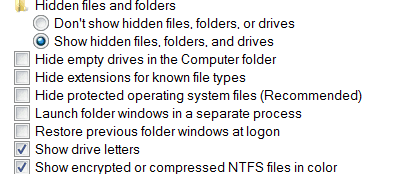
finally, got an hour now. I tried the fix which modifies the pagefile from the advance system settings but I got stuck on step number 6. where it says "Delete 'pagefile.sys' from the root of C: drive. Note: pagefile.sys is a hidden file and is not visible until you set the folder option to view hidden files."

I couldn't find that specific file even when I searched my entire drive C using the search box on the upper right of the windows explorer. what does this mean? could this be the cause? I read the guide for the other fix which uses a dvd disc for windows 7 or a repair disk. Sad to say that I don't have both. This unit was preinstalled with windows 7 when I bought it and the store clerk just advised me to run the SAMSUNG RECOVERY SOLUTION to create an initial backup of the entire system.

I'm really sorry for the delay in reply. I don't have net in my room, and work right now is very hairy. I just caught this small break atm.
 

My Computer

Computer Manufacturer/Model Number
Samsung Electronics - NP-R580-JS01SA
OS
Windows 7 Home Premium 32bit
CPU
Intel(R) Core(TM) i5 M 520 @ 2.40Ghz
Motherboard
SAMSUNG ELECTRONICS CO. R580
Memory
4GB DDR3 RAM
Graphics Card(s)
1 GB NVidia Geforce GT 330M
Sound Card
Realtek High Definition V. 6.6
Monitor(s) Displays
Generic PnP monitor
Screen Resolution
1366 x 768
Hard Drives
500 GB IDE/SATA
WIN + E | Organize from menu line | Folder and search options | View tab | check/uncheck to agree with following snippet | APPLY | OK

file settings.PNG
 

My Computer

Computer Manufacturer/Model Number
Toshiba Satellite S875D-S7239 laptop
OS
MS Windows 7 Ultimate SP1 64-bit
CPU
AMD A10-4600M
Motherboard
AMD Pumori (Socket FT1)
Memory
6.00 GB Dual-Channel DDR3 @ 798MHz (11-11-12-28)
Graphics Card(s)
AMD Radeon HD 7660G
Sound Card
High Definition Audio Device
Monitor(s) Displays
Generic PnP Monitor (1600x900@60Hz)
Screen Resolution
1600x900@60Hz
Hard Drives
SSD 119GB Corsair CSSD-V128GB2 ATA Device
Keyboard
Standard PS/2 Keyboard
Mouse
HP Wireless Optical Mobile Mouse Model FHA-3410
Internet Speed
What the local pub, local coffee shop offers.
Other Info
Optical Drive:MATSHITA BD-CMB UJ160B ATA Device


Also have an Asus ha1002xp netbook with Win 7 Ultimate installed.
Ok, so i tried the fix again last night, followed the instructions to the letter. I saw the pagefile.sys but it got removed automatically when I rebooted after tweaking the advance system settings for pagefile. I unchecked those check boxes that you posted above Karl. And so I defragged drive C from an elevated CMD. After successful defragging I rebooted and set the pagefile size to the recommended for initial and maximum (the same size) and clicked set, and then I created a test Restore Point and after another reboot when i tried restoring my system the RP was gone. so I went to the system restore configuration menu from the system protection and adjusted the space to 10% (20GB) and made another reboot but I still got the same result.

Now my other option is the RESCUE DISK procedure. SO how can I make a rescue disk?
 

My Computer

Computer Manufacturer/Model Number
Samsung Electronics - NP-R580-JS01SA
OS
Windows 7 Home Premium 32bit
CPU
Intel(R) Core(TM) i5 M 520 @ 2.40Ghz
Motherboard
SAMSUNG ELECTRONICS CO. R580
Memory
4GB DDR3 RAM
Graphics Card(s)
1 GB NVidia Geforce GT 330M
Sound Card
Realtek High Definition V. 6.6
Monitor(s) Displays
Generic PnP monitor
Screen Resolution
1366 x 768
Hard Drives
500 GB IDE/SATA
See if this applies:
Repair Install
How to Do a Repair Install to Fix Windows 7
 

My Computer

Computer Manufacturer/Model Number
Toshiba Satellite S875D-S7239 laptop
OS
MS Windows 7 Ultimate SP1 64-bit
CPU
AMD A10-4600M
Motherboard
AMD Pumori (Socket FT1)
Memory
6.00 GB Dual-Channel DDR3 @ 798MHz (11-11-12-28)
Graphics Card(s)
AMD Radeon HD 7660G
Sound Card
High Definition Audio Device
Monitor(s) Displays
Generic PnP Monitor (1600x900@60Hz)
Screen Resolution
1600x900@60Hz
Hard Drives
SSD 119GB Corsair CSSD-V128GB2 ATA Device
Keyboard
Standard PS/2 Keyboard
Mouse
HP Wireless Optical Mobile Mouse Model FHA-3410
Internet Speed
What the local pub, local coffee shop offers.
Other Info
Optical Drive:MATSHITA BD-CMB UJ160B ATA Device


Also have an Asus ha1002xp netbook with Win 7 Ultimate installed.
Karl, isn't this REPAIR INSTALL procedure a bit extensive for the Restore Point problem? what i mean is that, isn't there any short fixes for this?
 

My Computer

Computer Manufacturer/Model Number
Samsung Electronics - NP-R580-JS01SA
OS
Windows 7 Home Premium 32bit
CPU
Intel(R) Core(TM) i5 M 520 @ 2.40Ghz
Motherboard
SAMSUNG ELECTRONICS CO. R580
Memory
4GB DDR3 RAM
Graphics Card(s)
1 GB NVidia Geforce GT 330M
Sound Card
Realtek High Definition V. 6.6
Monitor(s) Displays
Generic PnP monitor
Screen Resolution
1366 x 768
Hard Drives
500 GB IDE/SATA
If I missed it sorry. Are you dual boot with any other operating system?
 

My Computer

Computer type
PC/Desktop
Computer Manufacturer/Model Number
Home made Desktop
OS
Windows 10 Pro. 64/ version 1709 Windows 7 Pro/64
CPU
Intel i7-6800K @ 4.3
Motherboard
ASUS X-99 Deluxe II
Memory
Corsair Platinum 16 gig @2400
Graphics Card(s)
EVGA GTX 1070 OC
Monitor(s) Displays
Asus 27" LED LCD/VE278Q
Screen Resolution
1920-1080 or 1280-720 HDMI
Hard Drives
INTEL SSD 730-240 Gb Sata 3.0/
PSU
EVGA Platium 1200W
Case
Phanteks Luxe Tempered Glass 8 fans/ one radiator
Cooling
XSPC/ Water Cooled CPU
Keyboard
Das 4 Professional
Mouse
Logitech M705/MX Anywhere 2-S
Internet Speed
100 mbits
Antivirus
Microsoft Security Essentials/ Malwarebytes Premium 3.0/ SAS
Browser
I.E. 11 default/Firefox/ ISP Time Warner Cable/Spectrum
Other Info
LG BluRay Burner/
Sound system-KLipsch-THX/
Icy Dock ssd Hot Swap bays.
Nope, not dual boot. Just W7 Home Premium OS. I tried putting restore point space to 20% (40GB) and when I rebooted the restore point I made was not removed. Why is that?
 

My Computer

Computer Manufacturer/Model Number
Samsung Electronics - NP-R580-JS01SA
OS
Windows 7 Home Premium 32bit
CPU
Intel(R) Core(TM) i5 M 520 @ 2.40Ghz
Motherboard
SAMSUNG ELECTRONICS CO. R580
Memory
4GB DDR3 RAM
Graphics Card(s)
1 GB NVidia Geforce GT 330M
Sound Card
Realtek High Definition V. 6.6
Monitor(s) Displays
Generic PnP monitor
Screen Resolution
1366 x 768
Hard Drives
500 GB IDE/SATA
To the best of my knowledge, your restore needs room to install completely. I'm glad you got your restore point back.
 

My Computer

Computer type
PC/Desktop
Computer Manufacturer/Model Number
Home made Desktop
OS
Windows 10 Pro. 64/ version 1709 Windows 7 Pro/64
CPU
Intel i7-6800K @ 4.3
Motherboard
ASUS X-99 Deluxe II
Memory
Corsair Platinum 16 gig @2400
Graphics Card(s)
EVGA GTX 1070 OC
Monitor(s) Displays
Asus 27" LED LCD/VE278Q
Screen Resolution
1920-1080 or 1280-720 HDMI
Hard Drives
INTEL SSD 730-240 Gb Sata 3.0/
PSU
EVGA Platium 1200W
Case
Phanteks Luxe Tempered Glass 8 fans/ one radiator
Cooling
XSPC/ Water Cooled CPU
Keyboard
Das 4 Professional
Mouse
Logitech M705/MX Anywhere 2-S
Internet Speed
100 mbits
Antivirus
Microsoft Security Essentials/ Malwarebytes Premium 3.0/ SAS
Browser
I.E. 11 default/Firefox/ ISP Time Warner Cable/Spectrum
Other Info
LG BluRay Burner/
Sound system-KLipsch-THX/
Icy Dock ssd Hot Swap bays.
dang, i just checked. now it disappeared again. I adjusted the space to 60GB now and rebooted, the RP remained. Is there some way to fix this thing without reinstalling windows?
 

My Computer

Computer Manufacturer/Model Number
Samsung Electronics - NP-R580-JS01SA
OS
Windows 7 Home Premium 32bit
CPU
Intel(R) Core(TM) i5 M 520 @ 2.40Ghz
Motherboard
SAMSUNG ELECTRONICS CO. R580
Memory
4GB DDR3 RAM
Graphics Card(s)
1 GB NVidia Geforce GT 330M
Sound Card
Realtek High Definition V. 6.6
Monitor(s) Displays
Generic PnP monitor
Screen Resolution
1366 x 768
Hard Drives
500 GB IDE/SATA
Zy in this thread are shown the vssadmin commands (from an elevated "Run as admin" command prompt) for looking at the storage for your Restore points, e.g.

vssadmin list shadowstorage

shows where your restore points would be saved to, and

vssadmin list shadows

gives you exactly what restore points you have. I just wonder if you look at these results if there's anything untoward in there e.g. like maybe your "save to" volume is wrong or something.
 

My Computer

Computer type
Laptop
Computer Manufacturer/Model Number
Dell Latitude E6540 Laptop
OS
Windows 7 Professional 64bit
CPU
Intel Core i7 4600M @ 2.90GHz
Motherboard
Dell Inc. 0CYT5F (SOCKET 0)
Memory
16.0GB Dual-Channel DDR3 @ 797MHz (11-11-11-28)
Graphics Card(s)
Intel HD Graphics 4600 (Dell) 2048MB ATI AMD Radeon HD 8790M
Sound Card
Realtek High Definition Audio
Monitor(s) Displays
HP ZR30w (2560x1600@60Hz)
Hard Drives
256GB LITEONIT LMT-256M6M-41 mm SATA (SSD)
1TB Samsung SSD 860 EVO mSATA SATA (SSD)
2TB USB 3.0 USB Device
115GB SanDisk Ultra Fit USB
Other Info
Multiple Dell E-Port Plus II Port Replicator/Docking Stations 0Y72NH USB 3.0 + 130W AC Adapters
Guys, thanks for all the help. Really appreciate it. My system is fine now, what I did was just restore my system with the image backup that I created the first time I booted up my laptop. Just need to reinstall all the programs I need right now. Thanks a lot. :D
 

My Computer

Computer Manufacturer/Model Number
Samsung Electronics - NP-R580-JS01SA
OS
Windows 7 Home Premium 32bit
CPU
Intel(R) Core(TM) i5 M 520 @ 2.40Ghz
Motherboard
SAMSUNG ELECTRONICS CO. R580
Memory
4GB DDR3 RAM
Graphics Card(s)
1 GB NVidia Geforce GT 330M
Sound Card
Realtek High Definition V. 6.6
Monitor(s) Displays
Generic PnP monitor
Screen Resolution
1366 x 768
Hard Drives
500 GB IDE/SATA
Back
Top