Restore points don't work

Joeaa

New member
Member
Local time
1:10 AM
Messages
56
win7 Home Premium
Restore Points will not restore.

I've been rebuilding my computer and doing restore points
for every install.
Creating points work fine.
I've restored many times at different points and I get the same result.

ERROR
System Restore did not complete
successfully. Your computer System files and setting were
not Changed.

----------
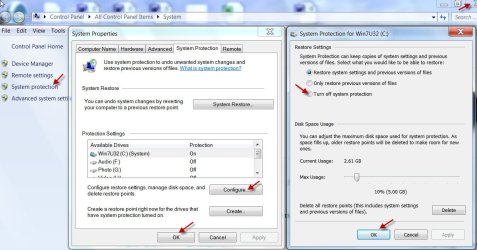
System protection > System protection > Configure
Restore Setting:
checked Restore system settings and previous verions of files
not only restore previous versions of files
not Turn off system protection

Disk Space Usage:
Disk space usage is set to 46% 55.66 GB The drive still has 45GB free space

one error said, it might be anti-virus causing the problem--NOT
one error said, unhide protected system files c:\ and goto System Volume Information

(folder options>View uncheck hide protected operating system files)

and uncheck read only bit but that does nothing to corrected the problem.

joeaa
 

My Computer

Computer Manufacturer/Model Number
HP
OS
Windows 7 Home Premium 64bit
CPU
AMD A8-3800
Motherboard
?
Memory
8 GB
Graphics Card(s)
Radeon HD Graphics 2.40 Ghz
Monitor(s) Displays
Samsung Digial, NEC analog
Hard Drives
1 x 2TB
Joe have you tried disabling the security and then tried?
 

My Computer

Computer type
PC/Desktop
Computer Manufacturer/Model Number
Own build (new) Desk1 / Asus ROG Win 7 / Desk2 1st build
OS
Desk1 7 Home Prem / Desk2 10 Pro / Main lap Asus ROG 10 Pro 2 laptop Toshiba 7 Pro Asus P2520 7 & 10
CPU
Desk1 i5 3750K / Laptop i7 GTX 860M / Desk2 i5 2500
Motherboard
Desk1 Asus P877-V / Desk2 Gigabyte H67 UD3H / Laptop ?
Memory
Desk1 8GB (1866) / Desk2 16GB (1333) / Laptop 8Gb DDR3
Graphics Card(s)
Desk 1& 2NVidia GTX 650 & Laptops on board Intel
Sound Card
Desk 1 & 2 -XONAR DG Realtek High Def audio Laptop
Monitor(s) Displays
Desk 1 Benq HD 2450 / Desk2 Philips 24" / Laptop 17.5"
Screen Resolution
1920x1080 D1 & D2 & Laptop 1
Hard Drives
Desk1 Samsung 120GB 830 SSD
Asus ROG 256GB 850 Pro SSD
Desk2 Samsung 840 256 SSD
Toshiba 120GB EVO
PSU
Desk 1 Corsair HX 1050/ Laptop ? / Desk 2 Corsair HX 650
Case
Desk 1 Cooler HAF XM ? Toshiba laptop / Desk2 Coolermaster
Cooling
Fans on all Desk1 -2 Desk2 - all Coolermasters 5 Laptop ?
Keyboard
Desk 1 MS Sidewinder X6 Desk 2 MS Sidewinder X 4
Mouse
Desk 1&2 - Gigabyte MS 900 gamer - laptop - Logitec wireless
Internet Speed
ADSL2+
Other Info
One other Desktop (tester) and spare Toshba laptop both with SSD's
Running Kaspersky 2016 ISS on all machines config'd identically
Logitec audio stereo systems on each machine (x3)
Canon MG5250MFC
Router/modem TP-Link running WPA2SK
Hi Joeaa

You may find your security or other installed software may be interfering witgh your System Restore, try launching System Restore in safe mode (keep tapping F8 at boot then choose Safe Mode).
 

My Computer

Computer type
PC/Desktop
Computer Manufacturer/Model Number
Home Built
OS
Win 7 Pro x64, Win 10 Pro x64, Linux Light x86
CPU
Core i7 3770K
Motherboard
Gigabyte GA-Z77P-D3
Memory
Crucial Ballistix Sport 8GB
Graphics Card(s)
ASUS GeForce GTX 650 Ti
Sound Card
On board
Monitor(s) Displays
ASUS 22 W/S
Screen Resolution
1920 x 1080
Hard Drives
Intel 320 Series SSD, WD Caviar Black 1TB
PSU
Corsair CX 750w
Case
Black Night
Cooling
120mm fans front/back, Coolermaster Hyper 212 Evo
Keyboard
Razer Blackwidow Expert 2013 Mechanical Keyboard
Mouse
Logitech G300 Gaming Mouse
Internet Speed
20mb Unlimited
Antivirus
ZA Antivirus + Firewall
Browser
Cyberfox
Other Info
Powered USB Hub, External Drives 3 x 1TB, Phone Dock.
one error said, it might be anti-virus causing the problem--NOT
one error said, unhide protected system files c:\ and goto System Volume Information

i'll try safe mode but i'm clueless about this method.
I know to press F8 but after that????
 

My Computer

Computer Manufacturer/Model Number
HP
OS
Windows 7 Home Premium 64bit
CPU
AMD A8-3800
Motherboard
?
Memory
8 GB
Graphics Card(s)
Radeon HD Graphics 2.40 Ghz
Monitor(s) Displays
Samsung Digial, NEC analog
Hard Drives
1 x 2TB
Restored in safe mode. i fumbled around until i found it.

Same response:
System restore did not complete successfully Your computer files and settings were not changed.
unspecified error 0x8007005
 

My Computer

Computer Manufacturer/Model Number
HP
OS
Windows 7 Home Premium 64bit
CPU
AMD A8-3800
Motherboard
?
Memory
8 GB
Graphics Card(s)
Radeon HD Graphics 2.40 Ghz
Monitor(s) Displays
Samsung Digial, NEC analog
Hard Drives
1 x 2TB
same results

I tried another safe mode restore.
This time I turn off Norton for 1hr instead of 15mins.

same results as above in my last post.
 

My Computer

Computer Manufacturer/Model Number
HP
OS
Windows 7 Home Premium 64bit
CPU
AMD A8-3800
Motherboard
?
Memory
8 GB
Graphics Card(s)
Radeon HD Graphics 2.40 Ghz
Monitor(s) Displays
Samsung Digial, NEC analog
Hard Drives
1 x 2TB
Restored in safe mode. i fumbled around until i found it.

Same response:
System restore did not complete successfully Your computer files and settings were not changed.
unspecified error 0x8007005

Are your Windows updates up to date ?
 

My Computer

Computer type
PC/Desktop
Computer Manufacturer/Model Number
Home Built
OS
Win 7 Pro x64, Win 10 Pro x64, Linux Light x86
CPU
Core i7 3770K
Motherboard
Gigabyte GA-Z77P-D3
Memory
Crucial Ballistix Sport 8GB
Graphics Card(s)
ASUS GeForce GTX 650 Ti
Sound Card
On board
Monitor(s) Displays
ASUS 22 W/S
Screen Resolution
1920 x 1080
Hard Drives
Intel 320 Series SSD, WD Caviar Black 1TB
PSU
Corsair CX 750w
Case
Black Night
Cooling
120mm fans front/back, Coolermaster Hyper 212 Evo
Keyboard
Razer Blackwidow Expert 2013 Mechanical Keyboard
Mouse
Logitech G300 Gaming Mouse
Internet Speed
20mb Unlimited
Antivirus
ZA Antivirus + Firewall
Browser
Cyberfox
Other Info
Powered USB Hub, External Drives 3 x 1TB, Phone Dock.
Disk space usage is set to 46% 55.66 GB The drive still has 45GB free space

45 GB free space on a 2 TB drive? I'm too lazy to do the math but that seems like a way low percentage.
I would clean off the crap and get to 50% or higher free space. Systems tend to work more smoothly.
 

My Computer

Computer Manufacturer/Model Number
HP Media Center
OS
Windows 7 32 bit
CPU
AMD 5200+ dual core
Memory
2 GB
Graphics Card(s)
NVidia GeForce 6150SE 128 MB
Monitor(s) Displays
CRT
Screen Resolution
1280x1024
Hard Drives
500 GB Sata internal :

SIIG USB 3.0 docking stations w/WD Caviar Black 6 Gb/s drives
Keyboard
PS/2
Mouse
PS/2 Wheel Mouse
Other Info
SIIG USB 3.0 PCIexpress card.
that 's only on the c:drive

Disk space usage is set to 46% 55.66 GB The drive still has 45GB free space
45 GB free space on a 2 TB drive? I'm too lazy to do the math but that seems like a way low percentage.
I would clean off the crap and get to 50% or higher free space. Systems tend to work more smoothly.

I have plenty of space elsewhere like e:\ and f:\ drives
 

My Computer

Computer Manufacturer/Model Number
HP
OS
Windows 7 Home Premium 64bit
CPU
AMD A8-3800
Motherboard
?
Memory
8 GB
Graphics Card(s)
Radeon HD Graphics 2.40 Ghz
Monitor(s) Displays
Samsung Digial, NEC analog
Hard Drives
1 x 2TB
Disk space usage is set to 46% 55.66 GB The drive still has 45GB free space
45 GB free space on a 2 TB drive? I'm too lazy to do the math but that seems like a way low percentage.
I would clean off the crap and get to 50% or higher free space. Systems tend to work more smoothly.

I have plenty of space elsewhere like e:\ and f:\ drives


c:\ 120GB 75GB used + 48gb free
E:\ 1.51 TB 106GB + 1.41 TB free
F:\ 172 GB 5.05Gb + 167GB
 

My Computer

Computer Manufacturer/Model Number
HP
OS
Windows 7 Home Premium 64bit
CPU
AMD A8-3800
Motherboard
?
Memory
8 GB
Graphics Card(s)
Radeon HD Graphics 2.40 Ghz
Monitor(s) Displays
Samsung Digial, NEC analog
Hard Drives
1 x 2TB
System Restore did not complete successfully. Your computer System files and setting were not Changed.
Got the exact same error long time ago, after disabling one service too much. Sorry, don't remember which. If by chance you've done anything with services lately (and restore used to work), try setting them back to manual or automatic. Your free space on c: is fine.
 

My Computer

Computer type
Laptop
Computer Manufacturer/Model Number
Dell \ Lenovo\ HP \ Toshiba
OS
W7, W8.1
Antivirus
MSE, Malwarebytes
Browser
FF
System Restore did not complete successfully. Your computer System files and setting were not Changed.
Got the exact same error long time ago, after disabling one service too much. Sorry, don't remember which. If by chance you've done anything with services lately (and restore used to work), try setting them back to manual or automatic. Your free space on c: is fine.

That's a good point. Shadow copy service may be set to manual or something weird like that.
 

My Computer

Computer Manufacturer/Model Number
HP Media Center
OS
Windows 7 32 bit
CPU
AMD 5200+ dual core
Memory
2 GB
Graphics Card(s)
NVidia GeForce 6150SE 128 MB
Monitor(s) Displays
CRT
Screen Resolution
1280x1024
Hard Drives
500 GB Sata internal :

SIIG USB 3.0 docking stations w/WD Caviar Black 6 Gb/s drives
Keyboard
PS/2
Mouse
PS/2 Wheel Mouse
Other Info
SIIG USB 3.0 PCIexpress card.
Something new to try. I have not disabled any services. I just start reinstalling win7.
I'll out this shadow copy, if I can find it.
 

My Computer

Computer Manufacturer/Model Number
HP
OS
Windows 7 Home Premium 64bit
CPU
AMD A8-3800
Motherboard
?
Memory
8 GB
Graphics Card(s)
Radeon HD Graphics 2.40 Ghz
Monitor(s) Displays
Samsung Digial, NEC analog
Hard Drives
1 x 2TB
System Restore did not complete successfully. Your computer System files and setting were not Changed.
Got the exact same error long time ago, after disabling one service too much. Sorry, don't remember which. If by chance you've done anything with services lately (and restore used to work), try setting them back to manual or automatic. Your free space on c: is fine.

That's a good point. Shadow copy service may be set to manual or something weird like that.

Found it. It's on manual, before I change it. Your saying put it automatic?
 

My Computer

Computer Manufacturer/Model Number
HP
OS
Windows 7 Home Premium 64bit
CPU
AMD A8-3800
Motherboard
?
Memory
8 GB
Graphics Card(s)
Radeon HD Graphics 2.40 Ghz
Monitor(s) Displays
Samsung Digial, NEC analog
Hard Drives
1 x 2TB
Hi, I just checked my system. The Volume Shadow copy service startup type is Manual only.

While you are checking the Services, also check Remote Procedure Call and also Task Scheduler. Both should be set to automatic.

With all that if there is no light, then do this simple trick, which seems to have worked for some.

Essentially you will be switching off System Restore, reboot and and switch on System Restore again, reboot. Please note that in the process you will lose all existing System Restore points.

Computer>right click> Properties > System Protection > configure > Turn off system Protection > OK > OK > close the main window and reboot.

Now repeat the same and switch on System Protection by selecting Restore system settings and previous versions of files. and then reboot.

25-07-2013 22-08-04.jpg

Now go ahead and check whether System Restore works. ( of course you would have lost all previous restore points. So you have to manually create a restore point and then check.)
 

My Computer

OS
Windows 7 Home Premium 32 bit
Got the exact same error long time ago, after disabling one service too much. Sorry, don't remember which. If by chance you've done anything with services lately (and restore used to work), try setting them back to manual or automatic. Your free space on c: is fine.

That's a good point. Shadow copy service may be set to manual or something weird like that.

Found it. It's on manual, before I change it. Your saying put it automatic?

I made it automatic and I did restore in safe mode Same problem. It won't restore.
I had lots of restore points, Maybe their just false points.
 

My Computer

Computer Manufacturer/Model Number
HP
OS
Windows 7 Home Premium 64bit
CPU
AMD A8-3800
Motherboard
?
Memory
8 GB
Graphics Card(s)
Radeon HD Graphics 2.40 Ghz
Monitor(s) Displays
Samsung Digial, NEC analog
Hard Drives
1 x 2TB
Essentially you will be switching off System Restore, reboot and and switch on System Restore again, reboot. Please note that in the process you will lose all existing System Restore points.
i'm not ready to shut off System Restore and lose my restore points.
Maybe, when I get a restore done.
 

My Computer

Computer Manufacturer/Model Number
HP
OS
Windows 7 Home Premium 64bit
CPU
AMD A8-3800
Motherboard
?
Memory
8 GB
Graphics Card(s)
Radeon HD Graphics 2.40 Ghz
Monitor(s) Displays
Samsung Digial, NEC analog
Hard Drives
1 x 2TB
it's beyond me why they would shut all this off so nothing work...lol
 

My Computer

Computer Manufacturer/Model Number
HP
OS
Windows 7 Home Premium 64bit
CPU
AMD A8-3800
Motherboard
?
Memory
8 GB
Graphics Card(s)
Radeon HD Graphics 2.40 Ghz
Monitor(s) Displays
Samsung Digial, NEC analog
Hard Drives
1 x 2TB
OK, wait to see if any other viable solution comes through. :)
 

My Computer

OS
Windows 7 Home Premium 32 bit
45 GB free space on a 2 TB drive? I'm too lazy to do the math but that seems like a way low percentage.
I would clean off the crap and get to 50% or higher free space. Systems tend to work more smoothly.

I have plenty of space elsewhere like e:\ and f:\ drives


c:\ 120GB 75GB used + 48gb free
E:\ 1.51 TB 106GB + 1.41 TB free
F:\ 172 GB 5.05Gb + 167GB

I would still try moving some of the stuff off C:. Then try. You can always copy it back.
 

My Computer

Computer Manufacturer/Model Number
HP Media Center
OS
Windows 7 32 bit
CPU
AMD 5200+ dual core
Memory
2 GB
Graphics Card(s)
NVidia GeForce 6150SE 128 MB
Monitor(s) Displays
CRT
Screen Resolution
1280x1024
Hard Drives
500 GB Sata internal :

SIIG USB 3.0 docking stations w/WD Caviar Black 6 Gb/s drives
Keyboard
PS/2
Mouse
PS/2 Wheel Mouse
Other Info
SIIG USB 3.0 PCIexpress card.
Back
Top