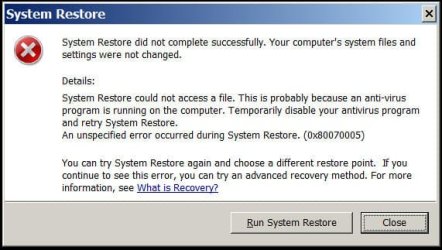
Restore points don't work

by the way, how many Restore Points do you have? Restore Points are kind of like a diff or patch scheme. It uses differences between the current content and state of files to return the system how it was. If you have dozens of restore points with all kinds of changes, it stands to reason the restore mechanism can get confused. It might be a case of "you can't get there from here." You might have to wipe and go with a clean slate. Make a system image backup first though.

This might account for the "file not found" error. The files indicated in that snapshot are not there anymore.
 

My Computer

Computer Manufacturer/Model Number
HP Media Center
OS
Windows 7 32 bit
CPU
AMD 5200+ dual core
Memory
2 GB
Graphics Card(s)
NVidia GeForce 6150SE 128 MB
Monitor(s) Displays
CRT
Screen Resolution
1280x1024
Hard Drives
500 GB Sata internal :

SIIG USB 3.0 docking stations w/WD Caviar Black 6 Gb/s drives
Keyboard
PS/2
Mouse
PS/2 Wheel Mouse
Other Info
SIIG USB 3.0 PCIexpress card.
Not a solution to OP's problem, but a point to ponder in this episode by a user.

"I was dutifully saving my restore points until one day I needed to do a restore. On ALL my restore points I got the message: 'System Restore did not complete successfully. Your computer's files and settings were not changed.'
Apparently what had happened was that I added a second hard drive. Apparently this completely messed up the restore function. I had to turn off system restore, eliminating all the old restore points and then turn it back on. It seems to work fine now. The moral is: DO A TEST RESTORE OCCASIONALLY TO SEE IF IT IS WORKING. I never got any error messages when saving all those restore points that could not be restored"


Read more: http://askbobrankin.com/system_restore_not_working.html#ixzz2a5CBUywm
 

My Computer

OS
Windows 7 Home Premium 32 bit
I have read posts on this Forum that some 3rd party defrag programs messed up Restore points and won't allow them to be retrieved.
 

My Computer

Computer type
PC/Desktop
Computer Manufacturer/Model Number
Home made Desktop
OS
Windows 10 Pro. 64/ version 1709 Windows 7 Pro/64
CPU
Intel i7-6800K @ 4.3
Motherboard
ASUS X-99 Deluxe II
Memory
Corsair Platinum 16 gig @2400
Graphics Card(s)
EVGA GTX 1070 OC
Monitor(s) Displays
Asus 27" LED LCD/VE278Q
Screen Resolution
1920-1080 or 1280-720 HDMI
Hard Drives
INTEL SSD 730-240 Gb Sata 3.0/
PSU
EVGA Platium 1200W
Case
Phanteks Luxe Tempered Glass 8 fans/ one radiator
Cooling
XSPC/ Water Cooled CPU
Keyboard
Das 4 Professional
Mouse
Logitech M705/MX Anywhere 2-S
Internet Speed
100 mbits
Antivirus
Microsoft Security Essentials/ Malwarebytes Premium 3.0/ SAS
Browser
I.E. 11 default/Firefox/ ISP Time Warner Cable/Spectrum
Other Info
LG BluRay Burner/
Sound system-KLipsch-THX/
Icy Dock ssd Hot Swap bays.
to all, Thanks for the support,

next will be to rebuild again lol knowing that I won't be able to go back

I tried to change the "System Volume Information", but it let me do that.
always goes back to "read only"

I tried a manual fix for 0x8007005 - Not it
I put Shadow copy on Automatic which were manual

my computer is still working, only problem is the left right scroll is stuck - can't move
The computer is always up to date.

Joe
 

My Computer

Computer Manufacturer/Model Number
HP
OS
Windows 7 Home Premium 64bit
CPU
AMD A8-3800
Motherboard
?
Memory
8 GB
Graphics Card(s)
Radeon HD Graphics 2.40 Ghz
Monitor(s) Displays
Samsung Digial, NEC analog
Hard Drives
1 x 2TB
hmmmmm............. I knew pretty well that you will finally come to this.:)

System Restore, as long as it works is a fantastic utility. I use it all the time whenever I try any new program or change system parameters for experimentation, to get back to the previous state. It is better than a plain uninstall and even an advanced uninstall with Revo Uninstaller. It has never failed me - that is so far and so good. :)

When System Restore does not work, then it is a PITA. Through out my search on OP's problem - there are hundreds of posts on it - I have not come across any successful solution for it, save for the switching off System Restore and then switch on as detailed in my post # 15, which restored the System Restore :) for many ( with the expense of losing all existing restore points).

What has been widely reported is that even changing the HDD layout by installing a second internal drive, throws or can throw System Restore out of gear. By extension, it could be any of the newly installed programs. Unless the user habitually does a Test System Restore on a schedule, it becomes difficult to pinpoint what exactly derailed the System Restore.That is the moral of the story (my post #22).
 

My Computer

OS
Windows 7 Home Premium 32 bit
Yes Joe do that what Miles says I had my main machine crash and burn yesterday and have done just that albeit only my pics and docs after a veritable train wreck salvage

PS Sorry Jumanji didn't see your post that is exactly what happened to mine image restore repair you name it - it didn't work only a chkdsk in safe mode brought it back from the dead for time to retrieve my pics and stuff. Other wise it is all going south VERY fast:rolleyes: Forgot to mention mine was an update too!!:mad:
 

My Computer

Computer type
PC/Desktop
Computer Manufacturer/Model Number
Own build (new) Desk1 / Asus ROG Win 7 / Desk2 1st build
OS
Desk1 7 Home Prem / Desk2 10 Pro / Main lap Asus ROG 10 Pro 2 laptop Toshiba 7 Pro Asus P2520 7 & 10
CPU
Desk1 i5 3750K / Laptop i7 GTX 860M / Desk2 i5 2500
Motherboard
Desk1 Asus P877-V / Desk2 Gigabyte H67 UD3H / Laptop ?
Memory
Desk1 8GB (1866) / Desk2 16GB (1333) / Laptop 8Gb DDR3
Graphics Card(s)
Desk 1& 2NVidia GTX 650 & Laptops on board Intel
Sound Card
Desk 1 & 2 -XONAR DG Realtek High Def audio Laptop
Monitor(s) Displays
Desk 1 Benq HD 2450 / Desk2 Philips 24" / Laptop 17.5"
Screen Resolution
1920x1080 D1 & D2 & Laptop 1
Hard Drives
Desk1 Samsung 120GB 830 SSD
Asus ROG 256GB 850 Pro SSD
Desk2 Samsung 840 256 SSD
Toshiba 120GB EVO
PSU
Desk 1 Corsair HX 1050/ Laptop ? / Desk 2 Corsair HX 650
Case
Desk 1 Cooler HAF XM ? Toshiba laptop / Desk2 Coolermaster
Cooling
Fans on all Desk1 -2 Desk2 - all Coolermasters 5 Laptop ?
Keyboard
Desk 1 MS Sidewinder X6 Desk 2 MS Sidewinder X 4
Mouse
Desk 1&2 - Gigabyte MS 900 gamer - laptop - Logitec wireless
Internet Speed
ADSL2+
Other Info
One other Desktop (tester) and spare Toshba laptop both with SSD's
Running Kaspersky 2016 ISS on all machines config'd identically
Logitec audio stereo systems on each machine (x3)
Canon MG5250MFC
Router/modem TP-Link running WPA2SK
I was in contact with Norton, It's not them because I've un-installed Norton twice now, it won't work.
Last shot will be to try more restore point before the problem I'm trying to clear up.
It's not anti-virus. It's probably this missing file but it doesn't what the missing file is.
 

Attachments

  • win7 system restore fails.jpg
    win7 system restore fails.jpg
    33.3 KB · Views: 2

My Computer

Computer Manufacturer/Model Number
HP
OS
Windows 7 Home Premium 64bit
CPU
AMD A8-3800
Motherboard
?
Memory
8 GB
Graphics Card(s)
Radeon HD Graphics 2.40 Ghz
Monitor(s) Displays
Samsung Digial, NEC analog
Hard Drives
1 x 2TB
yes, i think i'm done

I would reinstall again but I believe I will have the same problem.
My computer does work I just wanted to clear up a bad install.

Thanks for all the help.
Joe
 

My Computer

Computer Manufacturer/Model Number
HP
OS
Windows 7 Home Premium 64bit
CPU
AMD A8-3800
Motherboard
?
Memory
8 GB
Graphics Card(s)
Radeon HD Graphics 2.40 Ghz
Monitor(s) Displays
Samsung Digial, NEC analog
Hard Drives
1 x 2TB

My Computer

Computer type
PC/Desktop
Computer Manufacturer/Model Number
Own build (new) Desk1 / Asus ROG Win 7 / Desk2 1st build
OS
Desk1 7 Home Prem / Desk2 10 Pro / Main lap Asus ROG 10 Pro 2 laptop Toshiba 7 Pro Asus P2520 7 & 10
CPU
Desk1 i5 3750K / Laptop i7 GTX 860M / Desk2 i5 2500
Motherboard
Desk1 Asus P877-V / Desk2 Gigabyte H67 UD3H / Laptop ?
Memory
Desk1 8GB (1866) / Desk2 16GB (1333) / Laptop 8Gb DDR3
Graphics Card(s)
Desk 1& 2NVidia GTX 650 & Laptops on board Intel
Sound Card
Desk 1 & 2 -XONAR DG Realtek High Def audio Laptop
Monitor(s) Displays
Desk 1 Benq HD 2450 / Desk2 Philips 24" / Laptop 17.5"
Screen Resolution
1920x1080 D1 & D2 & Laptop 1
Hard Drives
Desk1 Samsung 120GB 830 SSD
Asus ROG 256GB 850 Pro SSD
Desk2 Samsung 840 256 SSD
Toshiba 120GB EVO
PSU
Desk 1 Corsair HX 1050/ Laptop ? / Desk 2 Corsair HX 650
Case
Desk 1 Cooler HAF XM ? Toshiba laptop / Desk2 Coolermaster
Cooling
Fans on all Desk1 -2 Desk2 - all Coolermasters 5 Laptop ?
Keyboard
Desk 1 MS Sidewinder X6 Desk 2 MS Sidewinder X 4
Mouse
Desk 1&2 - Gigabyte MS 900 gamer - laptop - Logitec wireless
Internet Speed
ADSL2+
Other Info
One other Desktop (tester) and spare Toshba laptop both with SSD's
Running Kaspersky 2016 ISS on all machines config'd identically
Logitec audio stereo systems on each machine (x3)
Canon MG5250MFC
Router/modem TP-Link running WPA2SK
Joeaa, I never used system restore, because with the complexity of the OS, and throwing many variables at it with the changes the user will make, I don't trust it to work. Think about it. It's very unlikely what you are doing to change the system was ever tested. You are doing the testing. The software you throw at the system may use methods that were never anticipated by the original design. It's just something I wouldn't rely on. Violates KISS.

What has ALWAYS worked for me is imaging. If you put some thought into the size of your system partition, imaging is very fast. I don't know how long it takes to set and retrieve restore points, but you know how much time you've spent on them.

You can use Macrium, Ghost or one of the other imaging utilities, and it takes about 5 minutes to make an image, and about the same time to restore an image. It has worked 100% for me, and I often roll back the system to a previous point by restoring an image. Don't use the Win 7 imaging utility. It has issues.
I can't think of one good reason to use anything that isn't 100% reliable.

Besides that, imaging has many other advantages. One you're finding out about right now. When system restore fails, or a drive fails, or a virus does the "right" work, system restore is useless. You have to do a reinstall, redo all your app setup work, etc.
If you image, you simple restore the image. Easy as pie.
 

My Computer

Computer Manufacturer/Model Number
Home Built
OS
Windows 7 Ultimate x64
CPU
QuadCore Intel Core i7 920, 2666 MHz (20 x 133)
Motherboard
Asus P6T
Memory
6134 MB (DDR3-1333 DDR3 SDRAM)
Graphics Card(s)
(2 - SLI) NVIDIA GeForce GTS 250 (1024 MB)
Sound Card
Onboard Realtek ALC888/1200 @ Intel 82801JB IC
Monitor(s) Displays
HDMII
Screen Resolution
1280 x 800
Hard Drives
Crucial M4 (64 GB SSD)
WD Caviar Blacks
WD5001AALS-00J7B1 ATA Device (465 GB)
WD5001AALS-00L3B2 ATA Device (465 GB)
WD Elements USB External (250 GB)
PSU
Corsair 550
Case
iStarUSA S-10000BL Black

My Computer

Computer type
PC/Desktop
Computer Manufacturer/Model Number
Own build (new) Desk1 / Asus ROG Win 7 / Desk2 1st build
OS
Desk1 7 Home Prem / Desk2 10 Pro / Main lap Asus ROG 10 Pro 2 laptop Toshiba 7 Pro Asus P2520 7 & 10
CPU
Desk1 i5 3750K / Laptop i7 GTX 860M / Desk2 i5 2500
Motherboard
Desk1 Asus P877-V / Desk2 Gigabyte H67 UD3H / Laptop ?
Memory
Desk1 8GB (1866) / Desk2 16GB (1333) / Laptop 8Gb DDR3
Graphics Card(s)
Desk 1& 2NVidia GTX 650 & Laptops on board Intel
Sound Card
Desk 1 & 2 -XONAR DG Realtek High Def audio Laptop
Monitor(s) Displays
Desk 1 Benq HD 2450 / Desk2 Philips 24" / Laptop 17.5"
Screen Resolution
1920x1080 D1 & D2 & Laptop 1
Hard Drives
Desk1 Samsung 120GB 830 SSD
Asus ROG 256GB 850 Pro SSD
Desk2 Samsung 840 256 SSD
Toshiba 120GB EVO
PSU
Desk 1 Corsair HX 1050/ Laptop ? / Desk 2 Corsair HX 650
Case
Desk 1 Cooler HAF XM ? Toshiba laptop / Desk2 Coolermaster
Cooling
Fans on all Desk1 -2 Desk2 - all Coolermasters 5 Laptop ?
Keyboard
Desk 1 MS Sidewinder X6 Desk 2 MS Sidewinder X 4
Mouse
Desk 1&2 - Gigabyte MS 900 gamer - laptop - Logitec wireless
Internet Speed
ADSL2+
Other Info
One other Desktop (tester) and spare Toshba laptop both with SSD's
Running Kaspersky 2016 ISS on all machines config'd identically
Logitec audio stereo systems on each machine (x3)
Canon MG5250MFC
Router/modem TP-Link running WPA2SK
I have done it!! Three cheers.
I have successfully done one restore point.
I used the recovery disk to get back of system files.
That eliminated all my restore points, I guess, I had to many?...lol
Being too careful, doesn't help!

Joe :cool:
 

My Computer

Computer Manufacturer/Model Number
HP
OS
Windows 7 Home Premium 64bit
CPU
AMD A8-3800
Motherboard
?
Memory
8 GB
Graphics Card(s)
Radeon HD Graphics 2.40 Ghz
Monitor(s) Displays
Samsung Digial, NEC analog
Hard Drives
1 x 2TB
Back
Top