
Restore Previous Folder Windows at Logon

How to Restore Previous Folder Windows at Logon


   Information
This tutorial will show you how to restore previous opened folder windows at logon from the last time you logged off, restarted, or shut down XP, Vista, Windows 7, or Windows 8.


OPTION ONE

Turn "Restore previous opened folder windows at logon" On or Off using Folder Options


1. Open Folder Options in XP/Vista/Windows 7 or Windows 8, and do step 2 or 3 below.

2. To Turn On "Restore Previous Folder Windows at Logon"
A) Check the Restore previous folder windows at logon box, and click/tap on OK.
3. To Turn Off "Restore Previous Folder Windows at Logon"
NOTE: This is the default setting.
A) Uncheck the Restore previous folder windows at logon box, and click/tap on OK.
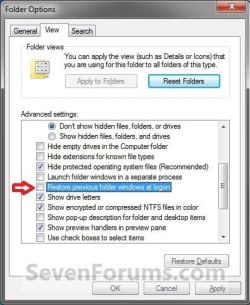
Folder_Options.jpg


OPTION TWO

Turn "Restore previous opened folder windows at logon" On or Off using REG File


1. Do step 2 or 3 below for what you would like to do.

2. To Turn On "Restore Previous Folder Windows at Logon"
A) Click/tap on the Download button below to download the file below, and go to step 4 below.
Turn_On_Restore_Prvious_Folder_Windows_at_Logon.reg

Download


3. To Turn Off "Restore Previous Folder Windows at Logon"
NOTE: This is the default setting.
A) Click/tap on the Download button below to download the file below, and go to step 4 below
Turn_Off_Restore_Prvious_Folder_Windows_at_Logon.reg

Download


3. Save the .reg file to your Desktop.

4. Double click/tap on the downloaded .reg file to merge it.

5. If prompted, click/tap on Run, Yes (UAC-Windows 7/8) OR Continue (UAC-Vista), Yes, and then OK.

6. When finished, you can delete the downloaded .reg file if you like.
That's it,
Shawn
 

Attachments

Last edited:
I know this is frightfully simple "when you know how" but this is one of the best tutorials you have done. Many thanks :geek:
 

My Computer

OS
Dual boot XP Pro and Seven/7127
Hello Anykey,

Simple is best I suppose. ;)
 

My Computer

Computer type
PC/Desktop
Computer Manufacturer/Model Number
Self built custom
OS
64-bit Windows 11 Pro for Workstations
CPU
Intel i7-8700K OC'd to 5 GHz
Motherboard
ASUS ROG Maximus XI Formula Z390
Memory
64 GB (4x16GB) G.SKILL TridentZ RGB DDR4 3600 MHz
Graphics Card(s)
ASUS ROG-STRIX-GTX1080TI-O11G-GAMING
Sound Card
Integrated
Monitor(s) Displays
2 x Samsung Odyssey G7 27"
Screen Resolution
2560x1440
Hard Drives
1TB Samsung 990 PRO M.2,
4TB Samsung 990 PRO PRO M.2,
TerraMaster F8 SSD Plus NAS
PSU
Seasonic Prime Titanium 850W
Case
Thermaltake Core P3
Cooling
Corsair Hydro H115i
Keyboard
Logitech wireless K800
Mouse
Logitech MX Master 4
Internet Speed
2 Gb/s Download and 100 Mb/s Upload
Antivirus
Malwarebyte Anti-Malware Premium
Browser
Google Chrome
Other Info
Logitech Z625 speaker system,
Logitech BRIO 4K Pro webcam,
HP Color LaserJet Pro MFP M477fdn,
APC SMART-UPS RT 1000 XL - SURT1000XLI,
Galaxy S23 Plus phone
Error Not Fixed

I can't get Explorer to resume at the folder (directory) that I last had open after switching the computer off, nor will it open the previous viewed window if I restart Explorer after closing it down.

Another problem is that it won't go back to the previous view format that I'd set.

I've done the Tools folder option bit.

I've ensured that the value 1 is entered in the "PersistBrowsers" of the registry.

I've done a DOS command prompt check for OS faults.

Any help will be appreciated.
 

My Computer

OS
Window7
Hello Doug, and welcome to Seven Forums.

Did you log off or shut down from the Start Menu, and not flip the switch on the computer case to turn off the computer?

This will only reopen Windows Explorer windows that were open when you logged off or Shut down the computer.
 

My Computer

Computer type
PC/Desktop
Computer Manufacturer/Model Number
Self built custom
OS
64-bit Windows 11 Pro for Workstations
CPU
Intel i7-8700K OC'd to 5 GHz
Motherboard
ASUS ROG Maximus XI Formula Z390
Memory
64 GB (4x16GB) G.SKILL TridentZ RGB DDR4 3600 MHz
Graphics Card(s)
ASUS ROG-STRIX-GTX1080TI-O11G-GAMING
Sound Card
Integrated
Monitor(s) Displays
2 x Samsung Odyssey G7 27"
Screen Resolution
2560x1440
Hard Drives
1TB Samsung 990 PRO M.2,
4TB Samsung 990 PRO PRO M.2,
TerraMaster F8 SSD Plus NAS
PSU
Seasonic Prime Titanium 850W
Case
Thermaltake Core P3
Cooling
Corsair Hydro H115i
Keyboard
Logitech wireless K800
Mouse
Logitech MX Master 4
Internet Speed
2 Gb/s Download and 100 Mb/s Upload
Antivirus
Malwarebyte Anti-Malware Premium
Browser
Google Chrome
Other Info
Logitech Z625 speaker system,
Logitech BRIO 4K Pro webcam,
HP Color LaserJet Pro MFP M477fdn,
APC SMART-UPS RT 1000 XL - SURT1000XLI,
Galaxy S23 Plus phone
i just tried the reg file and still didn't fix the problem. any other thoughts?
 

My Computer

Computer type
PC/Desktop
Computer Manufacturer/Model Number
Custom Built
OS
Win 7 Ultimate 64 Bit
CPU
Core2Duo E8400
Motherboard
Asus Rampage Formula
Memory
4 gigs DDR2 6400
Graphics Card(s)
EVGA nVidia 8800 CTS
Sound Card
Creative X-Fi
Monitor(s) Displays
HP W2371d 1920x1080
Screen Resolution
1920x1080
PSU
650 Watt
Cooling
Thermal-Electric
Internet Speed
50 MBPS
Antivirus
Bitdefender 2015 Beta
Browser
Cyberfox
Hello The Nude Dude,

Please describe the problem you are having. :)
 

My Computer

Computer type
PC/Desktop
Computer Manufacturer/Model Number
Self built custom
OS
64-bit Windows 11 Pro for Workstations
CPU
Intel i7-8700K OC'd to 5 GHz
Motherboard
ASUS ROG Maximus XI Formula Z390
Memory
64 GB (4x16GB) G.SKILL TridentZ RGB DDR4 3600 MHz
Graphics Card(s)
ASUS ROG-STRIX-GTX1080TI-O11G-GAMING
Sound Card
Integrated
Monitor(s) Displays
2 x Samsung Odyssey G7 27"
Screen Resolution
2560x1440
Hard Drives
1TB Samsung 990 PRO M.2,
4TB Samsung 990 PRO PRO M.2,
TerraMaster F8 SSD Plus NAS
PSU
Seasonic Prime Titanium 850W
Case
Thermaltake Core P3
Cooling
Corsair Hydro H115i
Keyboard
Logitech wireless K800
Mouse
Logitech MX Master 4
Internet Speed
2 Gb/s Download and 100 Mb/s Upload
Antivirus
Malwarebyte Anti-Malware Premium
Browser
Google Chrome
Other Info
Logitech Z625 speaker system,
Logitech BRIO 4K Pro webcam,
HP Color LaserJet Pro MFP M477fdn,
APC SMART-UPS RT 1000 XL - SURT1000XLI,
Galaxy S23 Plus phone
i have restore previous folders at logon checked and whenever i logoff or restart the folder aren't reopened. i have tried a fix from microsour, the reg file you have and no love. i'm out of ideas myself. hoping you have something you can think of to try. this is a fresh install. just did it on sunday, and the feature was working till yesterday.
 

My Computer

Computer type
PC/Desktop
Computer Manufacturer/Model Number
Custom Built
OS
Win 7 Ultimate 64 Bit
CPU
Core2Duo E8400
Motherboard
Asus Rampage Formula
Memory
4 gigs DDR2 6400
Graphics Card(s)
EVGA nVidia 8800 CTS
Sound Card
Creative X-Fi
Monitor(s) Displays
HP W2371d 1920x1080
Screen Resolution
1920x1080
PSU
650 Watt
Cooling
Thermal-Electric
Internet Speed
50 MBPS
Antivirus
Bitdefender 2015 Beta
Browser
Cyberfox
You could see if doing a system restore using a restore point dated when it was working may fix it for you.
 

My Computer

Computer type
PC/Desktop
Computer Manufacturer/Model Number
Self built custom
OS
64-bit Windows 11 Pro for Workstations
CPU
Intel i7-8700K OC'd to 5 GHz
Motherboard
ASUS ROG Maximus XI Formula Z390
Memory
64 GB (4x16GB) G.SKILL TridentZ RGB DDR4 3600 MHz
Graphics Card(s)
ASUS ROG-STRIX-GTX1080TI-O11G-GAMING
Sound Card
Integrated
Monitor(s) Displays
2 x Samsung Odyssey G7 27"
Screen Resolution
2560x1440
Hard Drives
1TB Samsung 990 PRO M.2,
4TB Samsung 990 PRO PRO M.2,
TerraMaster F8 SSD Plus NAS
PSU
Seasonic Prime Titanium 850W
Case
Thermaltake Core P3
Cooling
Corsair Hydro H115i
Keyboard
Logitech wireless K800
Mouse
Logitech MX Master 4
Internet Speed
2 Gb/s Download and 100 Mb/s Upload
Antivirus
Malwarebyte Anti-Malware Premium
Browser
Google Chrome
Other Info
Logitech Z625 speaker system,
Logitech BRIO 4K Pro webcam,
HP Color LaserJet Pro MFP M477fdn,
APC SMART-UPS RT 1000 XL - SURT1000XLI,
Galaxy S23 Plus phone
i'd rather avoid rolling the system back if possible.
 

My Computer

Computer type
PC/Desktop
Computer Manufacturer/Model Number
Custom Built
OS
Win 7 Ultimate 64 Bit
CPU
Core2Duo E8400
Motherboard
Asus Rampage Formula
Memory
4 gigs DDR2 6400
Graphics Card(s)
EVGA nVidia 8800 CTS
Sound Card
Creative X-Fi
Monitor(s) Displays
HP W2371d 1920x1080
Screen Resolution
1920x1080
PSU
650 Watt
Cooling
Thermal-Electric
Internet Speed
50 MBPS
Antivirus
Bitdefender 2015 Beta
Browser
Cyberfox

My Computer

Computer type
PC/Desktop
Computer Manufacturer/Model Number
Self built custom
OS
64-bit Windows 11 Pro for Workstations
CPU
Intel i7-8700K OC'd to 5 GHz
Motherboard
ASUS ROG Maximus XI Formula Z390
Memory
64 GB (4x16GB) G.SKILL TridentZ RGB DDR4 3600 MHz
Graphics Card(s)
ASUS ROG-STRIX-GTX1080TI-O11G-GAMING
Sound Card
Integrated
Monitor(s) Displays
2 x Samsung Odyssey G7 27"
Screen Resolution
2560x1440
Hard Drives
1TB Samsung 990 PRO M.2,
4TB Samsung 990 PRO PRO M.2,
TerraMaster F8 SSD Plus NAS
PSU
Seasonic Prime Titanium 850W
Case
Thermaltake Core P3
Cooling
Corsair Hydro H115i
Keyboard
Logitech wireless K800
Mouse
Logitech MX Master 4
Internet Speed
2 Gb/s Download and 100 Mb/s Upload
Antivirus
Malwarebyte Anti-Malware Premium
Browser
Google Chrome
Other Info
Logitech Z625 speaker system,
Logitech BRIO 4K Pro webcam,
HP Color LaserJet Pro MFP M477fdn,
APC SMART-UPS RT 1000 XL - SURT1000XLI,
Galaxy S23 Plus phone
i think i'll take your previous advice and do a rollback to 7pm on the 21st. all i've done since then are some minor updates which i know which ones. the hot fix you posted i had already found and tried with no luck. thank for the hep and suggestions.
 

My Computer

Computer type
PC/Desktop
Computer Manufacturer/Model Number
Custom Built
OS
Win 7 Ultimate 64 Bit
CPU
Core2Duo E8400
Motherboard
Asus Rampage Formula
Memory
4 gigs DDR2 6400
Graphics Card(s)
EVGA nVidia 8800 CTS
Sound Card
Creative X-Fi
Monitor(s) Displays
HP W2371d 1920x1080
Screen Resolution
1920x1080
PSU
650 Watt
Cooling
Thermal-Electric
Internet Speed
50 MBPS
Antivirus
Bitdefender 2015 Beta
Browser
Cyberfox
Agree. It'll definitely be more time and work trying to find a cause than a system restore back a couple of days.
 

My Computer

Computer type
PC/Desktop
Computer Manufacturer/Model Number
Self built custom
OS
64-bit Windows 11 Pro for Workstations
CPU
Intel i7-8700K OC'd to 5 GHz
Motherboard
ASUS ROG Maximus XI Formula Z390
Memory
64 GB (4x16GB) G.SKILL TridentZ RGB DDR4 3600 MHz
Graphics Card(s)
ASUS ROG-STRIX-GTX1080TI-O11G-GAMING
Sound Card
Integrated
Monitor(s) Displays
2 x Samsung Odyssey G7 27"
Screen Resolution
2560x1440
Hard Drives
1TB Samsung 990 PRO M.2,
4TB Samsung 990 PRO PRO M.2,
TerraMaster F8 SSD Plus NAS
PSU
Seasonic Prime Titanium 850W
Case
Thermaltake Core P3
Cooling
Corsair Hydro H115i
Keyboard
Logitech wireless K800
Mouse
Logitech MX Master 4
Internet Speed
2 Gb/s Download and 100 Mb/s Upload
Antivirus
Malwarebyte Anti-Malware Premium
Browser
Google Chrome
Other Info
Logitech Z625 speaker system,
Logitech BRIO 4K Pro webcam,
HP Color LaserJet Pro MFP M477fdn,
APC SMART-UPS RT 1000 XL - SURT1000XLI,
Galaxy S23 Plus phone
figured out my prob. a secondary was going bad but not to the point where windows would inform me, but to the point it was causing file system problems. it's also the reason 8.1 would not install. i'd also post this in the thread i created about having problems getting 8.1 installed, but someone pulled the thread BEFORE the issue was resovled.
 

My Computer

Computer type
PC/Desktop
Computer Manufacturer/Model Number
Custom Built
OS
Win 7 Ultimate 64 Bit
CPU
Core2Duo E8400
Motherboard
Asus Rampage Formula
Memory
4 gigs DDR2 6400
Graphics Card(s)
EVGA nVidia 8800 CTS
Sound Card
Creative X-Fi
Monitor(s) Displays
HP W2371d 1920x1080
Screen Resolution
1920x1080
PSU
650 Watt
Cooling
Thermal-Electric
Internet Speed
50 MBPS
Antivirus
Bitdefender 2015 Beta
Browser
Cyberfox
Thank you for posting back with your findings. :)

I don't see the thread that was pulled anywhere though. Not even in the post bin.
 

My Computer

Computer type
PC/Desktop
Computer Manufacturer/Model Number
Self built custom
OS
64-bit Windows 11 Pro for Workstations
CPU
Intel i7-8700K OC'd to 5 GHz
Motherboard
ASUS ROG Maximus XI Formula Z390
Memory
64 GB (4x16GB) G.SKILL TridentZ RGB DDR4 3600 MHz
Graphics Card(s)
ASUS ROG-STRIX-GTX1080TI-O11G-GAMING
Sound Card
Integrated
Monitor(s) Displays
2 x Samsung Odyssey G7 27"
Screen Resolution
2560x1440
Hard Drives
1TB Samsung 990 PRO M.2,
4TB Samsung 990 PRO PRO M.2,
TerraMaster F8 SSD Plus NAS
PSU
Seasonic Prime Titanium 850W
Case
Thermaltake Core P3
Cooling
Corsair Hydro H115i
Keyboard
Logitech wireless K800
Mouse
Logitech MX Master 4
Internet Speed
2 Gb/s Download and 100 Mb/s Upload
Antivirus
Malwarebyte Anti-Malware Premium
Browser
Google Chrome
Other Info
Logitech Z625 speaker system,
Logitech BRIO 4K Pro webcam,
HP Color LaserJet Pro MFP M477fdn,
APC SMART-UPS RT 1000 XL - SURT1000XLI,
Galaxy S23 Plus phone
Back
Top