
Solved Restoring Default Folder Icon - Not Working?

Graysull

New member
Local time
10:42 AM
Messages
49
Hi,

A few months back I changed my default folder icon, and now I would like to change it to something else. In regedit, I made a Shell Icons folder in the proper directory (I removed the old one), yet it does not seem to work. It has the key "3" in it, with the directory of the new icon. It is a 256x256 .ico file. Actually, there are traces of it working. For example, in Chrome, when you go to say upload a profile picture, it shows the right icon. In Windows Explorer, however, it only shows the old one. Help would be very much appreciated.

Thanks,

Graysull
 

My Computer

Computer type
PC/Desktop
Computer Manufacturer/Model Number
Modified Dell
OS
Windows 7 Home Premium 64 Bit
CPU
Intel i5
Memory
16 GB
Graphics Card(s)
Radeon R7 260x
Monitor(s) Displays
2 ASUS 19", 1 Vizio 27~"
Screen Resolution
1440 x 900 (2), 1920 x 1080
Hard Drives
1 TB Hard Drive
Keyboard
Razer DeathStalker Expert
Mouse
Razer Naga 2014
Internet Speed
Decent
Antivirus
McAfee
Browser
Chrome

My Computer

Computer type
PC/Desktop
Computer Manufacturer/Model Number
Custom assembled by me :}
OS
Win-7-Pro64bit 7-H-Prem-64bit
CPU
i7-5930K 2nd i9-9940x both water blocked VRM's too
Motherboard
ASUS SABERTOOTH X99 2nd ASUS x299 Apex
Memory
Trident-z 3200C14 2nd Trident-z 3600C16
Graphics Card(s)
EVGA 1080ti ftw3 2nd Titan Xp both water blocked
Sound Card
Built-in Realtek
Monitor(s) Displays
1-AOC G2460PG 24"G-Sync 144Hz/ 2nd 1-ASUS VG248QE 24" 144Hz
Screen Resolution
1920 x 1080 144Hz
Hard Drives
2-Samsung M.2 Evo & Evo Plus
2-Samsung 850 EVO 500GB SSD's/ 3-2.5 W.D. Black 1tb-&3-1tb/3-3.5 WD Black 1tb hdd's
PSU
EVGA SuperNOVA 1000-P2 2nd 1200-P2
Case
2-Corsair Obsidian Series 450D Black ATX Mid Tower
Cooling
Custom water loops
Keyboard
Logitech G710+/ 2nd Logitech G910
Mouse
2-RedDragon M901 Perdition 16400 dpi Gaming mouse = wired
Internet Speed
Comcast Ping 19ms 89.31mbps download speed 6.12mbps upload
Antivirus
Malwarebytes Pro/ Superantispyware Pro
Browser
FireFox & Pale moon
Other Info
2nd ASUS X299 Apex/Intel i9-9940x with Custom water loop/7H-Prem-x64/Corsair 450D case/Ram Trident-z 3600C16 4x8gb / Samsung970Evo plus 500gb SSD/Dual ssd EZ swap evo/PSU EVGA SuperNova 1200w-P2 80+Platinum/GPU Titan Xp /8-ML-140 on push-pull on 2-280GTX rads
Hi,

I tried running the bat file and restarted my computer. It did not change the folder icons back to the default. In the registry editor, I cannot find a trace that says to make the old icon the default icon.

Thanks
 

My Computer

Computer type
PC/Desktop
Computer Manufacturer/Model Number
Modified Dell
OS
Windows 7 Home Premium 64 Bit
CPU
Intel i5
Memory
16 GB
Graphics Card(s)
Radeon R7 260x
Monitor(s) Displays
2 ASUS 19", 1 Vizio 27~"
Screen Resolution
1440 x 900 (2), 1920 x 1080
Hard Drives
1 TB Hard Drive
Keyboard
Razer DeathStalker Expert
Mouse
Razer Naga 2014
Internet Speed
Decent
Antivirus
McAfee
Browser
Chrome
Default Folder icon?

Default folder icon - it's not clear which icon you mean.

Use this SevenForums search to find the tutorial you need and maybe post your question in the relevant thread.


SevenForums Change Folder Icon Tutorial
 

My Computer

Computer type
Laptop
Computer Manufacturer/Model Number
ASUS
OS
Microsoft Windows 7 Home Premium 64-bit 7601 Multiprocessor Free Service Pack 1
CPU
AMD C-60 APU with Radeon(tm) HD Graphics
Motherboard
ASUSTeK COMPUTER INC. X501U
Memory
4.00 GB
Graphics Card(s)
AMD Radeon HD 6290 Graphics
Sound Card
(1) AMD High Definition Audio Device (2) Realtek High Defi
Screen Resolution
1366 x 768 x 32 bits (4294967296 colors) @ 60 Hz
Hard Drives
Hitachi HTS545050A7E380 SATA Disk Device
Antivirus
Comodo CIS & FW, SecureAplus App Whitelisting, Threatfire
Browser
Cyberfox 64bit, Opera 64bit, Airfox
Other Info
Spy-The-Spy, HitmanPro.Alert, Norton Connect Safe, MJRegWatcher, BitDefender TrafficLight, Voodoo Shield, Zemana AntiMalware
You know when you install Windows, and all the folders have the same yellow-folder icon? Well, I changed the yellow-folder icon to something else in the registry editor. So now, all of the folders have a different Icon.
 

My Computer

Computer type
PC/Desktop
Computer Manufacturer/Model Number
Modified Dell
OS
Windows 7 Home Premium 64 Bit
CPU
Intel i5
Memory
16 GB
Graphics Card(s)
Radeon R7 260x
Monitor(s) Displays
2 ASUS 19", 1 Vizio 27~"
Screen Resolution
1440 x 900 (2), 1920 x 1080
Hard Drives
1 TB Hard Drive
Keyboard
Razer DeathStalker Expert
Mouse
Razer Naga 2014
Internet Speed
Decent
Antivirus
McAfee
Browser
Chrome
Registry Key for icons

Post the registry key(s) that you modified and I expect that someone will upload the default keys for you.
 

My Computer

Computer type
Laptop
Computer Manufacturer/Model Number
ASUS
OS
Microsoft Windows 7 Home Premium 64-bit 7601 Multiprocessor Free Service Pack 1
CPU
AMD C-60 APU with Radeon(tm) HD Graphics
Motherboard
ASUSTeK COMPUTER INC. X501U
Memory
4.00 GB
Graphics Card(s)
AMD Radeon HD 6290 Graphics
Sound Card
(1) AMD High Definition Audio Device (2) Realtek High Defi
Screen Resolution
1366 x 768 x 32 bits (4294967296 colors) @ 60 Hz
Hard Drives
Hitachi HTS545050A7E380 SATA Disk Device
Antivirus
Comodo CIS & FW, SecureAplus App Whitelisting, Threatfire
Browser
Cyberfox 64bit, Opera 64bit, Airfox
Other Info
Spy-The-Spy, HitmanPro.Alert, Norton Connect Safe, MJRegWatcher, BitDefender TrafficLight, Voodoo Shield, Zemana AntiMalware
There is no longer files that I have edited in the registry. I deleted the ones I used to change the default icon. What I did was, I created a key called Shell Icons in HKEY_LOCAL_MACHINE (or whatever its called) > Software > Microsoft > Windows > Current Version > Explorer, with a string called 3, with the value being the directory of the icon.
 

My Computer

Computer type
PC/Desktop
Computer Manufacturer/Model Number
Modified Dell
OS
Windows 7 Home Premium 64 Bit
CPU
Intel i5
Memory
16 GB
Graphics Card(s)
Radeon R7 260x
Monitor(s) Displays
2 ASUS 19", 1 Vizio 27~"
Screen Resolution
1440 x 900 (2), 1920 x 1080
Hard Drives
1 TB Hard Drive
Keyboard
Razer DeathStalker Expert
Mouse
Razer Naga 2014
Internet Speed
Decent
Antivirus
McAfee
Browser
Chrome
Upload Reg Key

Try uploading the following and we will try to work out what you did:

HKEY_LOCAL_MACHINE\SOFTWARE\Microsoft\Windows\CurrentVersion\Explorer

Right click the Explorer key and choose Export.

Save to your desktop with the file name Explorer.reg and upload it and attach it to your next post.
 

My Computer

Computer type
Laptop
Computer Manufacturer/Model Number
ASUS
OS
Microsoft Windows 7 Home Premium 64-bit 7601 Multiprocessor Free Service Pack 1
CPU
AMD C-60 APU with Radeon(tm) HD Graphics
Motherboard
ASUSTeK COMPUTER INC. X501U
Memory
4.00 GB
Graphics Card(s)
AMD Radeon HD 6290 Graphics
Sound Card
(1) AMD High Definition Audio Device (2) Realtek High Defi
Screen Resolution
1366 x 768 x 32 bits (4294967296 colors) @ 60 Hz
Hard Drives
Hitachi HTS545050A7E380 SATA Disk Device
Antivirus
Comodo CIS & FW, SecureAplus App Whitelisting, Threatfire
Browser
Cyberfox 64bit, Opera 64bit, Airfox
Other Info
Spy-The-Spy, HitmanPro.Alert, Norton Connect Safe, MJRegWatcher, BitDefender TrafficLight, Voodoo Shield, Zemana AntiMalware
I have attached the file. Folder10.ico is the icon I want, by the way. Also, I don't know if I said this before, but it does work but ONLY when uploading a file through chrome.

Thanks
 

Attachments

My Computer

Computer type
PC/Desktop
Computer Manufacturer/Model Number
Modified Dell
OS
Windows 7 Home Premium 64 Bit
CPU
Intel i5
Memory
16 GB
Graphics Card(s)
Radeon R7 260x
Monitor(s) Displays
2 ASUS 19", 1 Vizio 27~"
Screen Resolution
1440 x 900 (2), 1920 x 1080
Hard Drives
1 TB Hard Drive
Keyboard
Razer DeathStalker Expert
Mouse
Razer Naga 2014
Internet Speed
Decent
Antivirus
McAfee
Browser
Chrome
Try this fix

Okay so I've attached a reg file that I hope will work. Download it and save to your desktop.

Go back into your registry:

HKEY_LOCAL_MACHINE\SOFTWARE\Microsoft\Windows\CurrentVersion\Explorer\Shell Icons

Delete the string named 3 in the right pane.

Exit registry editor.

Double click the downloaded file and it should merge to the registry but won't take effect until you've logged off and on or rebooted.

Note: That icon you wanted - icon number 10 looks very thin! Perhaps you could use 9 instead.

The tutorial you need is here:

http://www.sevenforums.com/tutorials/23825-folder-icon-change-windows-7-default-folder-icon.html
 

Attachments

Last edited:

My Computer

Computer type
Laptop
Computer Manufacturer/Model Number
ASUS
OS
Microsoft Windows 7 Home Premium 64-bit 7601 Multiprocessor Free Service Pack 1
CPU
AMD C-60 APU with Radeon(tm) HD Graphics
Motherboard
ASUSTeK COMPUTER INC. X501U
Memory
4.00 GB
Graphics Card(s)
AMD Radeon HD 6290 Graphics
Sound Card
(1) AMD High Definition Audio Device (2) Realtek High Defi
Screen Resolution
1366 x 768 x 32 bits (4294967296 colors) @ 60 Hz
Hard Drives
Hitachi HTS545050A7E380 SATA Disk Device
Antivirus
Comodo CIS & FW, SecureAplus App Whitelisting, Threatfire
Browser
Cyberfox 64bit, Opera 64bit, Airfox
Other Info
Spy-The-Spy, HitmanPro.Alert, Norton Connect Safe, MJRegWatcher, BitDefender TrafficLight, Voodoo Shield, Zemana AntiMalware
Ok, I will do as you said soon. Folder10 is the name of the icon that I downloaded. It isn't actually number 10 in the default icons. :) In the imageres.dll file, I believe it is number 3.
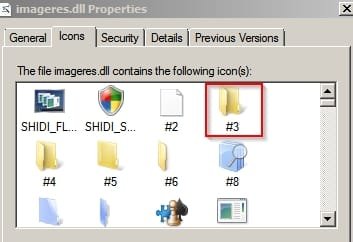
Thanks
 

My Computer

Computer type
PC/Desktop
Computer Manufacturer/Model Number
Modified Dell
OS
Windows 7 Home Premium 64 Bit
CPU
Intel i5
Memory
16 GB
Graphics Card(s)
Radeon R7 260x
Monitor(s) Displays
2 ASUS 19", 1 Vizio 27~"
Screen Resolution
1440 x 900 (2), 1920 x 1080
Hard Drives
1 TB Hard Drive
Keyboard
Razer DeathStalker Expert
Mouse
Razer Naga 2014
Internet Speed
Decent
Antivirus
McAfee
Browser
Chrome
imageres.dll

Ok, I will do as you said soon. Folder10 is the name of the icon that I downloaded. It isn't actually number 10 in the default icons. :) In the imageres.dll file, I believe it is number 3.
Thanks

Okay forget that reg file then - the one I uploaded. Do you want to me to make a new one with icon 3 from imageres.dll ?

I'll post a screenshot of it in a minute just to double check.
 

My Computer

Computer type
Laptop
Computer Manufacturer/Model Number
ASUS
OS
Microsoft Windows 7 Home Premium 64-bit 7601 Multiprocessor Free Service Pack 1
CPU
AMD C-60 APU with Radeon(tm) HD Graphics
Motherboard
ASUSTeK COMPUTER INC. X501U
Memory
4.00 GB
Graphics Card(s)
AMD Radeon HD 6290 Graphics
Sound Card
(1) AMD High Definition Audio Device (2) Realtek High Defi
Screen Resolution
1366 x 768 x 32 bits (4294967296 colors) @ 60 Hz
Hard Drives
Hitachi HTS545050A7E380 SATA Disk Device
Antivirus
Comodo CIS & FW, SecureAplus App Whitelisting, Threatfire
Browser
Cyberfox 64bit, Opera 64bit, Airfox
Other Info
Spy-The-Spy, HitmanPro.Alert, Norton Connect Safe, MJRegWatcher, BitDefender TrafficLight, Voodoo Shield, Zemana AntiMalware
I downloaded a skin pack and that made the "default" folder icon (3) look differently. Also, I already ran the reg file.
 

My Computer

Computer type
PC/Desktop
Computer Manufacturer/Model Number
Modified Dell
OS
Windows 7 Home Premium 64 Bit
CPU
Intel i5
Memory
16 GB
Graphics Card(s)
Radeon R7 260x
Monitor(s) Displays
2 ASUS 19", 1 Vizio 27~"
Screen Resolution
1440 x 900 (2), 1920 x 1080
Hard Drives
1 TB Hard Drive
Keyboard
Razer DeathStalker Expert
Mouse
Razer Naga 2014
Internet Speed
Decent
Antivirus
McAfee
Browser
Chrome
Icon screenshot

imageres.dll icon 3.jpg

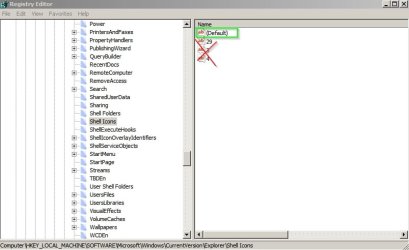
If that's the one you want I believe that all you need to do is delete the "3" string in the registry and log off/ on.

HKEY_LOCAL_MACHINE\SOFTWARE\Microsoft\Windows\CurrentVersion\Explorer\Shell Icons

Leave "Default" and delete anything else!

Default.jpg
 

My Computer

Computer type
Laptop
Computer Manufacturer/Model Number
ASUS
OS
Microsoft Windows 7 Home Premium 64-bit 7601 Multiprocessor Free Service Pack 1
CPU
AMD C-60 APU with Radeon(tm) HD Graphics
Motherboard
ASUSTeK COMPUTER INC. X501U
Memory
4.00 GB
Graphics Card(s)
AMD Radeon HD 6290 Graphics
Sound Card
(1) AMD High Definition Audio Device (2) Realtek High Defi
Screen Resolution
1366 x 768 x 32 bits (4294967296 colors) @ 60 Hz
Hard Drives
Hitachi HTS545050A7E380 SATA Disk Device
Antivirus
Comodo CIS & FW, SecureAplus App Whitelisting, Threatfire
Browser
Cyberfox 64bit, Opera 64bit, Airfox
Other Info
Spy-The-Spy, HitmanPro.Alert, Norton Connect Safe, MJRegWatcher, BitDefender TrafficLight, Voodoo Shield, Zemana AntiMalware
Icon in your imageres.dll file

Is that icon still showing up in your imageres.dll file?

And if so - is it number 3?
 

My Computer

Computer type
Laptop
Computer Manufacturer/Model Number
ASUS
OS
Microsoft Windows 7 Home Premium 64-bit 7601 Multiprocessor Free Service Pack 1
CPU
AMD C-60 APU with Radeon(tm) HD Graphics
Motherboard
ASUSTeK COMPUTER INC. X501U
Memory
4.00 GB
Graphics Card(s)
AMD Radeon HD 6290 Graphics
Sound Card
(1) AMD High Definition Audio Device (2) Realtek High Defi
Screen Resolution
1366 x 768 x 32 bits (4294967296 colors) @ 60 Hz
Hard Drives
Hitachi HTS545050A7E380 SATA Disk Device
Antivirus
Comodo CIS & FW, SecureAplus App Whitelisting, Threatfire
Browser
Cyberfox 64bit, Opera 64bit, Airfox
Other Info
Spy-The-Spy, HitmanPro.Alert, Norton Connect Safe, MJRegWatcher, BitDefender TrafficLight, Voodoo Shield, Zemana AntiMalware
Hi,

I just restarted my computer after running the reg file. IT WORKED. Thank you so much, I've had this problem for literally a year. Just in case this sort of situation happens again, would I just run the reg file again? Also one more thing, is it just me that my profile pic isn't showing up on the left?

Thanks (a lot) again.

:)
 

My Computer

Computer type
PC/Desktop
Computer Manufacturer/Model Number
Modified Dell
OS
Windows 7 Home Premium 64 Bit
CPU
Intel i5
Memory
16 GB
Graphics Card(s)
Radeon R7 260x
Monitor(s) Displays
2 ASUS 19", 1 Vizio 27~"
Screen Resolution
1440 x 900 (2), 1920 x 1080
Hard Drives
1 TB Hard Drive
Keyboard
Razer DeathStalker Expert
Mouse
Razer Naga 2014
Internet Speed
Decent
Antivirus
McAfee
Browser
Chrome
Glad it worked

Hi,

I just restarted my computer after running the reg file. IT WORKED. Thank you so much, I've had this problem for literally a year. Just in case this sort of situation happens again, would I just run the reg file again? Also one more thing, is it just me that my profile pic isn't showing up on the left?

Thanks (a lot) again.

:)

If it's working now just export the registry key and save it so that you can use it if needed.

As for your profile pic - I wouldn't know. As far as I can remember it has to be a certain format and size in order for it to work. I'll have a look at the image requirements.
 

My Computer

Computer type
Laptop
Computer Manufacturer/Model Number
ASUS
OS
Microsoft Windows 7 Home Premium 64-bit 7601 Multiprocessor Free Service Pack 1
CPU
AMD C-60 APU with Radeon(tm) HD Graphics
Motherboard
ASUSTeK COMPUTER INC. X501U
Memory
4.00 GB
Graphics Card(s)
AMD Radeon HD 6290 Graphics
Sound Card
(1) AMD High Definition Audio Device (2) Realtek High Defi
Screen Resolution
1366 x 768 x 32 bits (4294967296 colors) @ 60 Hz
Hard Drives
Hitachi HTS545050A7E380 SATA Disk Device
Antivirus
Comodo CIS & FW, SecureAplus App Whitelisting, Threatfire
Browser
Cyberfox 64bit, Opera 64bit, Airfox
Other Info
Spy-The-Spy, HitmanPro.Alert, Norton Connect Safe, MJRegWatcher, BitDefender TrafficLight, Voodoo Shield, Zemana AntiMalware
Profile Pic

Here's what I see about uploading profile pics:

Note: The maximum size of your custom image is 150 by 150 pixels or 100.0 KB (whichever is smaller).
 

My Computer

Computer type
Laptop
Computer Manufacturer/Model Number
ASUS
OS
Microsoft Windows 7 Home Premium 64-bit 7601 Multiprocessor Free Service Pack 1
CPU
AMD C-60 APU with Radeon(tm) HD Graphics
Motherboard
ASUSTeK COMPUTER INC. X501U
Memory
4.00 GB
Graphics Card(s)
AMD Radeon HD 6290 Graphics
Sound Card
(1) AMD High Definition Audio Device (2) Realtek High Defi
Screen Resolution
1366 x 768 x 32 bits (4294967296 colors) @ 60 Hz
Hard Drives
Hitachi HTS545050A7E380 SATA Disk Device
Antivirus
Comodo CIS & FW, SecureAplus App Whitelisting, Threatfire
Browser
Cyberfox 64bit, Opera 64bit, Airfox
Other Info
Spy-The-Spy, HitmanPro.Alert, Norton Connect Safe, MJRegWatcher, BitDefender TrafficLight, Voodoo Shield, Zemana AntiMalware
Avatar

Try uploading a picture using "Avatar" and see if that displays.

Edit:

I see your pic in your profile. Upload it again using customise profile > edit avatar.
 
Last edited:

My Computer

Computer type
Laptop
Computer Manufacturer/Model Number
ASUS
OS
Microsoft Windows 7 Home Premium 64-bit 7601 Multiprocessor Free Service Pack 1
CPU
AMD C-60 APU with Radeon(tm) HD Graphics
Motherboard
ASUSTeK COMPUTER INC. X501U
Memory
4.00 GB
Graphics Card(s)
AMD Radeon HD 6290 Graphics
Sound Card
(1) AMD High Definition Audio Device (2) Realtek High Defi
Screen Resolution
1366 x 768 x 32 bits (4294967296 colors) @ 60 Hz
Hard Drives
Hitachi HTS545050A7E380 SATA Disk Device
Antivirus
Comodo CIS & FW, SecureAplus App Whitelisting, Threatfire
Browser
Cyberfox 64bit, Opera 64bit, Airfox
Other Info
Spy-The-Spy, HitmanPro.Alert, Norton Connect Safe, MJRegWatcher, BitDefender TrafficLight, Voodoo Shield, Zemana AntiMalware
Ok I got the profile pic figured out. However, now when I am uploading a file via chrome, it shows the folder 10 icon (the default registry one).
 

My Computer

Computer type
PC/Desktop
Computer Manufacturer/Model Number
Modified Dell
OS
Windows 7 Home Premium 64 Bit
CPU
Intel i5
Memory
16 GB
Graphics Card(s)
Radeon R7 260x
Monitor(s) Displays
2 ASUS 19", 1 Vizio 27~"
Screen Resolution
1440 x 900 (2), 1920 x 1080
Hard Drives
1 TB Hard Drive
Keyboard
Razer DeathStalker Expert
Mouse
Razer Naga 2014
Internet Speed
Decent
Antivirus
McAfee
Browser
Chrome
Back
Top