Hi,
I'm attempting my first RAID0 setup. I have an OEM version of windows on one of my SSDs, and I just bought another identical SSD (vertex 4 256GB) to try and put them in a RAID0 array.
I have created the RAID0 array in my ASUS motherboard's BIOS settings. I then boot Windows 7 from the disk and go to the repair section. I ask it to restore my system image, and I'm told that in order to do so, I will have to exactly copy the partition that was on my old SSD (which was only 256GB compared to my new 512GB RAID array). I go ahead with that, and the result is that I have my Windows 7 loaded, but it only has 256GB in it's partition. Not only that, but I can't even tell if my RAID configuration has worked for that 256GB that I can see.
What I have tried:
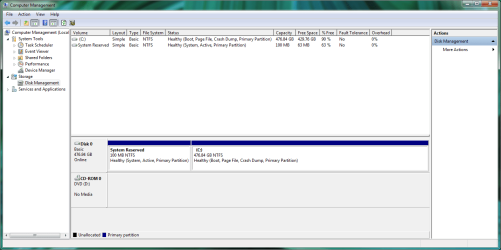
When I go to My Computer > Computer Management > Disk Management, I can see my 500GB drive, but it appears to be partitioned into 100MB of "System Reserved" (like my old windows 7), 250GB of my restored C drive, and 250GB of unallocated space. I managed to get the unallocated space to be a new drive (called F), but I was hoping that my C drive could simply have 500GB.
So how can I tell if my drive is in a RAID0 configuration from within Windows 7 (64 bit) and if so can I join these 2 drives back together?
Thanks very much for your time.
I'm attempting my first RAID0 setup. I have an OEM version of windows on one of my SSDs, and I just bought another identical SSD (vertex 4 256GB) to try and put them in a RAID0 array.
I have created the RAID0 array in my ASUS motherboard's BIOS settings. I then boot Windows 7 from the disk and go to the repair section. I ask it to restore my system image, and I'm told that in order to do so, I will have to exactly copy the partition that was on my old SSD (which was only 256GB compared to my new 512GB RAID array). I go ahead with that, and the result is that I have my Windows 7 loaded, but it only has 256GB in it's partition. Not only that, but I can't even tell if my RAID configuration has worked for that 256GB that I can see.
What I have tried:
When I go to My Computer > Computer Management > Disk Management, I can see my 500GB drive, but it appears to be partitioned into 100MB of "System Reserved" (like my old windows 7), 250GB of my restored C drive, and 250GB of unallocated space. I managed to get the unallocated space to be a new drive (called F), but I was hoping that my C drive could simply have 500GB.
So how can I tell if my drive is in a RAID0 configuration from within Windows 7 (64 bit) and if so can I join these 2 drives back together?
Thanks very much for your time.
My Computer
- OS
- Windows 7 Home Premium 64bit