Restoring windows to earliest restore point

Preflight1452

New member
Local time
3:41 AM
Messages
12
I was wondering if windows had an emergency restore point which might date back to real early in time.
I made some really bad registry changes which had no backup as well as no restore point dating early enough to fix the problem.
So I was wondering if it is possible that windows keeps a hidden restore point which I might be able to access through recovery mode or some way to return windows to a really earlier state or even to its defaults again.
Please help me.
 

My Computer My Computer

Computer type
Laptop
Computer Manufacturer/Model Number
Dell
OS
Windows 7 Ultimate

My Computer My Computer

Computer type
PC/Desktop
Computer Manufacturer/Model Number
Dell XPS 420
OS
Windows 10, Home Clean Install
CPU
Intel Core2 processsor Q8200(2.33Ghz 1333FSB) Quad Core Tech
Motherboard
Dell
Memory
6 gb
Graphics Card(s)
ATI Radeon 256MB HD3650
Sound Card
Intergrated 7.1 Channel Audio
Monitor(s) Displays
Dell SP2009W 20"
Hard Drives
640 GB Serial ATA Hard drive
Cooling
Fan
Keyboard
Dell USB Keyboard
Mouse
Dell Premium Optical USB
Internet Speed
DSL 2.85
For a small charge, if still available, you could get a disk from the company that sold you the computer.
 

My Computer My Computer

Computer type
PC/Desktop
Computer Manufacturer/Model Number
Dell XPS 420
OS
Windows 10, Home Clean Install
CPU
Intel Core2 processsor Q8200(2.33Ghz 1333FSB) Quad Core Tech
Motherboard
Dell
Memory
6 gb
Graphics Card(s)
ATI Radeon 256MB HD3650
Sound Card
Intergrated 7.1 Channel Audio
Monitor(s) Displays
Dell SP2009W 20"
Hard Drives
640 GB Serial ATA Hard drive
Cooling
Fan
Keyboard
Dell USB Keyboard
Mouse
Dell Premium Optical USB
Internet Speed
DSL 2.85
There may be copies of the registry hives in windows\system32\config\regback.

You would need to boot into pe to copy them into windows\system32\config.

As described in this tutorial.

Startup Repair Infinite Loop Recovery - Windows 7 Help Forums

You can borrow my boot media, which will let you see what you are doing rather than relying on commands .

boot media 17514x64-v4.iso


I was wondering if windows had an emergency restore point which might date back to real early in time.
I made some really bad registry changes which had no backup as well as no restore point dating early enough to fix the problem.
So I was wondering if it is possible that windows keeps a hidden restore point which I might be able to access through recovery mode or some way to return windows to a really earlier state or even to its defaults again.
Please help me.
 

My Computers My Computers

System One System Two

  • Computer type
    PC/Desktop
    OS
    7 X64
    CPU
    i5 8400
    Motherboard
    gigabyte b365m ds3h
    Memory
    2x8gb 3200mhz
    Hard Drives
    various
    PSU
    pure power 11 400w cm
    Case
    Coolermaster
    Cooling
    cryorig m9i
  • Computer type
    PC/Desktop
    OS
    7x64
    CPU
    g5400
    Motherboard
    ga b365m ds3h
    Memory
    8gb ddr4 2400
    PSU
    xfx pro 450w
There may be copies of the registry hives in windows\system32\config\regback.

You would need to boot into pe to copy them into windows\system32\config.

As described in this tutorial.

Startup Repair Infinite Loop Recovery - Windows 7 Help Forums

You can borrow my boot media, which will let you see what you are doing rather than relying on commands .

boot media 17514x64-v4.iso

Thank you for taking time to respond, my system turned out to have the repair system option so I was easily able to enter the command prompt option and overwrite \Windows\System32\config files with the ones in RegBack. However, I think the files in RegBack weren't a clean version as I noticed their size was very different then the ranges described in the Infinite Loop Recovery article, although I didn't care much. But when I rebooted, I noticed nothing changed, I even opened the registry to check if a specific key disabling Windows Defender (which I had purposely set) still existed as proof, and bitterly enough nothing had changed at all, as if the RegBack files were no different. Can you help with this?
 

My Computer My Computer

Computer type
Laptop
Computer Manufacturer/Model Number
Dell
OS
Windows 7 Ultimate

My Computers My Computers

System One System Two

  • Computer type
    PC/Desktop
    OS
    7 X64
    CPU
    i5 8400
    Motherboard
    gigabyte b365m ds3h
    Memory
    2x8gb 3200mhz
    Hard Drives
    various
    PSU
    pure power 11 400w cm
    Case
    Coolermaster
    Cooling
    cryorig m9i
  • Computer type
    PC/Desktop
    OS
    7x64
    CPU
    g5400
    Motherboard
    ga b365m ds3h
    Memory
    8gb ddr4 2400
    PSU
    xfx pro 450w
bbj8uLE.png
PX6A5
PX6A5
PX6A5

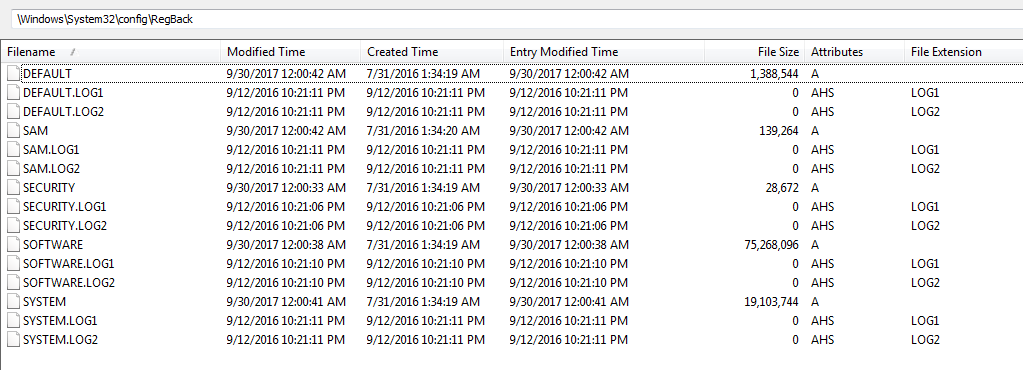
I think I might have found shadow copies in RegBack [not sure [see the frame attached]]
I have no idea how to use the copies [assuming these are shadow copies in the first place], I tried copying them to a dir but it appears empty and I don't know how I would use these files with their strange extensions. Please help
 
Last edited:

My Computer My Computer

Computer type
Laptop
Computer Manufacturer/Model Number
Dell
OS
Windows 7 Ultimate
They are dated30/9/17 so probably too recent to help.
 

My Computers My Computers

System One System Two

  • Computer type
    PC/Desktop
    OS
    7 X64
    CPU
    i5 8400
    Motherboard
    gigabyte b365m ds3h
    Memory
    2x8gb 3200mhz
    Hard Drives
    various
    PSU
    pure power 11 400w cm
    Case
    Coolermaster
    Cooling
    cryorig m9i
  • Computer type
    PC/Desktop
    OS
    7x64
    CPU
    g5400
    Motherboard
    ga b365m ds3h
    Memory
    8gb ddr4 2400
    PSU
    xfx pro 450w

My Computer My Computer

Computer type
Laptop
Computer Manufacturer/Model Number
Dell
OS
Windows 7 Ultimate
Back
Top