
Turning on my PC after hibernation last night stuck in Windows Error Recovery, instead of just swimmingly proceeding through normal resume process.
This is how my screen looked like: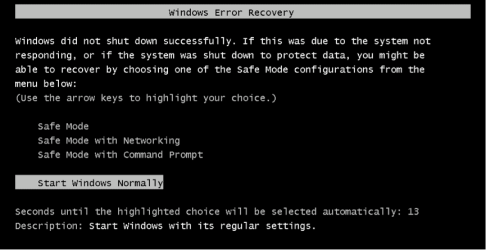
I chose "Start Window Normally"
Now does anyone have any idea if I can have another shot at resuming from hibernation, maybe force windows now to restart from last saved hibernation file?
Is there anything I can try or is it done now that I have started window without it?
Although I do see hiberfil.sys in my root partition.
This is how my screen looked like:
I chose "Start Window Normally"
Now does anyone have any idea if I can have another shot at resuming from hibernation, maybe force windows now to restart from last saved hibernation file?
Is there anything I can try or is it done now that I have started window without it?
Although I do see hiberfil.sys in my root partition.
My Computer
At a glance
Windows 7 Ultimate x64Intel(R) Core(TM) i3 CPU M370 2.40GHz2 GB RAMIntel(R) HD Grpahics (not worth the money)
- Computer Manufacturer/Model Number
- Lenovo G560(this is a laptop)
- OS
- Windows 7 Ultimate x64
- CPU
- Intel(R) Core(TM) i3 CPU M370 2.40GHz
- Memory
- 2 GB RAM
- Graphics Card(s)
- Intel(R) HD Grpahics (not worth the money)
- Screen Resolution
- 1360 x 768


