Ridiculously High CPU Usage on Fresh Install

bildo

New member
Local time
5:06 AM
Messages
7
Hi guys,
I have had XP Pro for a number of years now, and I know full well that after a while it had always deteriorated and I would have to format. This happened for around the third time where it became nearly unbareably slow. I figured since it keeps happening, and to generally get with the times I may aswell purchase Windows 7 and do a completely fresh install.

I initially only had only 600(and something)MB of RAM so I looked at Windows 7's required specifications and went out and purchased 2x 1GB RAM.

I have an Intel Pentium 4 2.66GHz processor and from Windows recommendations this exceeded their requirements so I stuck with that.

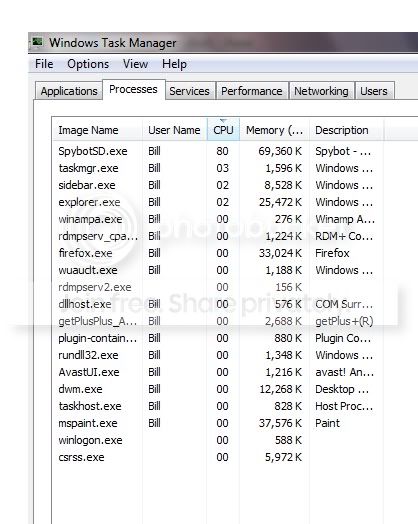
Now, I literally installed the new OS, installed Firefox, Avast! and a couple of other programs to get me going. I then noticed that when viewing videos in Firefox that it was extremely slow, and I then added the Gadget to the desktop which tells you CPU usage and noticed that this seemed to spend more time at 100% than not! I proceeded to run Spybot S&D to see what it would pick up, while the scan was running it was near-impossible to use the computer and here are a couple of screenshots showing the usage:

screenshot1.jpg

screenshot2.jpg


After Spybot S&D completed it's search it then found 6 things, which were removed, all of the latest Windows Updates applied and restarted. It is now sitting at 100% again.

I removed the two smaller RAM sticks today, so I'm now left with the 2x 1GB in the machine now. I also put them in the correct slots for 'optimal performance'.

Here's a screenshot of playing a normal video through Firefox, which works absolutely perfectly on my laptop:
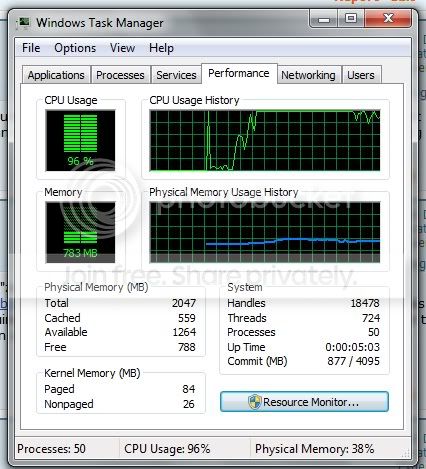
ss1.jpg

ss2.jpg


This is not merely down to the plugin, it's just whatever process is doing (what should be) a fairly simple task at the time.
 

My Computer

OS
Windows 7
Test your memory
Guide to using Memtest86+ - Geeks to Go!

Run each stick for 6 passes and then check each socket with a good stick

Uninstall your antivirus and use Microsoft Security Essentials, Malwarebytes and the Windows Firewall, they use little memory. Run malwarebytes and the antivirus to be sure there are no malware problems.

Do a clean boot to find out the specific cause.
http://support.microsoft.com/kb/929135
 

My Computer

Computer type
PC/Desktop
Computer Manufacturer/Model Number
Dell XPS 420
OS
Windows 10, Home Clean Install
CPU
Intel Core2 processsor Q8200(2.33Ghz 1333FSB) Quad Core Tech
Motherboard
Dell
Memory
6 gb
Graphics Card(s)
ATI Radeon 256MB HD3650
Sound Card
Intergrated 7.1 Channel Audio
Monitor(s) Displays
Dell SP2009W 20"
Hard Drives
640 GB Serial ATA Hard drive
Cooling
Fan
Keyboard
Dell USB Keyboard
Mouse
Dell Premium Optical USB
Internet Speed
DSL 2.85
Hi,
Check your bios has not defaulted.

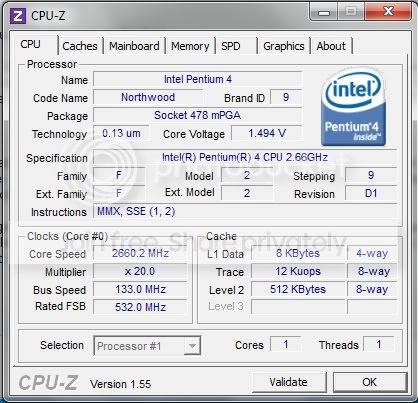
Either go into bios and check the cpu speed, or goto cpuid.com and download cpu-z. Run this and check your processor is really running at 2.66GHz. If it's not, go into bios and check the settings have not gone to failsafe. Also go into control panel. Open Power Options and select "high performance" rather than Balanced (default) or certainly Power save (slow).


You do have an issue here. An old friend of mine put win 7 on an Athlon XP 1.8GHz PC with 2GB ram, and it ran fine. I can't help but think your processor is not running at full steam. Otherwise, have you got all the correct drivers installed?

Don't forget: The mobo battery (Lithium button cell CR2032 3V) can cause all sorts of issues when it gets low. The bios will default to safe (slow) settings. A new one is nearly 3.3V. If it gets down to 3.0V it's time for it to be changed.
 

My Computer

Computer Manufacturer/Model Number
Home built
OS
Win 7 Home Premium x64
CPU
Athlon 64 X2 4200
Motherboard
Asus A8N-SLI Deluxe
Memory
Corsair 2GB PC3500 at 400MHz 2-3-2-5-1T
Graphics Card(s)
GeForce 8800GTS 640MB
Sound Card
TerraTec Universe 7.1
Monitor(s) Displays
Proview 19in CRT and Samsung 17in TFT
Screen Resolution
1280x1024
Hard Drives
Seagate 320Gb SATA 300 - Windows and Programes
Western Digital 750GB SATA 300 - Data/Files only
Hitachi 500GB SATA300 - Backups
PSU
Enermax 650w
Case
Lian Li
Cooling
Forced air
Thanks for the responses guys, I quickly ran CPU-Z before I head out for a while, here's a screenshot of the outcome:
ss3.jpg


Please let me know if that gives you any further insight, I shall carry out the other options when I get home.

Many thanks!
 

My Computer

OS
Windows 7
Well, if plugin-container.exe goes up to 100% when playing video, I'm guessing there's a plugin for video you have installed that you also have installed on your laptop which works fine (also assuming Win7, same v of firefox, same rev of plugin, etc). I'm not sure this is RAM-related at all (especially with no other symptoms), as it sounds more like a problem with the installation of Firefox or the plugin (or both).
 

My Computer

Computer type
PC/Desktop
Computer Manufacturer/Model Number
Custom
OS
Windows 10 Pro x64
CPU
Intel Core i7 4790K @ 4.5GHz
Motherboard
Asus Maximus Hero VII
Memory
32GB DDR3
Graphics Card(s)
Nvidia GeForce GTX970
Sound Card
Realtek HD Audio
Screen Resolution
1920x1200
Hard Drives
1x Samsung 250GB SSD
4x WD RE 2TB (RAIDZ)
PSU
Corsair AX760i
Case
Fractal Design Define R4
Cooling
Noctua NH-D15
Well, if plugin-container.exe goes up to 100% when playing video, I'm guessing there's a plugin for video you have installed that you also have installed on your laptop which works fine (also assuming Win7, same v of firefox, same rev of plugin, etc). I'm not sure this is RAM-related at all (especially with no other symptoms), as it sounds more like a problem with the installation of Firefox or the plugin (or both).

It's not just video, it's anything that makes the computer do some work. It's basically like where a normal computer would just process something fairly simple mine throws all its toys out the pram and has a fit. There are so many programs that boost it straight to 100%, not just Firefox streaming videos, that was used as an example.

The main reason I left XP is due to this issue, and hoping that it was just a tired OS, a clogged up C: and whatever else happens over time. So it's not an issue that has recently occoured during the installation of anything and I can only assume it's hardware related.
 

My Computer

OS
Windows 7
If you can reinstall Windows 7 with no other apps and repro it, I'd like to have a look at some dump files. Is that possible?
 

My Computer

Computer type
PC/Desktop
Computer Manufacturer/Model Number
Custom
OS
Windows 10 Pro x64
CPU
Intel Core i7 4790K @ 4.5GHz
Motherboard
Asus Maximus Hero VII
Memory
32GB DDR3
Graphics Card(s)
Nvidia GeForce GTX970
Sound Card
Realtek HD Audio
Screen Resolution
1920x1200
Hard Drives
1x Samsung 250GB SSD
4x WD RE 2TB (RAIDZ)
PSU
Corsair AX760i
Case
Fractal Design Define R4
Cooling
Noctua NH-D15
Sorry for being a newbie, I never really have to reinstall OS so this is all relatively new to me. I wouldn't really have a problem with reinstalling Windows 7 but I'm unsure what 'repro' means and what 'dump files' are.

Thanks!
 

My Computer

OS
Windows 7
Since BSOD isn't mentioned, I don't think you'd have any dump files.

I think the problem is simply that the Pentium 4 is an old, single core processor. New software assumes you have relatively new hardware. I think what you have is about what can be expected. If you'd like to see better performance, you can try to http://www.sevenforums.com/tutorials/11728-optimize-windows-7-a.html?
 

My Computer

Computer type
Laptop
Computer Manufacturer/Model Number
Toshiba P775-S7100
OS
Windows 7 Professional SP1 64-bit
CPU
Intel Core i5-2450M @2.5 GHz
Memory
6 GB DDR3 1333MHz
Graphics Card(s)
Intel HD 3000
Monitor(s) Displays
Built-in 17.3" LED; 22" Insignia NS-L22Q-10A
Screen Resolution
1600x900; 1360x768
Hard Drives
750 GB Hitachi
1TB Seagate FreeAgent External
Internet Speed
Verizon DSL Speed(Down/Up): 3360 Kbps / 800 Kbps
Antivirus
MSE and MBAM Pro
Browser
IE10
The problem as stated above is the single core processor, time for upgrade.
 

My Computer

Computer type
PC/Desktop
OS
Microsoft Windows 10 Professional / Windows 7 Professional
CPU
Intel i5-3570
Motherboard
Lenovo Mahobay
Memory
16GB DDR3
Graphics Card(s)
AMD Radeon HD 7850 2GB
Sound Card
(1) Realtek HD Audio (2) AMD HD Audio
Monitor(s) Displays
LG LS192WS
Screen Resolution
1440 x 900 @ 32bit color
Hard Drives
(1) SUV300S37A/120G (2) ST3500413AS SATA Disk Device AHCI mode enabled.
PSU
Corsair HX620
Case
Thermaltake V4 Black Edition
Cooling
Cooler Master Hyper 212 + Artic Silver 5 on CPU/GPU
Keyboard
Dell SK-8115
Mouse
Razer Copperhead with MAPED mat (awesome!)
Internet Speed
100 Mbps up/down
Browser
Chrome
The problem as stated above is the single core processor, time for upgrade.

I don't think he/she needs to feel an urgency to upgrade. He/she just needs to realize that newer software has higher hardware demands, and use the hardware appropriately.
 

My Computer

Computer type
Laptop
Computer Manufacturer/Model Number
Toshiba P775-S7100
OS
Windows 7 Professional SP1 64-bit
CPU
Intel Core i5-2450M @2.5 GHz
Memory
6 GB DDR3 1333MHz
Graphics Card(s)
Intel HD 3000
Monitor(s) Displays
Built-in 17.3" LED; 22" Insignia NS-L22Q-10A
Screen Resolution
1600x900; 1360x768
Hard Drives
750 GB Hitachi
1TB Seagate FreeAgent External
Internet Speed
Verizon DSL Speed(Down/Up): 3360 Kbps / 800 Kbps
Antivirus
MSE and MBAM Pro
Browser
IE10
Ok. It is running at 2.6GHz.. Like the other chaps are saying. Time for an upgrade.
 

My Computer

Computer Manufacturer/Model Number
Home built
OS
Win 7 Home Premium x64
CPU
Athlon 64 X2 4200
Motherboard
Asus A8N-SLI Deluxe
Memory
Corsair 2GB PC3500 at 400MHz 2-3-2-5-1T
Graphics Card(s)
GeForce 8800GTS 640MB
Sound Card
TerraTec Universe 7.1
Monitor(s) Displays
Proview 19in CRT and Samsung 17in TFT
Screen Resolution
1280x1024
Hard Drives
Seagate 320Gb SATA 300 - Windows and Programes
Western Digital 750GB SATA 300 - Data/Files only
Hitachi 500GB SATA300 - Backups
PSU
Enermax 650w
Case
Lian Li
Cooling
Forced air
I have figured it was time for an upgrade, and it's been quite a while since it was required so I'll buy whatever is required.

Can anyone tell me exactly what I need to buy and what is recommended for me? I would like a good performance/value comparison, I never do any gaming or anything but I do watch a lot of videos on YouTube/Vimeo and similar.

Thanks
 

My Computer

OS
Windows 7
This only a personal opinion.

I've just built a pc for a friend. Asus m4a89gtd pro/usb3. Phenom II 955 [black edition clocked to 3.4GHz; just change the multiplier, and lower the volts a little if your using std cooler], and 4GB of Corsair 1600 C8 RAM, running at 7.7.7. 20 1T @ 1333Mhz. [loosen these latency settings and and at 1600MHz the throughput is faster]. A 500GB hdd plus a 500Gb hdd for backup and it is lightening fast...

Check prices mate, but in the real world this pc is as fast as [on paper a 1366 i7 is much quicker and cost a bl**dy site more] an Intel i7 920. I cannot belive it myself. This mobo has SATA 6Gbps USB3 and one x16 PCIe ALL at the same time...... You pays your money and takes your choice..... This is not what you should do, but a statment from someone who is prepaired to say what he has found. Whatever you do. Do the ground work mate. Don't assume that someone like me knows what he's talking about. Listen; yes. But please make your own mind up.

All the best...
Cheers.
 

My Computer

Computer Manufacturer/Model Number
Home built
OS
Win 7 Home Premium x64
CPU
Athlon 64 X2 4200
Motherboard
Asus A8N-SLI Deluxe
Memory
Corsair 2GB PC3500 at 400MHz 2-3-2-5-1T
Graphics Card(s)
GeForce 8800GTS 640MB
Sound Card
TerraTec Universe 7.1
Monitor(s) Displays
Proview 19in CRT and Samsung 17in TFT
Screen Resolution
1280x1024
Hard Drives
Seagate 320Gb SATA 300 - Windows and Programes
Western Digital 750GB SATA 300 - Data/Files only
Hitachi 500GB SATA300 - Backups
PSU
Enermax 650w
Case
Lian Li
Cooling
Forced air
Back
Top