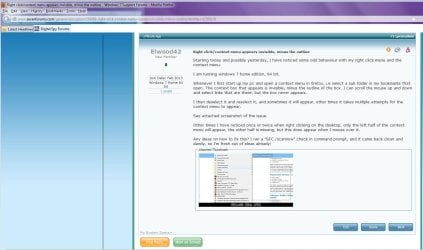
Right click/context menu appears invisible, minus the outline

Elwood42

New member
Member
Local time
4:32 PM
Messages
57
Starting today and possibly yesterday, I have noticed some odd behaviour with my right click menu and the context menu.

I am running windows 7 home edition, 64 bit.

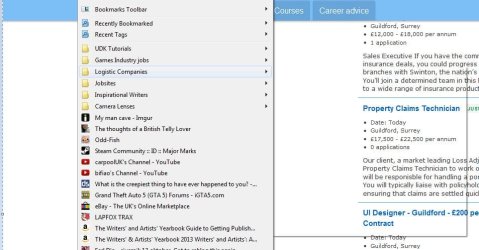
Whenever I first start up my pc and open a context menu in firefox, i.e select a sub folder in my bookmarks that open. The context box that appears is invisible, minus the outline of the box. I can scroll the mouse up and down and select links that are there, but the box never appears.

I then deselect it and reselect it, and sometimes it will appear, other times it takes multiple attempts for the context menu to appear.

See attached screenshot of the issue.

Other times I have noticed once or twice when right clicking on the desktop, only the left half of the context menu will appear, the other half is missing, but this does appear when I mouse over it.

Any ideas on how to fix this? I ran a "SFC /scannow" check in command prompt, and it came back clean and dandy, so I'm fresh out of ideas already!
 

Attachments
  • Context menu.JPG
    Context menu.JPG
    70.5 KB · Views: 436

My Computer My Computer

At a glance

.Intel(R)
OS
.
CPU
Intel(R)
Motherboard
ASUSTeK
Just happened again here, clicked the latest headlines drop down, and the box was invisible minus the outline, and the links could be selected in the invisible menu.

Like I say, it happens when I first turn on then occurs less often as the day goes on using the pc. I then recently restarted and within restarting, it has occurred twice in the first fifteen minutes.
 

Attachments

  • second example.JPG
    second example.JPG
    122.2 KB · Views: 27

My Computer My Computer

At a glance

.Intel(R)
OS
.
CPU
Intel(R)
Motherboard
ASUSTeK

My Computer My Computer

At a glance

Windows 10 Home 64BitIntel Core i5 10400 @ 2.90GHz8.00GB Single-Channel Unknown @ 1329MHz (16-2...
Computer type
PC/Desktop
Computer Manufacturer/Model Number
Self assembled
OS
Windows 10 Home 64Bit
CPU
Intel Core i5 10400 @ 2.90GHz
Motherboard
Intel Corporation DG41WV (PROCESSOR)
Memory
8.00GB Single-Channel Unknown @ 1329MHz (16-20-20-38)
Sound Card
Realtek High Definition Audio
Monitor(s) Displays
DELL E170S
Screen Resolution
1280x1024 pixels
Hard Drives
931GB TOSHIBA DT01ACA100 (SATA)
238GB TEAM TM8PS7256G (SATA SSD)
Case
Nothing Fancy
Cooling
Fans
Keyboard
A4 Tech Co LTD
Mouse
A4 Tech Co Ltd/Logitech
Internet Speed
25 Mbps
Hello and welcome to Sevenforums Elwood42

Disable hardware acceleration on Firefox and see if that makes a difference:
Just tried that and immediately after turning it off, it happened again on the drop down. I do find it odd as it's worked fine before with hardware acceleration turned on, but I'll see if it works after a restart.

Do you have any other suggestions in the event this isn't going to fix it, which I am unsure of?

Edit: Nope, just happened again after restarting firefox and my pc with hardware acceleration turned off. Next suggestion? :)
 

My Computer My Computer

At a glance

.Intel(R)
OS
.
CPU
Intel(R)
Motherboard
ASUSTeK
Also, just used the normal windows right click function, and this occurred, which I did mention in my original post. Notice how half of the context box is missing.
 

Attachments

  • Right Click.JPG
    Right Click.JPG
    15.6 KB · Views: 9

My Computer My Computer

At a glance

.Intel(R)
OS
.
CPU
Intel(R)
Motherboard
ASUSTeK
Restart your computer
 

My Computer My Computer

At a glance

Windows 10 Home 64BitIntel Core i5 10400 @ 2.90GHz8.00GB Single-Channel Unknown @ 1329MHz (16-2...
Computer type
PC/Desktop
Computer Manufacturer/Model Number
Self assembled
OS
Windows 10 Home 64Bit
CPU
Intel Core i5 10400 @ 2.90GHz
Motherboard
Intel Corporation DG41WV (PROCESSOR)
Memory
8.00GB Single-Channel Unknown @ 1329MHz (16-20-20-38)
Sound Card
Realtek High Definition Audio
Monitor(s) Displays
DELL E170S
Screen Resolution
1280x1024 pixels
Hard Drives
931GB TOSHIBA DT01ACA100 (SATA)
238GB TEAM TM8PS7256G (SATA SSD)
Case
Nothing Fancy
Cooling
Fans
Keyboard
A4 Tech Co LTD
Mouse
A4 Tech Co Ltd/Logitech
Internet Speed
25 Mbps
Restarted my pc, all seemed okay, then it happened again. I seem to be noticing a pattern in it occurs when I watch a youtube video, which uses adobe flash player. Not sure how it relates however.
 

My Computer My Computer

At a glance

.Intel(R)
OS
.
CPU
Intel(R)
Motherboard
ASUSTeK
Did you make any changes recently? Hardware/Software wise?
 

My Computer My Computer

At a glance

Windows 10 Home 64BitIntel Core i5 10400 @ 2.90GHz8.00GB Single-Channel Unknown @ 1329MHz (16-2...
Computer type
PC/Desktop
Computer Manufacturer/Model Number
Self assembled
OS
Windows 10 Home 64Bit
CPU
Intel Core i5 10400 @ 2.90GHz
Motherboard
Intel Corporation DG41WV (PROCESSOR)
Memory
8.00GB Single-Channel Unknown @ 1329MHz (16-20-20-38)
Sound Card
Realtek High Definition Audio
Monitor(s) Displays
DELL E170S
Screen Resolution
1280x1024 pixels
Hard Drives
931GB TOSHIBA DT01ACA100 (SATA)
238GB TEAM TM8PS7256G (SATA SSD)
Case
Nothing Fancy
Cooling
Fans
Keyboard
A4 Tech Co LTD
Mouse
A4 Tech Co Ltd/Logitech
Internet Speed
25 Mbps
I did have an adobe flash player update this morning, but I believe this issue was occurring before that. I just uninstalled adobe flash plugin to see if it would improve, restarted my pc, only to find the issue is still happening.

Beyond that, no I've not made any changes.
 

My Computer My Computer

At a glance

.Intel(R)
OS
.
CPU
Intel(R)
Motherboard
ASUSTeK
Reinstall your browser.
 

My Computer My Computer

At a glance

Windows 10 Home 64BitIntel Core i5 10400 @ 2.90GHz8.00GB Single-Channel Unknown @ 1329MHz (16-2...
Computer type
PC/Desktop
Computer Manufacturer/Model Number
Self assembled
OS
Windows 10 Home 64Bit
CPU
Intel Core i5 10400 @ 2.90GHz
Motherboard
Intel Corporation DG41WV (PROCESSOR)
Memory
8.00GB Single-Channel Unknown @ 1329MHz (16-20-20-38)
Sound Card
Realtek High Definition Audio
Monitor(s) Displays
DELL E170S
Screen Resolution
1280x1024 pixels
Hard Drives
931GB TOSHIBA DT01ACA100 (SATA)
238GB TEAM TM8PS7256G (SATA SSD)
Case
Nothing Fancy
Cooling
Fans
Keyboard
A4 Tech Co LTD
Mouse
A4 Tech Co Ltd/Logitech
Internet Speed
25 Mbps
Sounds to be a Firefox(FF) issue. As Koolkat suggests, uninstall FF. After uninstalling run theCCleaner Registry cleaner in default settings and reboot. Use the free version.

Download and reinstall FF and test.
 

My Computer My Computer

At a glance

Windows 7 Ultimate X64 SP1Intel i5-2550K, Differing ~4.4-4.8GHz No buil...16GB G.Skill Sniper 1866MHz @ 2133MHz 2x8GBASUS GTX650TIB-DC2OC-2GD5, (650TI Boost)
Computer type
PC/Desktop
Computer Manufacturer/Model Number
Home Built Desktop By DataTech
OS
Windows 7 Ultimate X64 SP1
CPU
Intel i5-2550K, Differing ~4.4-4.8GHz No built in GPU
Motherboard
ASUS P8Z68-V PRO/GEN3
Memory
16GB G.Skill Sniper 1866MHz @ 2133MHz 2x8GB
Graphics Card(s)
ASUS GTX650TIB-DC2OC-2GD5, (650TI Boost)
Sound Card
Onboard Realtek 5-1
Monitor(s) Displays
Samsung P2570HD
Screen Resolution
1920x1080
Hard Drives
Samsung 840 Pro 256GB SSD for OS, 500GB Seagate Constellation (Enterprise drive) for Data
PSU
Corsair HX650W
Case
Inwin Dragon Rider
Cooling
Hyper 212 EVO w/two Noctua fans, push-pull, @1300 RPM
Keyboard
E-Z Eyes, bright yellow keys with large characters
Mouse
steelseries SENSEI Laser Pro Gaming
Internet Speed
48-51Mbs Mbs down, 11 Mbs up Xfinity Cable
Antivirus
Norton Internet Security 2013
Browser
IE 10, Opera, Pale Moon if needed
Other Info
4 case fans, LG BluRay-RE, ASUS DVD-RW, Mr. Fusion power supply, 1.21 gigawatts.
Okay, after a lot of hassle, firefox is reinstalled. Will test and see how it performs and will then report back soon. Thanks for the help so far!
 

My Computer My Computer

At a glance

.Intel(R)
OS
.
CPU
Intel(R)
Motherboard
ASUSTeK
Okay, after a lot of hassle, firefox is reinstalled. Will test and see how it performs and will then report back soon. Thanks for the help so far!
Hassle to uninstall firefox? What are the hassles you faced, care to explain please?
 

My Computer My Computer

At a glance

Microsoft Windows 10 Pro Insider Preview 64-bitIntel(R) Core(TM) i3-4130 CPU @ 3.40GHzCorsair Vengence 4GB x2 (8.00GB Dual-Channel ...2047MB GeForce GTS 450 (ZOTAC International)
Computer type
PC/Desktop
Computer Manufacturer/Model Number
Self Assembled
OS
Microsoft Windows 10 Pro Insider Preview 64-bit
CPU
Intel(R) Core(TM) i3-4130 CPU @ 3.40GHz
Motherboard
Gigabyte Technology Co., Ltd. B85M-D3H
Memory
Corsair Vengence 4GB x2 (8.00GB Dual-Channel DDR3 @ 798MHz)
Graphics Card(s)
2047MB GeForce GTS 450 (ZOTAC International)
Sound Card
Onboard (Realtek High Definition Audio)
Monitor(s) Displays
LG Flatron E2040T
Screen Resolution
1600x900
Hard Drives
Western Digital 1 TB
Seagate 500 GB
PSU
Corsair VS550
Case
Cooler Master K380
Cooling
Cooler Master Seidon 120V Plus
Keyboard
Logitech MK260r
Mouse
Logitech MK260r
Internet Speed
PMPL Broadband
Antivirus
Windows Defender + MBAM
Browser
Firefox
Other Info
Dell Studio 15" Laptop
Okay, after a lot of hassle, firefox is reinstalled. Will test and see how it performs and will then report back soon. Thanks for the help so far!
Hassle to uninstall firefox? What are the hassles you faced, care to explain please?

Uninstalling was easy, but when it came to reinstalling it, I had to download the install via internet explorer, and it conveniently failed to download it four times, so I had to download google chrome to download firefox, so I could install it!
 

My Computer My Computer

At a glance

.Intel(R)
OS
.
CPU
Intel(R)
Motherboard
ASUSTeK
Ah OK.
DISABLE GPU acceleration in the new install now, and observe the situation.
 

My Computer My Computer

At a glance

Microsoft Windows 10 Pro Insider Preview 64-bitIntel(R) Core(TM) i3-4130 CPU @ 3.40GHzCorsair Vengence 4GB x2 (8.00GB Dual-Channel ...2047MB GeForce GTS 450 (ZOTAC International)
Computer type
PC/Desktop
Computer Manufacturer/Model Number
Self Assembled
OS
Microsoft Windows 10 Pro Insider Preview 64-bit
CPU
Intel(R) Core(TM) i3-4130 CPU @ 3.40GHz
Motherboard
Gigabyte Technology Co., Ltd. B85M-D3H
Memory
Corsair Vengence 4GB x2 (8.00GB Dual-Channel DDR3 @ 798MHz)
Graphics Card(s)
2047MB GeForce GTS 450 (ZOTAC International)
Sound Card
Onboard (Realtek High Definition Audio)
Monitor(s) Displays
LG Flatron E2040T
Screen Resolution
1600x900
Hard Drives
Western Digital 1 TB
Seagate 500 GB
PSU
Corsair VS550
Case
Cooler Master K380
Cooling
Cooler Master Seidon 120V Plus
Keyboard
Logitech MK260r
Mouse
Logitech MK260r
Internet Speed
PMPL Broadband
Antivirus
Windows Defender + MBAM
Browser
Firefox
Other Info
Dell Studio 15" Laptop
Still occuring when I select one of the bookmark sub folders. one of the six won't display the context menu, while the other five do.

I am getting baffled and annoyed by this now. It seems completely random.
 

My Computer My Computer

At a glance

.Intel(R)
OS
.
CPU
Intel(R)
Motherboard
ASUSTeK
Do a full scan of your computer with Free MBAM.
 

My Computer My Computer

At a glance

Microsoft Windows 10 Pro Insider Preview 64-bitIntel(R) Core(TM) i3-4130 CPU @ 3.40GHzCorsair Vengence 4GB x2 (8.00GB Dual-Channel ...2047MB GeForce GTS 450 (ZOTAC International)
Computer type
PC/Desktop
Computer Manufacturer/Model Number
Self Assembled
OS
Microsoft Windows 10 Pro Insider Preview 64-bit
CPU
Intel(R) Core(TM) i3-4130 CPU @ 3.40GHz
Motherboard
Gigabyte Technology Co., Ltd. B85M-D3H
Memory
Corsair Vengence 4GB x2 (8.00GB Dual-Channel DDR3 @ 798MHz)
Graphics Card(s)
2047MB GeForce GTS 450 (ZOTAC International)
Sound Card
Onboard (Realtek High Definition Audio)
Monitor(s) Displays
LG Flatron E2040T
Screen Resolution
1600x900
Hard Drives
Western Digital 1 TB
Seagate 500 GB
PSU
Corsair VS550
Case
Cooler Master K380
Cooling
Cooler Master Seidon 120V Plus
Keyboard
Logitech MK260r
Mouse
Logitech MK260r
Internet Speed
PMPL Broadband
Antivirus
Windows Defender + MBAM
Browser
Firefox
Other Info
Dell Studio 15" Laptop
Don't see how it is malware related, but will give it a shot!
 

My Computer My Computer

At a glance

.Intel(R)
OS
.
CPU
Intel(R)
Motherboard
ASUSTeK
Note the scan is still running with zero results so far, but having had a look around, I went into System > Advanced settings > performance settings > I then changed visual effects from "decide what is best for my computer" to "Best for performance"

This has made everything look like windows 95, however the context menus appear to be loading correctly thus far. It leads me to believe it is somehow performance related, but my computer has been running fine for the eight months I've had it, and it's not under any kind of heavy operations when the context menus fail.

Yet changing to a low quality, high performance appearance seems to solve it. However I don't really want to use this basic look permanently, I'm just hoping it might help someone point out what performance related issue could be the cause that I am missing.

EDIT: And the malware entire computer scan just finished with zero results found. My computer is pristine and clean from any kind of viruses or malware, which is reassuring!

Second EDIT: With a bit of trial and error, it seems to occur when I have the "Use visual styles on windows and butttons" turned on, and once it is turned off, it stops occurring, but everything looks so primitive. How could the windows style become corrupted to cause the issue?
 

My Computer My Computer

At a glance

.Intel(R)
OS
.
CPU
Intel(R)
Motherboard
ASUSTeK
To better help us to help you would you please add your systems specs? Here's how:SystemInfo See Your System Specs Under System Manufacturer/Model Number add whether it is a desktop or laptop and whether self built. Very important

Log in to Seven Forums and you will be able to transfer the info directly to the specs page in your profile from within the System Info app.

After doing this your specs will be available in each of your posts.
Click on My system Specs in the lower left of this post to see how it should look.:)
Full instructions are in the tutorial.

Your issue may be related to your graphics card or driver. What seems to be happening is it can't fully handle all of w7 Aero appearance. What you are getting with the primitive look is the Classic, non-Aero theme.
 

My Computer My Computer

At a glance

Windows 7 Ultimate X64 SP1Intel i5-2550K, Differing ~4.4-4.8GHz No buil...16GB G.Skill Sniper 1866MHz @ 2133MHz 2x8GBASUS GTX650TIB-DC2OC-2GD5, (650TI Boost)
Computer type
PC/Desktop
Computer Manufacturer/Model Number
Home Built Desktop By DataTech
OS
Windows 7 Ultimate X64 SP1
CPU
Intel i5-2550K, Differing ~4.4-4.8GHz No built in GPU
Motherboard
ASUS P8Z68-V PRO/GEN3
Memory
16GB G.Skill Sniper 1866MHz @ 2133MHz 2x8GB
Graphics Card(s)
ASUS GTX650TIB-DC2OC-2GD5, (650TI Boost)
Sound Card
Onboard Realtek 5-1
Monitor(s) Displays
Samsung P2570HD
Screen Resolution
1920x1080
Hard Drives
Samsung 840 Pro 256GB SSD for OS, 500GB Seagate Constellation (Enterprise drive) for Data
PSU
Corsair HX650W
Case
Inwin Dragon Rider
Cooling
Hyper 212 EVO w/two Noctua fans, push-pull, @1300 RPM
Keyboard
E-Z Eyes, bright yellow keys with large characters
Mouse
steelseries SENSEI Laser Pro Gaming
Internet Speed
48-51Mbs Mbs down, 11 Mbs up Xfinity Cable
Antivirus
Norton Internet Security 2013
Browser
IE 10, Opera, Pale Moon if needed
Other Info
4 case fans, LG BluRay-RE, ASUS DVD-RW, Mr. Fusion power supply, 1.21 gigawatts.
Back
Top