robocopy script is not working through Scheduler

ashishmahanta

New member
Local time
11:04 PM
Messages
5
Dear All,

My batch file of robocopy is working fine. But when I tried to run it through task scheduler, none of the files transfer to the target location.

@echo off
echo +-----------------------------------------+
echo Database Export Utility for server
echo +-----------------------------------------+
echo .
ROBOCOPY E:\dp_dir \\192.168.30.28\inter_loc_dump /LOG:LOG_FILE.TXT

Above script is working fine...but task scheduler is keep on running without any results.

Please help me out.

Regards,
Ashish Kumar Mahanta
 

My Computer

Computer type
PC/Desktop
Computer Manufacturer/Model Number
acer
OS
64 bit, windows 7
Hi and Welcome to SevenForums,

In the Scheduler, what settings have you set under General, Triggers and Actions?

Regards,
Jamie
 

My Computer

Computer type
PC/Desktop
Computer Manufacturer/Model Number
Self Built
OS
Windows 8.1 Pro x64
CPU
Intel Core i5-2500K @ 3.30GHz - S1155
Motherboard
Asus P8P67 LE Rev3, Intel P67, S115
Memory
8GB Corsair DDR3 XMS3, PC3-12800
Graphics Card(s)
NVIDIA GeForce GTX 650
Sound Card
On-Board
Monitor(s) Displays
3 x 24" {Extended Display}
Screen Resolution
1920 x 1080
Hard Drives
300GB Seagate Barracuda 7200
PSU
550W Coolermaster GX550
Case
Silverstone Precision PS04B
Cooling
Stock
Keyboard
Logitech K120
Mouse
World of Warcraft Cataclysm MMO Gaming Mouse
Internet Speed
80 MB
Antivirus
MSE / Windows Defender
Browser
Chrome
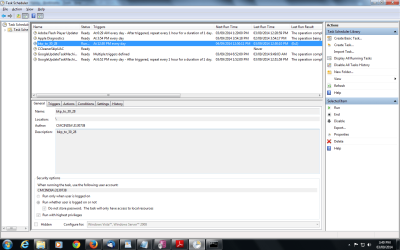
In general >> bkp_to_30_28
clicked on below radio button -
run whether user is logged on or not
do not store pasword.
run with highest privileges.

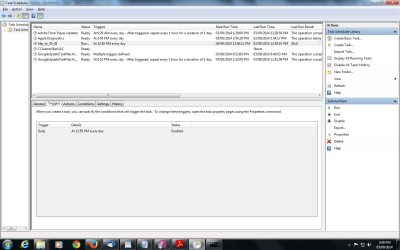
In Trigger >> Daily --timing --enabled

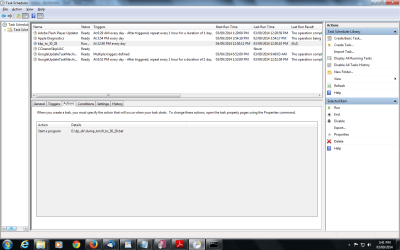
In Action >> path of the batch file.

But i am running it manually. As for testing purpose i need to start it manually.

Is it due to permission issue? Since folders are getting transfer to remote server.

Any more details required?
 
Last edited:

My Computer

Computer type
PC/Desktop
Computer Manufacturer/Model Number
acer
OS
64 bit, windows 7

My Computer

Computer type
PC/Desktop
Computer Manufacturer/Model Number
Self Built
OS
Windows 8.1 Pro x64
CPU
Intel Core i5-2500K @ 3.30GHz - S1155
Motherboard
Asus P8P67 LE Rev3, Intel P67, S115
Memory
8GB Corsair DDR3 XMS3, PC3-12800
Graphics Card(s)
NVIDIA GeForce GTX 650
Sound Card
On-Board
Monitor(s) Displays
3 x 24" {Extended Display}
Screen Resolution
1920 x 1080
Hard Drives
300GB Seagate Barracuda 7200
PSU
550W Coolermaster GX550
Case
Silverstone Precision PS04B
Cooling
Stock
Keyboard
Logitech K120
Mouse
World of Warcraft Cataclysm MMO Gaming Mouse
Internet Speed
80 MB
Antivirus
MSE / Windows Defender
Browser
Chrome
When I run batch file manually. It works fine (folder copied to destination location). When i run task scheduler, nothing comes up. It shows, only running.


action-tab.png

trigger-tab.png

general-tab.png
 

My Computer

Computer type
PC/Desktop
Computer Manufacturer/Model Number
acer
OS
64 bit, windows 7
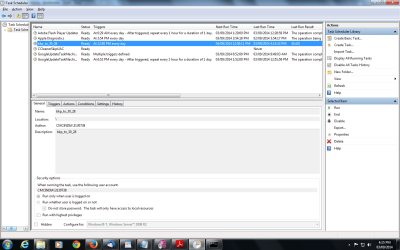
Try changing the Security options to 'Run only when user is logged on' and un-check 'Run with highest privileges'

Now change the 'Configure for' drop down box to Windows 7

OK/Save that and see if it runs now?
 

My Computer

Computer type
PC/Desktop
Computer Manufacturer/Model Number
Self Built
OS
Windows 8.1 Pro x64
CPU
Intel Core i5-2500K @ 3.30GHz - S1155
Motherboard
Asus P8P67 LE Rev3, Intel P67, S115
Memory
8GB Corsair DDR3 XMS3, PC3-12800
Graphics Card(s)
NVIDIA GeForce GTX 650
Sound Card
On-Board
Monitor(s) Displays
3 x 24" {Extended Display}
Screen Resolution
1920 x 1080
Hard Drives
300GB Seagate Barracuda 7200
PSU
550W Coolermaster GX550
Case
Silverstone Precision PS04B
Cooling
Stock
Keyboard
Logitech K120
Mouse
World of Warcraft Cataclysm MMO Gaming Mouse
Internet Speed
80 MB
Antivirus
MSE / Windows Defender
Browser
Chrome
Thanks a lot.
May I know what is the difference between the radio button? I was using always "Run with highest privileges"
After doing the changes, my folders is getting transfer to the destination server (manually started the task manager).


Thankgeneral-tab_updated.png
 

My Computer

Computer type
PC/Desktop
Computer Manufacturer/Model Number
acer
OS
64 bit, windows 7
Have you tried placing the path in double quotes ? I know in theory you only need to do this if there is a space in the path / directory name, however task scheduler tends to treat batch files differently and in order to get mine working with it the path needed the double quotes added... worth a shot easy enough to change back if it don't work.
 

My Computer

Computer type
Laptop
Computer Manufacturer/Model Number
Sony
OS
Windows 7 x64 SP1
CPU
Intel
Motherboard
Sony
Memory
4gb
Graphics Card(s)
Nvidia
Hard Drives
WD
Internet Speed
Dial up wasn't as bad as this !
Antivirus
Avast
Browser
Firefox
Can you confirm that since making those changes it now works?

Regards,
Jamie
 

My Computer

Computer type
PC/Desktop
Computer Manufacturer/Model Number
Self Built
OS
Windows 8.1 Pro x64
CPU
Intel Core i5-2500K @ 3.30GHz - S1155
Motherboard
Asus P8P67 LE Rev3, Intel P67, S115
Memory
8GB Corsair DDR3 XMS3, PC3-12800
Graphics Card(s)
NVIDIA GeForce GTX 650
Sound Card
On-Board
Monitor(s) Displays
3 x 24" {Extended Display}
Screen Resolution
1920 x 1080
Hard Drives
300GB Seagate Barracuda 7200
PSU
550W Coolermaster GX550
Case
Silverstone Precision PS04B
Cooling
Stock
Keyboard
Logitech K120
Mouse
World of Warcraft Cataclysm MMO Gaming Mouse
Internet Speed
80 MB
Antivirus
MSE / Windows Defender
Browser
Chrome
Dear Jamie,

Thanks a lot dear. It is working now.

Regards,
Ashish Kumar Mahanta
 

My Computer

Computer type
PC/Desktop
Computer Manufacturer/Model Number
acer
OS
64 bit, windows 7
I'm glad to hear that has helped. :thumbsup:

Regards,
Jamie
 

My Computer

Computer type
PC/Desktop
Computer Manufacturer/Model Number
Self Built
OS
Windows 8.1 Pro x64
CPU
Intel Core i5-2500K @ 3.30GHz - S1155
Motherboard
Asus P8P67 LE Rev3, Intel P67, S115
Memory
8GB Corsair DDR3 XMS3, PC3-12800
Graphics Card(s)
NVIDIA GeForce GTX 650
Sound Card
On-Board
Monitor(s) Displays
3 x 24" {Extended Display}
Screen Resolution
1920 x 1080
Hard Drives
300GB Seagate Barracuda 7200
PSU
550W Coolermaster GX550
Case
Silverstone Precision PS04B
Cooling
Stock
Keyboard
Logitech K120
Mouse
World of Warcraft Cataclysm MMO Gaming Mouse
Internet Speed
80 MB
Antivirus
MSE / Windows Defender
Browser
Chrome
Show us what you changed to make it work

Can you show us what you changed exactly to make it work. Did you add double quote in the directory path on both source and destination??

thanks.
 

My Computer

Computer type
PC/Desktop
Computer Manufacturer/Model Number
Dell, HP
OS
Windows 2008 64 bit, windows 7 32 bit, windows 2012 R2 64 bit
Back
Top