RootKit&TrojanViruses

haplyss

New member
Local time
5:00 AM
Messages
20
I have a Gateway computer, 64 bit, DX4822-01, with Intel pentium E5300 Dual Core, 2.6GHZ each, 6GB ram, and 1TB HDD, running Windows 7 Home Premium x 64 bit.

I've been getting a red warning on my screen that says I have (1) a Rootkit.Sirefef.spy and (2) a Trojan.fakAV-Download viruses. I've had trouble downloading with message 'cannot be downloaded'. Occasionally one gets through.

Does anyone out there have the expertise to help me delete these viruses.

Any help will be appreciated.

Haplyss
 

My Computer

OS
windows 7
Welcome to the forum, haplyss!

Please use the following diagnostic tool. It has a powerful detection mechanism, and may help us get to the cause of your issues:

:info: Please use the Farbar Recovery Scan Tool.
Download: Farbar Recovery Scan Tool Download
Select the version that applies to your system 64-bit
Save it to your Desktop.
Double-click the downloaded file to run it.

When the tool opens click Yes to the disclaimer.
At the program's console, press the Scan button.

When done, the tool produces a log, FRST.txt, in the same directory from which the tool is run (Desktop).
:ar: Please provide the FRST.txt in your reply.

The first time the tool is run, it also makes another log: Addition.txt
:ar: Also post the Addition.txt in your reply.


:info: Also, use the Farbar Service Scanner.
Download: Downloading Farbar Service Scanner

We will get a view of all services and dependencies scoped by the tool...

Make sure the following options are checked:
Internet Services
Windows Firewall
System Restore
Security Center
Windows Update
Windows Defender

Press: Scan
When done, FSS creates a log, FSS.txt, on the Desktop.

:ar: Please provide the FSS.txt in your reply.

Thank you.
 

My Computer

Computer type
PC/Desktop
Computer Manufacturer/Model Number
An ol' eMachines
OS
Windows 7 Home Premium
Internet Speed
Fine for me...I'm retired!
From what did you get the warning. It could be a fake warning from some site that wnats your money.
 

My Computer

Computer Manufacturer/Model Number
HP, Dell, Gateway, Toshiba - 4 laptops and 2 desktops
OS
Vista, Windows7, Mint Mate, Zorin, Windows 8
CPU
from 1.6GHz Duo to i7
Monitor(s) Displays
2x HP w2207
Hard Drives
5x HDD, 7x SSD, 12x Externals
Keyboard
with trackball - no mices
Mouse
Trackball mice
Internet Speed
DSL 6000
Hi, WHS,

I hope I did this right. I'm sending all that was created, when running these programs.
 

Attachments

Last edited:

My Computer

OS
windows 7
You have three anti virus programs running, please choose one, i would recommend MSE or Avira.
I noticed Ilivid which can be a pain.


Please download Junkware Removal Tool to your desktop.

  • Shutdown your antivirus to avoid any conflicts.
  • Right click over JRT.exe and select Run as administrator on Windows Vista or Windows 7, double-click on XP.
  • The tool will open and start scanning your system.
  • Please be patient as this can take a while to complete.
  • On completion, a log (JRT.txt) is saved to your desktop and will automatically open.
  • Post the contents of JRT.txt into your next reply message
  • When completed make sure to re-enable your antivirus
Please download AdwCleaner by Xplode and save to your Desktop.


  • Double click on AdwCleaner.exe to run the tool.
    Vista/Windows 7/8 users right-click and select Run As Administrator
  • Click on the Scan button.
  • AdwCleaner will begin...be patient as the scan may take some time to complete.
  • When it's done you'll see: Pending: Please uncheck elements you don't want removed.
  • Now click on the Report button...a logfile (AdwCleaner[R0].txt) will open in Notepad for review.
  • Look over the log especially under Files/Folders for any program you want to save.
  • If there's a program you may want to save, just uncheck it from AdwCleaner.
  • If you're not sure, post the log for review. (all items found are adware/spyware/foistware)
  • If you're ready to clean it all up.....click the Clean button.
  • After rebooting, a logfile report (AdwCleaner[S0].txt) will open automatically.
  • Copy and paste the contents of that logfile in your next reply.
  • A copy of that logfile will also be saved in the C:\AdwCleaner folder.
  • Items that are deleted are moved to the Quarantine Folder: C:\AdwCleaner\Quarantine
  • To restore an item that has been deleted:
  • Go to Tools > Quarantine Manager > check what you want restored > now click on Restore.
 

My Computer

Computer type
Laptop
Computer Manufacturer/Model Number
Packard Bell
OS
Windows 7 Home Premium 64Bit
CPU
AMD A6-3420M 1.5GHZ OC - 2.0GHZ
Memory
4GB DDR3 1600MHZ
Graphics Card(s)
AMD RADEON 6520G+AMD RADEON HD7470M 1GB DDR3
Screen Resolution
1366x768
Hard Drives
500GB SATA
Internet Speed
18Mb Unlimited
Antivirus
AVAST!
Browser
MOZILLA FIREFOX
haplyss,

In my previous instructions it was requested you post the FRST.txt, the Addition.txt, and the FSS.txt.

Please post the :ar: FRST.tx in your reply!! Really need to see it.

Thanks.


My Computer

Computer type
PC/Desktop
Computer Manufacturer/Model Number
An ol' eMachines
OS
Windows 7 Home Premium
Internet Speed
Fine for me...I'm retired!
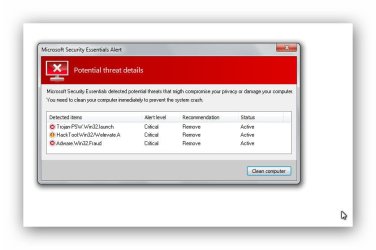
I've been under the weather for several days. I've attached the only FRST.txt I have, and I've attached a copy of the virus warning notice. I sure hope these are helpful.
 

Attachments

  • FRST.txt
    FRST.txt
    99.4 KB · Views: 2
  • Virus030520141150pm.jpg
    Virus030520141150pm.jpg
    37.6 KB · Views: 0

My Computer

OS
windows 7
I've been under the weather for several days. I've attached the only FRST.txt I have, and I've attached a copy of the virus warning notice. I sure hope these are helpful.

That seems legitimate. Do you remember installing MSE? Do not use it if it asks for money because the real MSE is free. If it does, you should install Malwarebytes FREE and run a full scan.
 

My Computer

Computer type
PC/Desktop
Computer Manufacturer/Model Number
Dell Vostro 400/Dell XPS 8700(Slightly Customized for me by Dell)/Toshiba Satellite T135
OS
Windows 7 Professional 32-bit/Windows 8 64-bit/Win7 Pro64-bit
CPU
Intel Core 2 Quad Q6600/Intel Core i7 4790/Intel Pentium
Memory
2GB/16GB/4GB
Graphics Card(s)
Intel G33/G31 Express(Vostro)/NVIDIA GeForce GTX 745(XPS)
Monitor(s) Displays
HP 2009m(Vostro)/ViewSonic VX2250wm-LED(XPS)
Screen Resolution
1600x900(Vostro)/1920x1080(XPS)
Hard Drives
Seagate ST3160815AS(Vostro)/Western Digital Blue(Satellite)
External:
Western Digital My Passport 0748
Samsung HM121HC
Keyboard
Dell L100)(Vostro)/Dell KB2133p(XPS)
Mouse
Dell M-UAV-DEL8(XPS)
Internet Speed
100 Mbit/s(Only when IPTV is plugged out)
Antivirus
Avast, Malwarebytes PRO
Browser
Internet Explorer 11
Other Info
Note: Names with slashes between two different parts mean that the left is my old desktop and the right is my old laptop and the middle is my new desktop.(Unless specified)
Ping is horrible for servers overseas in US and Europe.
New laptop:LG Gram(Not available in US) Processor:Intel Core i3 4th Gen Ultra Low Power RAM:4GB Hard Drive:SK Hynix OEM MSATA or M.2 Graphics:Intel HD
I think my brain is still in disaster area. I sent wrong file on virus warning. The attached is the current one I copied.
 

Attachments

  • WarningInfectedPC.1.png
    WarningInfectedPC.1.png
    21.3 KB · Views: 1

My Computer

OS
windows 7
Now that's a fake warning. Install Malwarebytes and run it. Also, you should have no problem running mse afterwards.
 

My Computer

Computer type
PC/Desktop
Computer Manufacturer/Model Number
Dell Vostro 400/Dell XPS 8700(Slightly Customized for me by Dell)/Toshiba Satellite T135
OS
Windows 7 Professional 32-bit/Windows 8 64-bit/Win7 Pro64-bit
CPU
Intel Core 2 Quad Q6600/Intel Core i7 4790/Intel Pentium
Memory
2GB/16GB/4GB
Graphics Card(s)
Intel G33/G31 Express(Vostro)/NVIDIA GeForce GTX 745(XPS)
Monitor(s) Displays
HP 2009m(Vostro)/ViewSonic VX2250wm-LED(XPS)
Screen Resolution
1600x900(Vostro)/1920x1080(XPS)
Hard Drives
Seagate ST3160815AS(Vostro)/Western Digital Blue(Satellite)
External:
Western Digital My Passport 0748
Samsung HM121HC
Keyboard
Dell L100)(Vostro)/Dell KB2133p(XPS)
Mouse
Dell M-UAV-DEL8(XPS)
Internet Speed
100 Mbit/s(Only when IPTV is plugged out)
Antivirus
Avast, Malwarebytes PRO
Browser
Internet Explorer 11
Other Info
Note: Names with slashes between two different parts mean that the left is my old desktop and the right is my old laptop and the middle is my new desktop.(Unless specified)
Ping is horrible for servers overseas in US and Europe.
New laptop:LG Gram(Not available in US) Processor:Intel Core i3 4th Gen Ultra Low Power RAM:4GB Hard Drive:SK Hynix OEM MSATA or M.2 Graphics:Intel HD
I'd highly recommend running the programs i suggested in post#5

Sorry to here you've been unwell, hope your feeling better soon!
 

My Computer

Computer type
Laptop
Computer Manufacturer/Model Number
Packard Bell
OS
Windows 7 Home Premium 64Bit
CPU
AMD A6-3420M 1.5GHZ OC - 2.0GHZ
Memory
4GB DDR3 1600MHZ
Graphics Card(s)
AMD RADEON 6520G+AMD RADEON HD7470M 1GB DDR3
Screen Resolution
1366x768
Hard Drives
500GB SATA
Internet Speed
18Mb Unlimited
Antivirus
AVAST!
Browser
MOZILLA FIREFOX
Back
Top