Router / Networking Problem, 2 Routers Same Network

stuartrozier

New member
Member
VIP
Local time
1:14 PM
Messages
113
Hello,

My belkin wireless AP has recently died, and im having to use an old O2 Thompson wireless modem router for wireless connectivity.

The wireless connectivity doesn't seem to be an issue at the moment, connection is good.

The weird problem is, my PC, and a couple of other LAN enabled devices that are connected to the network, are connecting to this old Thompson router,

and I don't know why :/

The current setup is as follows ...

Virgin Superhub (Netgear) cable router (LAN - Port 1) --->

--->powered 12 switch box
This switch box contains 12 ports, all of which are consumed, ... and ONE of the ports, is the
Thompson old router , which I am using for wireless.

Basically, as confusing as im making this sound....

I want all LAN devices to connect to the virgin router (via the switch box), and the virgin router to assign a ip address, (like it used too) ...
and my for pc to also connect to this virgin router, (like it used too) ...

BUT NOW ...

my computer and all other LAN devices , seem to be connected to this bizarre old Thompson wireless modem router, and its assigning ips to my devices :/

many thanks,

stuart
 

My Computer

Computer Manufacturer/Model Number
HP
OS
Windows 7 Home Pre 64bit
CPU
i7 intel core 2.93GHZ
Motherboard
MSI
Memory
16.00GB
Graphics Card(s)
nVidia GT 220
Plug the router into one of the free ports on the Virgin, but not no. 1
 

My Computer

Computer type
Laptop
Computer Manufacturer/Model Number
HP 17-ak0xx, dv7 3173nr
OS
Win7 Home Premium x64 W10Pro&Home
CPU
A12 9720p 4+8 TurionII M520
Motherboard
HP 3839
Memory
6GB 8GB
Graphics Card(s)
R7
Monitor(s) Displays
24" sa550
Screen Resolution
1600x900 1920x1080
Mouse
Logitechx2
Internet Speed
120Mb/s down 12up
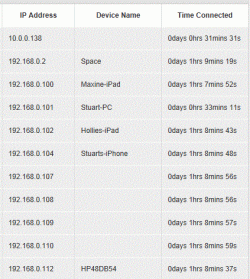
devices.GIF

this is a current image of my virgin hub ...

the hubs dhcp settings, ( I was told) to set them from range 100 - 254,

but the devices, ie ...
Maxine,
stuart,
Hollie,
... to connect directly the Thompsons router, and not Virgins, even though they are both connected on the same LAN network ...

the devices above used to say ...

Maxine 192.168.0.11
Stuart 192.168.0.15
Hollie 192.168.0.8


but now they range over 100, and are connecting to the Thompson router ( I was told to change the Thompsons IP add to 192.168.0.99 ...
 

My Computer

Computer Manufacturer/Model Number
HP
OS
Windows 7 Home Pre 64bit
CPU
i7 intel core 2.93GHZ
Motherboard
MSI
Memory
16.00GB
Graphics Card(s)
nVidia GT 220
Plug the router into one of the free ports on the Virgin, but not no. 1


Hello,

thanks for quick reply -

the reason im using the wireless router, is because, where the Virgin Hub is, there is no wireless reception -
so wouldn't be physically possible to connect them directly into each other - Although,

aren't they connected anyway, but just via the switch box ?

many thanks,

Stuart
 

My Computer

Computer Manufacturer/Model Number
HP
OS
Windows 7 Home Pre 64bit
CPU
i7 intel core 2.93GHZ
Motherboard
MSI
Memory
16.00GB
Graphics Card(s)
nVidia GT 220
You need to change the Thomson to use bridge mode, or turn off DHCP "depends on the settings available" this will bypass the router function so that only the Virgin router will be handling DHCP, this will place everything into the same subnet which is what you want.

You can even see the Thomson's IP isn't in the same subnet with the 10.0.0.138 IP.
 

My Computer

Computer type
PC/Desktop
Computer Manufacturer/Model Number
Home built
OS
Windows 7 Ult, Windows 8.1 Pro,
CPU
Q9650-4.275GHz, E8600 4.5GHz, E6750-3.8GHz
Motherboard
Evga 780i FTW
Memory
G.Skill PC2 9600 1200Mhz 5 5 5 15 2T
Graphics Card(s)
GTX480
Sound Card
Asus Xonar D2
Monitor(s) Displays
HannsG
Screen Resolution
1680X1050
Hard Drives
GSkill Phoenix Pro 120GB SSD
PSU
ThermalTake Toughpower 1000Watt modular
Case
ThermalTake XaserV
Cooling
Xigmatek S1283
Keyboard
Logitech G15
Mouse
Logitech G9
Internet Speed
T1
You need to change the Thomson to use bridge mode, or turn off DHCP "depends on the settings available" this will bypass the router function so that only the Virgin router will be handling DHCP, this will place everything into the same subnet which is what you want.

You can even see the Thomson's IP isn't in the same subnet with the 10.0.0.138 IP.


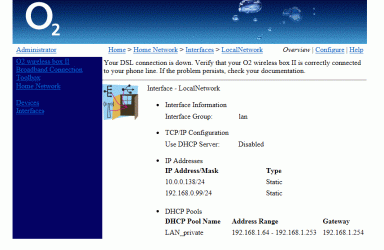
Thankyou, yes ive done this too - I will poaste a copy of the Thompsons settings page as it is at the moment,

...

o2.GIF

thankyou
 

My Computer

Computer Manufacturer/Model Number
HP
OS
Windows 7 Home Pre 64bit
CPU
i7 intel core 2.93GHZ
Motherboard
MSI
Memory
16.00GB
Graphics Card(s)
nVidia GT 220
I'm really not sure why this is showing a second IP in the 10. range. Is the Virgin hub a managed switch?
 

My Computer

Computer type
PC/Desktop
Computer Manufacturer/Model Number
Home built
OS
Windows 7 Ult, Windows 8.1 Pro,
CPU
Q9650-4.275GHz, E8600 4.5GHz, E6750-3.8GHz
Motherboard
Evga 780i FTW
Memory
G.Skill PC2 9600 1200Mhz 5 5 5 15 2T
Graphics Card(s)
GTX480
Sound Card
Asus Xonar D2
Monitor(s) Displays
HannsG
Screen Resolution
1680X1050
Hard Drives
GSkill Phoenix Pro 120GB SSD
PSU
ThermalTake Toughpower 1000Watt modular
Case
ThermalTake XaserV
Cooling
Xigmatek S1283
Keyboard
Logitech G15
Mouse
Logitech G9
Internet Speed
T1
Back
Top