Router Password?

DekHog

New member
Local time
10:33 PM
Messages
16
OK, not quite a Windows 7 issue, but since this appears to be such a knowledgeable place I thought I'd ask here first - a client has a router that someone else installed, and who is no longer available through any means, apparently. They have a Draytek Vigor 2820 router, which works well, and also has quite a complicated setup.

Have backed up a cfg file for the router, but don't have the password for access to it - I can access it, as the password is stored on the PC that it's hard wired to, but it's far from ideal, as if the hard drive ever goes down on the PC I'll need to reset the router anyway.

I can't change the password in the router firmware as it needs the old password first - is there any way of getting the stored password from the (XP Pro) PC? Have tried asterix reader, etc without any luck...

TIA
 

My Computer

Computer Manufacturer/Model Number
Dell XPS-M1330
OS
Windows 7 Ultimate 32bit
Reset

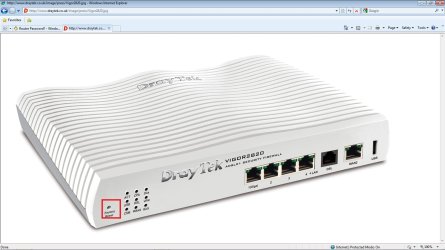
Use a small screwdriver and reset the router to factory settings and use your browser to config new password.

Regards,
Adrian
 

Attachments

  • reset.jpg
    reset.jpg
    103.5 KB · Views: 153

My Computer

Computer Manufacturer/Model Number
Custom Build
OS
Windows 7 7600 1 X64
CPU
AMD PHENOM II X 550 PROCESSOR 3.1 ghz
Motherboard
ASUS M4A78-TE
Memory
Corsair 4 gig ddr 3
Graphics Card(s)
ati radeon 3300
Sound Card
ati hd
Monitor(s) Displays
syncmaster 2033sw
Screen Resolution
1600X900 60 hz refresh
Hard Drives
twin_seagates SATA's 1 TB & 500 Gig, hitachi_slimline 160 gig
PSU
antec_550 watt
Case
cooler master GLite
Cooling
stock_heat sink
Internet Speed
20mbs up/ 1.5mbs down
Other Info
favorite child "stewie"
favorite dog "brian"
I know I can do that, but it's what I'm trying to avoid unless absolutely necessary.... was hoping for a password solution rather than having to set up all the VNC ports and everything again... :)
 

My Computer

Computer Manufacturer/Model Number
Dell XPS-M1330
OS
Windows 7 Ultimate 32bit
Unfortunately it seems to be your only viable solution...
 

My Computer

Computer type
PC/Desktop
Computer Manufacturer/Model Number
LENOVO K450 @3.0GHZ
OS
64-bit Windows 8.1 Pro
CPU
Core(TM) i5 CPU 4330 Haswell @ 3.20GHz
Motherboard
LENOVO
Memory
12.00 GB
Graphics Card(s)
Intel(R) HD Graphics
Sound Card
Intel HD integtrated
Monitor(s) Displays
HP 25' ISP Monitor
Screen Resolution
1900/1020
Hard Drives
(1) ST1000DM003-1CH162 (2) Generic STORAGE DEVICE USB Device (3) Generic STORAGE DEVICE USB Device
Internet Speed
100mb down/10mb up

My Computer

Computer Manufacturer/Model Number
Custom Build
OS
Windows 7 7600 1 X64
CPU
AMD PHENOM II X 550 PROCESSOR 3.1 ghz
Motherboard
ASUS M4A78-TE
Memory
Corsair 4 gig ddr 3
Graphics Card(s)
ati radeon 3300
Sound Card
ati hd
Monitor(s) Displays
syncmaster 2033sw
Screen Resolution
1600X900 60 hz refresh
Hard Drives
twin_seagates SATA's 1 TB & 500 Gig, hitachi_slimline 160 gig
PSU
antec_550 watt
Case
cooler master GLite
Cooling
stock_heat sink
Internet Speed
20mbs up/ 1.5mbs down
Other Info
favorite child "stewie"
favorite dog "brian"
I know I can do that, but it's what I'm trying to avoid unless absolutely necessary.... was hoping for a password solution rather than having to set up all the VNC ports and everything again... :)
Unable to comply without the initial pw, your only option is hardware reset.
 

My Computer

Computer Manufacturer/Model Number
Custom Build
OS
Windows 7 7600 1 X64
CPU
AMD PHENOM II X 550 PROCESSOR 3.1 ghz
Motherboard
ASUS M4A78-TE
Memory
Corsair 4 gig ddr 3
Graphics Card(s)
ati radeon 3300
Sound Card
ati hd
Monitor(s) Displays
syncmaster 2033sw
Screen Resolution
1600X900 60 hz refresh
Hard Drives
twin_seagates SATA's 1 TB & 500 Gig, hitachi_slimline 160 gig
PSU
antec_550 watt
Case
cooler master GLite
Cooling
stock_heat sink
Internet Speed
20mbs up/ 1.5mbs down
Other Info
favorite child "stewie"
favorite dog "brian"

My Computer

Computer Manufacturer/Model Number
Sony Vaio FZ21Z
OS
Windows 7 Ultimate x64 ®™
CPU
Intel Core 2 Duo (2.2 GHz)
Motherboard
Sony (Intel Chipset)
Memory
2x 2GB Corsair (667 MHz)
Graphics Card(s)
NVIDIA 8600M GS (256MB)
Sound Card
Sigmatel
Monitor(s) Displays
15.4" TFT X-Black
Screen Resolution
1280x800
Hard Drives
Western Digital 300GB Scorpio Black (7200rpm)
Mouse
Logitech Anywhere MX
Internet Speed
Sky 5MB
Notice: I do not know the router in question, the following is based on the test I just made with my Belkin N1 Vision router.

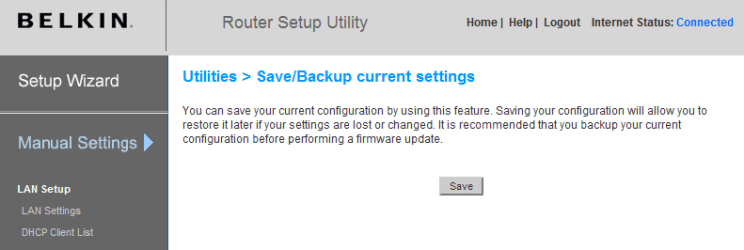
I went to the router's control panel which is protected by password set by myself. I made a backup of router configuration settings and saved it.

Router_Backup.PNG

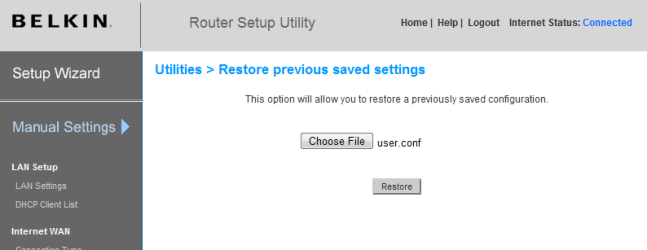
After that, I reseted my router to factory defaults. This automatically meant that also the password to access router's control panel was reseted to default. I entered the default password to access router, and chose the option to restore previous settings.

Router_Backup_2.PNG

Worked like a charm. The password of my router was reseted, and all the previous settings restored.

At least in my case, the router password is not stored in router configuration. It's just a local, browser password to enter the web interface.

Kari
 

My Computer

Computer type
Laptop
Computer Manufacturer/Model Number
HP ENVY 17-1150eg
OS
Windows 10 Pro x64 EN-GB
CPU
1.6 GHz Intel Core i7-720QM Processor
Memory
6 GB
Graphics Card(s)
ATI Mobility Radeon HD 5850 Graphics
Sound Card
Beats sound system with integrated subwoofer
Monitor(s) Displays
17" laptop display, 22" LED and 32" Full HD TV through HDMI
Screen Resolution
1600*900 (1), 1920*1080 (2&3)
Hard Drives
Internal: 2 x 500 GB SATA Hard Disk Drive 7200 rpm
External: 2TB for backups, 3TB USB3 network drive for media
Cooling
As Envy runs a bit warm, I have it on a Cooler Master pad
Keyboard
Logitech diNovo Media Desktop Laser (bluetooth)
Mouse
Logitech Performance Mouse MX
Internet Speed
50/10 Mbps VDSL
Antivirus
Windows Defender 4.3.9431.0
Browser
Maxthon 3.5.2., IE11
Thanks to all - I think I'll give Kari's suggestion a try, as I have a backup of the current setup cfg file, and the user/pass combination comes up in the IE password window, so it seems likely it might work - will take screenshots of the relevant router pages to set up again should it not work... it's not a necessity, but I just like to be in control. :D
 

My Computer

Computer Manufacturer/Model Number
Dell XPS-M1330
OS
Windows 7 Ultimate 32bit
I went to the router's control panel which is protected by password set by myself. I made a backup of router configuration settings and saved it.

View attachment 63400

After that, I reseted my router to factory defaults. This automatically meant that also the password to access router's control panel was reseted to default. I entered the default password to access router, and chose the option to restore previous settings.

View attachment 63401

Worked like a charm. The password of my router was reseted, and all the previous settings restored.

This is a good tip for those with routers. I did this awhile ago and it saves a lot of headaches should something go wrong.
 

My Computer

Computer type
PC/Desktop
Computer Manufacturer/Model Number
Custom built by me.
OS
Windows 10 Pro
CPU
Intel Core i7-4770K (3.5Ghz)
Motherboard
Gigabyte G1 Sniper 5 (F10 Bios)
Memory
32 gig Corsair Dominator Platinum (4x8Gig)
Graphics Card(s)
Sapphire Tri-X R9 Fury
Sound Card
Soundblaster ZXR
Monitor(s) Displays
NEC PA242W 24" LCD Monitor
Screen Resolution
1920 x 1200
Hard Drives
Primary - Samsung 850 Pro (512gig), Samsung 840 Pro (256gig), 2TB WD Caviar Black.
PSU
EVGA Supernova 1000 G2
Case
Cooler Master HAF X
Cooling
Corsair H100i with Corsair Air Series SP120 Quiet Fans
Keyboard
Logitech Wireless Wave
Mouse
Logitech Performance MX
Internet Speed
High Speed Cable
Antivirus
Norton Security
Browser
IE11
Other Info
Memory Timings - 1866MHz @ 9-9-9-27-1T @ 1.5 volts
Back
Top