RPC Virus Virus

akshaybz

New member
Local time
4:42 PM
Messages
22
PC Tools Firewall Plus--Help!

In my pc's device manager under "network Adapters" i see "PC Tools Driver #6"...ok I remember I installed PC Tools Firewall Plus months ago..and It might have been installed then....it also has a tiny yellow exclamation mark over...useless stuff...so i decide to uninstall it..
So, I click uninstall and the device manager page refreshes but OMG! it's still there:mad:
I tried many times but that ugly thing is still there...:sick:
Can anyone help?
 

My Computer

Computer Manufacturer/Model Number
Dell Inspiron 1525
OS
Windows 7 Ultimate x32
CPU
Core 2 Duo
Motherboard
T5800 @2GHz
Memory
3 GB
Screen Resolution
1280x800
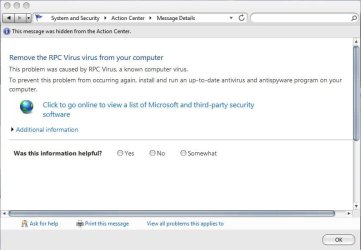
The action center keeps on saying "Remove the RPC Virus Virus"..
Anyone knows how to remove it??
I'm using MSE and Malwarebytes Anti Malware and both found nothing!
 

My Computer

Computer Manufacturer/Model Number
Dell Inspiron 1525
OS
Windows 7 Ultimate x32
CPU
Core 2 Duo
Motherboard
T5800 @2GHz
Memory
3 GB
Screen Resolution
1280x800
The RPC Virus (aka Remote Procedure Call Virus) is also known as MSBlast or the Blaster Virus, is a malicious worm that spreads by infecting vulnerable computers. If your computer has been infected, you may experience frequent system crashes or be completely unable to access any website. Remove the virus using an updated spyware removal tool immediately.
What is RPC Virus – Fake Alert?

RPC Virus is a fake alert message coming from a rogue security program that will mislead its victim from buying the licensed version of the software. The fake alert messages will be shown as:
Remove the RPC Virus virus
Windows has detected RPC Virus, a known computer virus on your computer. RPC Virus has caused your computer to stop working properly.
Remove the RPC Virus virus from your computer
This problem was caused by RPC Virus, a known computer virus.
To prevent this problem from occurring again, install and run an up-to-date antivirus and antispyware program on your computer.
RPC Virus or MSBlast Removal Instructions

Suggest you run these tools, do a full system scan after following the removal instructions. If you cannot do this in regular mode, then run in safe mode:

http://www.microsoft.com/security/pc-security/malware-removal.aspx

http://security.symantec.com/nbrt/npe.asp?lcid=1033
 

My Computer

Computer type
PC/Desktop
Computer Manufacturer/Model Number
Dell Hell oh Well
OS
Win 7 32 Home Premium, Win 7 64 Pro, Win 8.1, Win 10
CPU
Intel Core 2 Duo 2.93GHz
Memory
Not much with my ADHD
Graphics Card(s)
ATI Radeon HD 4350
Monitor(s) Displays
24" HDTV/Monitor
Screen Resolution
Blurry after a Scotch or 2
Hard Drives
1 HDD 250 GB, 1 HDD 1 TB, 3 - 1 TB Externals
Case
Don't get on my case...man :D
Cooling
I have an Air Conditioner & Diet Pepsi
Keyboard
Saitek Cyborg
Mouse
10 yr old MS optical mouse that still works
Internet Speed
Never fast enough
Antivirus
Various
Browser
Various
Actually neither the process nor the registry key was found in my PC...any gusses??
 

My Computer

Computer Manufacturer/Model Number
Dell Inspiron 1525
OS
Windows 7 Ultimate x32
CPU
Core 2 Duo
Motherboard
T5800 @2GHz
Memory
3 GB
Screen Resolution
1280x800
Malwarebytes' Anti-Malware should pick that baddie up. Try updating MBAM then do a Full Scan. Post the resulting log here, please.
 

My Computer

Computer Manufacturer/Model Number
Dell Studio 15
OS
Windows 7 Ultimate 64 bit
Actually neither the process nor the registry key was found in my PC...any gusses??

After you do the full malwarebytes scan as suggested by Carolyn, if nothing shows, run the Malicious software removal tool and then the Norton Power Eraser (full system scan)

These RPC Virus files can be in the form of EXE, DLL, LSP, TOOLBAR, BROWSER HIJACK, and/or BROWSER PLUGIN. For example, RPC Virus might create a file like
%PROGRAM_FILES%\RPC Virus\RPC Virus.exe. Locate and remove these files.

You may wish to consider running the Malwarebytes & Malicious software removal tool while disconnected from the net.

The Power Eraser will need a net connection to function properly
 

My Computer

Computer type
PC/Desktop
Computer Manufacturer/Model Number
Dell Hell oh Well
OS
Win 7 32 Home Premium, Win 7 64 Pro, Win 8.1, Win 10
CPU
Intel Core 2 Duo 2.93GHz
Memory
Not much with my ADHD
Graphics Card(s)
ATI Radeon HD 4350
Monitor(s) Displays
24" HDTV/Monitor
Screen Resolution
Blurry after a Scotch or 2
Hard Drives
1 HDD 250 GB, 1 HDD 1 TB, 3 - 1 TB Externals
Case
Don't get on my case...man :D
Cooling
I have an Air Conditioner & Diet Pepsi
Keyboard
Saitek Cyborg
Mouse
10 yr old MS optical mouse that still works
Internet Speed
Never fast enough
Antivirus
Various
Browser
Various
MBAM cleaned this:
Code:
Registry Keys Infected:
HKEY_CURRENT_USER\SOFTWARE\TJHTHX1O7X (Trojan.FakeAlert) -> Quarantined and deleted successfully.

Also here is screenshot of my task manager which are suspicious:
 

My Computer

Computer Manufacturer/Model Number
Dell Inspiron 1525
OS
Windows 7 Ultimate x32
CPU
Core 2 Duo
Motherboard
T5800 @2GHz
Memory
3 GB
Screen Resolution
1280x800
Good, glad it's apparently sorted.

Now it's a good idea to run a full system scan with MSE, Malwarebytes and the Malicious Software tool just to be sure it's out of the system & there are no leftovers. Run these scans disconnected from the net so that it can't "call for help".

That's just to be sure it's gone, I know this can take a little bit, but why take chances on it coming back?
 

My Computer

Computer type
PC/Desktop
Computer Manufacturer/Model Number
Dell Hell oh Well
OS
Win 7 32 Home Premium, Win 7 64 Pro, Win 8.1, Win 10
CPU
Intel Core 2 Duo 2.93GHz
Memory
Not much with my ADHD
Graphics Card(s)
ATI Radeon HD 4350
Monitor(s) Displays
24" HDTV/Monitor
Screen Resolution
Blurry after a Scotch or 2
Hard Drives
1 HDD 250 GB, 1 HDD 1 TB, 3 - 1 TB Externals
Case
Don't get on my case...man :D
Cooling
I have an Air Conditioner & Diet Pepsi
Keyboard
Saitek Cyborg
Mouse
10 yr old MS optical mouse that still works
Internet Speed
Never fast enough
Antivirus
Various
Browser
Various
Those are legit processes in the screenshot

for example, see HERE
 

My Computer

Computer Manufacturer/Model Number
Dell Studio 15
OS
Windows 7 Ultimate 64 bit
Yeah, don't delete anything that "looks suspicious", let the scanners decided that. If you remove the wrong thing, you could end up crippling your PC.

After Mbam cleaned the file out, did the warnings disappear?
 

My Computer

Computer type
PC/Desktop
Computer Manufacturer/Model Number
Dell Hell oh Well
OS
Win 7 32 Home Premium, Win 7 64 Pro, Win 8.1, Win 10
CPU
Intel Core 2 Duo 2.93GHz
Memory
Not much with my ADHD
Graphics Card(s)
ATI Radeon HD 4350
Monitor(s) Displays
24" HDTV/Monitor
Screen Resolution
Blurry after a Scotch or 2
Hard Drives
1 HDD 250 GB, 1 HDD 1 TB, 3 - 1 TB Externals
Case
Don't get on my case...man :D
Cooling
I have an Air Conditioner & Diet Pepsi
Keyboard
Saitek Cyborg
Mouse
10 yr old MS optical mouse that still works
Internet Speed
Never fast enough
Antivirus
Various
Browser
Various

My Computer

Computer type
PC/Desktop
Computer Manufacturer/Model Number
Bruce ... somewhere in his 40's
OS
Windows 7 Ultimate 32bit SP1
CPU
Intel(R) Core(TM)2 Quad CPU @ 2.40GHz, 2400 MHz
Motherboard
INTEL/D975XBX2
Memory
4 GB
Graphics Card(s)
ATI Radeon HD 2600 Pro
Monitor(s) Displays
Samsung SyncMaster 914v
Screen Resolution
1280 x 1024
Hard Drives
2/500GB each ... ST3500630AS ATA Device.
One is not connected
PSU
Rocketfish 700 W
Case
G.Skill Gigabyte Chassis
Keyboard
Standard PS/2 Keyboard
Mouse
Microsoft PS/2 Mouse
Internet Speed
DSL
Antivirus
Avira Internet Security
Browser
IE 11
Other Info
ATI HDMI Audio
Yeah, don't delete anything that "looks suspicious", let the scanners decided that. If you remove the wrong thing, you could end up crippling your PC.

After Mbam cleaned the file out, did the warnings disappear?

no they didnt

i didnt download codec pack
 

My Computer

Computer Manufacturer/Model Number
Dell Inspiron 1525
OS
Windows 7 Ultimate x32
CPU
Core 2 Duo
Motherboard
T5800 @2GHz
Memory
3 GB
Screen Resolution
1280x800
Scan with DDS:
  1. Please download DDS ... by sUBs. Save it to your desktop. Alternate download links here or here.
    Disable any script blocking software you have running before running DDS.
  2. Please double click dds.com to run the tool. (File name will be different if alternate download used).
    Vista - W7 users: You must right click on the file above and select "Run As Administrator" to run the tool.
    A black window will open with some instructions/comments...
  3. When done, DDS will open two (2) logs:
    • DDS.txt
    • Attach.txt
    Caution: The above logs will NOT be saved... you must save them to your desktop.
  4. Please post both the DDS.txt and Attach.txt files in your next reply.

Also, post a screen shot of the action center with the warning message, if you can.
 

My Computer

Computer Manufacturer/Model Number
Dell Studio 15
OS
Windows 7 Ultimate 64 bit
Security Application Check:

Please download and save SecurityCheck.exe to your Desktop from one of the links below.

Link 1
Link 2


  • Right click SecurityCheck.exe, select "Run as administrator, then follow the onscreen instructions inside of the black box.
  • A Notepad document should open automatically called checkup.txt
  • Please post the contents of that document in your next reply.
 

My Computer

Computer Manufacturer/Model Number
Dell Studio 15
OS
Windows 7 Ultimate 64 bit
Ok i have attached screenshot of action center & the log files..
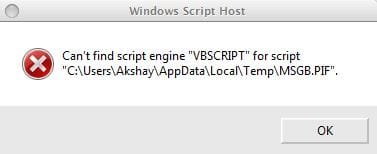
Also i received some sort of error that is also attached...
Thanx
 

Attachments

  • Capture.JPG
    Capture.JPG
    46.2 KB · Views: 19
  • Capture1.JPG
    Capture1.JPG
    13.9 KB · Views: 13
  • Attach.txt
    Attach.txt
    4.4 KB · Views: 7
  • DDS.txt
    DDS.txt
    15.3 KB · Views: 11

My Computer

Computer Manufacturer/Model Number
Dell Inspiron 1525
OS
Windows 7 Ultimate x32
CPU
Core 2 Duo
Motherboard
T5800 @2GHz
Memory
3 GB
Screen Resolution
1280x800
Actually this log has some errors too....it says i have ie8 but i have ie9 :)

Also, it shows AVG 2011, which i uninstalled earlier but some traces might be left :)
 

Attachments

My Computer

Computer Manufacturer/Model Number
Dell Inspiron 1525
OS
Windows 7 Ultimate x32
CPU
Core 2 Duo
Motherboard
T5800 @2GHz
Memory
3 GB
Screen Resolution
1280x800
Registry Cleaners

Re. TuneUp Utilities 2011

I don't personally recommend the use of ANY registry cleaners. Here is an excerpt from a discussion on regcleaners
Most reg cleaners aren't bad as such, but they aren't perfect and even the best have been known to cause problems. The point we are trying to make is that the risk of using one far outweighs any benefit. If it does work perfectly you will not see any difference. If it doesn't work properly you may end up with an expensive doorstop.

Please Uninstall the Following Programs:
TuneUp Utilities 2011
TuneUp Utilities Language Pack (en-US)

===================

P2P - I see you have P2P software ( uTorrent ) installed on your machine. I'm not here to pass judgment on file-sharing as a concept. However, I will warn you that engaging in this activity and having this kind of software installed on your machine will always make you more susceptible to re-infections. It likely contributed to your current situation.

Please note: Even if you are using a "safe" P2P program, it is only the program that is safe. You will be sharing files from uncertified sources, and these are often infected. The bad guys use P2P filesharing as a major conduit to spread their wares.

I would strongly recommend that you uninstall uTorrent now. You can do so via Control Panel >> Programs and features.

If you choose to leave them on the machine, please refrain from using them while we are cleaning the machine to prevent further infection.

===================

Here is an interview in which Corrine does a terrific job explaining why Registry Cleaners and P2P programs should be avoided:
"Ask an MVP about: Home PC Security"

===================

AVG was not successfully uninstalled. Please use the AVG Removal Tool to completely uninstall that program.

AVG Remover
Please save any work and close all open windows... you have to REBOOT your machine during in this step.
Please download AVG Remover(32bit) and save it to your desktop.
If you are attempting to remove the 64bit version of AVG... please download this version AVG Remover(64bit).
  1. Double click on avgremover.exe to start the process. (64bit version... avgremoverx64.exe)
    If using Vista, you must right click (avgremover.exe or avgremoverx64.exe) and choose "Run As Administrator".
    A black command window will open... and you will receive a "removal and rebooting" warning prompt...
  2. Reply Yes to the "Do you want to continue?" prompt.
    The remover will begin searching for and removing AVG entries...
  3. When completed, a text file will appear on your desktop "avgremover.log"... (it may be named differently for the 64bit version)
    Please reboot your computer at this time. (You may receive a prompt to do so...)
  4. Please copy and paste the contents of avgremover.log in your next reply.

===================

Now that you have done the above steps, I would like to see logs from a different scanner.

Download and run OTL
  1. Download OTL by OldTimer to your desktop.
  2. Double-click on OTL.exe to run it.
  3. When the window appears, Check the boxes beside Scan All Users, LOP Check, and Purity Check.
  4. Under the Extra Registry section, select Use SafeList
  5. Click the Run Scan button. Do not change any settings unless otherwise told to do so. The scan wont take long.
  6. When the scan completes, it will open two notepad windows. OTL.Txt and Extras.Txt. These are saved in the same location as OTL.
  7. Copy & paste the contents of both logs in your next reply

===================

Please attach the following to your next reply:
  • avgremover.log
  • OTL.txt
  • Extras.txt

Note:Please include the header information when you post your logs.

 

My Computer

Computer Manufacturer/Model Number
Dell Studio 15
OS
Windows 7 Ultimate 64 bit
This is related to your other topic, RPC Virus Virus

I will ask a Moderator if the two topics should be merged.
 

My Computer

Computer Manufacturer/Model Number
Dell Studio 15
OS
Windows 7 Ultimate 64 bit
Here is my pastebin directory:
Code:
www.pastebin.com/u/akshaybz

This contains all my logs..
 

My Computer

Computer Manufacturer/Model Number
Dell Inspiron 1525
OS
Windows 7 Ultimate x32
CPU
Core 2 Duo
Motherboard
T5800 @2GHz
Memory
3 GB
Screen Resolution
1280x800

My Computer

Computer Manufacturer/Model Number
Dell Inspiron 1525
OS
Windows 7 Ultimate x32
CPU
Core 2 Duo
Motherboard
T5800 @2GHz
Memory
3 GB
Screen Resolution
1280x800
Back
Top