Solved run command in search box

djlm

New member
Local time
11:59 PM
Messages
11
Hi all,

I have until recently used windows 7's search box as a "run command" replacement, typing cmd, frontpg, winword, excel, etc.. to open these programs quickly.

Recently my search box stopped working like this and is now only a... search box. If I type CMD it will no longer run command prompt, but will search from CMD within my PC.

I know I can Window+R or even add the run command back to the start menu, but I really want to use the search box for run command as I have been doing.

Any ideas what can cause this and how to fix? I've already searched for virus and malware but nothing found after using 2 different programs and also kapersky's online scan.

Thanks to all.

Kindly,

DJ LM
 

My Computer

OS
Windows 7 Ultimate x64
Hi all,

I have until recently used windows 7's search box as a "run command" replacement, typing cmd, frontpg, winword, excel, etc.. to open these programs quickly.

Recently my search box stopped working like this and is now only a... search box. If I type CMD it will no longer run command prompt, but will search from CMD within my PC.

I know I can Window+R or even add the run command back to the start menu, but I really want to use the search box for run command as I have been doing.

Any ideas what can cause this and how to fix? I've already searched for virus and malware but nothing found after using 2 different programs and also kapersky's online scan.

Thanks to all.

Kindly,

DJ LM

Might be an association issue. Try tying in winword.exe


Ken J
 

My Computer

Computer Manufacturer/Model Number
HP Pavillion dv-7 1005 Tx
OS
Win 8 Release candidate 8400
CPU
[email protected]
Memory
4 gigs
Graphics Card(s)
Nvidia 9600M
Sound Card
HD built-in
Monitor(s) Displays
17" Wxga
Screen Resolution
1440x900
Cooling
none
Internet Speed
45Mb down 5Mb up

My Computer

Computer type
PC/Desktop
Computer Manufacturer/Model Number
Self Assembled
OS
Microsoft Windows 10 Pro Insider Preview 64-bit
CPU
Intel(R) Core(TM) i3-4130 CPU @ 3.40GHz
Motherboard
Gigabyte Technology Co., Ltd. B85M-D3H
Memory
Corsair Vengence 4GB x2 (8.00GB Dual-Channel DDR3 @ 798MHz)
Graphics Card(s)
2047MB GeForce GTS 450 (ZOTAC International)
Sound Card
Onboard (Realtek High Definition Audio)
Monitor(s) Displays
LG Flatron E2040T
Screen Resolution
1600x900
Hard Drives
Western Digital 1 TB
Seagate 500 GB
PSU
Corsair VS550
Case
Cooler Master K380
Cooling
Cooler Master Seidon 120V Plus
Keyboard
Logitech MK260r
Mouse
Logitech MK260r
Internet Speed
PMPL Broadband
Antivirus
Windows Defender + MBAM
Browser
Firefox
Other Info
Dell Studio 15" Laptop
Hi Ken,

Thanks. I've tried that but it still only searched :-(

Best Regards,

DJ LM


Hi Arc,

Running the command now. Will go out to eat and on my return I'll post the result. Many thanks.

Best,

DJ LM
 

My Computer

OS
Windows 7 Ultimate x64
Hi,

The SFC /SCANNOW command was quicker thank I though. It's finished, but nothing happened, it just shut down after it ended.

Still not working the run from search box :-(

Thanks for helping either way.

Best,

DJ LM
 

My Computer

OS
Windows 7 Ultimate x64

My Computer

Computer Manufacturer/Model Number
Hopalong/ Godzilla
OS
Windows7 Pro 64bit SP-1; Windows XP Pro 32bit
CPU
Intel Core i7-870 Lynnfield 2.93GHz LGA 1156 95W Quad-Core
Motherboard
ASUS P7P55D-E PRO
Memory
8GB@1400MHz Crucial Ballistix DDR3-1600 4x2GB
Graphics Card(s)
ASUS ENGTX460 DirectCU/2DI/1GD5 1GB 256-bit GDDR5
Sound Card
VIA Onboard
Monitor(s) Displays
Asus VS248H-P 24"; Samsung SyncMaster 941BW 19"ws
Screen Resolution
1920x1080; 1440x900
Hard Drives
Samsung 830 120GB SSD
Intel 320 120GB SSD
Western Digital Caviar Black WD7501AALS 750GB 7200 RPM SATA 3.0Gb/s
Western Digital Caviar Black WD6401AALS 640GB 7200 RPM SATA 3.0Gb/s
PSU
COOLER MASTER Silent Pro RS850-AMBAJ3-US 850W Modular
Case
COOLER MASTER HAF 932 RC-932-KKN5-GP Black
Cooling
Scythe "Mugen-2 Rev.B" (2 ScytheKaze-Jyuni PWM fans)
Keyboard
Logitech K-320
Mouse
Kensington
Antivirus
Avast Inernet Suite
Browser
IE 9 ; Chrome

My Computer

Computer type
PC/Desktop
Computer Manufacturer/Model Number
Self Assembled
OS
Microsoft Windows 10 Pro Insider Preview 64-bit
CPU
Intel(R) Core(TM) i3-4130 CPU @ 3.40GHz
Motherboard
Gigabyte Technology Co., Ltd. B85M-D3H
Memory
Corsair Vengence 4GB x2 (8.00GB Dual-Channel DDR3 @ 798MHz)
Graphics Card(s)
2047MB GeForce GTS 450 (ZOTAC International)
Sound Card
Onboard (Realtek High Definition Audio)
Monitor(s) Displays
LG Flatron E2040T
Screen Resolution
1600x900
Hard Drives
Western Digital 1 TB
Seagate 500 GB
PSU
Corsair VS550
Case
Cooler Master K380
Cooling
Cooler Master Seidon 120V Plus
Keyboard
Logitech MK260r
Mouse
Logitech MK260r
Internet Speed
PMPL Broadband
Antivirus
Windows Defender + MBAM
Browser
Firefox
Other Info
Dell Studio 15" Laptop

My Computer

Computer type
Laptop
Computer Manufacturer/Model Number
Sony Vaio VPCEB47GM Laptop
OS
Win 7 Pro 64-bit
CPU
Intel i5 2.4 Ghz
Memory
8GB DDR3
Graphics Card(s)
Intel HD 3000
Sound Card
IDT High Definition
Monitor(s) Displays
15.6 WGXA Anti-Glare LED
Screen Resolution
1280x800
Hard Drives
640Gb 7200rpm
Antivirus
MSE
Browser
Opera (primary) with IE9 backup
Hi all,

I have until recently used windows 7's search box as a "run command" replacement, typing cmd, frontpg, winword, excel, etc.. to open these programs quickly.

Recently my search box stopped working like this and is now only a... search box. If I type CMD it will no longer run command prompt, but will search from CMD within my PC.

I know I can Window+R or even add the run command back to the start menu, but I really want to use the search box for run command as I have been doing.

Any ideas what can cause this and how to fix? I've already searched for virus and malware but nothing found after using 2 different programs and also kapersky's online scan.

Thanks to all.

Kindly,

DJ LM

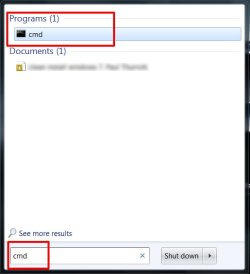
djlm, I'm not fully understanding your issue. What happens when you type "cmd" in the search box? You don't get a results window? Here's what I get when I try it.

window.jpg

At this point, if I hit enter, the command prompt pops right up. Is this not what you get? What appears in the results window after you type "cmd"?
 

My Computer

Computer Manufacturer/Model Number
Custom Build
OS
Windows 7 Pro/32 Academic. Build 7600
CPU
Intel 2.3 Duo core
Motherboard
EliteGroup G31T-M
Memory
4 GB DDR
Graphics Card(s)
Nvidia GeForce 9500 GT
Sound Card
Built in
Monitor(s) Displays
Viewsonic 15" 4:3
Screen Resolution
1280 x 1024
Hard Drives
WD Caviar Black 750 GB
WD 250 GB External
PSU
Antec 450w
Keyboard
Standard windows
Mouse
Logitech USB
Internet Speed
Bellsouth DSL 6.0
Try a System Restore.
Just in case. It won't hurt anything and may fix. Easy to do.
http://www.sevenforums.com/tutorials/700-system-restore.html

Do you know what day it started? Go back one day from there.
Worth a try.
Mike

It's been going on for over a month now. Using the restore, if it doesn't work can I "unrestore" to my current state before using restore?

And finally try http://www.sevenforums.com/tutorials/3413-repair-install.html (if system restore also fails ) .

Can I do this without my DVD in the drive? My drive is dead, but I can easily copy the contents to a pendrive on my notebook which has a working dvd drive.

It sounds like you have a corrupt index and you might need to rebuild it.


Improve Windows searches using the index: frequently asked questions

Will test this. I'll report later with results.


Hi all,

I have until recently used windows 7's search box as a "run command" replacement, typing cmd, frontpg, winword, excel, etc.. to open these programs quickly.

Recently my search box stopped working like this and is now only a... search box. If I type CMD it will no longer run command prompt, but will search from CMD within my PC.

I know I can Window+R or even add the run command back to the start menu, but I really want to use the search box for run command as I have been doing.

Any ideas what can cause this and how to fix? I've already searched for virus and malware but nothing found after using 2 different programs and also kapersky's online scan.

Thanks to all.

Kindly,

DJ LM

djlm, I'm not fully understanding your issue. What happens when you type "cmd" in the search box? You don't get a results window? Here's what I get when I try it.

View attachment 114073

At this point, if I hit enter, the command prompt pops right up. Is this not what you get? What appears in the results window after you type "cmd"?

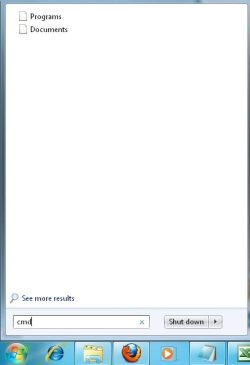
Hi,

This made me think that even the search funcion is not working right, as I get this results, no icons on them, and pressing enter does nothing after typing.

cmd.jpg


Thanks again to all that replied.
 

My Computer

OS
Windows 7 Ultimate x64
Have you tried rebuilding the index as marsmimar suggested? How did that work out for you?
 

My Computer

Computer Manufacturer/Model Number
Custom Build
OS
Windows 7 Pro/32 Academic. Build 7600
CPU
Intel 2.3 Duo core
Motherboard
EliteGroup G31T-M
Memory
4 GB DDR
Graphics Card(s)
Nvidia GeForce 9500 GT
Sound Card
Built in
Monitor(s) Displays
Viewsonic 15" 4:3
Screen Resolution
1280 x 1024
Hard Drives
WD Caviar Black 750 GB
WD 250 GB External
PSU
Antec 450w
Keyboard
Standard windows
Mouse
Logitech USB
Internet Speed
Bellsouth DSL 6.0
Have you tried rebuilding the index as marsmimar suggested? How did that work out for you?

Hi,

Yep I did, and unfortunatelly it did not work.

I guess my last chance would be a repair install which I want to avoid :-(

Thanks for all the help.

Best Regards,

DJ LM
 

My Computer

OS
Windows 7 Ultimate x64
It's me again :-)

It seems this is the same problem as me. I didn't realize that my search was wierd too. The same happens when I try to click on a search result, I get the "these files can't be opened" message:

Run a command from Windows 7 Start Menu - Super User

Best,

DJ LM
 

My Computer

OS
Windows 7 Ultimate x64
Process of elimination. Since I don't know everything you tried so far.

Lets try this first.
http://www.sevenforums.com/tutorials/25343-windows-search-turn-off.html

Second or first make sure your not checked "Don't Search" in the red box below. Click blue Customize to get directions to the "Customize Start Menu" window below.

Stolen from Brinks tutorial:D
http://www.sevenforums.com/tutorials/36599-search-windows-7-a.html
notesmall1.png
Note

You can use the search box line in the Start menu to find files, folders, programs, and e‑mail messages stored on your computer. When searching from the Start menu, only files that have been indexed will appear in search results.

You can also adjust these settings below in the Customize Start Menu settings for what is to be included in the search from the Start Menu Search box.


My Computer

Computer Manufacturer/Model Number
Hopalong/ Godzilla
OS
Windows7 Pro 64bit SP-1; Windows XP Pro 32bit
CPU
Intel Core i7-870 Lynnfield 2.93GHz LGA 1156 95W Quad-Core
Motherboard
ASUS P7P55D-E PRO
Memory
8GB@1400MHz Crucial Ballistix DDR3-1600 4x2GB
Graphics Card(s)
ASUS ENGTX460 DirectCU/2DI/1GD5 1GB 256-bit GDDR5
Sound Card
VIA Onboard
Monitor(s) Displays
Asus VS248H-P 24"; Samsung SyncMaster 941BW 19"ws
Screen Resolution
1920x1080; 1440x900
Hard Drives
Samsung 830 120GB SSD
Intel 320 120GB SSD
Western Digital Caviar Black WD7501AALS 750GB 7200 RPM SATA 3.0Gb/s
Western Digital Caviar Black WD6401AALS 640GB 7200 RPM SATA 3.0Gb/s
PSU
COOLER MASTER Silent Pro RS850-AMBAJ3-US 850W Modular
Case
COOLER MASTER HAF 932 RC-932-KKN5-GP Black
Cooling
Scythe "Mugen-2 Rev.B" (2 ScytheKaze-Jyuni PWM fans)
Keyboard
Logitech K-320
Mouse
Kensington
Antivirus
Avast Inernet Suite
Browser
IE 9 ; Chrome
Process of elimination. Since I don't know everything you tried so far.

Lets try this first.
http://www.sevenforums.com/tutorials/25343-windows-search-turn-off.html

Second or first make sure your not checked "Don't Search" in the red box below.

Stolen from Brinks tutorial:D
http://www.sevenforums.com/tutorials/36599-search-windows-7-a.html
notesmall1.png
Note

You can use the search box line in the Start menu to find files, folders, programs, and e‑mail messages stored on your computer. When searching from the Start menu, only files that have been indexed will appear in search results.

You can also adjust these settings below in the Customize Start Menu settings for what is to be included in the search from the Start Menu Search box.


Hello,

The search is on for sure, reading that link indicates that when it's off I wouldn't even see the search field in Windows.

As for the second link, the setting here is just like that, search with public folders marked, and search programs and control panel is ticked.

Thanks for your help.

Best,

DJ LM
 

My Computer

OS
Windows 7 Ultimate x64

My Computer

Computer Manufacturer/Model Number
Hopalong/ Godzilla
OS
Windows7 Pro 64bit SP-1; Windows XP Pro 32bit
CPU
Intel Core i7-870 Lynnfield 2.93GHz LGA 1156 95W Quad-Core
Motherboard
ASUS P7P55D-E PRO
Memory
8GB@1400MHz Crucial Ballistix DDR3-1600 4x2GB
Graphics Card(s)
ASUS ENGTX460 DirectCU/2DI/1GD5 1GB 256-bit GDDR5
Sound Card
VIA Onboard
Monitor(s) Displays
Asus VS248H-P 24"; Samsung SyncMaster 941BW 19"ws
Screen Resolution
1920x1080; 1440x900
Hard Drives
Samsung 830 120GB SSD
Intel 320 120GB SSD
Western Digital Caviar Black WD7501AALS 750GB 7200 RPM SATA 3.0Gb/s
Western Digital Caviar Black WD6401AALS 640GB 7200 RPM SATA 3.0Gb/s
PSU
COOLER MASTER Silent Pro RS850-AMBAJ3-US 850W Modular
Case
COOLER MASTER HAF 932 RC-932-KKN5-GP Black
Cooling
Scythe "Mugen-2 Rev.B" (2 ScytheKaze-Jyuni PWM fans)
Keyboard
Logitech K-320
Mouse
Kensington
Antivirus
Avast Inernet Suite
Browser
IE 9 ; Chrome

My Computer

Computer type
PC/Desktop
Computer Manufacturer/Model Number
Self Assembled
OS
Microsoft Windows 10 Pro Insider Preview 64-bit
CPU
Intel(R) Core(TM) i3-4130 CPU @ 3.40GHz
Motherboard
Gigabyte Technology Co., Ltd. B85M-D3H
Memory
Corsair Vengence 4GB x2 (8.00GB Dual-Channel DDR3 @ 798MHz)
Graphics Card(s)
2047MB GeForce GTS 450 (ZOTAC International)
Sound Card
Onboard (Realtek High Definition Audio)
Monitor(s) Displays
LG Flatron E2040T
Screen Resolution
1600x900
Hard Drives
Western Digital 1 TB
Seagate 500 GB
PSU
Corsair VS550
Case
Cooler Master K380
Cooling
Cooler Master Seidon 120V Plus
Keyboard
Logitech MK260r
Mouse
Logitech MK260r
Internet Speed
PMPL Broadband
Antivirus
Windows Defender + MBAM
Browser
Firefox
Other Info
Dell Studio 15" Laptop
Also at the bottom of the tutorials I posted is a list of related tutorials.

Mike

As Arc has posted the Repair install may become the only choice.
I figured these other tutorials were worth a shot first.;)
 

My Computer

Computer Manufacturer/Model Number
Hopalong/ Godzilla
OS
Windows7 Pro 64bit SP-1; Windows XP Pro 32bit
CPU
Intel Core i7-870 Lynnfield 2.93GHz LGA 1156 95W Quad-Core
Motherboard
ASUS P7P55D-E PRO
Memory
8GB@1400MHz Crucial Ballistix DDR3-1600 4x2GB
Graphics Card(s)
ASUS ENGTX460 DirectCU/2DI/1GD5 1GB 256-bit GDDR5
Sound Card
VIA Onboard
Monitor(s) Displays
Asus VS248H-P 24"; Samsung SyncMaster 941BW 19"ws
Screen Resolution
1920x1080; 1440x900
Hard Drives
Samsung 830 120GB SSD
Intel 320 120GB SSD
Western Digital Caviar Black WD7501AALS 750GB 7200 RPM SATA 3.0Gb/s
Western Digital Caviar Black WD6401AALS 640GB 7200 RPM SATA 3.0Gb/s
PSU
COOLER MASTER Silent Pro RS850-AMBAJ3-US 850W Modular
Case
COOLER MASTER HAF 932 RC-932-KKN5-GP Black
Cooling
Scythe "Mugen-2 Rev.B" (2 ScytheKaze-Jyuni PWM fans)
Keyboard
Logitech K-320
Mouse
Kensington
Antivirus
Avast Inernet Suite
Browser
IE 9 ; Chrome
Back
Top