Running VMXP from External HD

tuuoploki

New member
Member
Local time
10:25 AM
Messages
76
I have had a frustrating day. I have been trying to create a VMXP on my external HD. When i create it on the external drive, i look at the settings and it is using a parent vhd on the C: drive. It is also storing all the data on the vhd located on the C: Drive. I have tried merging vhds, or creating new ones. Whenever i have it using one vhd on my external HD, it will not start and asks me to create a new VMXP. Can anyone here tell me how i can make a VMXP that runs entirely on my external HD, leaving nothing on the C: Drive, except the one file where you change settings from "Manage Virtual Machine", infact if theres a way of having that file on the HD as well that would be very usefull. Thanks
 

My Computer

Computer Manufacturer/Model Number
Home made
OS
Windows 7 Home Premium 64-bit
I assume with VMXP you mean Windows XP Mode?

What differs Windows XP Mode from other Virtual PC virtual machines is that it needs a parent disk. This parent disk is by default located in C:\Program Files\Windows XP Mode\Windows XP Mode base.vhd

   Information
The XP Mode parent disk should not be moved, edited or altered in any way or the original XP Mode virtual machine loses its functionality!

Only delete it if you are not going to use XP Mode anymore


If you want to move the virtual XP completely to another partition, you have to merge (join together) the parent disk with your XP Mode vhd.


Here's how:
  • Open the folder Virtual Machines, located in your user folder
  • Right click Windows XP Mode, choose Settings from context menu
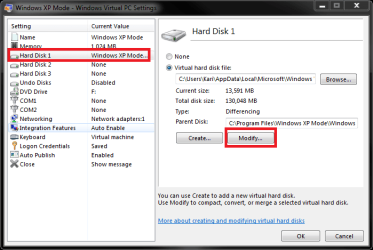
  • Choose Hard Disk 1, click Modify

    XPM_merge_1.png
    .
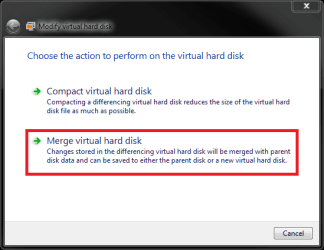
  • Choose Merge virtual hard disk

    XPM_merge_2.png
    .
  • Choose New file, browse to location you want to save it and give it a name. Click Merge

    XPM_merge_3.png
Be patient, merging can easily take an hour. The new, merged Windows XP vhd is a standalone disk which does not need the parent disk.

After the merged vhd is done, you have to create a new virtual machine and mount your new XP virtual machine to it. This tutorial tells you how to do it: http://www.sevenforums.com/tutorials/8254-windows-virtual-pc-create-virtual-machine.html

If you want, you can now delete the XP Mode parent disk and original vhd.

Kari
 
Last edited:

My Computer

Computer type
Laptop
Computer Manufacturer/Model Number
HP ENVY 17-1150eg
OS
Windows 10 Pro x64 EN-GB
CPU
1.6 GHz Intel Core i7-720QM Processor
Memory
6 GB
Graphics Card(s)
ATI Mobility Radeon HD 5850 Graphics
Sound Card
Beats sound system with integrated subwoofer
Monitor(s) Displays
17" laptop display, 22" LED and 32" Full HD TV through HDMI
Screen Resolution
1600*900 (1), 1920*1080 (2&3)
Hard Drives
Internal: 2 x 500 GB SATA Hard Disk Drive 7200 rpm
External: 2TB for backups, 3TB USB3 network drive for media
Cooling
As Envy runs a bit warm, I have it on a Cooler Master pad
Keyboard
Logitech diNovo Media Desktop Laser (bluetooth)
Mouse
Logitech Performance Mouse MX
Internet Speed
50/10 Mbps VDSL
Antivirus
Windows Defender 4.3.9431.0
Browser
Maxthon 3.5.2., IE11
Back
Top