
Safely Remove Hardware - Eject Device

How to Use Safely Remove Hardware to Eject a Device in Windows 7 and Windows 8

   Information
This tutorial will show you how to use Safely Remove Hardware in Windows 7, Windows 8/8.1, and Windows RT to safely shutdown and eject a storage device before just unplugging or disconnecting it to help prevent accidental data loss if data were still being copied or saved to or from the device. For example, if you have write caching enable on the device.

   Tip
To have access to an external drive (ex: USB key) again after you have already ejected it using Safely Remove Hardware, you will just need to unplug it and plug it back in, or restart the PC.


Available Hotfix:
   Warning
It is not recommended to eject an internal drive. If you do, then restarting the computer will allow you to have access to it again.


Here's How:
1. Make sure that anything that is being copied or saved to or from the storage device that you want to eject has finished.

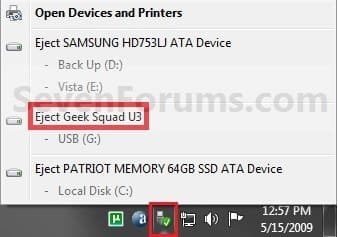
2. Click/tap on the Safely Remove Hardware notification area icon, and click/tap on the Eject drive option for the listed drive that you want to eject, and go to step 4 below. (see screenshot below)
Step1.jpg
OR

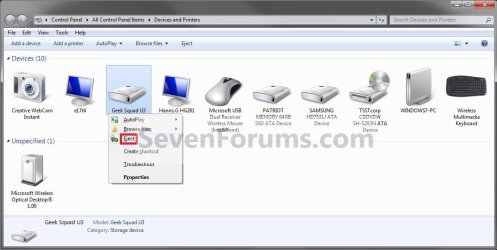
3. Open Devices and Printers.
A) Right click or press and hold on the storage device that you want to eject, then click/tap on Eject. (see screenshot below)

OR

B) Right click or press and hold on your computer device (ex: WINDOWS7-PC), select Eject, then click/tap on a listed storage device that you want to eject. (see screenshot below)
Step1A.jpg
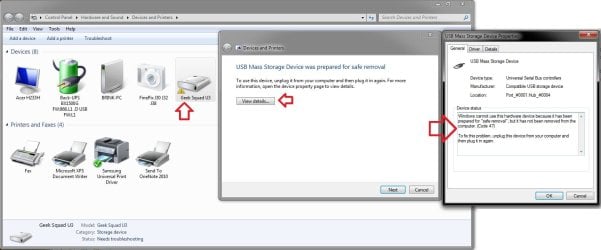
C) You will notice that your device will have a warning/alert overlay icon it now. This only indicates that you will not be able to use this device again unless you unplug it and then plug it in again. (see screenshot below)
Troubleshoot.jpg
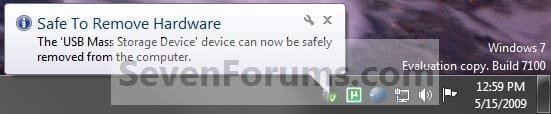
4. When you see this notification message below, you can now safely remove the device from the computer. (see screenshot below)
NOTE: Some devices (ex: USB flash drives) may still have their light on even after you ejected it. As long as you got this Safe to remove hardware message below, it will be safe to disconnect your device even though the light is still on.
Step2.jpg
   Tip
If you do not get the Safe to remove hardware notification message above, then for next time uncheck Always show all icons and notifications on the taskbar (click on link) box and click on OK. Afterwards check the Always show all icons and notifications on the taskbar box and click on OK. This will toggle these settings off an on to have it work again.


That's it,
Shawn


Last edited:
Amicroe 16GB flash drive

using eject in windows explorer windows doesn't remove drive
I have to use the <Safely Remove Hardware and Eject Media> icon in the systray

2x Astone
32GB white Amicroe
using <Eject> in windows explorer is OK.

Vista had <Safely Remove> which worked flawlessly; just make sure all flash drive folders are closed.
win7 only has <Eject>; win7 automatically closes all folders

I normally use Zentimo / SafelyRemove, which have winkey-S as default safely remove keyboard shortcut.
 

My Computer

OS
windows 7 professional 32 bit
but there are hard disk without the power off button like wester digital WESTERN DIGITAL Elements Desktop

how can i power off the hard disk ?
thanks
cheers
 

My Computer

Computer type
PC/Desktop
OS
windows 7 ultimate 64bit
Hello Drugo,

According to the HDD's product information webpage below, it:

Turns on and off with your computer. Enters idle mode when not in use. Utilizes a WD drive with power-saving WD GreenPower Technology and an EnergyStar compliant power supply.
 

My Computer

Computer type
PC/Desktop
Computer Manufacturer/Model Number
Self built custom
OS
64-bit Windows 11 Pro for Workstations
CPU
Intel i7-8700K OC'd to 5 GHz
Motherboard
ASUS ROG Maximus XI Formula Z390
Memory
64 GB (4x16GB) G.SKILL TridentZ RGB DDR4 3600 MHz
Graphics Card(s)
ASUS ROG-STRIX-GTX1080TI-O11G-GAMING
Sound Card
Integrated
Monitor(s) Displays
2 x Samsung Odyssey G7 27"
Screen Resolution
2560x1440
Hard Drives
1TB Samsung 990 PRO M.2,
4TB Samsung 990 PRO PRO M.2,
TerraMaster F8 SSD Plus NAS
PSU
Seasonic Prime Titanium 850W
Case
Thermaltake Core P3
Cooling
Corsair Hydro H115i
Keyboard
Logitech wireless K800
Mouse
Logitech MX Master 4
Internet Speed
2 Gb/s Download and 100 Mb/s Upload
Antivirus
Malwarebyte Anti-Malware Premium
Browser
Google Chrome
Other Info
Logitech Z625 speaker system,
Logitech BRIO 4K Pro webcam,
HP Color LaserJet Pro MFP M477fdn,
APC SMART-UPS RT 1000 XL - SURT1000XLI,
Galaxy S23 Plus phone
Hello Drugo,

According to the HDD's product information webpage below, it:

Turns on and off with your computer. Enters idle mode when not in use. Utilizes a WD drive with power-saving WD GreenPower Technology and an EnergyStar compliant power supply.
thanks Brink

but if i want to power off but keep on my pc?

cheers
 

My Computer

Computer type
PC/Desktop
OS
windows 7 ultimate 64bit
After using the Safely Remove Hardware "Eject" option on it, you should be able to just unplug it from the computer and then the wall outlet to do so.
 

My Computer

Computer type
PC/Desktop
Computer Manufacturer/Model Number
Self built custom
OS
64-bit Windows 11 Pro for Workstations
CPU
Intel i7-8700K OC'd to 5 GHz
Motherboard
ASUS ROG Maximus XI Formula Z390
Memory
64 GB (4x16GB) G.SKILL TridentZ RGB DDR4 3600 MHz
Graphics Card(s)
ASUS ROG-STRIX-GTX1080TI-O11G-GAMING
Sound Card
Integrated
Monitor(s) Displays
2 x Samsung Odyssey G7 27"
Screen Resolution
2560x1440
Hard Drives
1TB Samsung 990 PRO M.2,
4TB Samsung 990 PRO PRO M.2,
TerraMaster F8 SSD Plus NAS
PSU
Seasonic Prime Titanium 850W
Case
Thermaltake Core P3
Cooling
Corsair Hydro H115i
Keyboard
Logitech wireless K800
Mouse
Logitech MX Master 4
Internet Speed
2 Gb/s Download and 100 Mb/s Upload
Antivirus
Malwarebyte Anti-Malware Premium
Browser
Google Chrome
Other Info
Logitech Z625 speaker system,
Logitech BRIO 4K Pro webcam,
HP Color LaserJet Pro MFP M477fdn,
APC SMART-UPS RT 1000 XL - SURT1000XLI,
Galaxy S23 Plus phone
After using the Safely Remove Hardware "Eject" option on it, you should be able to just unplug it from the computer and then the wall outlet to do so.
thanks
but Safely Remove Hardware better alternative
there is
Power off drives on stopping in Vista & Win 7
When you safely remove the device in Windows XP it powers the device off – in the case of a flash drive its led was switched off and in the case of a portable hard drive it was spun down. But Microsoft changed this behavior in Vista and it still exists in Win 7: after you stop the device on these OSes the hard drive continue spinning and flash drive continue lighting. All modern hard drives park theirs heads automatically when you unplug them so in theory this behavior shouldn’t lead to loss data or damaged drives. But in practice the hard drive usually sound strangely when you unplug them on run and this makes a hard drive owner being a bit nervous when he hears that :)
USB Safely Remove can change this behavior and make the system power down USB ports. In order to enable this feature just answer "Yes, please" when USB Safely Remove suggests you to enable it.
 

My Computer

Computer type
PC/Desktop
OS
windows 7 ultimate 64bit
Well, there you go. Even better. :)
 

My Computer

Computer type
PC/Desktop
Computer Manufacturer/Model Number
Self built custom
OS
64-bit Windows 11 Pro for Workstations
CPU
Intel i7-8700K OC'd to 5 GHz
Motherboard
ASUS ROG Maximus XI Formula Z390
Memory
64 GB (4x16GB) G.SKILL TridentZ RGB DDR4 3600 MHz
Graphics Card(s)
ASUS ROG-STRIX-GTX1080TI-O11G-GAMING
Sound Card
Integrated
Monitor(s) Displays
2 x Samsung Odyssey G7 27"
Screen Resolution
2560x1440
Hard Drives
1TB Samsung 990 PRO M.2,
4TB Samsung 990 PRO PRO M.2,
TerraMaster F8 SSD Plus NAS
PSU
Seasonic Prime Titanium 850W
Case
Thermaltake Core P3
Cooling
Corsair Hydro H115i
Keyboard
Logitech wireless K800
Mouse
Logitech MX Master 4
Internet Speed
2 Gb/s Download and 100 Mb/s Upload
Antivirus
Malwarebyte Anti-Malware Premium
Browser
Google Chrome
Other Info
Logitech Z625 speaker system,
Logitech BRIO 4K Pro webcam,
HP Color LaserJet Pro MFP M477fdn,
APC SMART-UPS RT 1000 XL - SURT1000XLI,
Galaxy S23 Plus phone
Well, there you go. Even better. :)
Hi Brink
i guess the program tweak the registry
i would really love to know what extcly does , because the program need a reboot
and it's has not drivers or others

how can i know which key does it change?

so i can add information for the tutorial

thanks
cheers
 

My Computer

Computer type
PC/Desktop
OS
windows 7 ultimate 64bit
I'm afraid I don't know since that's programmed into the program. :(
 

My Computer

Computer type
PC/Desktop
Computer Manufacturer/Model Number
Self built custom
OS
64-bit Windows 11 Pro for Workstations
CPU
Intel i7-8700K OC'd to 5 GHz
Motherboard
ASUS ROG Maximus XI Formula Z390
Memory
64 GB (4x16GB) G.SKILL TridentZ RGB DDR4 3600 MHz
Graphics Card(s)
ASUS ROG-STRIX-GTX1080TI-O11G-GAMING
Sound Card
Integrated
Monitor(s) Displays
2 x Samsung Odyssey G7 27"
Screen Resolution
2560x1440
Hard Drives
1TB Samsung 990 PRO M.2,
4TB Samsung 990 PRO PRO M.2,
TerraMaster F8 SSD Plus NAS
PSU
Seasonic Prime Titanium 850W
Case
Thermaltake Core P3
Cooling
Corsair Hydro H115i
Keyboard
Logitech wireless K800
Mouse
Logitech MX Master 4
Internet Speed
2 Gb/s Download and 100 Mb/s Upload
Antivirus
Malwarebyte Anti-Malware Premium
Browser
Google Chrome
Other Info
Logitech Z625 speaker system,
Logitech BRIO 4K Pro webcam,
HP Color LaserJet Pro MFP M477fdn,
APC SMART-UPS RT 1000 XL - SURT1000XLI,
Galaxy S23 Plus phone
Safely Removal

Hi'
A friend told me that you could safely remove your USB flash drive by press-holding "ESC" whilst removimg the drive. Can this be true?
 

My Computer

Computer Manufacturer/Model Number
Toshiba
OS
Windows 7 Home Premium 64 bit
CPU
Intel(R)
Motherboard
Dont know
Memory
RAM
Graphics Card(s)
Intel
Sound Card
WDM
Monitor(s) Displays
Generic PnP display
Hard Drives
Toshiba MK6475GSX
TSST corp CDDVD TS-L633F
PSU
Dont know
Case
Dont Know
Cooling
Dont know
Hello PapaDove, and welcome to Seven Forums.

I don't think so. I've never heard of that before.
 

My Computer

Computer type
PC/Desktop
Computer Manufacturer/Model Number
Self built custom
OS
64-bit Windows 11 Pro for Workstations
CPU
Intel i7-8700K OC'd to 5 GHz
Motherboard
ASUS ROG Maximus XI Formula Z390
Memory
64 GB (4x16GB) G.SKILL TridentZ RGB DDR4 3600 MHz
Graphics Card(s)
ASUS ROG-STRIX-GTX1080TI-O11G-GAMING
Sound Card
Integrated
Monitor(s) Displays
2 x Samsung Odyssey G7 27"
Screen Resolution
2560x1440
Hard Drives
1TB Samsung 990 PRO M.2,
4TB Samsung 990 PRO PRO M.2,
TerraMaster F8 SSD Plus NAS
PSU
Seasonic Prime Titanium 850W
Case
Thermaltake Core P3
Cooling
Corsair Hydro H115i
Keyboard
Logitech wireless K800
Mouse
Logitech MX Master 4
Internet Speed
2 Gb/s Download and 100 Mb/s Upload
Antivirus
Malwarebyte Anti-Malware Premium
Browser
Google Chrome
Other Info
Logitech Z625 speaker system,
Logitech BRIO 4K Pro webcam,
HP Color LaserJet Pro MFP M477fdn,
APC SMART-UPS RT 1000 XL - SURT1000XLI,
Galaxy S23 Plus phone
Hello PapaDove, and welcome to Seven Forums.

I don't think so. I've never heard of that before.
Brink
may i ask you about To Turn Off USB Selective Suspend ?


does it turn off only the external hard disk or the usb keyboard and the usb mouse too?

thanks
cheers
 

My Computer

Computer type
PC/Desktop
OS
windows 7 ultimate 64bit
Safely Removal

Thanks Brink!
I have practiced this for a while now even though i have always doubted it. I will stop right away and inform others who practiced it too.
 

My Computer

Computer Manufacturer/Model Number
Toshiba
OS
Windows 7 Home Premium 64 bit
CPU
Intel(R)
Motherboard
Dont know
Memory
RAM
Graphics Card(s)
Intel
Sound Card
WDM
Monitor(s) Displays
Generic PnP display
Hard Drives
Toshiba MK6475GSX
TSST corp CDDVD TS-L633F
PSU
Dont know
Case
Dont Know
Cooling
Dont know
Yeah, I would prefer to use Safely Remove Hardware and get a notice that it was actually safe to remove first.
 

My Computer

Computer type
PC/Desktop
Computer Manufacturer/Model Number
Self built custom
OS
64-bit Windows 11 Pro for Workstations
CPU
Intel i7-8700K OC'd to 5 GHz
Motherboard
ASUS ROG Maximus XI Formula Z390
Memory
64 GB (4x16GB) G.SKILL TridentZ RGB DDR4 3600 MHz
Graphics Card(s)
ASUS ROG-STRIX-GTX1080TI-O11G-GAMING
Sound Card
Integrated
Monitor(s) Displays
2 x Samsung Odyssey G7 27"
Screen Resolution
2560x1440
Hard Drives
1TB Samsung 990 PRO M.2,
4TB Samsung 990 PRO PRO M.2,
TerraMaster F8 SSD Plus NAS
PSU
Seasonic Prime Titanium 850W
Case
Thermaltake Core P3
Cooling
Corsair Hydro H115i
Keyboard
Logitech wireless K800
Mouse
Logitech MX Master 4
Internet Speed
2 Gb/s Download and 100 Mb/s Upload
Antivirus
Malwarebyte Anti-Malware Premium
Browser
Google Chrome
Other Info
Logitech Z625 speaker system,
Logitech BRIO 4K Pro webcam,
HP Color LaserJet Pro MFP M477fdn,
APC SMART-UPS RT 1000 XL - SURT1000XLI,
Galaxy S23 Plus phone
Hi! New to the forum, and I'm sure I'll have more questions. This topic seemed relative to my inquiry.
I'm an old XP user who just got converted to 7. I notice that when I do a Safely Remove Hardware task, I get the note that it's OK to remove the device, but the light on my USB device or the light on my PC next to my camera card do not go out when it's safe to remove, as they did when I had XP. Is this a feature of 7 that's different than my XP , or is something not right here? Thanks...
 

My Computer

OS
Windows 7 Professional
Hello kman, and welcome to Seven Forums.

I've noticed that it's pretty much a hit and miss with the light going out for devices. As long as you got the safe to remove message, you're fine to disconnect it though. :)
 

My Computer

Computer type
PC/Desktop
Computer Manufacturer/Model Number
Self built custom
OS
64-bit Windows 11 Pro for Workstations
CPU
Intel i7-8700K OC'd to 5 GHz
Motherboard
ASUS ROG Maximus XI Formula Z390
Memory
64 GB (4x16GB) G.SKILL TridentZ RGB DDR4 3600 MHz
Graphics Card(s)
ASUS ROG-STRIX-GTX1080TI-O11G-GAMING
Sound Card
Integrated
Monitor(s) Displays
2 x Samsung Odyssey G7 27"
Screen Resolution
2560x1440
Hard Drives
1TB Samsung 990 PRO M.2,
4TB Samsung 990 PRO PRO M.2,
TerraMaster F8 SSD Plus NAS
PSU
Seasonic Prime Titanium 850W
Case
Thermaltake Core P3
Cooling
Corsair Hydro H115i
Keyboard
Logitech wireless K800
Mouse
Logitech MX Master 4
Internet Speed
2 Gb/s Download and 100 Mb/s Upload
Antivirus
Malwarebyte Anti-Malware Premium
Browser
Google Chrome
Other Info
Logitech Z625 speaker system,
Logitech BRIO 4K Pro webcam,
HP Color LaserJet Pro MFP M477fdn,
APC SMART-UPS RT 1000 XL - SURT1000XLI,
Galaxy S23 Plus phone
OK... Thanks! Just curious, though, as to what can happen if you forget and remove your device without doing the Safely Remove routine.
 

My Computer

OS
Windows 7 Professional
If Windows was in the middle of copying/moving/reading something from the device at the time you removed it, then that something would be corrupted and/or lost. If the drive was sitting idle with no reads/writes happening, then most likely nothing would happen.

You could disable write caching for the device to help prevent issue by accidentally removing it without using Safely Remove.

http://www.sevenforums.com/tutorials/10392-write-caching-enable-disable.html
 

My Computer

Computer type
PC/Desktop
Computer Manufacturer/Model Number
Self built custom
OS
64-bit Windows 11 Pro for Workstations
CPU
Intel i7-8700K OC'd to 5 GHz
Motherboard
ASUS ROG Maximus XI Formula Z390
Memory
64 GB (4x16GB) G.SKILL TridentZ RGB DDR4 3600 MHz
Graphics Card(s)
ASUS ROG-STRIX-GTX1080TI-O11G-GAMING
Sound Card
Integrated
Monitor(s) Displays
2 x Samsung Odyssey G7 27"
Screen Resolution
2560x1440
Hard Drives
1TB Samsung 990 PRO M.2,
4TB Samsung 990 PRO PRO M.2,
TerraMaster F8 SSD Plus NAS
PSU
Seasonic Prime Titanium 850W
Case
Thermaltake Core P3
Cooling
Corsair Hydro H115i
Keyboard
Logitech wireless K800
Mouse
Logitech MX Master 4
Internet Speed
2 Gb/s Download and 100 Mb/s Upload
Antivirus
Malwarebyte Anti-Malware Premium
Browser
Google Chrome
Other Info
Logitech Z625 speaker system,
Logitech BRIO 4K Pro webcam,
HP Color LaserJet Pro MFP M477fdn,
APC SMART-UPS RT 1000 XL - SURT1000XLI,
Galaxy S23 Plus phone
Back
Top