Safely Remove Hardware - Eject Device

How to Use Safely Remove Hardware to Eject a Device in Windows 7 and Windows 8

   Information
This tutorial will show you how to use Safely Remove Hardware in Windows 7, Windows 8/8.1, and Windows RT to safely shutdown and eject a storage device before just unplugging or disconnecting it to help prevent accidental data loss if data were still being copied or saved to or from the device. For example, if you have write caching enable on the device.

   Tip
To have access to an external drive (ex: USB key) again after you have already ejected it using Safely Remove Hardware, you will just need to unplug it and plug it back in, or restart the PC.


Available Hotfix:
   Warning
It is not recommended to eject an internal drive. If you do, then restarting the computer will allow you to have access to it again.


Here's How:
1. Make sure that anything that is being copied or saved to or from the storage device that you want to eject has finished.

2. Click/tap on the Safely Remove Hardware notification area icon, and click/tap on the Eject drive option for the listed drive that you want to eject, and go to step 4 below. (see screenshot below)
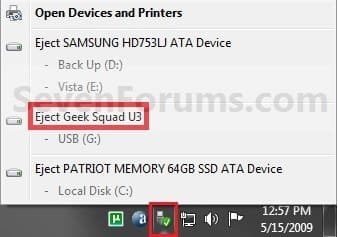
Step1.jpg
OR

3. Open Devices and Printers.
A) Right click or press and hold on the storage device that you want to eject, then click/tap on Eject. (see screenshot below)

OR

B) Right click or press and hold on your computer device (ex: WINDOWS7-PC), select Eject, then click/tap on a listed storage device that you want to eject. (see screenshot below)
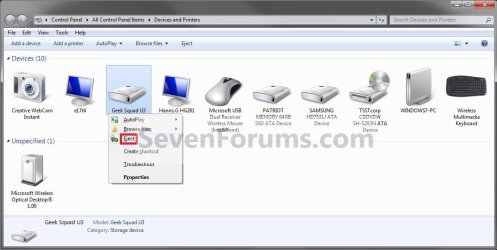
Step1A.jpg
C) You will notice that your device will have a warning/alert overlay icon it now. This only indicates that you will not be able to use this device again unless you unplug it and then plug it in again. (see screenshot below)
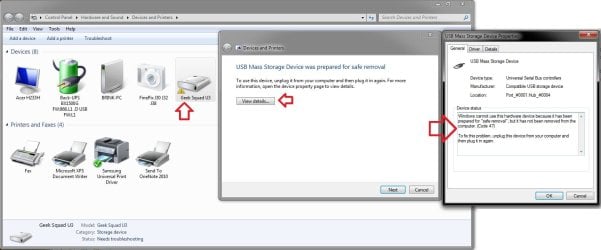
Troubleshoot.jpg
4. When you see this notification message below, you can now safely remove the device from the computer. (see screenshot below)
NOTE: Some devices (ex: USB flash drives) may still have their light on even after you ejected it. As long as you got this Safe to remove hardware message below, it will be safe to disconnect your device even though the light is still on.
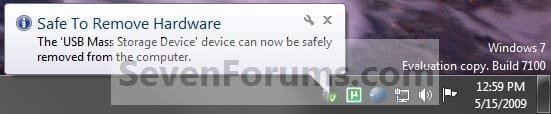
Step2.jpg
   Tip
If you do not get the Safe to remove hardware notification message above, then for next time uncheck Always show all icons and notifications on the taskbar (click on link) box and click on OK. Afterwards check the Always show all icons and notifications on the taskbar box and click on OK. This will toggle these settings off an on to have it work again.


That's it,
Shawn


Last edited:
I'm having sort of the same problem of hugga26: I can eject my USB drive, but I get no balloon notification. After I eject it, I still see its icon. To make sure it's been ejected, I click on the icon, and if it goes away, then I pull the USB drive. Sometimes I forget to do that and open Explorer to see if the drive is still there.

How can I get the notification back?
 

My Computer

OS
Windows 7
Are you using a USB memory stick, a storage device , or is it a wireless phone or wireless mouse USB dongle?

The wireless phone or wireless mouse USB dongle can be unplugged at any time.
 

My Computer

Computer type
PC/Desktop
Computer Manufacturer/Model Number
76~2.0
OS
Windows 7 Ult x64 - SP1/ Windows 8 Pro x64
CPU
Intel Core i5-3570K 4.6GHz
Motherboard
Gigabyte GA-Z77X UD3H, f18
Memory
8GB (2X4GB) DDR3 1600 Corsair Vengeance CL8 1.5v
Graphics Card(s)
Sapphire HD 7770 Vapor-X OC 1GB DDR5
Sound Card
Onboard VIA VT2021
Monitor(s) Displays
22" LCD Dell
Screen Resolution
1680x1050
Hard Drives
Samsung 840Pro 128GB SSD,
Seagate Barracuda 500GB SATA2 7200rpm 32MB cache, Seagate Barracuda 1TB SATA2 7200rpm 32MB cache,
PSU
Corsair HX650W
Case
Cooler Master Storm Scout
Cooling
Corsair H80 2x12cm Noctua NF P12 , 2x14cm case fans
Keyboard
Logitech Wave
Mouse
CM Sentinel
Internet Speed
Dismal
Antivirus
Avast
Browser
Opera Next
Other Info
Haswell laptop: HP Envy 17t-j, i7-4700MQ, GeForce 740M 2GB DDR3, 17.3" Full HD 1920x1080, 16GB RAM, Samsung 840 Pro 128GB, 1TB Hitachi 7200 HDD,
Desktop: eSATA ports,
External eSATA Seagate 500GB SATA2 7200rpm,
External WD USB 500GB
Are you using a USB memory stick, a storage device , or is it a wireless phone or wireless mouse USB dongle?

The wireless phone or wireless mouse USB dongle can be unplugged at any time.
It's a storage device. It happens only on my 7 Pro 64-bit PC, not on the other in my sig.
 
Last edited:

My Computer

OS
Windows 7

My Computer

Computer type
PC/Desktop
Computer Manufacturer/Model Number
Self built custom
OS
64-bit Windows 11 Pro for Workstations
CPU
Intel i7-8700K OC'd to 5 GHz
Motherboard
ASUS ROG Maximus XI Formula Z390
Memory
64 GB (4x16GB) G.SKILL TridentZ RGB DDR4 3600 MHz
Graphics Card(s)
ASUS ROG-STRIX-GTX1080TI-O11G-GAMING
Sound Card
Integrated
Monitor(s) Displays
2 x Samsung Odyssey G7 27"
Screen Resolution
2560x1440
Hard Drives
1TB Samsung 990 PRO M.2,
4TB Samsung 990 PRO PRO M.2,
TerraMaster F8 SSD Plus NAS
PSU
Seasonic Prime Titanium 850W
Case
Thermaltake Core P3
Cooling
Corsair Hydro H115i
Keyboard
Logitech wireless K800
Mouse
Logitech MX Master 4
Internet Speed
2 Gb/s Download and 100 Mb/s Upload
Antivirus
Malwarebyte Anti-Malware Premium
Browser
Google Chrome
Other Info
Logitech Z625 speaker system,
Logitech BRIO 4K Pro webcam,
HP Color LaserJet Pro MFP M477fdn,
APC SMART-UPS RT 1000 XL - SURT1000XLI,
Galaxy S23 Plus phone
Hello Paul,

Double check to make sure that you have checked the Always show all icons and notifications on the taskbar box for the Notification Area icons to see if that may be why you are not getting the notice.

Hope this helps,
Shawn
Thanks, Brink. To save time, I keep Always show all icons and notifications on the taskbar marked for USB storage pen drives. So I don't have to sometimes click that little up arrow to reach the icon.

I don't know what may be causing the notification pop-up not to show. Some conflict, I guess...
 

My Computer

OS
Windows 7

My Computer

Computer type
PC/Desktop
Computer Manufacturer/Model Number
Self built custom
OS
64-bit Windows 11 Pro for Workstations
CPU
Intel i7-8700K OC'd to 5 GHz
Motherboard
ASUS ROG Maximus XI Formula Z390
Memory
64 GB (4x16GB) G.SKILL TridentZ RGB DDR4 3600 MHz
Graphics Card(s)
ASUS ROG-STRIX-GTX1080TI-O11G-GAMING
Sound Card
Integrated
Monitor(s) Displays
2 x Samsung Odyssey G7 27"
Screen Resolution
2560x1440
Hard Drives
1TB Samsung 990 PRO M.2,
4TB Samsung 990 PRO PRO M.2,
TerraMaster F8 SSD Plus NAS
PSU
Seasonic Prime Titanium 850W
Case
Thermaltake Core P3
Cooling
Corsair Hydro H115i
Keyboard
Logitech wireless K800
Mouse
Logitech MX Master 4
Internet Speed
2 Gb/s Download and 100 Mb/s Upload
Antivirus
Malwarebyte Anti-Malware Premium
Browser
Google Chrome
Other Info
Logitech Z625 speaker system,
Logitech BRIO 4K Pro webcam,
HP Color LaserJet Pro MFP M477fdn,
APC SMART-UPS RT 1000 XL - SURT1000XLI,
Galaxy S23 Plus phone
Brink, thanks a lot for another great tutorial!.


Hi all,

I realised my cruzer micro 4GB thumbdrive could not do safety remove using U3 as well as the safety remove icon. But strangely, I can go to "My Computer" and rightclick both my U3 drive and thumbdrive to do a Eject, the U3 and safety remove icon are still in my notication area.

I tried to update my U3 lanchpad version, it doesnt help at all.. any idea to help me fix this problem please? I have other thumbdrive without U3, I am able to eject them using the safety remove at notication area. I have dual boot of windows 7(default boot) as well as windows XP

Hi,
I'm having problem on my cruzer micro (8gb) flash drive. It seems that when I safely remove it, the light on the flash drive doesn't stop. On other pc it does when safely remove.

I've tried the different ways to safely remove as on the 1st page. I noticed on "Devices and Printers", when I eject the flash drive, a warning appears on the icon that means "It needs troubleshooting".

The same here.
I have SanDisk cruzer micro 8gb with u3.
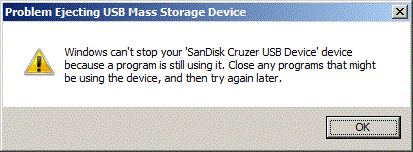
I'm trying to safely eject it, but it claims that some program is still using it.

Here is the notorious window screenshot:
usb.gif

Here is the event in the system event log:
level: information
source: userpnp
event id: 20011
task category: (7006)
description:
Device action request for device 'USB\VID_0781&PID_5406\0000167EB7736603' was vetoed by 'USBSTOR\Disk&Ven_SanDisk&Prod_Cruzer&Rev_4.05\0000167EB7736603&0' with veto type 5.
usb2.gif

However if I preform right click --> eject on the drive in "computer" it's working perfect.

Here SanDisk's reference to this issue:
http://kb.sandisk.com/app/answers/detail/a_id/1168
http://kb.sandisk.com/app/answers/detail/a_id/308/related/1
 
Last edited:

My Computer

OS
Windows 7 Ultimate 32bit
CPU
AMD Phenom II x4 965 3.4GHz
Motherboard
Gigabyte GA-890FXA-UD5 rev2.0
Memory
G.SKILL F3-16000CL8D-4GBPIS (2GBx2)
Graphics Card(s)
Inno3d GTX480 1.5GB GDDR5
Monitor(s) Displays
LG FLATRON W2486L
Screen Resolution
1920x1080@60Hz
Hard Drives
Western Digital Caviar Black WD1002FAEX 1TB 64MB 7200RPM Sata III x3
PSU
Enermax MODU82+ 625W
Case
Thermaltake Element G Middle Tower

My Computer

Computer type
PC/Desktop
Computer Manufacturer/Model Number
Self built custom
OS
64-bit Windows 11 Pro for Workstations
CPU
Intel i7-8700K OC'd to 5 GHz
Motherboard
ASUS ROG Maximus XI Formula Z390
Memory
64 GB (4x16GB) G.SKILL TridentZ RGB DDR4 3600 MHz
Graphics Card(s)
ASUS ROG-STRIX-GTX1080TI-O11G-GAMING
Sound Card
Integrated
Monitor(s) Displays
2 x Samsung Odyssey G7 27"
Screen Resolution
2560x1440
Hard Drives
1TB Samsung 990 PRO M.2,
4TB Samsung 990 PRO PRO M.2,
TerraMaster F8 SSD Plus NAS
PSU
Seasonic Prime Titanium 850W
Case
Thermaltake Core P3
Cooling
Corsair Hydro H115i
Keyboard
Logitech wireless K800
Mouse
Logitech MX Master 4
Internet Speed
2 Gb/s Download and 100 Mb/s Upload
Antivirus
Malwarebyte Anti-Malware Premium
Browser
Google Chrome
Other Info
Logitech Z625 speaker system,
Logitech BRIO 4K Pro webcam,
HP Color LaserJet Pro MFP M477fdn,
APC SMART-UPS RT 1000 XL - SURT1000XLI,
Galaxy S23 Plus phone
In Vista, this was sometimes caused by having the balloon tips disabled. Double check using the "manual" way in Method Two in OPTION TWO in the tutorial below to make sure that they are still enabled. It's the same in Windows 7.

Notification Area Balloon Tips - Enable or Disable - Vista Forums
Didn't work... :cry:

Paul, depending on when this issue first began, you might try a System Restore to a date/time prior to the problem.

http://www.sevenforums.com/tutorials/700-system-restore.html

If you don't have a restore point (turned off, too far back, etc.) I'd try running System File Checker:

http://www.sevenforums.com/tutorials/1538-sfc-scannow-command-system-file-checker.html
 

My Computer

Computer type
Laptop
Computer Manufacturer/Model Number
Sony Vaio VPCEB47GM Laptop
OS
Win 7 Pro 64-bit
CPU
Intel i5 2.4 Ghz
Memory
8GB DDR3
Graphics Card(s)
Intel HD 3000
Sound Card
IDT High Definition
Monitor(s) Displays
15.6 WGXA Anti-Glare LED
Screen Resolution
1280x800
Hard Drives
640Gb 7200rpm
Antivirus
MSE
Browser
Opera (primary) with IE9 backup
I tried every suggestion for my case here TNA–except system restore (too far back).
I'm gonna check on Microsoft Fix it, maybe there's some solution there. Thanks, guys.
 

My Computer

OS
Windows 7
You're welcome Paul. Please keep us posted of your results. :)
 

My Computer

Computer type
PC/Desktop
Computer Manufacturer/Model Number
Self built custom
OS
64-bit Windows 11 Pro for Workstations
CPU
Intel i7-8700K OC'd to 5 GHz
Motherboard
ASUS ROG Maximus XI Formula Z390
Memory
64 GB (4x16GB) G.SKILL TridentZ RGB DDR4 3600 MHz
Graphics Card(s)
ASUS ROG-STRIX-GTX1080TI-O11G-GAMING
Sound Card
Integrated
Monitor(s) Displays
2 x Samsung Odyssey G7 27"
Screen Resolution
2560x1440
Hard Drives
1TB Samsung 990 PRO M.2,
4TB Samsung 990 PRO PRO M.2,
TerraMaster F8 SSD Plus NAS
PSU
Seasonic Prime Titanium 850W
Case
Thermaltake Core P3
Cooling
Corsair Hydro H115i
Keyboard
Logitech wireless K800
Mouse
Logitech MX Master 4
Internet Speed
2 Gb/s Download and 100 Mb/s Upload
Antivirus
Malwarebyte Anti-Malware Premium
Browser
Google Chrome
Other Info
Logitech Z625 speaker system,
Logitech BRIO 4K Pro webcam,
HP Color LaserJet Pro MFP M477fdn,
APC SMART-UPS RT 1000 XL - SURT1000XLI,
Galaxy S23 Plus phone
Ah, thank you Paul. :)
 

My Computer

Computer type
PC/Desktop
Computer Manufacturer/Model Number
Self built custom
OS
64-bit Windows 11 Pro for Workstations
CPU
Intel i7-8700K OC'd to 5 GHz
Motherboard
ASUS ROG Maximus XI Formula Z390
Memory
64 GB (4x16GB) G.SKILL TridentZ RGB DDR4 3600 MHz
Graphics Card(s)
ASUS ROG-STRIX-GTX1080TI-O11G-GAMING
Sound Card
Integrated
Monitor(s) Displays
2 x Samsung Odyssey G7 27"
Screen Resolution
2560x1440
Hard Drives
1TB Samsung 990 PRO M.2,
4TB Samsung 990 PRO PRO M.2,
TerraMaster F8 SSD Plus NAS
PSU
Seasonic Prime Titanium 850W
Case
Thermaltake Core P3
Cooling
Corsair Hydro H115i
Keyboard
Logitech wireless K800
Mouse
Logitech MX Master 4
Internet Speed
2 Gb/s Download and 100 Mb/s Upload
Antivirus
Malwarebyte Anti-Malware Premium
Browser
Google Chrome
Other Info
Logitech Z625 speaker system,
Logitech BRIO 4K Pro webcam,
HP Color LaserJet Pro MFP M477fdn,
APC SMART-UPS RT 1000 XL - SURT1000XLI,
Galaxy S23 Plus phone
It couldn't be easier... :o

I found this:

When I eject media safe to remove hardware message does not appear

and simply changed the option to hide then back to show icons and notifications and... voilà! Everything back to normal!

But now I wonder what Windows thing might have done such a "corruption" of that feature... :confused:

Solved on my part. Thnx y'all!

Paul, just for clarification... did you have to install that utility "Ultimate Windows Tweaker" in order to enable balloon tips?
 

My Computer

Computer type
Laptop
Computer Manufacturer/Model Number
Sony Vaio VPCEB47GM Laptop
OS
Win 7 Pro 64-bit
CPU
Intel i5 2.4 Ghz
Memory
8GB DDR3
Graphics Card(s)
Intel HD 3000
Sound Card
IDT High Definition
Monitor(s) Displays
15.6 WGXA Anti-Glare LED
Screen Resolution
1280x800
Hard Drives
640Gb 7200rpm
Antivirus
MSE
Browser
Opera (primary) with IE9 backup
Thanks!
 

My Computer

Computer Manufacturer/Model Number
Intel DG31PR (Intel Dual core 2.5 E5200 @ 2.5GHz)
OS
windows7 Ultimate SP1 x32bit
CPU
Intel
Motherboard
Intel DG31PR
Memory
Kinsgton 1GB an Transcend 2GB
Graphics Card(s)
Intel- onboard
Sound Card
Intel- onboard
Monitor(s) Displays
ViewSonic LCD Widescreen 19
Screen Resolution
1400x900
Hard Drives
Samsung 256GB
PSU
Legend
Case
Legend
Cooling
Intel
Keyboard
Seemo
Mouse
Prolink
Internet Speed
Download Speed-512Kbps, Upload Speed-128Kbps (ADSL wired)
Other Info
UPS- Prolink Pro650s
Router Prolink H5201
Sub Woofer - Creative 2.1
Ditto. Thanks for the clarification Paul. ;)
 

My Computer

Computer type
Laptop
Computer Manufacturer/Model Number
Sony Vaio VPCEB47GM Laptop
OS
Win 7 Pro 64-bit
CPU
Intel i5 2.4 Ghz
Memory
8GB DDR3
Graphics Card(s)
Intel HD 3000
Sound Card
IDT High Definition
Monitor(s) Displays
15.6 WGXA Anti-Glare LED
Screen Resolution
1280x800
Hard Drives
640Gb 7200rpm
Antivirus
MSE
Browser
Opera (primary) with IE9 backup
Not showing USB drive while ejecting

I tried to do the same thing but did not workout for me.
Everything happened same as u have mentioned but got the below message;
Windows Resource Protection found corrupt files but was unable to repair them.
I still did not get eject pendrive options. same thing what manoj was facing. Please help.
 

My Computer

OS
Windows 7 Home Premium 64bit
I tried to do the same thing but did not workout for me.
Everything happened same as u have mentioned but got the below message;
Windows Resource Protection found corrupt files but was unable to repair them.
I still did not get eject pendrive options. same thing what manoj was facing. Please help.
Raees, since it's about corrupt files, I suggest you try the System File Checker.
 

My Computer

OS
Windows 7
Back
Top