Safest Way to Clone Windows 7 Volume for Dual Booting

Here is a link I found useful. The did not do advice for a generalized BCD before cloning, but did afterward and it does work.

Multibooters, Vista Dual and Multibooting - Cloning Vista

I also wonder if having a separate system and boot partition make a difference (i.e. installing windows 7 on an existing partition where boot and system are the same vs. reformatting and letting windows 7 install create a separate 100MB system partition and boot partition). I have the system=boot.

- Gene
I'm hesitant to enter the discourse again...........
People who are unsure just need to realise that if you have the system reserved active partition it serves an important booting function and you can't simply delete it and walk away. How to incorporate it's function into the Boot partition and have "System, active, Boot.." in one partition has been done to death on this forum.

Can I suggest that if Gregrocker is willing we let him and him alone assist the OP with any further guidelines for this particular issue in order to bring it to a close.
 
Last edited:

My Computer My Computer

At a glance

Windows 7x64 Home Premium SP1Intel i7 2600kG.Skill Ripjaws (DDR3-1600) 2x4GBNvidia GeForce GTS 450; Intel HD Graphics 300...
Computer type
PC/Desktop
Computer Manufacturer/Model Number
Own build
OS
Windows 7x64 Home Premium SP1
CPU
Intel i7 2600k
Motherboard
ASUS P8Z68 Deluxe
Memory
G.Skill Ripjaws (DDR3-1600) 2x4GB
Graphics Card(s)
Nvidia GeForce GTS 450; Intel HD Graphics 3000(GT2+)
Monitor(s) Displays
Dell Ultrasharp IPS panel U2311H, Samsung SyncMaster P2350
Screen Resolution
1920x1080
Hard Drives
Samsung 850 Pro SSD 256GB, Samsung SSD 840 120GB, Seagates 1TB Barracuda ST31000528AS x2
PSU
Seasonic M12II 520W
Case
Lian Li Lancool PC-K60
Cooling
Case: 1x120mm, 3x140mm CPU: Hyper 212+
Keyboard
Logitech MK520 (wireless)
Mouse
Logitech MK520
Internet Speed
6-7 Mbps
Antivirus
Norton Security Premium, Malwarebytes on 2 (MSE on 3rd PC)
Browser
FireFox
Other Info
Audio: Logitech Z523 2.1
Here is a link I found useful. The did not do advice for a generalized BCD before cloning, but did afterward and it does work.

Multibooters, Vista Dual and Multibooting - Cloning Vista

I also wonder if having a separate system and boot partition make a difference (i.e. installing windows 7 on an existing partition where boot and system are the same vs. reformatting and letting windows 7 install create a separate 100MB system partition and boot partition). I have the system=boot.

- Gene


Hello Gene.

There are other ways to create the 100MB SysResv boot partition; have you seen this; and it can be done with Windows own disk management, have a look at the second one.


System Reserved : Create for Dual Boot

Boot Windows 7 from a Logical Partition
 

My Computer My Computer

At a glance

W 7 64-bit UltimateIntel Q9550 Yorkfield8GB Dominator 8500C5DATI : XFX 5870
Computer Manufacturer/Model Number
* BFK Customs *
OS
W 7 64-bit Ultimate
CPU
Intel Q9550 Yorkfield
Motherboard
ASUS P5Q Pro
Memory
8GB Dominator 8500C5D
Graphics Card(s)
ATI : XFX 5870
Sound Card
Realtek HD Audio 7-1
Monitor(s) Displays
1x 47" LCD HDMI & 3x 26" LCD HDMI
Screen Resolution
1920x1080P & 1920x1200
Hard Drives
1x 80GB Intel X25-M G2 SSD : 1x 500GB & 1x 640GB WD Caviar Black(s)
PSU
Corsair 620HX
Case
Cooler Master RC-690
Cooling
Tuniq Tower 120, 2x 140mm and 3x 120mm case fans
Keyboard
Microsoft 500
Mouse
Razer Diamondback 3G
Internet Speed
14 Mb/s
Other Info
1x Koutech 3Gb/s SATA HDD Hot Swap Rack
Here is a link I found useful. The did not do advice for a generalized BCD before cloning, but did afterward and it does work.

Multibooters, Vista Dual and Multibooting - Cloning Vista

I also wonder if having a separate system and boot partition make a difference (i.e. installing windows 7 on an existing partition where boot and system are the same vs. reformatting and letting windows 7 install create a separate 100MB system partition and boot partition). I have the system=boot.

- Gene
I'm hesitant to enter the fray again...........
People who are unsure just need to realise that if you have the system reserved active partition it serves an important booting function and you can't simply delete it and walk away. How to incorporate it's function into the Boot partition and have "System, active, Boot.." in one partition has been done to death on this forum.

Can I suggest that if Gregrocker is willing we let him and him alone assist the OP with any further guidelines for this particular issue in order to bring it to a close.

If the original poster wants me to not assist I won't but I don;t think that is your call.

And since when did this become a fray? Those are fighting words (literally)
 
Last edited:

My Computer My Computer

At a glance

Windows 10 Pro. EFI boot partition, full EFI ...i7 4770k 4.4GHz (44-44-43-43 turbo) @ 1.248V16GB (8GBx2) @2200 MHz G.skill Sniper 10-11-1...MSI GTX 970 Gaming 4G
Computer type
PC/Desktop
Computer Manufacturer/Model Number
Home built (GeneO industries)/Model 4
OS
Windows 10 Pro. EFI boot partition, full EFI boot
CPU
i7 4770k 4.4GHz (44-44-43-43 turbo) @ 1.248V
Motherboard
ASUS Maximus VI Hero
Memory
16GB (8GBx2) @2200 MHz G.skill Sniper 10-11-10-30-1, 1.6V
Graphics Card(s)
MSI GTX 970 Gaming 4G
Sound Card
Onboard SupremeFX Audio
Monitor(s) Displays
NEC Spectraview 2490WUXi-SV
Screen Resolution
1920 x 1200
Hard Drives
Samsung 850 Pro 256GB (OS), Samsung 2x 128GB 840 Pro SSD in RAID0, 3x WD Blue 6Gb/s 1TB RAID0, WD 2TB Black external USB 3.0, 2TB WD20EARS Green external USB 3.0, 2x 500GB Seagate and 1 750 GB external USB, 1x 350GB external USB3
PSU
Seasonic X-850 (2012 KM3 model)
Case
Fractal Design Define R4
Cooling
NH-D14, NF-F12, NF-A15; NF-P14, NF-P12,NF-A14, S12A PWM
Keyboard
Cooler Master Storm Quickfire Rapid - Brown
Mouse
Logitech G602
Internet Speed
126.4 Mb/s down, 24.3 Mb/s up
Other Info
USB 3.0 x8 , SATA III x8, eSATA, USB 2.0 x6. Samsung DVD R/W drive.

WEI: CPU 7.8, Memory 7.9, Graphics 7.9, Disk 7.9
Here is a link I found useful. The did not do advice for a generalized BCD before cloning, but did afterward and it does work.

Multibooters, Vista Dual and Multibooting - Cloning Vista

I also wonder if having a separate system and boot partition make a difference (i.e. installing windows 7 on an existing partition where boot and system are the same vs. reformatting and letting windows 7 install create a separate 100MB system partition and boot partition). I have the system=boot.

- Gene
I'm hesitant to enter the fray again...........
People who are unsure just need to realise that if you have the system reserved active partition it serves an important booting function and you can't simply delete it and walk away. How to incorporate it's function into the Boot partition and have "System, active, Boot.." in one partition has been done to death on this forum.

Can I suggest that if Gregrocker is willing we let him and him alone assist the OP with any further guidelines for this particular issue in order to bring it to a close.

If the original poster wants me to not assist I won't but I don;t think that is your call.
It is absolutely is not my call. Just merely a suggestion as I clearly stated

"Can I suggest that if Gregrocker is willing we...."

If I was asking the question I would simply want an answer from whoever, not a saga (the thread is at page 7 already).
 

My Computer My Computer

At a glance

Windows 7x64 Home Premium SP1Intel i7 2600kG.Skill Ripjaws (DDR3-1600) 2x4GBNvidia GeForce GTS 450; Intel HD Graphics 300...
Computer type
PC/Desktop
Computer Manufacturer/Model Number
Own build
OS
Windows 7x64 Home Premium SP1
CPU
Intel i7 2600k
Motherboard
ASUS P8Z68 Deluxe
Memory
G.Skill Ripjaws (DDR3-1600) 2x4GB
Graphics Card(s)
Nvidia GeForce GTS 450; Intel HD Graphics 3000(GT2+)
Monitor(s) Displays
Dell Ultrasharp IPS panel U2311H, Samsung SyncMaster P2350
Screen Resolution
1920x1080
Hard Drives
Samsung 850 Pro SSD 256GB, Samsung SSD 840 120GB, Seagates 1TB Barracuda ST31000528AS x2
PSU
Seasonic M12II 520W
Case
Lian Li Lancool PC-K60
Cooling
Case: 1x120mm, 3x140mm CPU: Hyper 212+
Keyboard
Logitech MK520 (wireless)
Mouse
Logitech MK520
Internet Speed
6-7 Mbps
Antivirus
Norton Security Premium, Malwarebytes on 2 (MSE on 3rd PC)
Browser
FireFox
Other Info
Audio: Logitech Z523 2.1
Sorry guys - was away for a few days.

The more I read, the more terrified I become about trying this at all - once bitten twice shy I guess.

I don't mind using a BIOS switch to choose boot drive (the system in question is a Dell - so F12), but I don't have clean drives to work with. Because I'm now booting using a clone (on an otherwise clean drive) of an original which then refused to boot, I somehow need to try and find a way to reclone my clone back over my currupted original, which shares a drive with 2 other partitions (both of which I need to keep).

I do also have a 3rd drive in the system, which I can use to create a backup image to restore from, but I'm concerned about some suggestions that the only safe way to do this is to clone onto a clean (and preferably identical) drive.

I will try and wade through the extensive set of posts above and hope I've understood everything before I embark.

Jules

You best option while trying to get the original up and running is to set one of the others up as a primary storage and backup device where you can manually copy things over to that as well as imaging the source drive using the system image already included in 7.

First you would start fresh with the dedicated storage even if you need to wipe it clean to insure the best results. The second step is having the destinattion drive(new OS HD) installed as the second drive until cloning or seeing a working restoration of the image before seeing that made Disk 0.

The backup option in 7 will preserve everything including the 100mb and any other partitions on the source drive without worry. A second image even with Acronis free or full version regardless will allow you to mount the image as a second C drive for incremental backups and allowing you to delete as well as add more files to it.

If any problems are seen from cloning or imaging the last option would be the Windows Easy Transfer tool to restore files and settings following a clean install on the new OS drive. The important thing is getting the new drive up and running along having all your files backed up on a safe location.

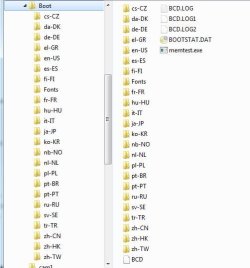
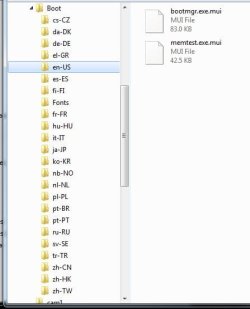
The images attached here examine the "boot" folder seen on C following a prepartitioning and format of a drive seeing a fresh install of Windows compared to one not seeing that having the 100mb system reserved.
 

Attachments

  • BCD Folder Revealed.jpg
    BCD Folder Revealed.jpg
    13.7 KB · Views: 5
  • BCD Store Revealed.jpg
    BCD Store Revealed.jpg
    33.7 KB · Views: 5
  • BCD Store Revealed 2.jpg
    BCD Store Revealed 2.jpg
    27.2 KB · Views: 5

My Computers My Computers

  • At a glance

    W7 Ultimate x64/W10 Pro x64/W11 Pro Triple Bo...AMD Phenom II X4 975 Deneb 3.6ghz - 965 2nd r...Kingston Hyper X DDR3 1600 1.5v 16gb - Hyper ...MSI HD Radeon 5750 1gb - MSI HD Radeon 6450 o...
    Computer type
    PC/Desktop
    Computer Manufacturer/Model Number
    Custom builds = 2
    OS
    W7 Ultimate x64/W10 Pro x64/W11 Pro Triple Boot - Main PC W7 Remote PC Micro ATX W7 Pro x64/W11 Pro
    CPU
    AMD Phenom II X4 975 Deneb 3.6ghz - 965 2nd remote pc
    Motherboard
    Gigabyte GA-790XTA-UD4-Gigabyte GA-880GM-D2H remote pc
    Memory
    Kingston Hyper X DDR3 1600 1.5v 16gb - Hyper X Fury 8gb 2nd
    Graphics Card(s)
    MSI HD Radeon 5750 1gb - MSI HD Radeon 6450 on mini tower
    Sound Card
    Creative Labs X-Fi Xtreme Audio P - Realtek onooard 2nd case
    Monitor(s) Displays
    ASUS VW199T-P 19" HP 2082a Main-HP 2082a 20" remote pc
    Screen Resolution
    Asus 1440x900 - HP 1600x900
    Hard Drives
    WD Black 1TB HD per OS W7, W10, and pending W11 presently on 500gb OS Drive - Pending Triple 1TB HDs for Spanned Storage/backup volume
    Single 2TB external USB enclosure, single 1TB System 7 Host/Boot drive, Pending 8TB external HD for system image b
    PSU
    Corsair 750TX - primary / Corsair CX600 - second
    Case
    Antec 900-2 - SSD compatible / NZXT Vulcan mini tower
    Cooling
    Zalman CNPS9900A
    Keyboard
    AZIO L70 Backlit Letters Gaming - ONN Cordless/USB
    Mouse
    MSI DS200 Programmable, Logitech Cordless
    Internet Speed
    30mbps upgrade - primary hard wired - mini tower usb WiFi
    Antivirus
    GFI VIPRE Internet Security 2014 on W7 2016 beta on W10,
    Browser
    Cyberfox, WaterFox 64bit FF variants, FireFox x64, Pale Moon
    Other Info
    Accomdata fan cooled usb 2.0 PIDE/Sata II, III external enclosure.
    Sambient usb/eSata PATA/Sata II, III external enclosure.
  • At a glance

    W7 Pro x64/W11 ProAMD Deneb 3.6ghz - 965Kingston Hyper X Fury 8gbMSI HD Radeon 6450 DVI Output
    Computer type
    PC/Desktop
    System Manufacturer/Model Number
    CUSTOM ASSEMBLY
    OS
    W7 Pro x64/W11 Pro
    CPU
    AMD Deneb 3.6ghz - 965
    Motherboard
    Gigabyte GA-880GM-D2H remote pc
    Memory
    Kingston Hyper X Fury 8gb
    Graphics Card(s)
    MSI HD Radeon 6450 DVI Output
    Sound Card
    Realtek onooard Creative or Other separate PENDING
    Monitor(s) Displays
    VIZIO 32" LCD TV Separate LCD Pending
    Screen Resolution
    1600x1080
    Hard Drives
    WD 500GB OS Host/Boot WD Green 1TB Storage/Backup
    PSU
    Corsair 600W - THERMALTAKE 600W spare case
    Case
    NZXT Vulcan mini tower
    Cooling
    Twin 120mm Top Fans - 240mm Side Cover
    Keyboard
    ONN Cordless/USB Logitech Cordless
    Mouse
    ONN USB/Cordless - Logitech Cordless
    Internet Speed
    DSL 5G
    Browser
    MS Edge, FireFox, WaterFox x64, FireFox Nightly
    Other Info
    OS Testing-Remote Access to Main TeamViewer
Two points:

First, I think I've flogged to death the case of the original OS volume failing to boot after I cloned it - all documented here. I have given up on that partition and am now looking to go about creating a new clone more 'scientifically' than I did last time.

Second, I have no issues with everybody throwing in their tuppence worth. It's clear that this is a complex area, and there are multiple approaches, all of which are equally valid and more or less suitable to specific cases. I'm just grateful for all the help.

My hope when starting this thread (aside from solving an issue I personally have to tackle) was to try and get a pool of information together which might serve as a resource for others. There is clearly a huge wealth of knowledge and experise on this forum, and there are no really thorough and concise guides on how to create a totally robust multi-booting environment using clones, at least not that I've found.

Thanks again for all the help. If I can wrap up some mixes quickly, today should be D-Day for the clone.

Jules
 

My Computer My Computer

At a glance

Windows 7
OS
Windows 7
Sorry guys, I know there are reams and reams of detail above on how this should be done (all of which is taken on board and I hope understood), but I still have some specific questions which I need some guidance on.

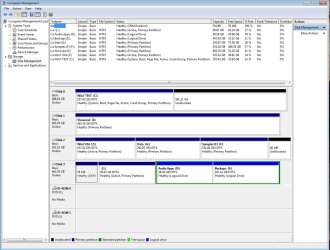
A screengrab of my disk management window is pasted below. It shows four drives:

Disk 0 - is my working Windows7 disk - one OS volume (Drive C) and a bunch of unallocated space. This was cloned from what is now Drive Z (Disk 2), but that process left Drive Z unbootable.

Disk 1 - is a data drive. I can use this to create backup images of my OS volume, which enables me to unplug OS drives whilst keeping my backup image available, for the purpose of restoring the clone to a different physical drive.

Disk 2 - contains my old corrupted OS Volume (now relabled Drive Z) and is where I would ideally create my clone, overwriting Drive Z. It also contains two other partitions which I need to retain, although they could be moved to Drive 0 if absolutely necessary. This disk presumably also contains its own MBR, as it was bootable prior to the last cloning operation.

Disk 3 - is not relevant for this exercise, but contains an old WinXP volume (Drive L), which I was using until a month or so ago. It therefore also has it's own MBR (I assume) as it has been a bootable drive in the past.

I realize this setup makes the cloning process more complex than in an ideal world. Therefore, please can I get some feedback specifically on the following points:

1. Is it safe or even possible to reliably carry out the cloning operation as proposed, at a partition rather than a physical drive level, given that I don't have clean drives to work with? I may as well know if I'm playing Russian roulette, and make the decision if I should buy a new drive and reorganise things?

2. My intention is to use Acronis to create an image backup of Drive C (my current OS volume), onto Disk 1, and then restore that image to what is currently Drive Z (which could be wiped first)? This could be done (I believe) with Disk 0 unplugged. Is this the correct approach?

3. As I am cloning a partition, NOT a physical drive, I have no option to clone the MBR. Does this render the plan unworkable, or does it not matter. Bear in mind that the target disk (disk 2) presumably has an existing MBR (?) and has a history of failing to boot - 'autochck not found' errors, followed by a blue screen. I am concerned that if I don't clone the MBR I will just be creating a new OS volume which is equally unbootable - what's the best way of tackling this?

If there was any chance of getting feedback specifically on these three points, I would be hugely grateful. I'm going to hold off proceeding until I hear back, because I think there are still some uncertainties here.

I'm grateful for all the help, and fully understand if the response is - "don't do it, it's not safe and it might not work".

Jules
 

Attachments

  • Drives.jpg
    Drives.jpg
    146 KB · Views: 9

My Computer My Computer

At a glance

Windows 7
OS
Windows 7
I explained in the previous thread that when your drive letter slips during cloning, it can only be corrected by using Paragon Rescue CD to change it back in the registry. http://www.sevenforums.com/installa...in7-partition-another-drive-2.html#post484430

The best way to Dual boot with separate HD's is to set the preferred HD as first to boot in BIOS setup, then to boot the other HD tap the one-time BIOS Boot Menu key at bootup. In order to set this up, you'll need to mark Active any OS HD which is not currently System Active, unplug all other HD's while you run Startup Repair up to 3 separate times to write the System MBR to it. Then you can plug back in the other HD's and boot whichever via the BIOS.

DISK3 XP appears to have lost its bootability as it no longer is marked System Active. It may need to be repaired if you want to boot it again.
 
Greg, Bare Foot (thought I saw a post earlier but looks like it got deleted)

I really appreciate the responses. Reading between the lines, I'm understanding that the procedure I outline 2 posts above is basically ok, subject to possibly needing to rebuild the MBR on the disk with the new clone by running startup repair 3 times. Therefore I assume it's ok to work at a partition image (rather than a drive image) level, as proposed. I'm cool with the BIOS boot menu approach to dual booting.

Re. your point on drive letters, I did this successfully to get the current clone to work, by using a registry hack, which I presume is what Paragon does. Whilst on that subject, will Windows automatically assign C: to whichever partition it boots into, or do I need to take extra steps to ensure only one partition is given letter C?

Disk 3's OS partition is basically redundant Greg, but I take your point on making it system active if I ever need to use it again.

Cheers

Jules
 

My Computer My Computer

At a glance

Windows 7
OS
Windows 7
Disk #3's OS primary is already active as you can easily see with one look at the snipping you took from the DM. You'll find the option for marking that active in the 7 boot drive's DM greyed out. To see that working again you would need to set that up as the Disk #0 long enough to perform a factory restorary as the default drive and move it over one notch as your second OS drive.

Disk #1 would be better in the Disk #2 spot as your main storage device. As far as cloning or restoring a disk image for an OS drive if the original installation saw itself as C that would be the drive letter the clone or restored image would see when booting into that drive.

The option for everything there however would have been seeing a clean install of 7 on the new drive which would have also seen a fresh registry and no hidden problems to suddenly come up on you rather then trying to expand into the large amount of unallocated drive space from cloning from a 200gb onto a 500gb drive. The drive could easily end up being seen as "raw" if the partition table information is lost.

To illustrate a multiboot setup across multiple drives that worked during the testing stages of the 7 RCs I still had this one from last year showing the first two drives as stand alone installs with the first unplugged for the second drive's install of the 64bit RC and followed by the custom install of the 32bit on a 3rd drive. Note one 500gb Green Power drive had been replaced by the two 1tb GPs and a new tb Black edition just before the retail release.

The situation then was the 32bit installer not adding the second drive's RC into the changed boot options while having taken over as the default OS adding Disk #0's install there. The first drive still remained the boot drive. When inadvertently booting from the 64bit RC disk instead of the 32bit not knowing if a problem with detection was seen the startup repair (recovered) the second drive's RC and added that into the boot options.

Now removing one drive from the equation since you have four there:

Disk #0 = host/boot and default OS drive,
Disk #1 = OEM XP drive,
Disk #2 = Main storage(if planning to eventually remove original 7 drive) or source for clone.
Disk #3 = Second storage drive once clean install seen on host and WET Backup restored. (WET = Windows Easy Transfer)

Cloning drives as seen with businesses to identical drives not mixed sizes to save on costs and tech down time. The findings here when comparing full system images made and restored with the 7 option as well as with Macrium's Reflect and the free as well as full version of Acronis True Image saw the best and most reliable results when going to restore the host drive with the 7 Backup & Recovery option. And this is why the best option for having a reliable OS on the first drive and avoiding problems was the not so fast option of using the WET tool with a clean install.

As for the option to add the XP entry into the 7 BCD that wouldn't prevent selecting and booting into XP using the F key boot device menu to select the drive. You would need to back things up from that drive before the factory recovery option was used for XP however.
 

Attachments

  • RC Testt Partitions .jpg
    RC Testt Partitions .jpg
    109.8 KB · Views: 0

My Computers My Computers

  • At a glance

    W7 Ultimate x64/W10 Pro x64/W11 Pro Triple Bo...AMD Phenom II X4 975 Deneb 3.6ghz - 965 2nd r...Kingston Hyper X DDR3 1600 1.5v 16gb - Hyper ...MSI HD Radeon 5750 1gb - MSI HD Radeon 6450 o...
    Computer type
    PC/Desktop
    Computer Manufacturer/Model Number
    Custom builds = 2
    OS
    W7 Ultimate x64/W10 Pro x64/W11 Pro Triple Boot - Main PC W7 Remote PC Micro ATX W7 Pro x64/W11 Pro
    CPU
    AMD Phenom II X4 975 Deneb 3.6ghz - 965 2nd remote pc
    Motherboard
    Gigabyte GA-790XTA-UD4-Gigabyte GA-880GM-D2H remote pc
    Memory
    Kingston Hyper X DDR3 1600 1.5v 16gb - Hyper X Fury 8gb 2nd
    Graphics Card(s)
    MSI HD Radeon 5750 1gb - MSI HD Radeon 6450 on mini tower
    Sound Card
    Creative Labs X-Fi Xtreme Audio P - Realtek onooard 2nd case
    Monitor(s) Displays
    ASUS VW199T-P 19" HP 2082a Main-HP 2082a 20" remote pc
    Screen Resolution
    Asus 1440x900 - HP 1600x900
    Hard Drives
    WD Black 1TB HD per OS W7, W10, and pending W11 presently on 500gb OS Drive - Pending Triple 1TB HDs for Spanned Storage/backup volume
    Single 2TB external USB enclosure, single 1TB System 7 Host/Boot drive, Pending 8TB external HD for system image b
    PSU
    Corsair 750TX - primary / Corsair CX600 - second
    Case
    Antec 900-2 - SSD compatible / NZXT Vulcan mini tower
    Cooling
    Zalman CNPS9900A
    Keyboard
    AZIO L70 Backlit Letters Gaming - ONN Cordless/USB
    Mouse
    MSI DS200 Programmable, Logitech Cordless
    Internet Speed
    30mbps upgrade - primary hard wired - mini tower usb WiFi
    Antivirus
    GFI VIPRE Internet Security 2014 on W7 2016 beta on W10,
    Browser
    Cyberfox, WaterFox 64bit FF variants, FireFox x64, Pale Moon
    Other Info
    Accomdata fan cooled usb 2.0 PIDE/Sata II, III external enclosure.
    Sambient usb/eSata PATA/Sata II, III external enclosure.
  • At a glance

    W7 Pro x64/W11 ProAMD Deneb 3.6ghz - 965Kingston Hyper X Fury 8gbMSI HD Radeon 6450 DVI Output
    Computer type
    PC/Desktop
    System Manufacturer/Model Number
    CUSTOM ASSEMBLY
    OS
    W7 Pro x64/W11 Pro
    CPU
    AMD Deneb 3.6ghz - 965
    Motherboard
    Gigabyte GA-880GM-D2H remote pc
    Memory
    Kingston Hyper X Fury 8gb
    Graphics Card(s)
    MSI HD Radeon 6450 DVI Output
    Sound Card
    Realtek onooard Creative or Other separate PENDING
    Monitor(s) Displays
    VIZIO 32" LCD TV Separate LCD Pending
    Screen Resolution
    1600x1080
    Hard Drives
    WD 500GB OS Host/Boot WD Green 1TB Storage/Backup
    PSU
    Corsair 600W - THERMALTAKE 600W spare case
    Case
    NZXT Vulcan mini tower
    Cooling
    Twin 120mm Top Fans - 240mm Side Cover
    Keyboard
    ONN Cordless/USB Logitech Cordless
    Mouse
    ONN USB/Cordless - Logitech Cordless
    Internet Speed
    DSL 5G
    Browser
    MS Edge, FireFox, WaterFox x64, FireFox Nightly
    Other Info
    OS Testing-Remote Access to Main TeamViewer
Jules: Win7 will decide what drive letter it wants to be. There is nothing you can do to change it once installed that will not bork your System, except in the case where a cloning app offers to let you select the drive letter during reimaging.
 
Two quick questions:

1. Can you restore an Acronis image using Windows Easy Trasfer? IS there any reason this is better than using Acronis' own recovery environment (I presume they have a boot disk)?
2. Using the BIOS Boot approach to switching OS drives, will the other (unused) drive and its OS still be available to the system?

Jules
 

My Computer My Computer

At a glance

Windows 7
OS
Windows 7
First attempt failed:

1. Used Acronis True Image 2011 to create an image of my working Win7 partition, which I stored on my data drive (now Disk 2)
2. Shut down, unplugged my OS drive (Disk 0) and reshuffled the drive order so that my destination drive is Disk 1 and data disk is Disk 2 (as Night Hawk suggested).
3. Booted into Acronis recovery environment using bootable CD.
4. Worked through Recovery wizard to restore image to Disk 1, into now unallocated space at the start of the disk (Disk 1). Enabled MBR restore and Disk Signature copy in the options (this is the only bit I was unsure about)
5. Result: "Recover Operation Failed" error within a minute, and with no explanation or further details of what the problem is.

Any suggestions gratefully received.

I realize I used Acronis to recover, rather than the Win7 recovery DVD, but I figured this is what Acronis is designed for, and I'm more likeley to get support from them than from Microsoft.

I have a support case logged, and a post on their support forums - here we go again ....

Jules
 

My Computer My Computer

At a glance

Windows 7
OS
Windows 7
I now also have a Disk Signature collision on the system, which has taken my destination disk offline. Although I can force it back online, my principal audio apps on the source drive are now crashing regularly.

Maybe I screwed up and missed some of the advice in the preceding 7 pages of posts, but I cannot believe this type of operation needs to be so complex and potentially destructive.:(
 

My Computer My Computer

At a glance

Windows 7
OS
Windows 7
Jules I've not heard of Acronis acting up in this way before.

Perhaps it's best to start over. System Restore your source drive to before the problems began there. Run sfc/ scannow as Admin to check system files. Post back if any problems persist.

Wipe the target drive using diskpart: http://www.sevenforums.com/tutorials/91339-ssd-hdd-optimize-windows-reinstallation.html

Now try the Acronis cloning function directly between the two drives using the Auto setting, so that it makes any partitioning differntial proportionate and rules out bad settings.
 
Hi Greg

I think the app issues are caused by the Drive Signature conflict, because the source drive was unplugged when I did the recovery, so there's no way that could have been changed. Therefore I doubt system restore will make any difference.

I'll have to wait and see what Acronis say (so far no response).

If I ever manage to complete this operation, I'll post back with what happened and how it worked out.

Jules
 

My Computer My Computer

At a glance

Windows 7
OS
Windows 7
Here is a link I found useful. The did not do advice for a generalized BCD before cloning, but did afterward and it does work.

Multibooters, Vista Dual and Multibooting - Cloning Vista

I also wonder if having a separate system and boot partition make a difference (i.e. installing windows 7 on an existing partition where boot and system are the same vs. reformatting and letting windows 7 install create a separate 100MB system partition and boot partition). I have the system=boot.

- Gene


Hello Gene.

There are other ways to create the 100MB SysResv boot partition; have you seen this; and it can be done with Windows own disk management, have a look at the second one.


System Reserved : Create for Dual Boot

Boot Windows 7 from a Logical Partition

Thanks, I am playing with this on my clone drive

Cheers,
Gene
 

My Computer My Computer

At a glance

Windows 10 Pro. EFI boot partition, full EFI ...i7 4770k 4.4GHz (44-44-43-43 turbo) @ 1.248V16GB (8GBx2) @2200 MHz G.skill Sniper 10-11-1...MSI GTX 970 Gaming 4G
Computer type
PC/Desktop
Computer Manufacturer/Model Number
Home built (GeneO industries)/Model 4
OS
Windows 10 Pro. EFI boot partition, full EFI boot
CPU
i7 4770k 4.4GHz (44-44-43-43 turbo) @ 1.248V
Motherboard
ASUS Maximus VI Hero
Memory
16GB (8GBx2) @2200 MHz G.skill Sniper 10-11-10-30-1, 1.6V
Graphics Card(s)
MSI GTX 970 Gaming 4G
Sound Card
Onboard SupremeFX Audio
Monitor(s) Displays
NEC Spectraview 2490WUXi-SV
Screen Resolution
1920 x 1200
Hard Drives
Samsung 850 Pro 256GB (OS), Samsung 2x 128GB 840 Pro SSD in RAID0, 3x WD Blue 6Gb/s 1TB RAID0, WD 2TB Black external USB 3.0, 2TB WD20EARS Green external USB 3.0, 2x 500GB Seagate and 1 750 GB external USB, 1x 350GB external USB3
PSU
Seasonic X-850 (2012 KM3 model)
Case
Fractal Design Define R4
Cooling
NH-D14, NF-F12, NF-A15; NF-P14, NF-P12,NF-A14, S12A PWM
Keyboard
Cooler Master Storm Quickfire Rapid - Brown
Mouse
Logitech G602
Internet Speed
126.4 Mb/s down, 24.3 Mb/s up
Other Info
USB 3.0 x8 , SATA III x8, eSATA, USB 2.0 x6. Samsung DVD R/W drive.

WEI: CPU 7.8, Memory 7.9, Graphics 7.9, Disk 7.9
I now also have a Disk Signature collision on the system, which has taken my destination disk offline. Although I can force it back online, my principal audio apps on the source drive are now crashing regularly.

Maybe I screwed up and missed some of the advice in the preceding 7 pages of posts, but I cannot believe this type of operation needs to be so complex and potentially destructive.:(

Jules, I haven't read through all of the responses, but if you did as you originally proposed: clone the partition AND the MBR, then you are also cloning the disk signature since it is in the MBR/track 0. This is how you get this signature conflict. You have a couple of options:

1. Don't clone the MBR
2. Do a sector level clone of the whole disk. You would need to save the data in the partitions you wish to keep, then recreate them and restore the data. When a new partition is created on your destination drive, it will get a new signature. or
3. Change the disk signature: http://www.howtohaven.com/system/change-disk-signature.shtml. Though I don't think you would want to take this path - I believe you might then have to hack into the registry to change the signature there for the mounted device, but probably not - windows will probably see all of the partitions on the drive as new volumes without drive letters, and assign them letters.


- Gene
 
Last edited:

My Computer My Computer

At a glance

Windows 10 Pro. EFI boot partition, full EFI ...i7 4770k 4.4GHz (44-44-43-43 turbo) @ 1.248V16GB (8GBx2) @2200 MHz G.skill Sniper 10-11-1...MSI GTX 970 Gaming 4G
Computer type
PC/Desktop
Computer Manufacturer/Model Number
Home built (GeneO industries)/Model 4
OS
Windows 10 Pro. EFI boot partition, full EFI boot
CPU
i7 4770k 4.4GHz (44-44-43-43 turbo) @ 1.248V
Motherboard
ASUS Maximus VI Hero
Memory
16GB (8GBx2) @2200 MHz G.skill Sniper 10-11-10-30-1, 1.6V
Graphics Card(s)
MSI GTX 970 Gaming 4G
Sound Card
Onboard SupremeFX Audio
Monitor(s) Displays
NEC Spectraview 2490WUXi-SV
Screen Resolution
1920 x 1200
Hard Drives
Samsung 850 Pro 256GB (OS), Samsung 2x 128GB 840 Pro SSD in RAID0, 3x WD Blue 6Gb/s 1TB RAID0, WD 2TB Black external USB 3.0, 2TB WD20EARS Green external USB 3.0, 2x 500GB Seagate and 1 750 GB external USB, 1x 350GB external USB3
PSU
Seasonic X-850 (2012 KM3 model)
Case
Fractal Design Define R4
Cooling
NH-D14, NF-F12, NF-A15; NF-P14, NF-P12,NF-A14, S12A PWM
Keyboard
Cooler Master Storm Quickfire Rapid - Brown
Mouse
Logitech G602
Internet Speed
126.4 Mb/s down, 24.3 Mb/s up
Other Info
USB 3.0 x8 , SATA III x8, eSATA, USB 2.0 x6. Samsung DVD R/W drive.

WEI: CPU 7.8, Memory 7.9, Graphics 7.9, Disk 7.9
Hi Gene

The issue I have is a) the MBR on this drive is probably corrupt - I couldn't boot into it after I cloned FROM it to my current OS - so somehow that needs to be fixed, plus the posts above aren't totally clear on whether the MBR should be cloned or not. b) I'm told that some applications cause problems if they don't recognize the Disk Signature, hence why I copied it.

Clearly if I do it again, I won't copy the Disk signature, although that's already done. I'm truly grateful to everybody here for the guidance and suggestions, but the fact that this amount of information has still not resulted in an absolutely clear method for doing this relatively simple operation safely can only suggest that Windows OS'es just don't like doing this.

I hate to say it, (and I am anything but a Mac lover) but on my Mac Pro, I just clone the partition and select it - no MBR and Disk signature worries. It just works. On PC it seems the only way to do this safely is to start wiping disks or work only with identical hardware, which seems kind of anachronistic in the 21st century.

Sorry for the grumpy tone. After all the preparation and trying to get a clear and concise modus operandi, this has become a saga I could really have done without.

Jules
 
Last edited:

My Computer My Computer

At a glance

Windows 7
OS
Windows 7
Here is a link I found useful. The did not do advice for a generalized BCD before cloning, but did afterward and it does work.

Multibooters, Vista Dual and Multibooting - Cloning Vista

I also wonder if having a separate system and boot partition make a difference (i.e. installing windows 7 on an existing partition where boot and system are the same vs. reformatting and letting windows 7 install create a separate 100MB system partition and boot partition). I have the system=boot.

- Gene


Hello Gene.

There are other ways to create the 100MB SysResv boot partition; have you seen this; and it can be done with Windows own disk management, have a look at the second one.


System Reserved : Create for Dual Boot

Boot Windows 7 from a Logical Partition

Thanks, I am playing with this on my clone drive

Cheers,
Gene

Hello Gene.

I'm glad you find them useful; here's another interesting idea. ;)

System Reserved : Multi Boot from Logicals'
 

My Computer My Computer

At a glance

W 7 64-bit UltimateIntel Q9550 Yorkfield8GB Dominator 8500C5DATI : XFX 5870
Computer Manufacturer/Model Number
* BFK Customs *
OS
W 7 64-bit Ultimate
CPU
Intel Q9550 Yorkfield
Motherboard
ASUS P5Q Pro
Memory
8GB Dominator 8500C5D
Graphics Card(s)
ATI : XFX 5870
Sound Card
Realtek HD Audio 7-1
Monitor(s) Displays
1x 47" LCD HDMI & 3x 26" LCD HDMI
Screen Resolution
1920x1080P & 1920x1200
Hard Drives
1x 80GB Intel X25-M G2 SSD : 1x 500GB & 1x 640GB WD Caviar Black(s)
PSU
Corsair 620HX
Case
Cooler Master RC-690
Cooling
Tuniq Tower 120, 2x 140mm and 3x 120mm case fans
Keyboard
Microsoft 500
Mouse
Razer Diamondback 3G
Internet Speed
14 Mb/s
Other Info
1x Koutech 3Gb/s SATA HDD Hot Swap Rack
Back
Top