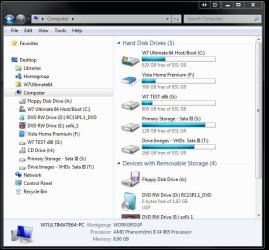
Safest Way to Clone Windows 7 Volume for Dual Booting

One of the main reasons besides the flexibility for having an identical second OS drive beside for testing as well as looking at dual booting is any possible hardware fail of the main drive. There I can restore an image made until eventually seeing another clean install at some point which is not uncommon.

It does preserve the software purchased however which won't always allow continous reinstalls rather then the need to buy the same versions of the same programs over and over. The actual fast and reliable way of seeing any dual boot setup is not restoring images but clean installs on each drive.

Here everything is already covered on one drive alone as far as softwares and running several VMs to look at other OSs. Anything on the second drive is merely a temporary option.
 

My Computers My Computers

  • At a glance

    W7 Ultimate x64/W10 Pro x64/W11 Pro Triple Bo...AMD Phenom II X4 975 Deneb 3.6ghz - 965 2nd r...Kingston Hyper X DDR3 1600 1.5v 16gb - Hyper ...MSI HD Radeon 5750 1gb - MSI HD Radeon 6450 o...
    Computer type
    PC/Desktop
    Computer Manufacturer/Model Number
    Custom builds = 2
    OS
    W7 Ultimate x64/W10 Pro x64/W11 Pro Triple Boot - Main PC W7 Remote PC Micro ATX W7 Pro x64/W11 Pro
    CPU
    AMD Phenom II X4 975 Deneb 3.6ghz - 965 2nd remote pc
    Motherboard
    Gigabyte GA-790XTA-UD4-Gigabyte GA-880GM-D2H remote pc
    Memory
    Kingston Hyper X DDR3 1600 1.5v 16gb - Hyper X Fury 8gb 2nd
    Graphics Card(s)
    MSI HD Radeon 5750 1gb - MSI HD Radeon 6450 on mini tower
    Sound Card
    Creative Labs X-Fi Xtreme Audio P - Realtek onooard 2nd case
    Monitor(s) Displays
    ASUS VW199T-P 19" HP 2082a Main-HP 2082a 20" remote pc
    Screen Resolution
    Asus 1440x900 - HP 1600x900
    Hard Drives
    WD Black 1TB HD per OS W7, W10, and pending W11 presently on 500gb OS Drive - Pending Triple 1TB HDs for Spanned Storage/backup volume
    Single 2TB external USB enclosure, single 1TB System 7 Host/Boot drive, Pending 8TB external HD for system image b
    PSU
    Corsair 750TX - primary / Corsair CX600 - second
    Case
    Antec 900-2 - SSD compatible / NZXT Vulcan mini tower
    Cooling
    Zalman CNPS9900A
    Keyboard
    AZIO L70 Backlit Letters Gaming - ONN Cordless/USB
    Mouse
    MSI DS200 Programmable, Logitech Cordless
    Internet Speed
    30mbps upgrade - primary hard wired - mini tower usb WiFi
    Antivirus
    GFI VIPRE Internet Security 2014 on W7 2016 beta on W10,
    Browser
    Cyberfox, WaterFox 64bit FF variants, FireFox x64, Pale Moon
    Other Info
    Accomdata fan cooled usb 2.0 PIDE/Sata II, III external enclosure.
    Sambient usb/eSata PATA/Sata II, III external enclosure.
  • At a glance

    W7 Pro x64/W11 ProAMD Deneb 3.6ghz - 965Kingston Hyper X Fury 8gbMSI HD Radeon 6450 DVI Output
    Computer type
    PC/Desktop
    System Manufacturer/Model Number
    CUSTOM ASSEMBLY
    OS
    W7 Pro x64/W11 Pro
    CPU
    AMD Deneb 3.6ghz - 965
    Motherboard
    Gigabyte GA-880GM-D2H remote pc
    Memory
    Kingston Hyper X Fury 8gb
    Graphics Card(s)
    MSI HD Radeon 6450 DVI Output
    Sound Card
    Realtek onooard Creative or Other separate PENDING
    Monitor(s) Displays
    VIZIO 32" LCD TV Separate LCD Pending
    Screen Resolution
    1600x1080
    Hard Drives
    WD 500GB OS Host/Boot WD Green 1TB Storage/Backup
    PSU
    Corsair 600W - THERMALTAKE 600W spare case
    Case
    NZXT Vulcan mini tower
    Cooling
    Twin 120mm Top Fans - 240mm Side Cover
    Keyboard
    ONN Cordless/USB Logitech Cordless
    Mouse
    ONN USB/Cordless - Logitech Cordless
    Internet Speed
    DSL 5G
    Browser
    MS Edge, FireFox, WaterFox x64, FireFox Nightly
    Other Info
    OS Testing-Remote Access to Main TeamViewer
Success!! :D

The disk repair activity on the source drive seems to have fixed the issues Acronis was having restoring or cloning the OS volume. Chkdsk and fsutil seem to have done the trick. Clearly my assumption that MFT errors whilst restoring suggested a faulty destination drive cost a load of time and extra frustration.

So here's what's been done:

1. I created a new backup of the source volume using Acronis.
2. I restored it (without the MBR) onto my newly fromatted destination drive, using Acronis from within Windows.
3. I shut down and disconnected the original source drive (to avoid booting issues on the first run).
4. I booted and used F12 to select the new boot drive - this failed, presumably because I had not copied the MBR (the boot drive selector simply froze when I tried to select the new OS drive).
5. I reconnected the old OS drive and rebooted into Windows.
6. I copied the MBR (on its own - Acronis lets you do this) onto the new destination drive.
7. I shut down, disconnected the old OS drive and rebooted, and again selected the new OS drive.
8. This time it gave me a boot error - 'Boot selection failed because a required device is inaccessible'.
9. I ran the Win7 startup CD and Startup Repair 3 times (you see - I do read these posts!).
10. I then booted into the cloned OS no problem.
11. I reconnected my original OS drive and rebooted, and selected the original OS - no problems apart from a Windows authentication warning which allowed me to re-authenticate without issue.
12. Rebooted again and selected the new volume (with both OS drives present in the system) - again booted into the cloned OS no problem.

Every time I reboot, the unused OS volume is relabelled as drive H:, and from what I can see there is no cross-linking between operating systems. In short everything looks good.

From here, I should hopefully be able to run a simple clone (or backup/restore) of my working OS volume, over the backup volume (without MBR), in order to keep both versions of Windows syncronised.

Can I please offer a final big "thank you!" to everyone for all the help and support. We got there in the end - and it only took 13 pages!

Jules
 

My Computer My Computer

At a glance

Windows 7
OS
Windows 7
great news Jules!
Gene
 

My Computer My Computer

At a glance

Windows 10 Pro. EFI boot partition, full EFI ...i7 4770k 4.4GHz (44-44-43-43 turbo) @ 1.248V16GB (8GBx2) @2200 MHz G.skill Sniper 10-11-1...MSI GTX 970 Gaming 4G
Computer type
PC/Desktop
Computer Manufacturer/Model Number
Home built (GeneO industries)/Model 4
OS
Windows 10 Pro. EFI boot partition, full EFI boot
CPU
i7 4770k 4.4GHz (44-44-43-43 turbo) @ 1.248V
Motherboard
ASUS Maximus VI Hero
Memory
16GB (8GBx2) @2200 MHz G.skill Sniper 10-11-10-30-1, 1.6V
Graphics Card(s)
MSI GTX 970 Gaming 4G
Sound Card
Onboard SupremeFX Audio
Monitor(s) Displays
NEC Spectraview 2490WUXi-SV
Screen Resolution
1920 x 1200
Hard Drives
Samsung 850 Pro 256GB (OS), Samsung 2x 128GB 840 Pro SSD in RAID0, 3x WD Blue 6Gb/s 1TB RAID0, WD 2TB Black external USB 3.0, 2TB WD20EARS Green external USB 3.0, 2x 500GB Seagate and 1 750 GB external USB, 1x 350GB external USB3
PSU
Seasonic X-850 (2012 KM3 model)
Case
Fractal Design Define R4
Cooling
NH-D14, NF-F12, NF-A15; NF-P14, NF-P12,NF-A14, S12A PWM
Keyboard
Cooler Master Storm Quickfire Rapid - Brown
Mouse
Logitech G602
Internet Speed
126.4 Mb/s down, 24.3 Mb/s up
Other Info
USB 3.0 x8 , SATA III x8, eSATA, USB 2.0 x6. Samsung DVD R/W drive.

WEI: CPU 7.8, Memory 7.9, Graphics 7.9, Disk 7.9
Glad to hear the good news! :D Now that you have the new drive OSed and running use the option in 7 for creating a full image to store on another drive in case you ever need to restore.

That should take about 100gb or more so store that on the 3rd drive you have there. With that you can keep the mbr info as well as the entire C volume intact and restore at any time. With a second image made by Acronis you can use the Utility & Tools section to see the image mounted for incremental backups for any new files added.

Note the images here where the image made of the previous Vista installation was mounted and accessible.
 

Attachments

  • Mounted Drive Image 1.jpg
    Mounted Drive Image 1.jpg
    68.8 KB · Views: 35
  • Mounted Drive Image 2.jpg
    Mounted Drive Image 2.jpg
    58.3 KB · Views: 31

My Computers My Computers

  • At a glance

    W7 Ultimate x64/W10 Pro x64/W11 Pro Triple Bo...AMD Phenom II X4 975 Deneb 3.6ghz - 965 2nd r...Kingston Hyper X DDR3 1600 1.5v 16gb - Hyper ...MSI HD Radeon 5750 1gb - MSI HD Radeon 6450 o...
    Computer type
    PC/Desktop
    Computer Manufacturer/Model Number
    Custom builds = 2
    OS
    W7 Ultimate x64/W10 Pro x64/W11 Pro Triple Boot - Main PC W7 Remote PC Micro ATX W7 Pro x64/W11 Pro
    CPU
    AMD Phenom II X4 975 Deneb 3.6ghz - 965 2nd remote pc
    Motherboard
    Gigabyte GA-790XTA-UD4-Gigabyte GA-880GM-D2H remote pc
    Memory
    Kingston Hyper X DDR3 1600 1.5v 16gb - Hyper X Fury 8gb 2nd
    Graphics Card(s)
    MSI HD Radeon 5750 1gb - MSI HD Radeon 6450 on mini tower
    Sound Card
    Creative Labs X-Fi Xtreme Audio P - Realtek onooard 2nd case
    Monitor(s) Displays
    ASUS VW199T-P 19" HP 2082a Main-HP 2082a 20" remote pc
    Screen Resolution
    Asus 1440x900 - HP 1600x900
    Hard Drives
    WD Black 1TB HD per OS W7, W10, and pending W11 presently on 500gb OS Drive - Pending Triple 1TB HDs for Spanned Storage/backup volume
    Single 2TB external USB enclosure, single 1TB System 7 Host/Boot drive, Pending 8TB external HD for system image b
    PSU
    Corsair 750TX - primary / Corsair CX600 - second
    Case
    Antec 900-2 - SSD compatible / NZXT Vulcan mini tower
    Cooling
    Zalman CNPS9900A
    Keyboard
    AZIO L70 Backlit Letters Gaming - ONN Cordless/USB
    Mouse
    MSI DS200 Programmable, Logitech Cordless
    Internet Speed
    30mbps upgrade - primary hard wired - mini tower usb WiFi
    Antivirus
    GFI VIPRE Internet Security 2014 on W7 2016 beta on W10,
    Browser
    Cyberfox, WaterFox 64bit FF variants, FireFox x64, Pale Moon
    Other Info
    Accomdata fan cooled usb 2.0 PIDE/Sata II, III external enclosure.
    Sambient usb/eSata PATA/Sata II, III external enclosure.
  • At a glance

    W7 Pro x64/W11 ProAMD Deneb 3.6ghz - 965Kingston Hyper X Fury 8gbMSI HD Radeon 6450 DVI Output
    Computer type
    PC/Desktop
    System Manufacturer/Model Number
    CUSTOM ASSEMBLY
    OS
    W7 Pro x64/W11 Pro
    CPU
    AMD Deneb 3.6ghz - 965
    Motherboard
    Gigabyte GA-880GM-D2H remote pc
    Memory
    Kingston Hyper X Fury 8gb
    Graphics Card(s)
    MSI HD Radeon 6450 DVI Output
    Sound Card
    Realtek onooard Creative or Other separate PENDING
    Monitor(s) Displays
    VIZIO 32" LCD TV Separate LCD Pending
    Screen Resolution
    1600x1080
    Hard Drives
    WD 500GB OS Host/Boot WD Green 1TB Storage/Backup
    PSU
    Corsair 600W - THERMALTAKE 600W spare case
    Case
    NZXT Vulcan mini tower
    Cooling
    Twin 120mm Top Fans - 240mm Side Cover
    Keyboard
    ONN Cordless/USB Logitech Cordless
    Mouse
    ONN USB/Cordless - Logitech Cordless
    Internet Speed
    DSL 5G
    Browser
    MS Edge, FireFox, WaterFox x64, FireFox Nightly
    Other Info
    OS Testing-Remote Access to Main TeamViewer
"This quote could be relevant to the discussion:
Source: "Acronis True Image WD Edition", 2000-2010, pp.48

When MBR recovery is chosen, the "Recover disk signature" box will appear in the bottom left corner at the next step. Recovering disk signature may be desirable due to the following reasons:
1. Acronis True Image WD Edition creates scheduled tasks using the signature of the source hard disk. If you recover the same disk signature, you don't need to re-create or edit the tasks created previously.
2. Some installed applications use disk signature for licensing and other purposes.
3. If you use Windows Restore Points, they will be lost when the disk signature is not recovered.
4. In addition, recovering disk signature allows to recover VSS snapshots used by Windows Vista and Windows 7's "Previous Versions" feature.
If the box is unselected, Acronis True Image WD Edition generates a new disk signature for the recovered drive. This may be needed when you use an image backup not for disaster recovery but for cloning your Windows Vista hard drive to another one. Trying to boot Windows after cloning with both drives connected will result in a problem. During Windows booting, its loader checks the disk signatures of all the connected drives, and if it finds two identical disk signatures, the loader changes the signature of the second disk, which would be the clone disk. Once this happens, the clone disk would not be able to boot up independently of the original disk, because the MountedDevices fields in the clone's registry reference the disk signature of the original disk, which will not be available if the original disk is disconnected."

The section of the same reference:
14.3.6 Cloning with Manual Partitions
may also be of interest

Not sure if this thread is being monitored any longer, but I will try for a response. In line item #3 pertaining to RESTORE PTS, is this stating that RESTORE PTS can be preserved in a clone if the disk signature is identical to the source disk? So far in every instance my clones do not contain the same RESTORE PTS as the source from which the clone was created. In fact, NO RESTORE PTS exist because SYS RESTORE is not enabled for the cloned partitions.

If indeed item #3 suggests that the RESTORE PTS can be preserved how do I make sure the disk signature is transferred identically?

I will also create a new thread to be sure that someone will view my ??'s.
 

My Computer My Computer

At a glance

Windows 7 Home Prem 32 bit
Computer type
PC/Desktop
OS
Windows 7 Home Prem 32 bit
It is a very old thread! Contributors will be flagged so I'm responding.

I think my main comments related to disk signatures. I have system system restore turned off on my SSD and rely exclusively on system images. Some years ago I found system restore unreliable.

I also use Macrium Reflect for system imaging and don't know if a system image restore will maintain "restore points". I'm also not sure about the case with cloning. As I have indicated it isn't an issue for me but someone else may care to comment.

You shouldn't have a problem with disk signatures using system imaging. The disk signature is stored as 4 bytes in the Master Boot Record (MBR) which will be replaced by the original when you perform a system image restore unless you go out of your way not too.

If you want more responses a new thread is a good idea.
 

My Computer My Computer

At a glance

Windows 7x64 Home Premium SP1Intel i7 2600kG.Skill Ripjaws (DDR3-1600) 2x4GBNvidia GeForce GTS 450; Intel HD Graphics 300...
Computer type
PC/Desktop
Computer Manufacturer/Model Number
Own build
OS
Windows 7x64 Home Premium SP1
CPU
Intel i7 2600k
Motherboard
ASUS P8Z68 Deluxe
Memory
G.Skill Ripjaws (DDR3-1600) 2x4GB
Graphics Card(s)
Nvidia GeForce GTS 450; Intel HD Graphics 3000(GT2+)
Monitor(s) Displays
Dell Ultrasharp IPS panel U2311H, Samsung SyncMaster P2350
Screen Resolution
1920x1080
Hard Drives
Samsung 850 Pro SSD 256GB, Samsung SSD 840 120GB, Seagates 1TB Barracuda ST31000528AS x2
PSU
Seasonic M12II 520W
Case
Lian Li Lancool PC-K60
Cooling
Case: 1x120mm, 3x140mm CPU: Hyper 212+
Keyboard
Logitech MK520 (wireless)
Mouse
Logitech MK520
Internet Speed
6-7 Mbps
Antivirus
Norton Security Premium, Malwarebytes on 2 (MSE on 3rd PC)
Browser
FireFox
Other Info
Audio: Logitech Z523 2.1
Back
Top