Dear admins, power users etc.
The last 36h hours i spend googling my problem but couldn't get any help to solve this issue. I have multiple Windows 7 machines (32bit and 64 bit) at home.
One machine shows my samba share in the network environment and i can access it via double click perfectly.
Another machine doesn't show my samba share in the network environment. However I can access it via \\Share\mount or via \\ip\mount (after accessing the mount it shows up in the network environment, not sure what causes the problem of not showing it in the network environment initally)
The "headache-giving" machine that i refer to in the introduction doesn't show the share in the network environment nor allowing me to access the \\Share\mount or \\ip\mount but only connecting to the samba share via mounting it as Networkdrive X,Y,Z...
As one can imagine googling this problem is not the easiest task and gives you a lot of false positive results. Trying to access my Share via \\Share\mount or \\ip\mount gives me the following error message:
(i apologize for it being german, however I hope that the smart ones will understand it anyways! )
As 2/3 or the windows machines can access the samba share, samba smb.conf problems can be excluded. So I strongly assume it is a Windows problem. I am running MCAfee Virusscan Enterprise. Windows Firewall is disabled and the machine is also in the same "WORKGROUP" as the samba share.
I really hope anyone of you have an idea that could help me solve the problem or point me towards the right direction! Thanks a lot in advance!
The error message is default when system cannot resolve the network address. Something is wrong and it could also be on the other end (Mac or Unix / Linux machine).
On the problem Windows rig, can NET VIEW see the Mac/Linux machine? Can you ping it?
Kari
My Computer
At a glance
Windows 10 Pro x64 EN-GB1.6 GHz Intel Core i7-720QM Processor6 GBATI Mobility Radeon HD 5850 Graphics
Computer type
Laptop
Computer Manufacturer/Model Number
HP ENVY 17-1150eg
OS
Windows 10 Pro x64 EN-GB
CPU
1.6 GHz Intel Core i7-720QM Processor
Memory
6 GB
Graphics Card(s)
ATI Mobility Radeon HD 5850 Graphics
Sound Card
Beats sound system with integrated subwoofer
Monitor(s) Displays
17" laptop display, 22" LED and 32" Full HD TV through HDMI
Screen Resolution
1600*900 (1), 1920*1080 (2&3)
Hard Drives
Internal: 2 x 500 GB SATA Hard Disk Drive 7200 rpm
External: 2TB for backups, 3TB USB3 network drive for media
Cooling
As Envy runs a bit warm, I have it on a Cooler Master pad
thank you for the input. net view gives me an error message: "Server is not configured for this Transaction" (translated).
I can ping the linux server without problem (netbios name wise and ip wise). I also tried to reinstall the network driver without success. So i am getting more and more clueless.
That sounds as if the network discovery is turned off. Have you checked that discovery is ON on your selected network type (Home / Work versus Public)?
My Computer
At a glance
Windows 10 Pro x64 EN-GB1.6 GHz Intel Core i7-720QM Processor6 GBATI Mobility Radeon HD 5850 Graphics
Computer type
Laptop
Computer Manufacturer/Model Number
HP ENVY 17-1150eg
OS
Windows 10 Pro x64 EN-GB
CPU
1.6 GHz Intel Core i7-720QM Processor
Memory
6 GB
Graphics Card(s)
ATI Mobility Radeon HD 5850 Graphics
Sound Card
Beats sound system with integrated subwoofer
Monitor(s) Displays
17" laptop display, 22" LED and 32" Full HD TV through HDMI
Screen Resolution
1600*900 (1), 1920*1080 (2&3)
Hard Drives
Internal: 2 x 500 GB SATA Hard Disk Drive 7200 rpm
External: 2TB for backups, 3TB USB3 network drive for media
Cooling
As Envy runs a bit warm, I have it on a Cooler Master pad
Your NET VIEW error message combined with the fact that could still PING the samba tells that A) Network works and B) The Windows machine is not discoverable on the network.
Let's start with this, come back when you have checked the above.
Kari
My Computer
At a glance
Windows 10 Pro x64 EN-GB1.6 GHz Intel Core i7-720QM Processor6 GBATI Mobility Radeon HD 5850 Graphics
Computer type
Laptop
Computer Manufacturer/Model Number
HP ENVY 17-1150eg
OS
Windows 10 Pro x64 EN-GB
CPU
1.6 GHz Intel Core i7-720QM Processor
Memory
6 GB
Graphics Card(s)
ATI Mobility Radeon HD 5850 Graphics
Sound Card
Beats sound system with integrated subwoofer
Monitor(s) Displays
17" laptop display, 22" LED and 32" Full HD TV through HDMI
Screen Resolution
1600*900 (1), 1920*1080 (2&3)
Hard Drives
Internal: 2 x 500 GB SATA Hard Disk Drive 7200 rpm
External: 2TB for backups, 3TB USB3 network drive for media
Cooling
As Envy runs a bit warm, I have it on a Cooler Master pad
Bitte gibst du mir die genaue NET VIEW Fehlermeldung in Deutsch.
English for other geeks to understand: Please give me the exact NET VIEW error message, original in German. Or even better, take a screenshot of command prompt window with command output and post it here.
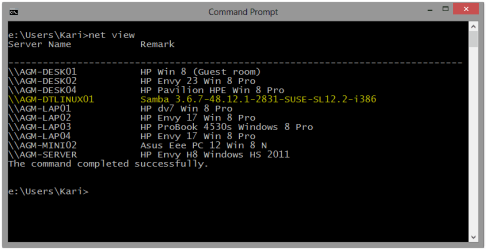
If network discovery is on and samba correctly configured, it should be shown in NET VIEW as for example in this screenshot from my home network:
My Computer
At a glance
Windows 10 Pro x64 EN-GB1.6 GHz Intel Core i7-720QM Processor6 GBATI Mobility Radeon HD 5850 Graphics
Computer type
Laptop
Computer Manufacturer/Model Number
HP ENVY 17-1150eg
OS
Windows 10 Pro x64 EN-GB
CPU
1.6 GHz Intel Core i7-720QM Processor
Memory
6 GB
Graphics Card(s)
ATI Mobility Radeon HD 5850 Graphics
Sound Card
Beats sound system with integrated subwoofer
Monitor(s) Displays
17" laptop display, 22" LED and 32" Full HD TV through HDMI
Screen Resolution
1600*900 (1), 1920*1080 (2&3)
Hard Drives
Internal: 2 x 500 GB SATA Hard Disk Drive 7200 rpm
External: 2TB for backups, 3TB USB3 network drive for media
Cooling
As Envy runs a bit warm, I have it on a Cooler Master pad
Your german is brilliant! Great
Error Message is: "Der Server ist nicht für Transaktionen konfiguriert". As I am working remote at the moment, its kind of hard with the screenshot. I hope also without screenshot you have an idea what it could be!
At home we speak German, my wife is an "Ossie" speaking German only, having studied Russian in school as only foreign language and nowadays "forced" herself to forget it as so many former DDR citizens.
Yes, I can understand that error message. Sorry to have doubt your English, I just wanted to be sure I do not miss something due translation mistakes.
I'm not home but connected there over VPN. I try to make some tests with Samba configuration. I will post my findings here but if I cannot do my tests over VPN it has to wait until I'm home in two or three hours.
However, I repeat what I said earlier: This error message combined with successful ping can IMO only be a configuration error.
Kari
My Computer
At a glance
Windows 10 Pro x64 EN-GB1.6 GHz Intel Core i7-720QM Processor6 GBATI Mobility Radeon HD 5850 Graphics
Computer type
Laptop
Computer Manufacturer/Model Number
HP ENVY 17-1150eg
OS
Windows 10 Pro x64 EN-GB
CPU
1.6 GHz Intel Core i7-720QM Processor
Memory
6 GB
Graphics Card(s)
ATI Mobility Radeon HD 5850 Graphics
Sound Card
Beats sound system with integrated subwoofer
Monitor(s) Displays
17" laptop display, 22" LED and 32" Full HD TV through HDMI
Screen Resolution
1600*900 (1), 1920*1080 (2&3)
Hard Drives
Internal: 2 x 500 GB SATA Hard Disk Drive 7200 rpm
External: 2TB for backups, 3TB USB3 network drive for media
Cooling
As Envy runs a bit warm, I have it on a Cooler Master pad
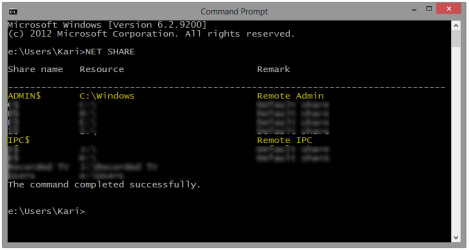
i can confirm positively that i can see with net share admin$ and ipc$. i can see other windows machines with my notebook. however i have another windows machine that can only see the debian server after the first connection to the share. beforehand that machine can not see the share under the network environment. i think i described the behaviour in my first post. it is quite weired. One windows 7 machine can see it and access it perfectly!
I have tried but I cannot reproduce your issue, but whatever I do my connection works.
You have confirmed that Debian is configured correctly, as it must be for your other Windows PCs can access it, Windows Network Discovery is turned on and you can ping Debian.
I'll ask if some of other geeks have an idea, I surely don't.
Kari
My Computer
At a glance
Windows 10 Pro x64 EN-GB1.6 GHz Intel Core i7-720QM Processor6 GBATI Mobility Radeon HD 5850 Graphics
Computer type
Laptop
Computer Manufacturer/Model Number
HP ENVY 17-1150eg
OS
Windows 10 Pro x64 EN-GB
CPU
1.6 GHz Intel Core i7-720QM Processor
Memory
6 GB
Graphics Card(s)
ATI Mobility Radeon HD 5850 Graphics
Sound Card
Beats sound system with integrated subwoofer
Monitor(s) Displays
17" laptop display, 22" LED and 32" Full HD TV through HDMI
Screen Resolution
1600*900 (1), 1920*1080 (2&3)
Hard Drives
Internal: 2 x 500 GB SATA Hard Disk Drive 7200 rpm
External: 2TB for backups, 3TB USB3 network drive for media
Cooling
As Envy runs a bit warm, I have it on a Cooler Master pad
that is actually the very frustrating point 2 out of 3 windows 7 machines can access the Debian Server (\\ and ip\\ wise) and there is no problem. just one stupid windows 7 notebook giving me headache and i don't know why!!! Spend 3 days invastigating already. No more clue right now!
that is actually the very frustrating point 2 out of 3 windows 7 machines can access the Debian Server (\\ and ip\\ wise) and there is no problem. just one stupid windows 7 notebook giving me headache and i don't know why!!! Spend 3 days invastigating already. No more clue right now!
Do you use wireless connection with that notebook and wired for those other computers? If so, could you try to shut down the notebook, connect it with Ethernet cable, boot it and try again?
BTW, I have asked some network gurus to have a look here.
Kari
My Computer
At a glance
Windows 10 Pro x64 EN-GB1.6 GHz Intel Core i7-720QM Processor6 GBATI Mobility Radeon HD 5850 Graphics
Computer type
Laptop
Computer Manufacturer/Model Number
HP ENVY 17-1150eg
OS
Windows 10 Pro x64 EN-GB
CPU
1.6 GHz Intel Core i7-720QM Processor
Memory
6 GB
Graphics Card(s)
ATI Mobility Radeon HD 5850 Graphics
Sound Card
Beats sound system with integrated subwoofer
Monitor(s) Displays
17" laptop display, 22" LED and 32" Full HD TV through HDMI
Screen Resolution
1600*900 (1), 1920*1080 (2&3)
Hard Drives
Internal: 2 x 500 GB SATA Hard Disk Drive 7200 rpm
External: 2TB for backups, 3TB USB3 network drive for media
Cooling
As Envy runs a bit warm, I have it on a Cooler Master pad


 )
)