Same issue With WD my passport 1TB

chinksankit

New member
Local time
5:44 PM
Messages
1
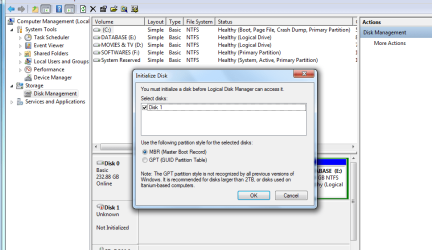
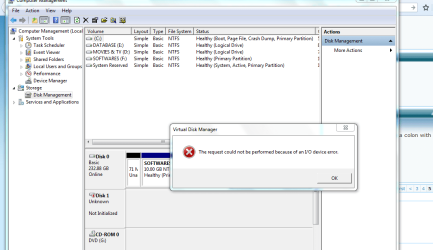
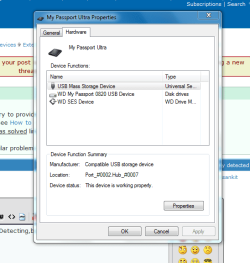
M experiencing the same Problem with my drive as well.Detecting,but not accessible.Please help :confused:
 

Attachments

  • pic 1.PNG
    pic 1.PNG
    30.2 KB · Views: 2
  • pic 2.PNG
    pic 2.PNG
    40.9 KB · Views: 2
  • pic 3.PNG
    pic 3.PNG
    20.7 KB · Views: 15
Last edited by a moderator:

My Computer My Computer

Computer type
Laptop
Computer Manufacturer/Model Number
Dell Studio 1535 Model 2008
OS
Windows 7 utimate 32bit x86
CPU
Intel Core 2 duo T5850 2.17ghz
Motherboard
Intel
Memory
3GB
Graphics Card(s)
Integrated
Hard Drives
Wd
Antivirus
NA
Browser
MOZILLA

My Computer My Computer

Computer type
PC/Desktop
Computer Manufacturer/Model Number
Own build (new) Desk1 / Asus ROG Win 7 / Desk2 1st build
OS
Desk1 7 Home Prem / Desk2 10 Pro / Main lap Asus ROG 10 Pro 2 laptop Toshiba 7 Pro Asus P2520 7 & 10
CPU
Desk1 i5 3750K / Laptop i7 GTX 860M / Desk2 i5 2500
Motherboard
Desk1 Asus P877-V / Desk2 Gigabyte H67 UD3H / Laptop ?
Memory
Desk1 8GB (1866) / Desk2 16GB (1333) / Laptop 8Gb DDR3
Graphics Card(s)
Desk 1& 2NVidia GTX 650 & Laptops on board Intel
Sound Card
Desk 1 & 2 -XONAR DG Realtek High Def audio Laptop
Monitor(s) Displays
Desk 1 Benq HD 2450 / Desk2 Philips 24" / Laptop 17.5"
Screen Resolution
1920x1080 D1 & D2 & Laptop 1
Hard Drives
Desk1 Samsung 120GB 830 SSD
Asus ROG 256GB 850 Pro SSD
Desk2 Samsung 840 256 SSD
Toshiba 120GB EVO
PSU
Desk 1 Corsair HX 1050/ Laptop ? / Desk 2 Corsair HX 650
Case
Desk 1 Cooler HAF XM ? Toshiba laptop / Desk2 Coolermaster
Cooling
Fans on all Desk1 -2 Desk2 - all Coolermasters 5 Laptop ?
Keyboard
Desk 1 MS Sidewinder X6 Desk 2 MS Sidewinder X 4
Mouse
Desk 1&2 - Gigabyte MS 900 gamer - laptop - Logitec wireless
Internet Speed
ADSL2+
Other Info
One other Desktop (tester) and spare Toshba laptop both with SSD's
Running Kaspersky 2016 ISS on all machines config'd identically
Logitec audio stereo systems on each machine (x3)
Canon MG5250MFC
Router/modem TP-Link running WPA2SK
Hello chinksankit and I am sorry you are having this problem!

So, to check if I am getting this right, you have an external WD My Passport 1TB hard drive and it has stopped being shown in My Computer, meaning it's prompting you to initialize it, but I suppose there is data on the drive that you need?

Which My Passport is this exactly and what were the circumstances under which it developed the issue?

Usually, this error would mean that the drive has had a partition table error or a corruption with the file system or many corrupted files on it. These would be reasons to make it stop working and accessed.

You could try using in cmd the command sfc /scannow, here's some more information on it from the Microsoft Support page:

https://support.microsoft.com/en-us/kb/929833?wa=wsignin1.0

Also, you could try fixing the master boot record, if the drive was initialized in MBR, this sevenforums tutorial would show you how:

http://www.sevenforums.com/tutorials/20864-mbr-restore-windows-7-master-boot-record.html

Good luck and post back! :)

CK_WD
 

My Computer My Computer

Computer type
PC/Desktop
OS
Windows 7 Home Premium x64
Back
Top