Solved SanDisk Cruzer Flash Drive-AUTOPLAY problem

prukeyhi

New member
Power User
VIP
Local time
1:57 PM
Messages
224
Location
Haifa-IL
Hi,

I have this flash drive
USB Flash Memory - Smart Design Flash USB Drive by SanDisk
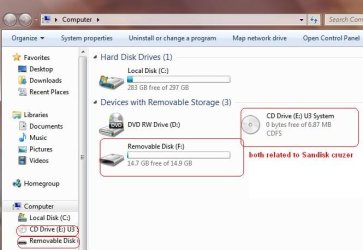
U3 is built within it. As i put it in win7 i dont have the AUTOPLAY menu , but I can through the browser locate the two components of the drive under My Computer:

1-CD DRIVE SYSTEM U3

2-REMOVABLE DISK

I think I read somewhere win 7 Such is restricted to built-DOK with U3 security because ...?

-I've No problem at all with AUTOPLAY in win 7 with all others DOK or disk insertion.

-I've No problem with the "problematic" DOK on VISTA / XP -AUTOPLAY menus opened immediately.

The problem is known?

How can we overcome it in WIN7?
 
Last edited:

My Computer My Computer

Computer type
PC/Desktop
OS
98SE/XP/windows7 32bit/ win10
I'm a little confused.

Not your fault, just my slow grasping of problems.

Could you do me a favor and

post a snip of the output of:
WIN E key combo
WIN is the key with the wavy flag.

Make a snapshot:
WIN | type SNIPPING | ENTER
Click the New button.
Drag the cursor around the area you want to snip.
File | Save as | select save location and name | Save button

Post the snapshot:
http://www.sevenforums.com/tutorials/9733-how-post-screenshot-seven-forums.html
 
Last edited:

My Computer My Computer

Computer Manufacturer/Model Number
Toshiba Satellite S875D-S7239 laptop
OS
MS Windows 7 Ultimate SP1 64-bit
CPU
AMD A10-4600M
Motherboard
AMD Pumori (Socket FT1)
Memory
6.00 GB Dual-Channel DDR3 @ 798MHz (11-11-12-28)
Graphics Card(s)
AMD Radeon HD 7660G
Sound Card
High Definition Audio Device
Monitor(s) Displays
Generic PnP Monitor (1600x900@60Hz)
Screen Resolution
1600x900@60Hz
Hard Drives
SSD 119GB Corsair CSSD-V128GB2 ATA Device
Keyboard
Standard PS/2 Keyboard
Mouse
HP Wireless Optical Mobile Mouse Model FHA-3410
Internet Speed
What the local pub, local coffee shop offers.
Other Info
Optical Drive:MATSHITA BD-CMB UJ160B ATA Device


Also have an Asus ha1002xp netbook with Win 7 Ultimate installed.
please:
 

Attachments

  • Untitled.jpg
    Untitled.jpg
    37.3 KB · Views: 135

My Computer My Computer

Computer type
PC/Desktop
OS
98SE/XP/windows7 32bit/ win10
My Sandisk Cruzer shows the same two exact options.
To use the U3 software click the CD drive (E).
To directly access files click the Removable Disk (F).

There is nothing wrong Windows is reading it as two seperate drives, one thru the U3 software and second by direct access.
If you look the MB size is different so Windows sees 2 drives plugged in.
Just an oddity not a problem.

I thought it very strange the first time I plugged mine in until I realized what it was doing.:D

Mike
 
Last edited:

My Computer My Computer

Computer Manufacturer/Model Number
Hopalong/ Godzilla
OS
Windows7 Pro 64bit SP-1; Windows XP Pro 32bit
CPU
Intel Core i7-870 Lynnfield 2.93GHz LGA 1156 95W Quad-Core
Motherboard
ASUS P7P55D-E PRO
Memory
8GB@1400MHz Crucial Ballistix DDR3-1600 4x2GB
Graphics Card(s)
ASUS ENGTX460 DirectCU/2DI/1GD5 1GB 256-bit GDDR5
Sound Card
VIA Onboard
Monitor(s) Displays
Asus VS248H-P 24"; Samsung SyncMaster 941BW 19"ws
Screen Resolution
1920x1080; 1440x900
Hard Drives
Samsung 830 120GB SSD
Intel 320 120GB SSD
Western Digital Caviar Black WD7501AALS 750GB 7200 RPM SATA 3.0Gb/s
Western Digital Caviar Black WD6401AALS 640GB 7200 RPM SATA 3.0Gb/s
PSU
COOLER MASTER Silent Pro RS850-AMBAJ3-US 850W Modular
Case
COOLER MASTER HAF 932 RC-932-KKN5-GP Black
Cooling
Scythe "Mugen-2 Rev.B" (2 ScytheKaze-Jyuni PWM fans)
Keyboard
Logitech K-320
Mouse
Kensington
Antivirus
Avast Inernet Suite
Browser
IE 9 ; Chrome
thanks guys
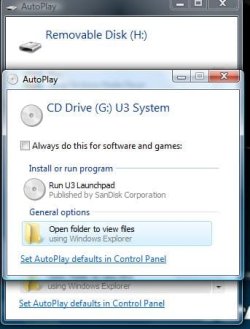
BUT my problem is -no autoplay menu upon Sandisk Cruzer insertion...

here is how autoplay (2 of them) opens in vista for Sandisk Cruzer
 

Attachments

  • Untitled.jpg
    Untitled.jpg
    24.1 KB · Views: 30

My Computer My Computer

Computer type
PC/Desktop
OS
98SE/XP/windows7 32bit/ win10
Click the Run U3 Launchpad in your picture.

Let it load. A U3 icon will be in the system tray. See picture below.
Right click the U3 icon then left click "Autorun U3 Launchpad on Drive Insertion".

Right click the icon again and there should be a check mark beside Autorun.
Leave it checked.
Click Open U3 Launchpad.
Click Eject.
Pull the drive, replug and hopefully it will ask you what you want to do.

That should do the trick I hope..

Howdy Karl.
Wasn't trying to butt in just new I had one that did the same.;)
 
Last edited:

My Computer My Computer

Computer Manufacturer/Model Number
Hopalong/ Godzilla
OS
Windows7 Pro 64bit SP-1; Windows XP Pro 32bit
CPU
Intel Core i7-870 Lynnfield 2.93GHz LGA 1156 95W Quad-Core
Motherboard
ASUS P7P55D-E PRO
Memory
8GB@1400MHz Crucial Ballistix DDR3-1600 4x2GB
Graphics Card(s)
ASUS ENGTX460 DirectCU/2DI/1GD5 1GB 256-bit GDDR5
Sound Card
VIA Onboard
Monitor(s) Displays
Asus VS248H-P 24"; Samsung SyncMaster 941BW 19"ws
Screen Resolution
1920x1080; 1440x900
Hard Drives
Samsung 830 120GB SSD
Intel 320 120GB SSD
Western Digital Caviar Black WD7501AALS 750GB 7200 RPM SATA 3.0Gb/s
Western Digital Caviar Black WD6401AALS 640GB 7200 RPM SATA 3.0Gb/s
PSU
COOLER MASTER Silent Pro RS850-AMBAJ3-US 850W Modular
Case
COOLER MASTER HAF 932 RC-932-KKN5-GP Black
Cooling
Scythe "Mugen-2 Rev.B" (2 ScytheKaze-Jyuni PWM fans)
Keyboard
Logitech K-320
Mouse
Kensington
Antivirus
Avast Inernet Suite
Browser
IE 9 ; Chrome
Karl,
-My last picture is from VISTA pc not WIN7
- "Autorun U3 Launchpad on Drive Insertion" was checked already....
- i did not get autoplay menus at all... did you?
 

My Computer My Computer

Computer type
PC/Desktop
OS
98SE/XP/windows7 32bit/ win10
Both autoplay options opened for me.
I'm not sure why yours isn't.
 
Last edited:

My Computer My Computer

Computer Manufacturer/Model Number
Hopalong/ Godzilla
OS
Windows7 Pro 64bit SP-1; Windows XP Pro 32bit
CPU
Intel Core i7-870 Lynnfield 2.93GHz LGA 1156 95W Quad-Core
Motherboard
ASUS P7P55D-E PRO
Memory
8GB@1400MHz Crucial Ballistix DDR3-1600 4x2GB
Graphics Card(s)
ASUS ENGTX460 DirectCU/2DI/1GD5 1GB 256-bit GDDR5
Sound Card
VIA Onboard
Monitor(s) Displays
Asus VS248H-P 24"; Samsung SyncMaster 941BW 19"ws
Screen Resolution
1920x1080; 1440x900
Hard Drives
Samsung 830 120GB SSD
Intel 320 120GB SSD
Western Digital Caviar Black WD7501AALS 750GB 7200 RPM SATA 3.0Gb/s
Western Digital Caviar Black WD6401AALS 640GB 7200 RPM SATA 3.0Gb/s
PSU
COOLER MASTER Silent Pro RS850-AMBAJ3-US 850W Modular
Case
COOLER MASTER HAF 932 RC-932-KKN5-GP Black
Cooling
Scythe "Mugen-2 Rev.B" (2 ScytheKaze-Jyuni PWM fans)
Keyboard
Logitech K-320
Mouse
Kensington
Antivirus
Avast Inernet Suite
Browser
IE 9 ; Chrome
Both autoplay options opened for me.
I'm not sure why yours isn't.
Well that's why i started this thread ...
i have no idea what can cause this fault :(
 

My Computer My Computer

Computer type
PC/Desktop
OS
98SE/XP/windows7 32bit/ win10
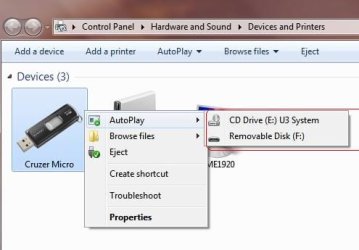
Open Computer as you did above to show drives.
Right click the CD drive showing the U3. Left click Open Auto Play.
New window left click "View more Autoplay options...."
See picture below.
In the new window "Use Auto play" at top should be checked as outlined in yellow in the picture.

You can also set each setting on this last page to Always ask by clicking curtain and choosing that option or which ever you prefer.
 
Last edited:

My Computer My Computer

Computer Manufacturer/Model Number
Hopalong/ Godzilla
OS
Windows7 Pro 64bit SP-1; Windows XP Pro 32bit
CPU
Intel Core i7-870 Lynnfield 2.93GHz LGA 1156 95W Quad-Core
Motherboard
ASUS P7P55D-E PRO
Memory
8GB@1400MHz Crucial Ballistix DDR3-1600 4x2GB
Graphics Card(s)
ASUS ENGTX460 DirectCU/2DI/1GD5 1GB 256-bit GDDR5
Sound Card
VIA Onboard
Monitor(s) Displays
Asus VS248H-P 24"; Samsung SyncMaster 941BW 19"ws
Screen Resolution
1920x1080; 1440x900
Hard Drives
Samsung 830 120GB SSD
Intel 320 120GB SSD
Western Digital Caviar Black WD7501AALS 750GB 7200 RPM SATA 3.0Gb/s
Western Digital Caviar Black WD6401AALS 640GB 7200 RPM SATA 3.0Gb/s
PSU
COOLER MASTER Silent Pro RS850-AMBAJ3-US 850W Modular
Case
COOLER MASTER HAF 932 RC-932-KKN5-GP Black
Cooling
Scythe "Mugen-2 Rev.B" (2 ScytheKaze-Jyuni PWM fans)
Keyboard
Logitech K-320
Mouse
Kensington
Antivirus
Avast Inernet Suite
Browser
IE 9 ; Chrome
karl,
do you have any V sign mark next to anything ?
 

Attachments

  • Untitled.jpg
    Untitled.jpg
    20.5 KB · Views: 13

My Computer My Computer

Computer type
PC/Desktop
OS
98SE/XP/windows7 32bit/ win10
Right click the CD drive showing the U3. Click Open Auto Play
When i right -click Open Auto Play on the cd drive or the removable disk - i do not get autoplay menu ...
-"Use Auto play" at top is already checked(like in your last screen shot)
 

My Computer My Computer

Computer type
PC/Desktop
OS
98SE/XP/windows7 32bit/ win10
Right click the disk with the U3 where it shows all the disk drives.
Left click the Open Auto Play.
Left click the next item listed also.

Edited previous post with left or right click.
 

My Computer My Computer

Computer Manufacturer/Model Number
Hopalong/ Godzilla
OS
Windows7 Pro 64bit SP-1; Windows XP Pro 32bit
CPU
Intel Core i7-870 Lynnfield 2.93GHz LGA 1156 95W Quad-Core
Motherboard
ASUS P7P55D-E PRO
Memory
8GB@1400MHz Crucial Ballistix DDR3-1600 4x2GB
Graphics Card(s)
ASUS ENGTX460 DirectCU/2DI/1GD5 1GB 256-bit GDDR5
Sound Card
VIA Onboard
Monitor(s) Displays
Asus VS248H-P 24"; Samsung SyncMaster 941BW 19"ws
Screen Resolution
1920x1080; 1440x900
Hard Drives
Samsung 830 120GB SSD
Intel 320 120GB SSD
Western Digital Caviar Black WD7501AALS 750GB 7200 RPM SATA 3.0Gb/s
Western Digital Caviar Black WD6401AALS 640GB 7200 RPM SATA 3.0Gb/s
PSU
COOLER MASTER Silent Pro RS850-AMBAJ3-US 850W Modular
Case
COOLER MASTER HAF 932 RC-932-KKN5-GP Black
Cooling
Scythe "Mugen-2 Rev.B" (2 ScytheKaze-Jyuni PWM fans)
Keyboard
Logitech K-320
Mouse
Kensington
Antivirus
Avast Inernet Suite
Browser
IE 9 ; Chrome
-that's what i did before -i do not get autoplay menu :(
-please answer my #11 question
-Any further help will be appreciated!
 

My Computer My Computer

Computer type
PC/Desktop
OS
98SE/XP/windows7 32bit/ win10
I am not sure what V sign you are refering to in your picture?
I don't know. ??

Found an easier way to get to Auotplay
Start then Control Panel then Auto Play is the third alphabetical listing on mine- should be similar on yours. Click it and at the top left is the place to checkmark if it isn't already.

I posted to try to get some extra help.

Mike
 

My Computer My Computer

Computer Manufacturer/Model Number
Hopalong/ Godzilla
OS
Windows7 Pro 64bit SP-1; Windows XP Pro 32bit
CPU
Intel Core i7-870 Lynnfield 2.93GHz LGA 1156 95W Quad-Core
Motherboard
ASUS P7P55D-E PRO
Memory
8GB@1400MHz Crucial Ballistix DDR3-1600 4x2GB
Graphics Card(s)
ASUS ENGTX460 DirectCU/2DI/1GD5 1GB 256-bit GDDR5
Sound Card
VIA Onboard
Monitor(s) Displays
Asus VS248H-P 24"; Samsung SyncMaster 941BW 19"ws
Screen Resolution
1920x1080; 1440x900
Hard Drives
Samsung 830 120GB SSD
Intel 320 120GB SSD
Western Digital Caviar Black WD7501AALS 750GB 7200 RPM SATA 3.0Gb/s
Western Digital Caviar Black WD6401AALS 640GB 7200 RPM SATA 3.0Gb/s
PSU
COOLER MASTER Silent Pro RS850-AMBAJ3-US 850W Modular
Case
COOLER MASTER HAF 932 RC-932-KKN5-GP Black
Cooling
Scythe "Mugen-2 Rev.B" (2 ScytheKaze-Jyuni PWM fans)
Keyboard
Logitech K-320
Mouse
Kensington
Antivirus
Avast Inernet Suite
Browser
IE 9 ; Chrome
-i do not have any V sign as you can see in my photo, do you have any thing marked?
-Control Panel then Auto Play checkmark is there already
 

My Computer My Computer

Computer type
PC/Desktop
OS
98SE/XP/windows7 32bit/ win10
I didn't see anything with a V.

I'm out of options so I posted for some help. I'm not sure when. It depends on who is on line and has any ideas.
Sorry I wasn't more help.
There is probably a simple check mark or box somewhere I missed or don't know about yet.

Mike

Try reading through this tutorial. I just found it but have not read it myself.
I'll read it also. Meet you back here.

http://www.sevenforums.com/tutorials/27544-autoplay-enable-disable-autorun.html
 

My Computer My Computer

Computer Manufacturer/Model Number
Hopalong/ Godzilla
OS
Windows7 Pro 64bit SP-1; Windows XP Pro 32bit
CPU
Intel Core i7-870 Lynnfield 2.93GHz LGA 1156 95W Quad-Core
Motherboard
ASUS P7P55D-E PRO
Memory
8GB@1400MHz Crucial Ballistix DDR3-1600 4x2GB
Graphics Card(s)
ASUS ENGTX460 DirectCU/2DI/1GD5 1GB 256-bit GDDR5
Sound Card
VIA Onboard
Monitor(s) Displays
Asus VS248H-P 24"; Samsung SyncMaster 941BW 19"ws
Screen Resolution
1920x1080; 1440x900
Hard Drives
Samsung 830 120GB SSD
Intel 320 120GB SSD
Western Digital Caviar Black WD7501AALS 750GB 7200 RPM SATA 3.0Gb/s
Western Digital Caviar Black WD6401AALS 640GB 7200 RPM SATA 3.0Gb/s
PSU
COOLER MASTER Silent Pro RS850-AMBAJ3-US 850W Modular
Case
COOLER MASTER HAF 932 RC-932-KKN5-GP Black
Cooling
Scythe "Mugen-2 Rev.B" (2 ScytheKaze-Jyuni PWM fans)
Keyboard
Logitech K-320
Mouse
Kensington
Antivirus
Avast Inernet Suite
Browser
IE 9 ; Chrome
some progression !
i'm able to open autoplay menus (with right click) only after reboot when the sandisk is still pluged in the USB port.
but when i eject it out and insert again - i can not reopen right click autoplay menus.
please tell me how you eject the sandisk in details please -may be the answer is lying here...

EDIT- thanks i read the tutorial my settings were/are correct.
 

Attachments

  • Untitled.jpg
    Untitled.jpg
    39.9 KB · Views: 14
Last edited:

My Computer My Computer

Computer type
PC/Desktop
OS
98SE/XP/windows7 32bit/ win10
Right click the U3 icon in the task bar. Left click Safely eject.
If Icon is missing go to Computer and right click either drive shown for Flash drive. The U3 or Sandisk.
Then left click Eject which wil be down the list 6-8 spots in the window.
It should tell you when it is safe or light on flash drive will go off.

Read this tutorial. We already did the method One.
Go to Method Two. I just did it on mine. They were all default.
There will be four items listed. Disable the top one leave the other three default.

AutoPlay - Enable or Disable AutoRun

Marking them disable actually turns the stuff on. It is arse backwards writing by Microsoft.
You are disabling the disable function.
Go figure.
 

My Computer My Computer

Computer Manufacturer/Model Number
Hopalong/ Godzilla
OS
Windows7 Pro 64bit SP-1; Windows XP Pro 32bit
CPU
Intel Core i7-870 Lynnfield 2.93GHz LGA 1156 95W Quad-Core
Motherboard
ASUS P7P55D-E PRO
Memory
8GB@1400MHz Crucial Ballistix DDR3-1600 4x2GB
Graphics Card(s)
ASUS ENGTX460 DirectCU/2DI/1GD5 1GB 256-bit GDDR5
Sound Card
VIA Onboard
Monitor(s) Displays
Asus VS248H-P 24"; Samsung SyncMaster 941BW 19"ws
Screen Resolution
1920x1080; 1440x900
Hard Drives
Samsung 830 120GB SSD
Intel 320 120GB SSD
Western Digital Caviar Black WD7501AALS 750GB 7200 RPM SATA 3.0Gb/s
Western Digital Caviar Black WD6401AALS 640GB 7200 RPM SATA 3.0Gb/s
PSU
COOLER MASTER Silent Pro RS850-AMBAJ3-US 850W Modular
Case
COOLER MASTER HAF 932 RC-932-KKN5-GP Black
Cooling
Scythe "Mugen-2 Rev.B" (2 ScytheKaze-Jyuni PWM fans)
Keyboard
Logitech K-320
Mouse
Kensington
Antivirus
Avast Inernet Suite
Browser
IE 9 ; Chrome
-upon eject it tells that it is safe to (on small square above the taskbar)
but the light on flash drive is not going off, but kind of slowly blinking every 3 seconds instead.

-i tried method 2 as well , my top one was disabled already and other 3 as default (not configure state) i also tried to put all 4 on default Still no good.

Still the best state i've reached is on #18 :(

Hopalong X- thank you very much so far !
Any other suggestions please?
 

My Computer My Computer

Computer type
PC/Desktop
OS
98SE/XP/windows7 32bit/ win10
Back
Top