Solved SanDisk Cruzer Flash Drive-AUTOPLAY problem

Put the top one back to disabled. Leave others at default. Otherwise Autoplay may not work for your CD player.

I noticed my light didn't go off either just now. As long as it tells you it is safe.
My Memorex light goes off so I thought they all did.

Sorry it isn't working right on the Autorun.
I'm out of options.
Maybe someone else will come up with something.
Check back later on this thread.
Maybe???

Mike
 

My Computer My Computer

At a glance

Windows7 Pro 64bit SP-1; Windows XP Pro 32bitIntel Core i7-870 Lynnfield 2.93GHz LGA 1156 ...8GB@1400MHz Crucial Ballistix DDR3-1600 4x2GBASUS ENGTX460 DirectCU/2DI/1GD5 1GB 256-bit G...
Computer Manufacturer/Model Number
Hopalong/ Godzilla
OS
Windows7 Pro 64bit SP-1; Windows XP Pro 32bit
CPU
Intel Core i7-870 Lynnfield 2.93GHz LGA 1156 95W Quad-Core
Motherboard
ASUS P7P55D-E PRO
Memory
8GB@1400MHz Crucial Ballistix DDR3-1600 4x2GB
Graphics Card(s)
ASUS ENGTX460 DirectCU/2DI/1GD5 1GB 256-bit GDDR5
Sound Card
VIA Onboard
Monitor(s) Displays
Asus VS248H-P 24"; Samsung SyncMaster 941BW 19"ws
Screen Resolution
1920x1080; 1440x900
Hard Drives
Samsung 830 120GB SSD
Intel 320 120GB SSD
Western Digital Caviar Black WD7501AALS 750GB 7200 RPM SATA 3.0Gb/s
Western Digital Caviar Black WD6401AALS 640GB 7200 RPM SATA 3.0Gb/s
PSU
COOLER MASTER Silent Pro RS850-AMBAJ3-US 850W Modular
Case
COOLER MASTER HAF 932 RC-932-KKN5-GP Black
Cooling
Scythe "Mugen-2 Rev.B" (2 ScytheKaze-Jyuni PWM fans)
Keyboard
Logitech K-320
Mouse
Kensington
Antivirus
Avast Inernet Suite
Browser
IE 9 ; Chrome
Looks like it might be a PlugnPlay issue, since it thinks it's a CD player might be a IDE/AHCI issue.

What is the BIOS setting for SATA?
IDE, AHCI or RAID?

It seems to be acting like an external HDD, if in IDE mode will only see the memory stick when it's plugged in before booting. It won't like it if you disconnect it while the computer is still running. You might get errors if you unplug it without shutting down the computer.

If your SATA setting is IDE and you want to change it to AHCI this tutorial will show you how to do this without re-installing your OS.


Another way to get around this is the handy HotSwap app.
You can try the Hot Swap app, it might work for you in IDE mode, haven't tried it myself as I found it after I changed to AHCI mode.

Hot Swap

It does the same thing as you can remove device from Device Manager but it provides much friendly user interface as you remove the removable device from the "Safely Remove Hardware" icon in the notification area.

I've used this for a couple of years, it will stay in the same place as the MS 'Safely Remove Hardware' does, actually looks and acts just like it but, will let you select any device in your system including your main HDD.

It will not load/install on your computer as a running program, you can open it when needed or set it as a startup task, then it will run after login.

A BIOS update on my laptop enabled the built in plugnPlay to work correctly, so didn't need HotSwap on it any more but, still use it on two desktops.

Let us know if this helps.
 

My Computer My Computer

At a glance

Windows 7 Ult x64 - SP1/ Windows 8 Pro x64Intel Core i5-3570K 4.6GHz8GB (2X4GB) DDR3 1600 Corsair Vengeance CL8 1.5vSapphire HD 7770 Vapor-X OC 1GB DDR5
Computer type
PC/Desktop
Computer Manufacturer/Model Number
76~2.0
OS
Windows 7 Ult x64 - SP1/ Windows 8 Pro x64
CPU
Intel Core i5-3570K 4.6GHz
Motherboard
Gigabyte GA-Z77X UD3H, f18
Memory
8GB (2X4GB) DDR3 1600 Corsair Vengeance CL8 1.5v
Graphics Card(s)
Sapphire HD 7770 Vapor-X OC 1GB DDR5
Sound Card
Onboard VIA VT2021
Monitor(s) Displays
22" LCD Dell
Screen Resolution
1680x1050
Hard Drives
Samsung 840Pro 128GB SSD,
Seagate Barracuda 500GB SATA2 7200rpm 32MB cache, Seagate Barracuda 1TB SATA2 7200rpm 32MB cache,
PSU
Corsair HX650W
Case
Cooler Master Storm Scout
Cooling
Corsair H80 2x12cm Noctua NF P12 , 2x14cm case fans
Keyboard
Logitech Wave
Mouse
CM Sentinel
Internet Speed
Dismal
Antivirus
Avast
Browser
Opera Next
Other Info
Haswell laptop: HP Envy 17t-j, i7-4700MQ, GeForce 740M 2GB DDR3, 17.3" Full HD 1920x1080, 16GB RAM, Samsung 840 Pro 128GB, 1TB Hitachi 7200 HDD,
Desktop: eSATA ports,
External eSATA Seagate 500GB SATA2 7200rpm,
External WD USB 500GB
hi dave,
i use AHCI
the utility is nice thanks, but does not help me.

Mike,
1-did you update or something on your sandisk drivers /U3 ?
2-under HKEY_CURRENT_USER\Software\Microsoft\Windows\CurrentVersion\Policies\Explorer
*i have default value for NoDriveTypeAutoRun is 0x91 (145) is it the same for you?
*DO you have another key there "NoDriveAutoRun "(i do not have just read a tweak about it)

I tried to reinstall sandisk drivers but no good.
cant get autoplay menu for the sandisk...
 
Last edited:

My Computer My Computer

At a glance

98SE/XP/windows7 32bit/ win10
Computer type
PC/Desktop
OS
98SE/XP/windows7 32bit/ win10
Problem solved :)
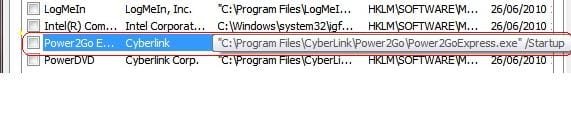
after some reading in sandisk forums i found out some gadgets can cause this problem.the fault gadget belongs
to cyberlink power2go express. after remove it from MSCONFIG- sandisk autoplay menus are open!
thank all the friends trying to help me through (Dear Mike)
 

Attachments

  • Untitled.jpg
    Untitled.jpg
    13.8 KB · Views: 114

My Computer My Computer

At a glance

98SE/XP/windows7 32bit/ win10
Computer type
PC/Desktop
OS
98SE/XP/windows7 32bit/ win10
thats an interesting soloution, thanks for posting results i have power2go on this laptop,so any issues i shall know why .although i have a sandisk cruzer slice flash and it shows autoplay fine.
 

My Computer My Computer

At a glance

Microsoft Windows 7 Home Premium 64-bit 7600IIx4 amd athelon 635 processor2x2gbati radeon HD 5450
Computer Manufacturer/Model Number
Hewlett packard/p6512uk
OS
Microsoft Windows 7 Home Premium 64-bit 7600
CPU
IIx4 amd athelon 635 processor
Motherboard
FOXCONN 2AA9
Memory
2x2gb
Graphics Card(s)
ati radeon HD 5450
Sound Card
(1) Realtek High Definition Audio (2) AMD High Definition
Monitor(s) Displays
samsung lcd tv 32"
Screen Resolution
1360x 768
Hard Drives
(1) WDC WD10 01FAES-60Z2A0 SATA Disk Device (2) Maxtor OneTouch USB Device (3) ST310003 33AS USB Device (4) WD My Book 1111 USB Device
PSU
?
Cooling
air!
Keyboard
wireless hp
Mouse
wireless Hp,optical
Internet Speed
1.10mb/s
Antivirus
MSE
Browser
Firefox
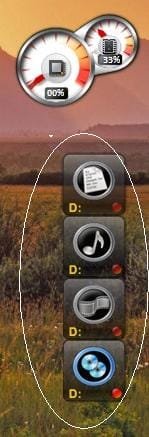
that's how the fault gadget looks like on the desktop
 

Attachments

  • Untitled.jpg
    Untitled.jpg
    15.3 KB · Views: 12

My Computer My Computer

At a glance

98SE/XP/windows7 32bit/ win10
Computer type
PC/Desktop
OS
98SE/XP/windows7 32bit/ win10
Your welcome.
Though I didn't get it working.

:DYou now know where all the Windows Autorun buttons, check boxes and default settings are!!!;)

Take care.
Mike
 

My Computer My Computer

At a glance

Windows7 Pro 64bit SP-1; Windows XP Pro 32bitIntel Core i7-870 Lynnfield 2.93GHz LGA 1156 ...8GB@1400MHz Crucial Ballistix DDR3-1600 4x2GBASUS ENGTX460 DirectCU/2DI/1GD5 1GB 256-bit G...
Computer Manufacturer/Model Number
Hopalong/ Godzilla
OS
Windows7 Pro 64bit SP-1; Windows XP Pro 32bit
CPU
Intel Core i7-870 Lynnfield 2.93GHz LGA 1156 95W Quad-Core
Motherboard
ASUS P7P55D-E PRO
Memory
8GB@1400MHz Crucial Ballistix DDR3-1600 4x2GB
Graphics Card(s)
ASUS ENGTX460 DirectCU/2DI/1GD5 1GB 256-bit GDDR5
Sound Card
VIA Onboard
Monitor(s) Displays
Asus VS248H-P 24"; Samsung SyncMaster 941BW 19"ws
Screen Resolution
1920x1080; 1440x900
Hard Drives
Samsung 830 120GB SSD
Intel 320 120GB SSD
Western Digital Caviar Black WD7501AALS 750GB 7200 RPM SATA 3.0Gb/s
Western Digital Caviar Black WD6401AALS 640GB 7200 RPM SATA 3.0Gb/s
PSU
COOLER MASTER Silent Pro RS850-AMBAJ3-US 850W Modular
Case
COOLER MASTER HAF 932 RC-932-KKN5-GP Black
Cooling
Scythe "Mugen-2 Rev.B" (2 ScytheKaze-Jyuni PWM fans)
Keyboard
Logitech K-320
Mouse
Kensington
Antivirus
Avast Inernet Suite
Browser
IE 9 ; Chrome
Back
Top