- Local time
- 4:40 PM
- Messages
- 512
Hi,
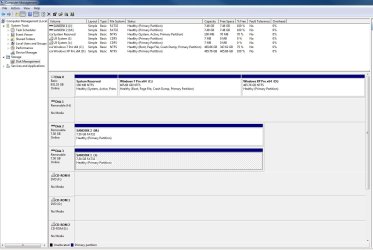
I have a couple of SanDisk 8GB Cruzer Micro USB Flash Drives that don't display consistently in Win 7 Disk Management. They are labeled SANDISK 1 and SANDISK 2. They appear properly as a drive icon with SANDISK 2 drive letter M or SANDISK 1 drive letter K in Win 7 Computer - Devices with Removable Storage, but intermittently appear properly in Win 7 Disk Management. For example, in the Volume list in the top window, I see only an disk icon under volume, nothing under File System, but Layout, Type, Status, Capacity, Free Space and the remainder of the columns appear normal.
Also, in the graphical display in the lower portion of the center section below the Volume list section, the left column appears normal, but the graphical portion to the right only displays 7.50GB, Healthy (Primary Partition), the label and drive letter are not displayed. Also, when I right click the displayed device in the left column, I get a pop-up entitled SanDisk Cruzer USB Device Properties, but when I click the Volumes Tab, I can't select the Volume and click Properties, because only a drive icon and capacity are displayed, the Propertied button is greyed out.
Interestingly, the above description is for when I have only one of the USB devices plugged into the system. When I plug the second USB device into the system, it displays properly without any issues. I don't think it's a device issue, because I can get either to display properly if it's the second USB device attached as indicated in the attached screen shots.
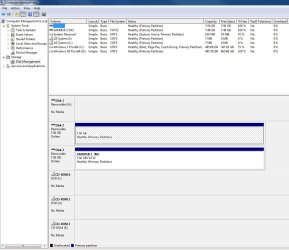
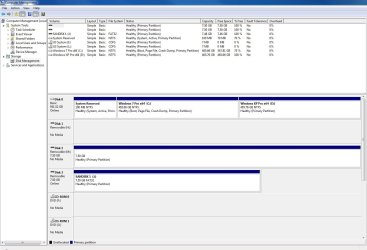
Also, as depicted in the second screen shot, if I unplug the problem device, it will clear from the lower section, but the drive icon and information doesn't clear from the Volume list section. You can see the two icons with missing information, because I plugged the device back in. They are for the same USB device. In this case, SANDISK 2.
Is there a solution to his issue?
Thanks in advance for your assistance.
Regards
I have a couple of SanDisk 8GB Cruzer Micro USB Flash Drives that don't display consistently in Win 7 Disk Management. They are labeled SANDISK 1 and SANDISK 2. They appear properly as a drive icon with SANDISK 2 drive letter M or SANDISK 1 drive letter K in Win 7 Computer - Devices with Removable Storage, but intermittently appear properly in Win 7 Disk Management. For example, in the Volume list in the top window, I see only an disk icon under volume, nothing under File System, but Layout, Type, Status, Capacity, Free Space and the remainder of the columns appear normal.
Also, in the graphical display in the lower portion of the center section below the Volume list section, the left column appears normal, but the graphical portion to the right only displays 7.50GB, Healthy (Primary Partition), the label and drive letter are not displayed. Also, when I right click the displayed device in the left column, I get a pop-up entitled SanDisk Cruzer USB Device Properties, but when I click the Volumes Tab, I can't select the Volume and click Properties, because only a drive icon and capacity are displayed, the Propertied button is greyed out.
Interestingly, the above description is for when I have only one of the USB devices plugged into the system. When I plug the second USB device into the system, it displays properly without any issues. I don't think it's a device issue, because I can get either to display properly if it's the second USB device attached as indicated in the attached screen shots.
Also, as depicted in the second screen shot, if I unplug the problem device, it will clear from the lower section, but the drive icon and information doesn't clear from the Volume list section. You can see the two icons with missing information, because I plugged the device back in. They are for the same USB device. In this case, SANDISK 2.
Is there a solution to his issue?
Thanks in advance for your assistance.
Regards
My Computer
At a glance
Windows 7 Professional x64 SP1Intel i7-980x @ 3.6GHzCorsair 12GB DDR3 RAM (3x4GB)EVGA NVIDIA GeForce GTX 760 SC
- Computer type
- PC/Desktop
- Computer Manufacturer/Model Number
- Custom Build
- OS
- Windows 7 Professional x64 SP1
- CPU
- Intel i7-980x @ 3.6GHz
- Motherboard
- Intel DX58SO
- Memory
- Corsair 12GB DDR3 RAM (3x4GB)
- Graphics Card(s)
- EVGA NVIDIA GeForce GTX 760 SC
- Sound Card
- Intel High Definition 7.1 Audio Subsystem - Realtek ALC889
- Monitor(s) Displays
- Dual Display - LG Electronics Flatron L227WTG
- Screen Resolution
- 1680 x 1050 60Hz 32-bit
- Hard Drives
- 2 Seagate Constellation ST1000NM0033 1TB SATA 6Gb/s HDDs configured as Intel SATA Array 0, RST RAID 1, Vol. 0 (C:\) & Vol. 1 (D:\), & 2 Seagate Barracuda ST500DM002 500GB SATA 6Gb/s HDDs configured as Intel SATA Array 1 RST RAID 1, Vol. 0 (E:\)
- PSU
- Corsair HX850W
- Case
- Antec P182
- Cooling
- Stock Intel i7-980x Cooling Solution + 4 120mm Case Fans
- Keyboard
- Microsoft Wireless Multimedia Keyboard 1.1
- Mouse
- Microsoft Standard Wireless Optical Mouse
- Internet Speed
- DSL - 3.0 Mb/s download 768 Kb/s upload
- Antivirus
- ESET Smart Security 12, Defender & SuperAntiSpyware Pro
- Browser
- Firefox Quantum 64-bit
- Other Info
- Optical Drives: Pioneer DVR-216R & TSSTcorp SH-S223Q, Anker USB 3.0 PCI-E Card, Hauppauge WinTV-HVR 2250 Dual TV Tuner Board for Windows Media Center, Bose Companion 3 Series II multimedia speaker system, APC Smart-UPS SMT1500