Sapphire HD3650 64-bit problem

pr00thisi

New member
Local time
10:42 AM
Messages
14
Hi I have just ugraded to Windows 7 64-bit and am having trouble getting my Sapphire HD3650 to work, I have had a look through the forums and have seen the addition to the .inf file that I can do but I think the line I keep finding is for the 32-bit version...

I'm using the 9.10 Hotfix version and my product key thingy is 9596

but the [ATI.Mfg.NTx86.6.0] section doesn't exist, I think it has been replaced with [ATI.Mfg.NTamd64.6.0]

but if I add the line:

"ATI Radeon HD 3650 AGP" = ati2mtag_RV630, PCI\VEN_1002&DEV_9596

in that section when the computer restarts after installing the driver I just get a black screen and then it restarts itself and then I have to load up in repair mode and restore it to a previous point to get it to work again..

Im getting quite frustrated to any help you guy can give would be greatly appreciated!
 

My Computer

OS
Windows 7
We'll get this to work somehow.

If I had to bet, you are using the wrong .inf, hence your troubles.
The line is the same for 32 or 64 bit, just different sections, as you've noted.

Generally, you want to use the first .inf in the folder, when looking at the folder contents in alphabetical order.

You're on the right track. Let me know if this helps or we need to do other stuff to get it working. In very rare instances, the CPU to AGP bridge comes into play.
 

My Computer

Computer Manufacturer/Model Number
self built
OS
7600.20510 x86
CPU
P4 550 3.4 GHz HT running at 3.5 GHz
Motherboard
MSI PM8M3-V (MS-7211 v1.x) Micro-ATX mainboard
Memory
OCZ 2 GB(2x1GB) DDR400mHz running @ 414 mHz
Graphics Card(s)
HIS Radeon HD 3850 IceQ 3 Turbo HDMI Dual DL-DVI AGP
Sound Card
MOTU Traveler firewire studio interface 192 kHz 24 bit
Monitor(s) Displays
22" widescreen Acer X223W LCD, 17" Compaq P75 CRT
Screen Resolution
1680x1050 and 1280x1024
Hard Drives
SATA I x2 WD, 400 GB and 120 GB, SATA 2 WD Caviar Black 1 TB
PSU
350W generic
Case
Cybertronpc, it glows blue
Cooling
stock cpu fan, Ice-Q 3 gpu and system, many case fans
Keyboard
Logitch Classical Keyboard 200
Mouse
Logitech Mediaplay cordless
Internet Speed
1792/448 kbits/sec
Other Info
SATA II PCI fake RAID adapter, 1 GB Readyboost, original ATI Remote Wonder (even works with WMC perfectly), Logitech Rumblepad 2 game controller x2
this is all I get just the one .inf
 

Attachments

  • INF.jpg
    INF.jpg
    78.2 KB · Views: 93

My Computer

OS
Windows 7
Alright. I don't think that's the right folder. Let me download the x64 and look. I'll get back to ya on this in a few.
 

My Computer

Computer Manufacturer/Model Number
self built
OS
7600.20510 x86
CPU
P4 550 3.4 GHz HT running at 3.5 GHz
Motherboard
MSI PM8M3-V (MS-7211 v1.x) Micro-ATX mainboard
Memory
OCZ 2 GB(2x1GB) DDR400mHz running @ 414 mHz
Graphics Card(s)
HIS Radeon HD 3850 IceQ 3 Turbo HDMI Dual DL-DVI AGP
Sound Card
MOTU Traveler firewire studio interface 192 kHz 24 bit
Monitor(s) Displays
22" widescreen Acer X223W LCD, 17" Compaq P75 CRT
Screen Resolution
1680x1050 and 1280x1024
Hard Drives
SATA I x2 WD, 400 GB and 120 GB, SATA 2 WD Caviar Black 1 TB
PSU
350W generic
Case
Cybertronpc, it glows blue
Cooling
stock cpu fan, Ice-Q 3 gpu and system, many case fans
Keyboard
Logitch Classical Keyboard 200
Mouse
Logitech Mediaplay cordless
Internet Speed
1792/448 kbits/sec
Other Info
SATA II PCI fake RAID adapter, 1 GB Readyboost, original ATI Remote Wonder (even works with WMC perfectly), Logitech Rumblepad 2 game controller x2
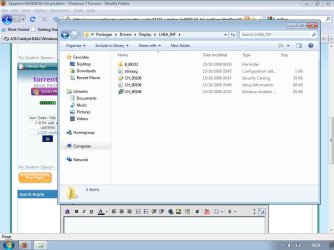
The correct folder is

C:\ATI\Support\9-10_vista64_win7_64_dd_ccc_wdm_enu\Driver\Packages\Drivers\Display\W76A_INF

and the .inf you should be using to edit is C7_83743.inf

This is for Catalyst 9.10 Suite, Windows 7, 64-bit.
 

Attachments

  • Capture.JPG
    Capture.JPG
    44.4 KB · Views: 61

My Computer

Computer Manufacturer/Model Number
self built
OS
7600.20510 x86
CPU
P4 550 3.4 GHz HT running at 3.5 GHz
Motherboard
MSI PM8M3-V (MS-7211 v1.x) Micro-ATX mainboard
Memory
OCZ 2 GB(2x1GB) DDR400mHz running @ 414 mHz
Graphics Card(s)
HIS Radeon HD 3850 IceQ 3 Turbo HDMI Dual DL-DVI AGP
Sound Card
MOTU Traveler firewire studio interface 192 kHz 24 bit
Monitor(s) Displays
22" widescreen Acer X223W LCD, 17" Compaq P75 CRT
Screen Resolution
1680x1050 and 1280x1024
Hard Drives
SATA I x2 WD, 400 GB and 120 GB, SATA 2 WD Caviar Black 1 TB
PSU
350W generic
Case
Cybertronpc, it glows blue
Cooling
stock cpu fan, Ice-Q 3 gpu and system, many case fans
Keyboard
Logitch Classical Keyboard 200
Mouse
Logitech Mediaplay cordless
Internet Speed
1792/448 kbits/sec
Other Info
SATA II PCI fake RAID adapter, 1 GB Readyboost, original ATI Remote Wonder (even works with WMC perfectly), Logitech Rumblepad 2 game controller x2
i'll try that again but the last time I edited that one as soon as it loaded up I got a blue screen like an old memory fault, if I get the same thing this time I'll note down the error code, cheers for the help dude this is starting to kill my brain...
 

My Computer

OS
Windows 7
just done that and now Im getting a code 52 on the card....

Windows cannot verify the digital signature for the drivers required for this device. A recent hardware or software change might have installed a file that is signed incorrectly or damaged, or that might be malicious software from an unknown source. (Code 52)

wondering how to deal with that one?
 

My Computer

OS
Windows 7
Oh right. I forgot about that since I don't use x64. x64 doesn't allow unsigned drivers I believe. But someone else in another thread and I got it to work for x64. He reported back and said it went great.

So maybe someone on x64 could tell you how to force the driver, if there is indeed a way.
 

My Computer

Computer Manufacturer/Model Number
self built
OS
7600.20510 x86
CPU
P4 550 3.4 GHz HT running at 3.5 GHz
Motherboard
MSI PM8M3-V (MS-7211 v1.x) Micro-ATX mainboard
Memory
OCZ 2 GB(2x1GB) DDR400mHz running @ 414 mHz
Graphics Card(s)
HIS Radeon HD 3850 IceQ 3 Turbo HDMI Dual DL-DVI AGP
Sound Card
MOTU Traveler firewire studio interface 192 kHz 24 bit
Monitor(s) Displays
22" widescreen Acer X223W LCD, 17" Compaq P75 CRT
Screen Resolution
1680x1050 and 1280x1024
Hard Drives
SATA I x2 WD, 400 GB and 120 GB, SATA 2 WD Caviar Black 1 TB
PSU
350W generic
Case
Cybertronpc, it glows blue
Cooling
stock cpu fan, Ice-Q 3 gpu and system, many case fans
Keyboard
Logitch Classical Keyboard 200
Mouse
Logitech Mediaplay cordless
Internet Speed
1792/448 kbits/sec
Other Info
SATA II PCI fake RAID adapter, 1 GB Readyboost, original ATI Remote Wonder (even works with WMC perfectly), Logitech Rumblepad 2 game controller x2
I've got that thing sorted now, I do it the way I did safe mode but when the driver actually works I get a blue screen of death and a quick countdown so I can't even get the error code...

Heard of that blue screen before?
 

My Computer

OS
Windows 7

My Computer

Computer Manufacturer/Model Number
self built
OS
7600.20510 x86
CPU
P4 550 3.4 GHz HT running at 3.5 GHz
Motherboard
MSI PM8M3-V (MS-7211 v1.x) Micro-ATX mainboard
Memory
OCZ 2 GB(2x1GB) DDR400mHz running @ 414 mHz
Graphics Card(s)
HIS Radeon HD 3850 IceQ 3 Turbo HDMI Dual DL-DVI AGP
Sound Card
MOTU Traveler firewire studio interface 192 kHz 24 bit
Monitor(s) Displays
22" widescreen Acer X223W LCD, 17" Compaq P75 CRT
Screen Resolution
1680x1050 and 1280x1024
Hard Drives
SATA I x2 WD, 400 GB and 120 GB, SATA 2 WD Caviar Black 1 TB
PSU
350W generic
Case
Cybertronpc, it glows blue
Cooling
stock cpu fan, Ice-Q 3 gpu and system, many case fans
Keyboard
Logitch Classical Keyboard 200
Mouse
Logitech Mediaplay cordless
Internet Speed
1792/448 kbits/sec
Other Info
SATA II PCI fake RAID adapter, 1 GB Readyboost, original ATI Remote Wonder (even works with WMC perfectly), Logitech Rumblepad 2 game controller x2
already sent him a pm pretty sure he just came on here until it worked so he isn't going to reply, looks like im going back to XP :P....how much RAM does Windsows 7 32 take? Max 3.25 or is it higher now??

Cheers for the help dude :)
 

My Computer

OS
Windows 7
Back
Top