Sata drive not showing up

danbeaulieu

New member
Local time
6:11 AM
Messages
15
Hello, I am wondering why my sata drive wont show up in windows 7, its has xp installed on it but I pulled it out of one machine and put it into my pc with w7 installed and nothing???

asus p5p800 mobo


Dan
 

My Computer My Computer

Computer Manufacturer/Model Number
Open Labs
OS
Windows 7 & Xp sp3
CPU
Phenom 9850 2.51 ghz Black Edition
Motherboard
m3a32-mvp deluxe (wi-fi/ap)
Memory
4GB Corsair Dominator
Graphics Card(s)
Ati sapphire 3870
Sound Card
Presonus Firestudio Tube
Monitor(s) Displays
Acer AL1721 Touch Screen
Hard Drives
ST3320620AS
PSU
800W
Case
Open Labs Custom
Cooling
Thermaltake Fans
Does it show up in the BIOS setup ?

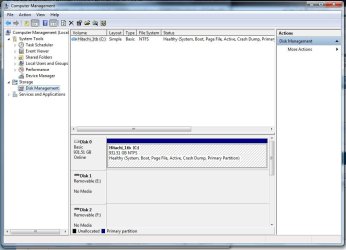
How about Computer Management :ar: Disk Management
 

Attachments

  • Disk_Management.JPG
    Disk_Management.JPG
    76.1 KB · Views: 44

My Computer My Computer

Computer type
PC/Desktop
Computer Manufacturer/Model Number
Built them myself, Science Experiments !
OS
Win7 Enterprise, Win7 x86 (Ult 7600), Win7 x64 Ult 7600, TechNet RTM on AMD x64 (2.8Ghz)
CPU
AMD fx8350 4ghz, AMD-32 2400mhz, AMD-64 3200mhz, AMDx64 2.8G
Motherboard
SIS 755, ECS-K8M890M-M (Ult 7600), GigaByte & others
Memory
2gb, 4gb on the Ult 7600, 4gb on Technet RTM, 32gb on FX8350
Graphics Card(s)
Draw my own Graphics, several nVidia cards
Sound Card
on motherboard
Monitor(s) Displays
19" flat scr, 28" I-Inc widescr,22" Emprex Widescr, 23" Acer
Screen Resolution
1280 x 1024, 1440 x 900, 1920 x 1080
Hard Drives
6 pata Ide HD's & 2 Sata HD's
added 80gb external on Ult 7600 computer,
numerous extra 1tb, 2TB, 3Tb SATA HD's
A collection of ext HD Docks w/ HDs
PSU
430w, 550w, 600w, 700, 800, etc
Case
All Generic Full Towers
Cooling
Open Air & a few fans, some w/ colored LEDs
Keyboard
Compaq & Dell recycled from GoodWill
Mouse
Made in China Optical Wired Mouse
Internet Speed
Fast Cable InterNet
Antivirus
AVG Free on 24 different Desktops, NO Problems!
Browser
IE 8 is preferred, but use FireFox sometimes
Other Info
Linksys Routers, switches, & Hubs
Too Many USB Flash Drives to count, Biggest is 64GB !
Eight computers in my home network.
Sixteen computers at my business network.
Linked via TeamViewer !
Lots of old used spare computer parts everywhere!
No its not showing up in the disk management window
 

My Computer My Computer

Computer Manufacturer/Model Number
Open Labs
OS
Windows 7 & Xp sp3
CPU
Phenom 9850 2.51 ghz Black Edition
Motherboard
m3a32-mvp deluxe (wi-fi/ap)
Memory
4GB Corsair Dominator
Graphics Card(s)
Ati sapphire 3870
Sound Card
Presonus Firestudio Tube
Monitor(s) Displays
Acer AL1721 Touch Screen
Hard Drives
ST3320620AS
PSU
800W
Case
Open Labs Custom
Cooling
Thermaltake Fans
Hello, I am wondering why my sata drive wont show up in windows 7, its has xp installed on it but I pulled it out of one machine and put it into my pc with w7 installed and nothing???

asus p5p800 mobo


Dan

I don't understand what you're trying to do.

If I read this correctly, you have a PC with Windows 7 installed. (Is that on a SATA HD?) When you try to attach a SATA HD to it, which is actually an XP OS disk, it's not seen in Disk Management.

How about in the BIOS? You should be able to see the physical discs that are attached.
 

My Computer My Computer

Computer Manufacturer/Model Number
homegrown
OS
Windows 7 Pro X64 SP1
CPU
Intel Core I7-3930k
Motherboard
Asus P9X79 Pro
Memory
16 GB Gskill DDR3-2133
Graphics Card(s)
eVGA GTX680
Sound Card
Creative X-Fi Titanium
Monitor(s) Displays
As PA246Q
Screen Resolution
1920 X 1200
Hard Drives
Corsair Force GT, 120 GB
WDC 1.5TB Caviar Black
PSU
PCP&C Silencer 750 Crossfire
Case
Silverstone FT02
Cooling
Noctua NH-D14
Keyboard
cheap Logitech USB
Mouse
Microsoft Intellimouse Explorer (old optical) USB
Internet Speed
6Mb cable
Other Info
Pioneer BDR-205
Samsung SH-203B
Monsoon 5.1 speakers
I have a setup with xp installed on a sata.
I have a setup with w7 installed on an IDE.

I would like to put the sata drive from the xp system into the windows 7 setup to transfer files then format. The sata (xp) drive doesn't show up in (w7 unit) bios.

So tomorrow morning I am going to try to flash the mobo with the latest bios, I'll keep you posted.
 

My Computer My Computer

Computer Manufacturer/Model Number
Open Labs
OS
Windows 7 & Xp sp3
CPU
Phenom 9850 2.51 ghz Black Edition
Motherboard
m3a32-mvp deluxe (wi-fi/ap)
Memory
4GB Corsair Dominator
Graphics Card(s)
Ati sapphire 3870
Sound Card
Presonus Firestudio Tube
Monitor(s) Displays
Acer AL1721 Touch Screen
Hard Drives
ST3320620AS
PSU
800W
Case
Open Labs Custom
Cooling
Thermaltake Fans
Flashed the Mobo with the latest bios and still no sata drive. Just fyi, I have an empty 720 gb sata as well which wont show up either.

Any ideas?
 

My Computer My Computer

Computer Manufacturer/Model Number
Open Labs
OS
Windows 7 & Xp sp3
CPU
Phenom 9850 2.51 ghz Black Edition
Motherboard
m3a32-mvp deluxe (wi-fi/ap)
Memory
4GB Corsair Dominator
Graphics Card(s)
Ati sapphire 3870
Sound Card
Presonus Firestudio Tube
Monitor(s) Displays
Acer AL1721 Touch Screen
Hard Drives
ST3320620AS
PSU
800W
Case
Open Labs Custom
Cooling
Thermaltake Fans
Hi danbeaulieu and Welcome to Seven Forums

Here's a suggestion, unplug the ide drive, put the sata in with the xp os boot and go strait into bios and make sure the sata is turned on boot up, then come back and let us know if that worked and we proceed to the next step
 

My Computer My Computer

Computer Manufacturer/Model Number
Dell XPS 730
OS
Windows 7 Home Premium 64 bit
CPU
Intel Core 2 quad Extreme Q9770 @ 3.2 GHz
Memory
4x2 GB Muskin 1600 MHz ram
Graphics Card(s)
NVidia GTX 250
Sound Card
Soundblaster X-Fi Fatality Champion
Monitor(s) Displays
2 Dell 2007WFP Ultrascans
Screen Resolution
3360 x 1050
Hard Drives
WD Black 1TB sata, 2-WD Black 500 sata, 2-Seagate 500 Go external
PSU
1000 Watt
Cooling
air
Keyboard
MS Natrual Keyboard Pro
Mouse
Logitech Wireless Trackball
Internet Speed
DSL Elite
Thanks for your help guys... I wound up switching power supplies and it booted right up. My 320 gb hd with xp on it works fine... However, the 720 gb drive clicks and then winds down. Once I make it into windows it doesn't show up at all. So I am sure that drive is screwed.
 

My Computer My Computer

Computer Manufacturer/Model Number
Open Labs
OS
Windows 7 & Xp sp3
CPU
Phenom 9850 2.51 ghz Black Edition
Motherboard
m3a32-mvp deluxe (wi-fi/ap)
Memory
4GB Corsair Dominator
Graphics Card(s)
Ati sapphire 3870
Sound Card
Presonus Firestudio Tube
Monitor(s) Displays
Acer AL1721 Touch Screen
Hard Drives
ST3320620AS
PSU
800W
Case
Open Labs Custom
Cooling
Thermaltake Fans
Did you also turn on the second sata in bios
 

My Computer My Computer

Computer Manufacturer/Model Number
Dell XPS 730
OS
Windows 7 Home Premium 64 bit
CPU
Intel Core 2 quad Extreme Q9770 @ 3.2 GHz
Memory
4x2 GB Muskin 1600 MHz ram
Graphics Card(s)
NVidia GTX 250
Sound Card
Soundblaster X-Fi Fatality Champion
Monitor(s) Displays
2 Dell 2007WFP Ultrascans
Screen Resolution
3360 x 1050
Hard Drives
WD Black 1TB sata, 2-WD Black 500 sata, 2-Seagate 500 Go external
PSU
1000 Watt
Cooling
air
Keyboard
MS Natrual Keyboard Pro
Mouse
Logitech Wireless Trackball
Internet Speed
DSL Elite
no, I only have 1 sata cable at the moment so I just unplugged the 320 and switched it with the 750.
I made up an RMA through Seagate.
 

My Computer My Computer

Computer Manufacturer/Model Number
Open Labs
OS
Windows 7 & Xp sp3
CPU
Phenom 9850 2.51 ghz Black Edition
Motherboard
m3a32-mvp deluxe (wi-fi/ap)
Memory
4GB Corsair Dominator
Graphics Card(s)
Ati sapphire 3870
Sound Card
Presonus Firestudio Tube
Monitor(s) Displays
Acer AL1721 Touch Screen
Hard Drives
ST3320620AS
PSU
800W
Case
Open Labs Custom
Cooling
Thermaltake Fans
no, I only have 1 sata cable at the moment so I just unplugged the 320 and switched it with the 750.
I made up an RMA through Seagate.

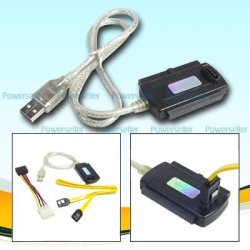
It is always good to have a few extra cables, so you can troubleshoot problems ;)
 

Attachments

  • Tri_Head_tb24611.jpg
    Tri_Head_tb24611.jpg
    19.7 KB · Views: 3

My Computer My Computer

Computer type
PC/Desktop
Computer Manufacturer/Model Number
Built them myself, Science Experiments !
OS
Win7 Enterprise, Win7 x86 (Ult 7600), Win7 x64 Ult 7600, TechNet RTM on AMD x64 (2.8Ghz)
CPU
AMD fx8350 4ghz, AMD-32 2400mhz, AMD-64 3200mhz, AMDx64 2.8G
Motherboard
SIS 755, ECS-K8M890M-M (Ult 7600), GigaByte & others
Memory
2gb, 4gb on the Ult 7600, 4gb on Technet RTM, 32gb on FX8350
Graphics Card(s)
Draw my own Graphics, several nVidia cards
Sound Card
on motherboard
Monitor(s) Displays
19" flat scr, 28" I-Inc widescr,22" Emprex Widescr, 23" Acer
Screen Resolution
1280 x 1024, 1440 x 900, 1920 x 1080
Hard Drives
6 pata Ide HD's & 2 Sata HD's
added 80gb external on Ult 7600 computer,
numerous extra 1tb, 2TB, 3Tb SATA HD's
A collection of ext HD Docks w/ HDs
PSU
430w, 550w, 600w, 700, 800, etc
Case
All Generic Full Towers
Cooling
Open Air & a few fans, some w/ colored LEDs
Keyboard
Compaq & Dell recycled from GoodWill
Mouse
Made in China Optical Wired Mouse
Internet Speed
Fast Cable InterNet
Antivirus
AVG Free on 24 different Desktops, NO Problems!
Browser
IE 8 is preferred, but use FireFox sometimes
Other Info
Linksys Routers, switches, & Hubs
Too Many USB Flash Drives to count, Biggest is 64GB !
Eight computers in my home network.
Sixteen computers at my business network.
Linked via TeamViewer !
Lots of old used spare computer parts everywhere!
Voice of Reason?

Hi Chaps,

I had the same problems, I was asking the oracle (Google) but nothing! It was only when i reached a zen like state of anger and was using my Ninja mind skills on the disk manager that i realsied, something soooo simple that i nearly collapsed into a singularity....... Windows had not yet assigned it a Drive Path/Letter. I promptly right clicked the volume (that wasnt appearing :p) and chose

--> Change Drive Letter and Paths <--

I then used the top option and chose a letter, Clicked OK and VOILA!!! i had my 1 Tb Sata Volume in the "Computer" window. I hope this helps a few, let us know how you get on :)
 

My Computer My Computer

Computer Manufacturer/Model Number
Custom
OS
Windows 7 Ultimate x64
CPU
Intel Core i5 2500
Motherboard
Asus P8P67 PRO Intel P67 (Socket 1155)
Memory
6GB Corsair XMS DDR3 PC16000
Graphics Card(s)
SLI GTX 460 1GB OC 800Mhz
Sound Card
Internal
Monitor(s) Displays
Dell C22w / Acer X243w
Hard Drives
OCZ Vertex 2 Sata ll SSD 60GB R/285Mb/s W274Mb/s

1Tb WD Sata ll
PSU
OCZ 750w Fatal1ty
Case
Coolermaster
Cooling
Stock
Back
Top