Solved SATA harddrive disappeared after installing intel RST driver?

texplorer

New member
Local time
7:47 AM
Messages
3
I have two drives in my Win7 machine. 1 SSD, and the other is a old 80GB mechanical hard drive. To get the most out of my SSD I was advised to install intel RST driver, after this my old hard drive disappeared in Windows. But if I change SATA mode from ACHI to IDE in bios, I could get the old hard drive back in Windows.

How do I stay in AHCI mode and keep my old drive in Windows at the same time?

Thanks!
 

My Computer My Computer

At a glance

Win7 64bit
OS
Win7 64bit
Hiyya texplorer and welcome mate just how old is the old HDD? I am also wondering why you need RST too as SSD's are not real slouches?
 

My Computer My Computer

At a glance

Desk1 7 Home Prem / Desk2 10 Pro / Main lap A...Desk1 i5 3750K / Laptop i7 GTX 860M / Desk2 i...Desk1 8GB (1866) / Desk2 16GB (1333) / Laptop...Desk 1& 2NVidia GTX 650 & Laptops on board Intel
Computer type
PC/Desktop
Computer Manufacturer/Model Number
Own build (new) Desk1 / Asus ROG Win 7 / Desk2 1st build
OS
Desk1 7 Home Prem / Desk2 10 Pro / Main lap Asus ROG 10 Pro 2 laptop Toshiba 7 Pro Asus P2520 7 & 10
CPU
Desk1 i5 3750K / Laptop i7 GTX 860M / Desk2 i5 2500
Motherboard
Desk1 Asus P877-V / Desk2 Gigabyte H67 UD3H / Laptop ?
Memory
Desk1 8GB (1866) / Desk2 16GB (1333) / Laptop 8Gb DDR3
Graphics Card(s)
Desk 1& 2NVidia GTX 650 & Laptops on board Intel
Sound Card
Desk 1 & 2 -XONAR DG Realtek High Def audio Laptop
Monitor(s) Displays
Desk 1 Benq HD 2450 / Desk2 Philips 24" / Laptop 17.5"
Screen Resolution
1920x1080 D1 & D2 & Laptop 1
Hard Drives
Desk1 Samsung 120GB 830 SSD
Asus ROG 256GB 850 Pro SSD
Desk2 Samsung 840 256 SSD
Toshiba 120GB EVO
PSU
Desk 1 Corsair HX 1050/ Laptop ? / Desk 2 Corsair HX 650
Case
Desk 1 Cooler HAF XM ? Toshiba laptop / Desk2 Coolermaster
Cooling
Fans on all Desk1 -2 Desk2 - all Coolermasters 5 Laptop ?
Keyboard
Desk 1 MS Sidewinder X6 Desk 2 MS Sidewinder X 4
Mouse
Desk 1&2 - Gigabyte MS 900 gamer - laptop - Logitec wireless
Internet Speed
ADSL2+
Other Info
One other Desktop (tester) and spare Toshba laptop both with SSD's
Running Kaspersky 2016 ISS on all machines config'd identically
Logitec audio stereo systems on each machine (x3)
Canon MG5250MFC
Router/modem TP-Link running WPA2SK
About 5 years. It is still SATA and working fine, I use it for download and temp folder for windows. I am getting a new drive, but I fear the new drive may have the same issues.
 

My Computer My Computer

At a glance

Win7 64bit
OS
Win7 64bit
About 5 years. It is still SATA and working fine, I use it for download and temp folder for windows. I am getting a new drive, but I fear the new drive may have the same issues.
Hum well mate I reckon maybe if that is the case then it might be worth dumping that RST an see what happens - if you can. I don't know much about it to be honest as I have never used it, but from what I can gather it is used mainly in RAID configurations which I a assuming you have't got.

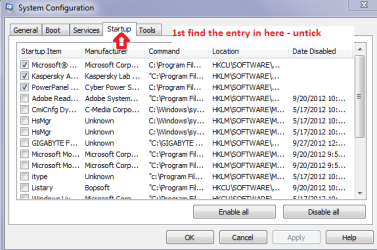
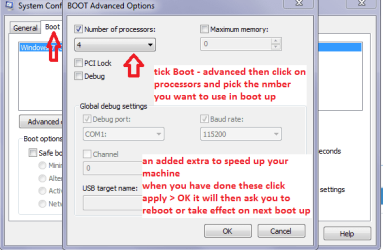
So one suggestion is maybe try going into msconfig and disable it in the start up box I have put in some pics to follow the third is just a speed up boot feature The services stuff I hope will help and in the start up menu you also only need the OS and security suite.

Otherwise if you have just got the OS for boot on the SSD as I would be inclined to image the data to the old drive if you can or at least save your important stuff to a stick say and then do a reinstall.

Oh just to reiterate the red lettering when you have reset the settings in msconfig - make sure you click Apply then OK
 

Attachments

  • MSCON1.PNG
    MSCON1.PNG
    14.2 KB · Views: 21
  • MSCON2.PNG
    MSCON2.PNG
    16 KB · Views: 19
  • MSCON3.PNG
    MSCON3.PNG
    15.8 KB · Views: 23

My Computer My Computer

At a glance

Desk1 7 Home Prem / Desk2 10 Pro / Main lap A...Desk1 i5 3750K / Laptop i7 GTX 860M / Desk2 i...Desk1 8GB (1866) / Desk2 16GB (1333) / Laptop...Desk 1& 2NVidia GTX 650 & Laptops on board Intel
Computer type
PC/Desktop
Computer Manufacturer/Model Number
Own build (new) Desk1 / Asus ROG Win 7 / Desk2 1st build
OS
Desk1 7 Home Prem / Desk2 10 Pro / Main lap Asus ROG 10 Pro 2 laptop Toshiba 7 Pro Asus P2520 7 & 10
CPU
Desk1 i5 3750K / Laptop i7 GTX 860M / Desk2 i5 2500
Motherboard
Desk1 Asus P877-V / Desk2 Gigabyte H67 UD3H / Laptop ?
Memory
Desk1 8GB (1866) / Desk2 16GB (1333) / Laptop 8Gb DDR3
Graphics Card(s)
Desk 1& 2NVidia GTX 650 & Laptops on board Intel
Sound Card
Desk 1 & 2 -XONAR DG Realtek High Def audio Laptop
Monitor(s) Displays
Desk 1 Benq HD 2450 / Desk2 Philips 24" / Laptop 17.5"
Screen Resolution
1920x1080 D1 & D2 & Laptop 1
Hard Drives
Desk1 Samsung 120GB 830 SSD
Asus ROG 256GB 850 Pro SSD
Desk2 Samsung 840 256 SSD
Toshiba 120GB EVO
PSU
Desk 1 Corsair HX 1050/ Laptop ? / Desk 2 Corsair HX 650
Case
Desk 1 Cooler HAF XM ? Toshiba laptop / Desk2 Coolermaster
Cooling
Fans on all Desk1 -2 Desk2 - all Coolermasters 5 Laptop ?
Keyboard
Desk 1 MS Sidewinder X6 Desk 2 MS Sidewinder X 4
Mouse
Desk 1&2 - Gigabyte MS 900 gamer - laptop - Logitec wireless
Internet Speed
ADSL2+
Other Info
One other Desktop (tester) and spare Toshba laptop both with SSD's
Running Kaspersky 2016 ISS on all machines config'd identically
Logitec audio stereo systems on each machine (x3)
Canon MG5250MFC
Router/modem TP-Link running WPA2SK
About 5 years. It is still SATA and working fine, I use it for download and temp folder for windows. I am getting a new drive, but I fear the new drive may have the same issues.
Hum well mate I reckon maybe if that is the case then it might be worth dumping that RST an see what happens - if you can. I don't know much about it to be honest as I have never used it, but from what I can gather it is used mainly in RAID configurations which I a assuming you have't got.

So one suggestion is maybe try going into msconfig and disable it in the start up box I have put in some pics to follow the third is just a speed up boot feature The services stuff I hope will help and in the start up menu you also only need the OS and security suite.

Otherwise if you have just got the OS for boot on the SSD as I would be inclined to image the data to the old drive if you can or at least save your important stuff to a stick say and then do a reinstall.

Oh just to reiterate the red lettering when you have reset the settings in msconfig - make sure you click Apply then OK

:D
Thanks mate, one sentence from your reply lighted me! "what I can gather it is used mainly in RAID configurations which I assuming you haven't got. " I realized that I previously removed the 3rd drive I had in the machine, which is in pair with the old hard drive currently in the machine. But I didn't delete the raid volume in bios. Intel RST or Windows must be treating this single old drive in the machine as raid all this time. After thinking you have said, I am sure my problem is related to raid. So I deleted the raid volume, everything is fine now. Thanks hugely!
 

My Computer My Computer

At a glance

Win7 64bit
OS
Win7 64bit
Great stuff texplorer thought it was odd when I first read your post as it didn't make any reason as to why an Intel app like that would muck up a whole machine.

All the same mate get onto the tutorial and do some of those tweaks from Brink they are brilliant and you will see the difference is machine speed as long as you don't mind losing a few of the fancy do dads like transparency etc.

http://www.sevenforums.com/tutorials/11728-optimize-windows-7-a.html?filter[2]=Performance Maintenance easy to do and really worth it.
 

My Computer My Computer

At a glance

Desk1 7 Home Prem / Desk2 10 Pro / Main lap A...Desk1 i5 3750K / Laptop i7 GTX 860M / Desk2 i...Desk1 8GB (1866) / Desk2 16GB (1333) / Laptop...Desk 1& 2NVidia GTX 650 & Laptops on board Intel
Computer type
PC/Desktop
Computer Manufacturer/Model Number
Own build (new) Desk1 / Asus ROG Win 7 / Desk2 1st build
OS
Desk1 7 Home Prem / Desk2 10 Pro / Main lap Asus ROG 10 Pro 2 laptop Toshiba 7 Pro Asus P2520 7 & 10
CPU
Desk1 i5 3750K / Laptop i7 GTX 860M / Desk2 i5 2500
Motherboard
Desk1 Asus P877-V / Desk2 Gigabyte H67 UD3H / Laptop ?
Memory
Desk1 8GB (1866) / Desk2 16GB (1333) / Laptop 8Gb DDR3
Graphics Card(s)
Desk 1& 2NVidia GTX 650 & Laptops on board Intel
Sound Card
Desk 1 & 2 -XONAR DG Realtek High Def audio Laptop
Monitor(s) Displays
Desk 1 Benq HD 2450 / Desk2 Philips 24" / Laptop 17.5"
Screen Resolution
1920x1080 D1 & D2 & Laptop 1
Hard Drives
Desk1 Samsung 120GB 830 SSD
Asus ROG 256GB 850 Pro SSD
Desk2 Samsung 840 256 SSD
Toshiba 120GB EVO
PSU
Desk 1 Corsair HX 1050/ Laptop ? / Desk 2 Corsair HX 650
Case
Desk 1 Cooler HAF XM ? Toshiba laptop / Desk2 Coolermaster
Cooling
Fans on all Desk1 -2 Desk2 - all Coolermasters 5 Laptop ?
Keyboard
Desk 1 MS Sidewinder X6 Desk 2 MS Sidewinder X 4
Mouse
Desk 1&2 - Gigabyte MS 900 gamer - laptop - Logitec wireless
Internet Speed
ADSL2+
Other Info
One other Desktop (tester) and spare Toshba laptop both with SSD's
Running Kaspersky 2016 ISS on all machines config'd identically
Logitec audio stereo systems on each machine (x3)
Canon MG5250MFC
Router/modem TP-Link running WPA2SK
Back
Top