Sata HDD works in external dock but not internally?

DNYBOY

New member
Local time
9:05 PM
Messages
8
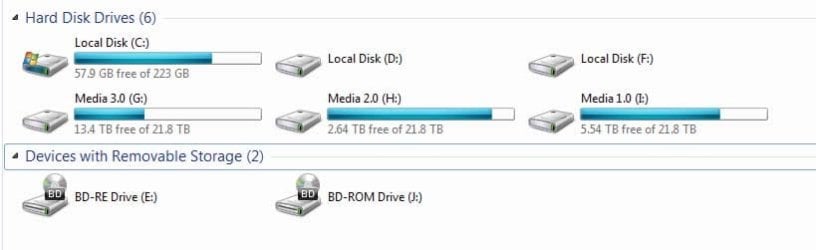
I have a recently newly built PC and I'm having some trouble with some Sata HDDs and getting them to work, I'll try provide as many details of the problem that I'm experiencing and also things I've already tried to hopefully save some time.
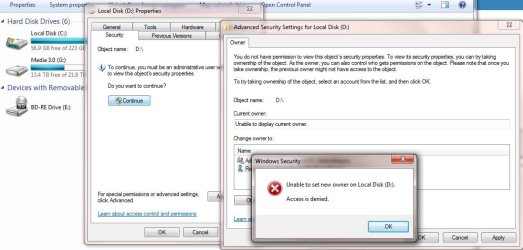
The OS SSD is working fine but I also have two Sata HDDs plugged in that windows sees but cannot use in any way, all I get is "location is not available" and "access denied" errors? If i remove the drives and plug them into an external USB dock they function perfectly but as soon as I put them back into the PC I cannot access them again?
Whilst connected internally I cannot format/partition in disk management nor can I change ownership in security settings. The only thing I have been able to achieve is to use the "CLEAN" function in diskpart in dos. Whilst in the external dock I can do everything including partition/format/set ownership and access as normal.
I've tried different ports on the mobo (SSATA & SATA) and Ive tried changing the bios setting to IDE & AHCI but no change. I downloaded MiniTool Partition Wizard but also no joy with it.
The two drives a WD 2TB & 4TB with no jumpers on them.
Has anyone got any ideas for me to try? I'm just about out of ideas

Thanks
Danny

ps: in the attached pic it looks like I'm using a user without admin rights when I go to change ownership on these drives but I am! That's part of the problem, I only get this error on these drives not any others.
 

Attachments
  • HDDs.jpg
    HDDs.jpg
    31.7 KB · Views: 3
  • AccessDenied.jpg
    AccessDenied.jpg
    81.4 KB · Views: 5

My Computer My Computer

At a glance

Windows 7 Ultimate x64GeForce GTX 1080
Computer type
PC/Desktop
OS
Windows 7 Ultimate x64
Motherboard
Asus Z10PE-D16
Graphics Card(s)
GeForce GTX 1080
What kind of external USB dock you have?
Did you bought them as a external HDD like WD Passport?
Don't ask me why, but WD Passport HDD uses electronic encryption so the only work on the external USB dock.
 

My Computers My Computers

  • At a glance

    Windows 7 HP 64i5 6600K - 800MHz to 4200MHz4+4G GSkill DDR4 3000IG - Intel 530
    Computer type
    PC/Desktop
    Computer Manufacturer/Model Number
    custom build
    OS
    Windows 7 HP 64
    CPU
    i5 6600K - 800MHz to 4200MHz
    Motherboard
    GA-Z170-HD3P
    Memory
    4+4G GSkill DDR4 3000
    Graphics Card(s)
    IG - Intel 530
    Monitor(s) Displays
    Samsung 226BW
    Screen Resolution
    1680x1050
    Hard Drives
    (1) -1 SM951 – 128GB M.2 AHCI PCIe SSD drive for Windows 7 and Lubuntu
    (2) -1 WD SATA 3 - 1T for Data
    (3) -1 WD SATA 3 - 1T for backup
    PSU
    Thermaltake 450W TR2 gold
    Keyboard
    Old and good Chicony mechanical keyboard
    Mouse
    Logitech mX performance - 9 buttons (had to disable some)
    Internet Speed
    500Mb/s
    Browser
    Firefox 64
    Other Info
    TinyWall firewall
  • At a glance

    Windows 7 Proi7-4500U 800MHz to 3.0GHz(4+4)G DDR3 1600IG intel 4400 + NVIDIA GeForce GT 745M
    Computer type
    Laptop
    System Manufacturer/Model Number
    Asus Q550LF
    OS
    Windows 7 Pro
    CPU
    i7-4500U 800MHz to 3.0GHz
    Motherboard
    Asus Q550LF
    Memory
    (4+4)G DDR3 1600
    Graphics Card(s)
    IG intel 4400 + NVIDIA GeForce GT 745M
    Sound Card
    Realtek
    Monitor(s) Displays
    LG Display LP156WF4-SPH1
    Screen Resolution
    1920 x 1080
    Hard Drives
    BX500 120G SSD for Windows and programs +
    1T HDD for data
    Internet Speed
    500 Mb/s
    Browser
    Firefox
    Other Info
    TinyWall firewall
The dock is a Shintaro SH23SDOCKE
Both HDDs are internal drives, WD Black (WD2002FAEX) 2TB & WD Red (4001FFSX) 4TB
 

My Computer My Computer

At a glance

Windows 7 Ultimate x64GeForce GTX 1080
Computer type
PC/Desktop
OS
Windows 7 Ultimate x64
Motherboard
Asus Z10PE-D16
Graphics Card(s)
GeForce GTX 1080
Hi DNYBOY,

Not that I am going give any solution - I am dumb on this sort of problems -, but some additional information may perhaps be in order for others to work on it.

1. Motherboard details Asus Z10PE-D16 ?

2. Windows Disk Management Screenshot with both 2TB and 4TB drives in the dock

3. MiniTool Partition Wizard Screenshot with the drives in the dock.

4. Whether your current system uses Intel Rapid Storage Technology drivers

5. Whether the drives are new or picked up from another PC

6. Whether you want to keep any data on it or willing to do a clean wipe and format those?

7. What are those huge TB media 1,2 & 3 drives and how are those connected to the system?

Screenshots:
Adhere to the guidelines here: Disk Management - Post a Screen Capture Image

Upload to Seven Forums : Screenshots and Files - Upload and Post in Seven Forums
 
Last edited:

My Computer My Computer

At a glance

Windows 7 Home Premium 32 bit
OS
Windows 7 Home Premium 32 bit
Hi Jumanji,

My motherboard is a Asus Z10PE-D16
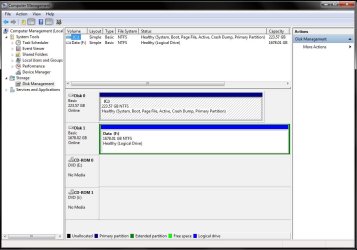
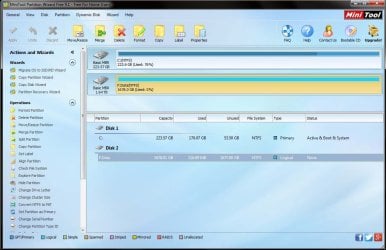
I have attached screen shots of the 2TB drive in the dock (I can only fit one drive in it) from Disk management and MiniTool.
I don't believe my system uses Intel Rapid Storage Technology drivers, I've looked under Storage controlers in device manager and I have ATTO Celerity FC-82EN Fibre Channel Adapter & also Intel C600+/C220+ series SATA AHCI Controller. Is that where I would find that information?
The drives are not new they have been picked from another PC and I have formatted them several times trying to get them going on this system so they are blank and can be wiped again.
Those huge media drives are connected to the above Fibre Channel Adapter and connect at startup through a program called metaSAN (this is a work PC). Ive tried disconnecting this connection and disabling this program from running at startup but there is still no change in gaining access to these WD HDDs, even if I boot into safe mode.
 

Attachments

  • ComMan.jpg
    ComMan.jpg
    99.4 KB · Views: 5
  • MiniPart.jpg
    MiniPart.jpg
    98.4 KB · Views: 5

My Computer My Computer

At a glance

Windows 7 Ultimate x64GeForce GTX 1080
Computer type
PC/Desktop
OS
Windows 7 Ultimate x64
Motherboard
Asus Z10PE-D16
Graphics Card(s)
GeForce GTX 1080
Thanks for the updates.. You can now put the 4TB drive and post the screenshots.

Check for any latest chipset/AHCI Controller drivers for your motherboard on the ASUS website and be ready to update if recommended by other knowledgeable people. I am blank on Intel which is always confusing.

Please wait for other experts to look into your problem.I shall take a backseat now :D.
 

My Computer My Computer

At a glance

Windows 7 Home Premium 32 bit
OS
Windows 7 Home Premium 32 bit
Your C drive is MBR and your D drive is GPT.
What win brand you are running? Is it a 64 bits OS?
Tell in details the story of the Shintaro SH23SDOCKE and the WD drives. Did you bought them separately? Did you install any kind of software?
On Shintaro data sheet it says it is compatible with HDD up to 2TB. How you use higher capacities?
External HDD Enclosure
 
Last edited:

My Computers My Computers

  • At a glance

    Windows 7 HP 64i5 6600K - 800MHz to 4200MHz4+4G GSkill DDR4 3000IG - Intel 530
    Computer type
    PC/Desktop
    Computer Manufacturer/Model Number
    custom build
    OS
    Windows 7 HP 64
    CPU
    i5 6600K - 800MHz to 4200MHz
    Motherboard
    GA-Z170-HD3P
    Memory
    4+4G GSkill DDR4 3000
    Graphics Card(s)
    IG - Intel 530
    Monitor(s) Displays
    Samsung 226BW
    Screen Resolution
    1680x1050
    Hard Drives
    (1) -1 SM951 – 128GB M.2 AHCI PCIe SSD drive for Windows 7 and Lubuntu
    (2) -1 WD SATA 3 - 1T for Data
    (3) -1 WD SATA 3 - 1T for backup
    PSU
    Thermaltake 450W TR2 gold
    Keyboard
    Old and good Chicony mechanical keyboard
    Mouse
    Logitech mX performance - 9 buttons (had to disable some)
    Internet Speed
    500Mb/s
    Browser
    Firefox 64
    Other Info
    TinyWall firewall
  • At a glance

    Windows 7 Proi7-4500U 800MHz to 3.0GHz(4+4)G DDR3 1600IG intel 4400 + NVIDIA GeForce GT 745M
    Computer type
    Laptop
    System Manufacturer/Model Number
    Asus Q550LF
    OS
    Windows 7 Pro
    CPU
    i7-4500U 800MHz to 3.0GHz
    Motherboard
    Asus Q550LF
    Memory
    (4+4)G DDR3 1600
    Graphics Card(s)
    IG intel 4400 + NVIDIA GeForce GT 745M
    Sound Card
    Realtek
    Monitor(s) Displays
    LG Display LP156WF4-SPH1
    Screen Resolution
    1920 x 1080
    Hard Drives
    BX500 120G SSD for Windows and programs +
    1T HDD for data
    Internet Speed
    500 Mb/s
    Browser
    Firefox
    Other Info
    TinyWall firewall
Good work @Megahertz07. I wanted to check the details of the Op's Shintaro's dock but then it slipped out of my mind. If the OP puts the 4TB drive in the dock and provides the WDM screenshot as asked in my post #6, it would have been evident. Anyway he must be in deep sleep now and may not comeback for another 6 hours atleast.

I was deliberating on the issue on and off and I feel that his drives were network shared by the previous owner. He may have to remove the network sharing of the drives before he can take current ownership and access the drives. He may reactivate network sharing after taking ownership.At the moment these are only thoughts based on what I have read about it. My interpretation may or may not be correct. Error message: "Unable to set new owner on Local Disk ( D: ) Access denied."
 

My Computer My Computer

At a glance

Windows 7 Home Premium 32 bit
OS
Windows 7 Home Premium 32 bit
DNYBOY,
You have a MB that I didn't even imagine it exist. It's like a kind of a super server with tweaks of a gamer MB.
But, as complex MB, there are many BIOS configurations.
What call my attention is that your C drive is Legacy / MBR. Why Win wasn't installed as UEFI / GPT?
On page 94/194 of the manual (http://dlcdnet.asus.com/pub/ASUS/mb/Socket2011-R3/Z10PE-D16_WS/Manual/E10188_Z10PE-D16_WS_WEB.pdf) you have the CSM options.
- Boot Option filter is by default Legacy only. It should be UEFI only.
- Network / Storage / Video is by default Legacy. It should be UEFI.
This two settings explains why Win was installed as legacy / MBR.
I'm not sure, but I think UEFI / GPT disks are not compatible with Win installed as Legacy OS.
You can't only change the BIOS settings as it wont boot on UEFI as your C drive is legacy / MBR
I would start from scratch: Backup all your data, configure your BIOS properly.
You must set on BIOS:
- SATA=AHCI
- CSM (Compatible System Mode) = enable
- Storage Boot and PCI device to UEFI only
- Fast boot to disable.

Detach ALL other drives, leaving only the C drive.
Boot with the Win 7 64 installation disk on UEFI mode, go to install, custom, advanced, delete all partitions, create a new one (Win will create 3 partitions) and proceed.
 

My Computers My Computers

  • At a glance

    Windows 7 HP 64i5 6600K - 800MHz to 4200MHz4+4G GSkill DDR4 3000IG - Intel 530
    Computer type
    PC/Desktop
    Computer Manufacturer/Model Number
    custom build
    OS
    Windows 7 HP 64
    CPU
    i5 6600K - 800MHz to 4200MHz
    Motherboard
    GA-Z170-HD3P
    Memory
    4+4G GSkill DDR4 3000
    Graphics Card(s)
    IG - Intel 530
    Monitor(s) Displays
    Samsung 226BW
    Screen Resolution
    1680x1050
    Hard Drives
    (1) -1 SM951 – 128GB M.2 AHCI PCIe SSD drive for Windows 7 and Lubuntu
    (2) -1 WD SATA 3 - 1T for Data
    (3) -1 WD SATA 3 - 1T for backup
    PSU
    Thermaltake 450W TR2 gold
    Keyboard
    Old and good Chicony mechanical keyboard
    Mouse
    Logitech mX performance - 9 buttons (had to disable some)
    Internet Speed
    500Mb/s
    Browser
    Firefox 64
    Other Info
    TinyWall firewall
  • At a glance

    Windows 7 Proi7-4500U 800MHz to 3.0GHz(4+4)G DDR3 1600IG intel 4400 + NVIDIA GeForce GT 745M
    Computer type
    Laptop
    System Manufacturer/Model Number
    Asus Q550LF
    OS
    Windows 7 Pro
    CPU
    i7-4500U 800MHz to 3.0GHz
    Motherboard
    Asus Q550LF
    Memory
    (4+4)G DDR3 1600
    Graphics Card(s)
    IG intel 4400 + NVIDIA GeForce GT 745M
    Sound Card
    Realtek
    Monitor(s) Displays
    LG Display LP156WF4-SPH1
    Screen Resolution
    1920 x 1080
    Hard Drives
    BX500 120G SSD for Windows and programs +
    1T HDD for data
    Internet Speed
    500 Mb/s
    Browser
    Firefox
    Other Info
    TinyWall firewall
How is this relevant to OP's problem? I am at a loss.

Do you mean that because OP had chosen to install his Windows 7 64 bit on Legacy mode with an MBR SSD drive he is unable to access his 2TB and 4TB GPT drives internally?

Or,

leaving aside the OP's problem, are you suggesting that it would be better if he uses UEFI and GPT SSD?

Will it resolve OP's problem?
 

My Computer My Computer

At a glance

Windows 7 Home Premium 32 bit
OS
Windows 7 Home Premium 32 bit
If you don't have a UEFI BIOS and / or if your OS isn't UEFI compatible, a UEFI / GPT disk will not be recognized. As BIOS makes the interface between the disk and the OS it's important to set Storage Boot and PCI device to UEFI only.
For example, Win 7 32 bits isn't compatible with UEFI / GPT, only Win 7 64 bits.
To have disks bigger than 2T, and work around this limitation, (not sure) manufacturers install a software that translate the GPT disk.
To install a GPT disk directly to the MB, you have to set UEFI on BIOS and have a UEFI OS compatible (Win 7 64bits). As Jumanji posted, the reason why you can't erase partitions can be because the owner is on a network, but I think that the problem is more related to UEFI BIOS settings and installed OS.
 

My Computers My Computers

  • At a glance

    Windows 7 HP 64i5 6600K - 800MHz to 4200MHz4+4G GSkill DDR4 3000IG - Intel 530
    Computer type
    PC/Desktop
    Computer Manufacturer/Model Number
    custom build
    OS
    Windows 7 HP 64
    CPU
    i5 6600K - 800MHz to 4200MHz
    Motherboard
    GA-Z170-HD3P
    Memory
    4+4G GSkill DDR4 3000
    Graphics Card(s)
    IG - Intel 530
    Monitor(s) Displays
    Samsung 226BW
    Screen Resolution
    1680x1050
    Hard Drives
    (1) -1 SM951 – 128GB M.2 AHCI PCIe SSD drive for Windows 7 and Lubuntu
    (2) -1 WD SATA 3 - 1T for Data
    (3) -1 WD SATA 3 - 1T for backup
    PSU
    Thermaltake 450W TR2 gold
    Keyboard
    Old and good Chicony mechanical keyboard
    Mouse
    Logitech mX performance - 9 buttons (had to disable some)
    Internet Speed
    500Mb/s
    Browser
    Firefox 64
    Other Info
    TinyWall firewall
  • At a glance

    Windows 7 Proi7-4500U 800MHz to 3.0GHz(4+4)G DDR3 1600IG intel 4400 + NVIDIA GeForce GT 745M
    Computer type
    Laptop
    System Manufacturer/Model Number
    Asus Q550LF
    OS
    Windows 7 Pro
    CPU
    i7-4500U 800MHz to 3.0GHz
    Motherboard
    Asus Q550LF
    Memory
    (4+4)G DDR3 1600
    Graphics Card(s)
    IG intel 4400 + NVIDIA GeForce GT 745M
    Sound Card
    Realtek
    Monitor(s) Displays
    LG Display LP156WF4-SPH1
    Screen Resolution
    1920 x 1080
    Hard Drives
    BX500 120G SSD for Windows and programs +
    1T HDD for data
    Internet Speed
    500 Mb/s
    Browser
    Firefox
    Other Info
    TinyWall firewall
A Legacy Bios / MBR PC can use GPT Data disks > 2TB.
I can post a screen print if you want.
 

My Computer My Computer

At a glance

Multi-Boot W7_Pro_x64 W8.1_Pro_x64 W10_Pro_x6...AMD Athlon II x4 6206GB GSkill DDR2 800AMD 4670 GPU + AMD 4200 IGP
Computer type
PC/Desktop
Computer Manufacturer/Model Number
home built
OS
Multi-Boot W7_Pro_x64 W8.1_Pro_x64 W10_Pro_x64 +Linux_VMs +Chromium_VM
CPU
AMD Athlon II x4 620
Motherboard
Gigabyte GA-MA785G-UD3H
Memory
6GB GSkill DDR2 800
Graphics Card(s)
AMD 4670 GPU + AMD 4200 IGP
Sound Card
on board Realtek ALC889A
Monitor(s) Displays
RCA 40" LCD TV, Insignia 32" LCD TV, HP 15" LCD monitor
Screen Resolution
1680 x 1050
Hard Drives
OCZ Vertex 3 120GB,
Samsung F3 1TB (3),
Several others - WD, Seagate, Hitachi, ...
PSU
Corsair 500 W
Case
Rosewill mid tower
Cooling
CM 90mm rifle
Keyboard
Gyration wireless, Logitech wireless, Dell USB wired
Mouse
Gyration wireless, Logitech wireless, V7 USB wired
Internet Speed
Spectrum - 100Mbps D / 10Mbps U
Antivirus
Avast, MBAM3, EMET, WinPatrol
Browser
Pale Moon, Firefox, IE
Other Info
2 multi-boot PC's
Mainly HTPC/Office/Gen purpose (no gaming).
Trendnet USB KVM.
LG DVD burner/Blue Ray Player.
Tray system for removable SATA backup drives.

Not currently OCd, under-volted.
I use Hybrid sleep, rarely re-boot or shutdown.

Hauppauge HD-PVR, Avermedia PCIe TV Tuner, Hauppauge PCI TV Tuner.

My Computers My Computers

  • At a glance

    Windows 7 HP 64i5 6600K - 800MHz to 4200MHz4+4G GSkill DDR4 3000IG - Intel 530
    Computer type
    PC/Desktop
    Computer Manufacturer/Model Number
    custom build
    OS
    Windows 7 HP 64
    CPU
    i5 6600K - 800MHz to 4200MHz
    Motherboard
    GA-Z170-HD3P
    Memory
    4+4G GSkill DDR4 3000
    Graphics Card(s)
    IG - Intel 530
    Monitor(s) Displays
    Samsung 226BW
    Screen Resolution
    1680x1050
    Hard Drives
    (1) -1 SM951 – 128GB M.2 AHCI PCIe SSD drive for Windows 7 and Lubuntu
    (2) -1 WD SATA 3 - 1T for Data
    (3) -1 WD SATA 3 - 1T for backup
    PSU
    Thermaltake 450W TR2 gold
    Keyboard
    Old and good Chicony mechanical keyboard
    Mouse
    Logitech mX performance - 9 buttons (had to disable some)
    Internet Speed
    500Mb/s
    Browser
    Firefox 64
    Other Info
    TinyWall firewall
  • At a glance

    Windows 7 Proi7-4500U 800MHz to 3.0GHz(4+4)G DDR3 1600IG intel 4400 + NVIDIA GeForce GT 745M
    Computer type
    Laptop
    System Manufacturer/Model Number
    Asus Q550LF
    OS
    Windows 7 Pro
    CPU
    i7-4500U 800MHz to 3.0GHz
    Motherboard
    Asus Q550LF
    Memory
    (4+4)G DDR3 1600
    Graphics Card(s)
    IG intel 4400 + NVIDIA GeForce GT 745M
    Sound Card
    Realtek
    Monitor(s) Displays
    LG Display LP156WF4-SPH1
    Screen Resolution
    1920 x 1080
    Hard Drives
    BX500 120G SSD for Windows and programs +
    1T HDD for data
    Internet Speed
    500 Mb/s
    Browser
    Firefox
    Other Info
    TinyWall firewall
Hey Guys,

Thanks for your feedback, as Jumanji mentioned I was sleeping on the other side of the world haha.
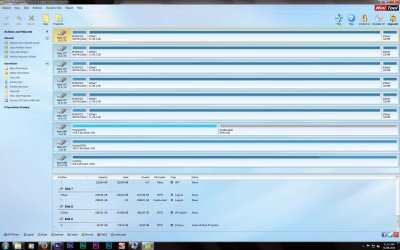
I have attached screen shots of the 4TB drive whilst in the external dock and it shows only the first 2TB of the drive which you were correct on saying this is a limitation for this dock. However when I connect it internally I can see the whole 4TB in disk manager and MiniTool (see the third attachment).

I checked the mentioned settings in the bios and they were:
- SATA=AHCI
- CSM (Compatible System Mode) = enable
- Storage Boot and PCI device = Legacy (not UEFI)
- Fast boot to disable.

Also I tried to re-format the 4TB drive so it is now MBR not GPT (well only a 2TB portion of it) but I still have no change. I was thinking this may have been an easier solution for the time being rather than re-installing everything, shouldn't this have had the same effect?

As for the story of this PC and it's HDD, It's a brand new PC purchased and put together by another guy I work with, he got this far and asked me to help with this issue as I know more about this sort of thing than him but am far from an expert (obviously!). As for the HDDs the big 4TB is actually NEW and the 2TB was picked from another PC (not in a RAID), both drives work perfect in two other computers we have put them in this issue only exists on this machine. The dock we just happened to have lying around and we were using to try and problem solve. The OS is Windows 7 Ultimate x64
 

Attachments

  • 4TBDM.jpg
    4TBDM.jpg
    94 KB · Views: 1
  • 4TBMini.jpg
    4TBMini.jpg
    109.6 KB · Views: 2
  • AllDrives.jpg
    AllDrives.jpg
    214.4 KB · Views: 6

My Computer My Computer

At a glance

Windows 7 Ultimate x64GeForce GTX 1080
Computer type
PC/Desktop
OS
Windows 7 Ultimate x64
Motherboard
Asus Z10PE-D16
Graphics Card(s)
GeForce GTX 1080
It turns out you are not the owner/ user with administrator privileges. Your friend Mr.X is. You are perhaps operating with a non-administrator guest account.

If your friend Mr.X trusts you, can you not log in as the original user and troubleshoot for him? That will greatly simplify matters. And during this troubleshooting process disconnect from the internet so that there is no network influence and also disconnect all other external drives including the media drives physically plugging those out ( safely remove) and also disabling your fibre channel adapter/program.

You have needlessly formatted the 4 GB drive as an MBR drive in the 4GB incompatible dock. Once you log in as the administrative user Mr.X, check whether you can read and write to 2TB as well as the 4TB (now 2TB MBR drive) drives and post your findings.In effect you will be starting afresh doing away with any unnecessary attendums that can be confusing.

As you said that you are not an expert, me too not an expert in dealing with these problems, but I think the above recommended process will put the whole thing in a proper perspective for other experts to chip in and guide you with any problems you face and report.

( Don't worry about the 4TB MBR drive. It can be reformatted as a GPT drive bringing the whole space accessible)

I am also not sure whether it is absolutely necessary that you should only use UEFI and reinstall Windows 7 64bit on a GPT SSD. Other experts to look in and advise you.
 

My Computer My Computer

At a glance

Windows 7 Home Premium 32 bit
OS
Windows 7 Home Premium 32 bit
This machine has a single admin account, the same account I am logged into and using.
I have tried booting into windows with no fibre channel drives connected and also disabling it's managment software (with the internet still connected) but no change. I was told by Mr.X that this problem existed before the fibre channels were connected and configured, but I didn't see this for my own eyes I have to trust him on that.

I don't mind formatting these drives over and over again as there is nothing on them, Ive done it several times whilst in the external dock. Also on the drive (whilst in the dock) Ive also gone into properties/Security and successfully claimed ownership of the drives under the admin user I'm logged into but alas as soon as I re-boot and re-connect back the drive back into the motherboard all is lost again? and I have no access and no control... ?
 

My Computer My Computer

At a glance

Windows 7 Ultimate x64GeForce GTX 1080
Computer type
PC/Desktop
OS
Windows 7 Ultimate x64
Motherboard
Asus Z10PE-D16
Graphics Card(s)
GeForce GTX 1080
Have you tried initializing the drive as GPT while it is connected to the motherboard (not in the dock) ?
You might also want to do a Diskpart Clean while it is connected to the motherboard (before initializing).
 

My Computer My Computer

At a glance

Multi-Boot W7_Pro_x64 W8.1_Pro_x64 W10_Pro_x6...AMD Athlon II x4 6206GB GSkill DDR2 800AMD 4670 GPU + AMD 4200 IGP
Computer type
PC/Desktop
Computer Manufacturer/Model Number
home built
OS
Multi-Boot W7_Pro_x64 W8.1_Pro_x64 W10_Pro_x64 +Linux_VMs +Chromium_VM
CPU
AMD Athlon II x4 620
Motherboard
Gigabyte GA-MA785G-UD3H
Memory
6GB GSkill DDR2 800
Graphics Card(s)
AMD 4670 GPU + AMD 4200 IGP
Sound Card
on board Realtek ALC889A
Monitor(s) Displays
RCA 40" LCD TV, Insignia 32" LCD TV, HP 15" LCD monitor
Screen Resolution
1680 x 1050
Hard Drives
OCZ Vertex 3 120GB,
Samsung F3 1TB (3),
Several others - WD, Seagate, Hitachi, ...
PSU
Corsair 500 W
Case
Rosewill mid tower
Cooling
CM 90mm rifle
Keyboard
Gyration wireless, Logitech wireless, Dell USB wired
Mouse
Gyration wireless, Logitech wireless, V7 USB wired
Internet Speed
Spectrum - 100Mbps D / 10Mbps U
Antivirus
Avast, MBAM3, EMET, WinPatrol
Browser
Pale Moon, Firefox, IE
Other Info
2 multi-boot PC's
Mainly HTPC/Office/Gen purpose (no gaming).
Trendnet USB KVM.
LG DVD burner/Blue Ray Player.
Tray system for removable SATA backup drives.

Not currently OCd, under-volted.
I use Hybrid sleep, rarely re-boot or shutdown.

Hauppauge HD-PVR, Avermedia PCIe TV Tuner, Hauppauge PCI TV Tuner.
You are having all this problems because Win 7 wasn't installed as it should. Your MB deserve a clean install with UEFI, and this problem will be gone.
 

My Computers My Computers

  • At a glance

    Windows 7 HP 64i5 6600K - 800MHz to 4200MHz4+4G GSkill DDR4 3000IG - Intel 530
    Computer type
    PC/Desktop
    Computer Manufacturer/Model Number
    custom build
    OS
    Windows 7 HP 64
    CPU
    i5 6600K - 800MHz to 4200MHz
    Motherboard
    GA-Z170-HD3P
    Memory
    4+4G GSkill DDR4 3000
    Graphics Card(s)
    IG - Intel 530
    Monitor(s) Displays
    Samsung 226BW
    Screen Resolution
    1680x1050
    Hard Drives
    (1) -1 SM951 – 128GB M.2 AHCI PCIe SSD drive for Windows 7 and Lubuntu
    (2) -1 WD SATA 3 - 1T for Data
    (3) -1 WD SATA 3 - 1T for backup
    PSU
    Thermaltake 450W TR2 gold
    Keyboard
    Old and good Chicony mechanical keyboard
    Mouse
    Logitech mX performance - 9 buttons (had to disable some)
    Internet Speed
    500Mb/s
    Browser
    Firefox 64
    Other Info
    TinyWall firewall
  • At a glance

    Windows 7 Proi7-4500U 800MHz to 3.0GHz(4+4)G DDR3 1600IG intel 4400 + NVIDIA GeForce GT 745M
    Computer type
    Laptop
    System Manufacturer/Model Number
    Asus Q550LF
    OS
    Windows 7 Pro
    CPU
    i7-4500U 800MHz to 3.0GHz
    Motherboard
    Asus Q550LF
    Memory
    (4+4)G DDR3 1600
    Graphics Card(s)
    IG intel 4400 + NVIDIA GeForce GT 745M
    Sound Card
    Realtek
    Monitor(s) Displays
    LG Display LP156WF4-SPH1
    Screen Resolution
    1920 x 1080
    Hard Drives
    BX500 120G SSD for Windows and programs +
    1T HDD for data
    Internet Speed
    500 Mb/s
    Browser
    Firefox
    Other Info
    TinyWall firewall
For me a 3TB GPT drive works with Windows installed as Legacy Bios / MBR.
I just plug it in and it works, no special drivers, workarounds, etc.

Here is a quote from the MS KB article linked in post #13

Overall requirements for a non-bootable data volume

For a system to be able to address the maximum capacity of a device that has a storage capacity of more than 2 TB, the following prerequisites apply:
  • The disk must be initialized by using GPT.
  • The Windows version must be one of the following (32-bit or 64-bit, unless otherwise noted, but including all SKU editions):
    • Windows Server 2008 R2 (only 64 bit version available)
    • Windows Server 2008
    • Windows 7
    • Windows Vista
  • The latest storage drivers from your storage controller manufacturer must be installed. For example, if your system uses an Intel storage controller that is set to “RAID” mode, make sure that you have the latest applicable drivers from the Intel support site.
  • Overall, you should contact your system vendor to determine whether the system supports device sizes of more than 2 TB.
Source: https://support.microsoft.com/en-us/kb/2581408
 

My Computer My Computer

At a glance

Multi-Boot W7_Pro_x64 W8.1_Pro_x64 W10_Pro_x6...AMD Athlon II x4 6206GB GSkill DDR2 800AMD 4670 GPU + AMD 4200 IGP
Computer type
PC/Desktop
Computer Manufacturer/Model Number
home built
OS
Multi-Boot W7_Pro_x64 W8.1_Pro_x64 W10_Pro_x64 +Linux_VMs +Chromium_VM
CPU
AMD Athlon II x4 620
Motherboard
Gigabyte GA-MA785G-UD3H
Memory
6GB GSkill DDR2 800
Graphics Card(s)
AMD 4670 GPU + AMD 4200 IGP
Sound Card
on board Realtek ALC889A
Monitor(s) Displays
RCA 40" LCD TV, Insignia 32" LCD TV, HP 15" LCD monitor
Screen Resolution
1680 x 1050
Hard Drives
OCZ Vertex 3 120GB,
Samsung F3 1TB (3),
Several others - WD, Seagate, Hitachi, ...
PSU
Corsair 500 W
Case
Rosewill mid tower
Cooling
CM 90mm rifle
Keyboard
Gyration wireless, Logitech wireless, Dell USB wired
Mouse
Gyration wireless, Logitech wireless, V7 USB wired
Internet Speed
Spectrum - 100Mbps D / 10Mbps U
Antivirus
Avast, MBAM3, EMET, WinPatrol
Browser
Pale Moon, Firefox, IE
Other Info
2 multi-boot PC's
Mainly HTPC/Office/Gen purpose (no gaming).
Trendnet USB KVM.
LG DVD burner/Blue Ray Player.
Tray system for removable SATA backup drives.

Not currently OCd, under-volted.
I use Hybrid sleep, rarely re-boot or shutdown.

Hauppauge HD-PVR, Avermedia PCIe TV Tuner, Hauppauge PCI TV Tuner.
You are having all this problems because Win 7 wasn't installed as it should.......

I disagree with this if you mean that it has to be installed only as UEFI+GPT. ( Unless it has some authoritative base/reference. I am unable to find one)

Just had a look at this one New motherboard has UEFI bios but my hdd is in MBR scheme...Want to format C drive and fresh install windows 7..HELP - USB - Windows 7

"uefi/ legacy is an option, not a requirement. your pc,'s bios has an option to use efi or not, find that option and turn efi off, then make rufus make a regular mbr win7 disk, and reinstall windows. if you dont know what uefi is then dont use it. its not for you "

"ah you have an asus mobo. boot into you bios, click advanced mode if not already in advanced mode, goto the boot tab, find compatibility ssupport module(CSM) and basically just make sure nothing is set to uefi. i believe its called OProm or something. once youve set those you can use your computer like the pre-efi days. gpt is unnessicary"

DavidE has also stated that he has a legacy + MBR install and he has no problem.
 
Last edited:

My Computer My Computer

At a glance

Windows 7 Home Premium 32 bit
OS
Windows 7 Home Premium 32 bit
Back
Top