Sata Mode AHCI / IDE

Serpentz

New member
Member
Local time
1:09 PM
Messages
46
Location
Kiev, Ukraine
Hey everyone. I hope everyone is doing fine. I've literally rebuilt my entire machine but I think I made a mistake before installing Windows 7.

I should have gone over the BIOS with a fine tooth comb, but I did not. The SATA mode is set to IDE instead of AHCI or RAID and now of course, I can't switch it to my knowledge without getting a BSOD. It means I would have to reinstall the OS over again.

I have been reading up online and did a search here, but didn't find the appropriate thead. I have two questions. I read on a forum somewhere, where an Intel user used a program to change this in Windows somehow. Is there some kind of utility that will allow me to switch to AHCI mode without reinstalling Win7 64bit?

Second question, is it worth it to switch over? I see the benefits are this:

AHCI mode brings 3 main advantages:
Supports NCQ (Native Command Queuing) allowing SATA drives to accept more than one command at a time and dynamically reorder the commands for maximum efficiency.
Supports hot plugging of devices
Supports staggered spin ups of multiple hard drives at boot time

My machine seems kind of slow when accessing data and don't know if this is an issue with the SATA drives being in IDE mode. I got some choppiness in some games that's coming from access data (tested) and that seems weird but could definitely come from SATA drives being in IDE mode.

I got an MSI R5770 Hawk Video card...I'm freaking in love with that thing :)

I have two Hitachi 7200RPM SATA and one Seagate Barracuda 7200RPM SATA drive. All three are 500GB

My new machine is ASRock M3A770DE Mainboard and I successfully unlocked the 4th core on my AMD Athlon 445 making it a Phenom X4 3.1 and it's running beautifully. Ran a stability test and it was perfect.

RAM is Kingston HyperX CAS8 running at 1600mhz

So my question....to AHCI or not. Do you think its worth it. Have you noticed huge performance gains.

So now I guess I better update my profile and sorry I haven't been around. Me and SevenForums had an email issue :o

Cheers!
 

My Computer

OS
Windows 7 Ultimate x64
CPU
QuadCore AMD Phenom II X4 B45, 3100 MHz
Motherboard
ASRock M3A770DE
Memory
4GB Kingston HyperX DDR3 1600MHz
Graphics Card(s)
MSI R5770 Hawk 1GB GDDR5
Sound Card
M-Audio Delta 1010 PCI
Monitor(s) Displays
2X Acer 22" LCD
Screen Resolution
1680X1050
Hard Drives
2x Hitachi 7200RPM SATA 500GB
1x Seagate Barracuda 7200RPM 500GB
PSU
Thermaltake 675watt 80 Bronze
Case
Generic
Cooling
Thermaltake SpinQ 360
Mouse
Logitech G9 Laser
That's weird. I thought Windows 7 handled switching to AHCI mode better than that. Guess it has the same problem as XP.

Anyway, quick answers to a couple of your questions:

1) There is nothing magical about AHCI. About all you will gain is the ability to hot-plug drives. That may be worthwhile if you use an external HDD connected by eSATA. Otherwise, I wouldn't worry about it.

From what I've read, NCQ is only of real benefit in an environment where the disk is being accessed constantly, such as server. Normal desktop users probably won't see any measurable benefit.

The staggered spin-up thing probably doesn't matter either. Maybe it would, if you were running a large RAID (like maybe a 6-disk RAID 10) and had a barely-adequate power supply.

2) Yes, there should be a way to install the AHCI drivers so that Windows 7 doesn't bluescreen on startup. I did it with Windows XP, although it wasn't all that straightforward. I didn't have to reinstall Windows XP, and you shouldn't have to reinstall Windows 7 either.

update:

Just for curiosity, I tried switching my disk controller to IDE mode. Windows 7 booted, but then made me reboot immediately, presumably because it had to install the IDE-mode drivers for the disk controller. On next startup, I re-ran the Windows Experience Index test. My disk score remained exactly the same (5.9) as when I had the disk controller in AHCI mode.

I then restarted, got into the BIOS menu & switched the disk controller back to AHCI mode. On restart, Windows 7 again booted fine.
 
Last edited:

My Computer

Computer Manufacturer/Model Number
Homebuilt
OS
Windows 7 Ultimate x64
CPU
Intel Core 2 Duo E8500
Motherboard
Asus P5E3 WS Pro
Memory
4 GB DDR3 1333 MHz (2 x 2 GB DIMM)
Graphics Card(s)
Nvidia GeForce 9800 GTX+
Sound Card
Creative Audigy 2 ZS
Monitor(s) Displays
NEC AccuSync 120 21" CRT, Samsung BX2440X 24" LCD
Screen Resolution
1600x1200 CRT, 1920x1080 LCD
Hard Drives
Various and sundry SATA I/II HDDs
PSU
850 W
Case
Lancool PC-K7B
Cooling
Standard fans & heatsink
Keyboard
Saitek Eclipse II, Nostromo n52
Mouse
Logitech MX 310
Internet Speed
20 Mbit cable
Other Info
Recently added: NEC/Renesas µPD720200 USB 3.0 card on PCI Express 2.0 1x slot
Hey thanks for the reply. I'll try to see if I can switch and see what happens. I don't think the Windows Index would change unless you replaced the drive with a solid state. 5.9 seems to be the best score you can get with a conventional hard disk.

Thanks for the reply.
 

My Computer

OS
Windows 7 Ultimate x64
CPU
QuadCore AMD Phenom II X4 B45, 3100 MHz
Motherboard
ASRock M3A770DE
Memory
4GB Kingston HyperX DDR3 1600MHz
Graphics Card(s)
MSI R5770 Hawk 1GB GDDR5
Sound Card
M-Audio Delta 1010 PCI
Monitor(s) Displays
2X Acer 22" LCD
Screen Resolution
1680X1050
Hard Drives
2x Hitachi 7200RPM SATA 500GB
1x Seagate Barracuda 7200RPM 500GB
PSU
Thermaltake 675watt 80 Bronze
Case
Generic
Cooling
Thermaltake SpinQ 360
Mouse
Logitech G9 Laser
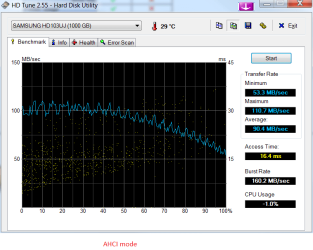
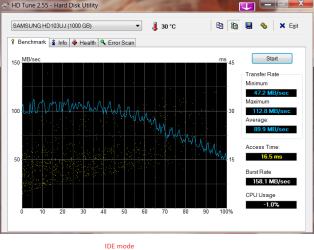
It might be informative if I ran a hard drive benchmark utility with the disks in both AHCI mode and IDE mode.

What would be a good testing utility? HD Tach has a trial version that will test for best-case (sequential) read speeds, which should be enough to show any differences between AHCI and IDE performance.

I didn't know mechanical HDD's could only score 5.9 on the Windows index. How about if you have them in a RAID 0 config? RAID 0, or one of its hybrids such as 1+0, can just about double read speeds in many cases.

I'll post results if I do get around to some testing.

Practically no difference, which is about what I expected.
 

Attachments

  • HDTune_AHCI_on.png
    HDTune_AHCI_on.png
    20.5 KB · Views: 1,874
  • HDTune_IDE_mode.png
    HDTune_IDE_mode.png
    23.6 KB · Views: 1,711
Last edited:

My Computer

Computer Manufacturer/Model Number
Homebuilt
OS
Windows 7 Ultimate x64
CPU
Intel Core 2 Duo E8500
Motherboard
Asus P5E3 WS Pro
Memory
4 GB DDR3 1333 MHz (2 x 2 GB DIMM)
Graphics Card(s)
Nvidia GeForce 9800 GTX+
Sound Card
Creative Audigy 2 ZS
Monitor(s) Displays
NEC AccuSync 120 21" CRT, Samsung BX2440X 24" LCD
Screen Resolution
1600x1200 CRT, 1920x1080 LCD
Hard Drives
Various and sundry SATA I/II HDDs
PSU
850 W
Case
Lancool PC-K7B
Cooling
Standard fans & heatsink
Keyboard
Saitek Eclipse II, Nostromo n52
Mouse
Logitech MX 310
Internet Speed
20 Mbit cable
Other Info
Recently added: NEC/Renesas µPD720200 USB 3.0 card on PCI Express 2.0 1x slot

My Computer

Computer Manufacturer/Model Number
Over Clockers Ultima Viper 2.80Ghz
OS
Windows 7 Ultimate 64 - OEM Service Pack 1
CPU
Intel Core i7 930 2.80Ghz Bloomfield Socket LGA 1366
Motherboard
Gigabyte GA-X58A-UD3R Intel X58 Socket 1366 DDR3
Memory
Patriot Viper 6GB 3x2GB DDR3 PC3-1200C9 1600Mhz Tri Channel
Graphics Card(s)
Asus ATI Radeon HD 5770 CuCore 1024MB GDDR5 PCI Express
Sound Card
Realtek ALC889 @ Intel 82801JB ICH10 - High Definition Audio
Monitor(s) Displays
Samsung SyncMaster 920N 19"
Screen Resolution
1280*1024
Hard Drives
1 x OCZ Vertex2 Series 120GB 2.5" SATA-II SSD
1 x Seagate Barracuda 7200.12 1TB SATA-II 32MB Cache
1 x Western Digital Caviar Green 2TB SATA-II 64 MB Cache
PSU
Corsair TX 650W ATX SLi
Case
Antec 902 Ultimate Gaming Case Black
Cooling
Prolimatech Megahalems Rev B CPU Cooler Socket 775/1156/1366
Keyboard
Microsoft Comfort Curve Keyboard
Mouse
Microsoft Optical USB
Internet Speed
ADSL24 FTTC 34.2 Mbps Down 7.1Mbps Up
Other Info
OcUK 22x DVDSATA ReWriter Black
Akasa AK-FN058 Apache Black Super Silent 120mm Fan
Printer Epson Stylus Photo R300
Scanner Canon Canoscan 8000F
There are ways of swapping, but don't bother if you are going to expect a performance difference, because there won't be, not with a spinner.
 

My Computer

OS
Windows 7 Ultimate x64 SP1
CPU
Intel Core i7-2600
Motherboard
Gigabyte GA-P67A-UD3P-B3
Memory
12 GB Patriot Extreme DDR3-1333
Graphics Card(s)
Nvidia GTX 470
Monitor(s) Displays
Dell UltraSharp 2209WA
Hard Drives
OCZ Agility3 240 GB, WD5001AALS, WD7501AALS
PSU
OCZ ModStream 700W
Case
CoolerMaster HAF 912 Advanced
Cooling
CoolerMaster Hyper 212 Plus
I just tried to switch...BSOD. So it's not possible anyway and for no performance gain, it's not even worth it to reinstall the OS.

Thanks for the replies everyone.
 

My Computer

OS
Windows 7 Ultimate x64
CPU
QuadCore AMD Phenom II X4 B45, 3100 MHz
Motherboard
ASRock M3A770DE
Memory
4GB Kingston HyperX DDR3 1600MHz
Graphics Card(s)
MSI R5770 Hawk 1GB GDDR5
Sound Card
M-Audio Delta 1010 PCI
Monitor(s) Displays
2X Acer 22" LCD
Screen Resolution
1680X1050
Hard Drives
2x Hitachi 7200RPM SATA 500GB
1x Seagate Barracuda 7200RPM 500GB
PSU
Thermaltake 675watt 80 Bronze
Case
Generic
Cooling
Thermaltake SpinQ 360
Mouse
Logitech G9 Laser
It is possible, I have done it before. Just follow the tutorial Steve Pressman gave. But, I don't believe you will see much performance gain unless you have an SSD.
 

My Computers

System One System Two

  • Computer type
    PC/Desktop
    Computer Manufacturer/Model Number
    ALWAYS UNDER CONSTRUCTION
    OS
    Windows 11 Pro
    CPU
    Ryzen 9 5900X
    Motherboard
    Asus X570 Crosshair Viii Hero
    Memory
    32GB G Skill DDR4-3600
    Graphics Card(s)
    EVGA RTX 3080 FTW 3 Ultra
    Sound Card
    On Board/Sennheiser PC37X Headset
    Monitor(s) Displays
    3 X Asus 27"
    Screen Resolution
    2560x1440
    Hard Drives
    2 X 1 TB NVME drives
    PSU
    EVGA 850
    Case
    Phanteks Eclipse P400A
    Cooling
    EVGA 280 AIO
    Keyboard
    Logitech G510s/ Logitech G13
    Mouse
    Logitech G502
    Internet Speed
    24/1
    Antivirus
    ESET/MBAM Pro/SAS Pro
    Browser
    Chrome/ Firefox/ Edge
  • Computer type
    Laptop
    System Manufacturer/Model Number
    Dell 16 Plus
    OS
    Windows 11 Pro
    CPU
    Intel Ultra 9 288V
    Memory
    32 GB LPDDR5X 8533
    Monitor(s) Displays
    16" Mini-LED HDR600 Touch 90 Hz
    Screen Resolution
    2560X1600
    Hard Drives
    1 TB NVME
This seems to depend on the BIOS and on the motherboard. I have posted my experience in the tutorial thread Steve mentioned, but let me repeat briefly. I have a Dell Inspiron 530, which I have upgraded to its max. When I bought a SSD, I decided to enable AHCI for it based on many accounts in these Forums and elsewhere. Trouble is, Dell Bios is very restricted, the only thing one can do is to switch from IDE to RAID. That (although not obviousl beforehand) does turn on AHCI. But, as much as I tried to enable AHCI in my old installation of Windows 7, I did not succeed. No matter what I do, if I boot the old Windows installation (installed for IDE) with the RAID/AHCI setting in the BIOS - the system will not boot, no BSOD, but right after initial animation the machine will reboot on its own. So for now I have to switch the BIOS setting every time I need to turn on another OS.

In addition, the eSATA experience also seems to be affected by this BIOS setting. Of course, my Dell mobo does not have a on-board eSATA, so I use a PCI-e card (made by Hama) with a JMicron chip. This is a RAID/AHCI card. Now, when I boot in IDE and then plug the external drive into the eSATA port on this card - everything works as advertised, although a bit slower than on my laptop which came with a native eSATA port. Now, if I boot into AHCI, then plugging the external drive into the eSATA card does not work. I am not sure if the two AHCI controllers are in conflict or something, I have not had the time yet to investigate this properly.

Now, since I am running two setups, one in IDE and one in AHCI, I can say that there is basically no difference between them, in every-day use. Of course, for the SSD AHCI is supposed to be better because of TRIM support, but that's "under the hood". On the surface, the SSD is definitely faster than HDD, although so far not as screaming fast as I believed it would after reading all the threads about them. But then, like I said, I only had very little time to play with the thing.
 

My Computer

Computer Manufacturer/Model Number
Dell Inspiron 530
OS
Windows 7 Ultimate (x64)
CPU
Q6600
Memory
8 GB
Graphics Card(s)
ATI Radeon HD 2600 XT
Monitor(s) Displays
Samsung Syncmaster P2450
Screen Resolution
1920x1080
Hard Drives
Samsung HD103UJ
Samsung HD501LJ
Internet Speed
25 Mb/s
I would recommend AHCI, you might not notice a performance improvement, but NCQ can reduce the HDD activity and disk thrashing.
If you're using eSATA it's nice to be able to remove the external when you want to.
The tutorial listed by steve-pressman does work very well.


@unifex, I switched from IDE to RAID on my Dell Inspiron 530, before the reg edit trick was known. Loaded the RAID drivers and when it asked to re-boot I went to the BIOS and switched it to RAID, after the OS loaded it asked for another re-boot and I was in AHCI mode.

If this doesn't work for you, use the above tutorial.

As long as you have the RAID drivers loaded in the OS it will run in AHCI mode.
When it re-boots by itself does it run fine afterwards?

I never used a PCI-e card, got a SATA cable that went to a backplate with a eSATA plug on it, nothing else just cable.
Works great for over three years now, can hot swap with a nice little program called "HotSwap", it looks and functions just like the MS Safely Remove Hardware option, except it will clear the cache and let you unplug the external.
This method will also let you run an OS from an external, it has no way of knowing it's not internal.

If your SSD is not noticeably faster, there might be something that is holding the performance back. Bad alignment, old drivers, there are several things that could be doing it.
 

My Computer

Computer type
PC/Desktop
Computer Manufacturer/Model Number
76~2.0
OS
Windows 7 Ult x64 - SP1/ Windows 8 Pro x64
CPU
Intel Core i5-3570K 4.6GHz
Motherboard
Gigabyte GA-Z77X UD3H, f18
Memory
8GB (2X4GB) DDR3 1600 Corsair Vengeance CL8 1.5v
Graphics Card(s)
Sapphire HD 7770 Vapor-X OC 1GB DDR5
Sound Card
Onboard VIA VT2021
Monitor(s) Displays
22" LCD Dell
Screen Resolution
1680x1050
Hard Drives
Samsung 840Pro 128GB SSD,
Seagate Barracuda 500GB SATA2 7200rpm 32MB cache, Seagate Barracuda 1TB SATA2 7200rpm 32MB cache,
PSU
Corsair HX650W
Case
Cooler Master Storm Scout
Cooling
Corsair H80 2x12cm Noctua NF P12 , 2x14cm case fans
Keyboard
Logitech Wave
Mouse
CM Sentinel
Internet Speed
Dismal
Antivirus
Avast
Browser
Opera Next
Other Info
Haswell laptop: HP Envy 17t-j, i7-4700MQ, GeForce 740M 2GB DDR3, 17.3" Full HD 1920x1080, 16GB RAM, Samsung 840 Pro 128GB, 1TB Hitachi 7200 HDD,
Desktop: eSATA ports,
External eSATA Seagate 500GB SATA2 7200rpm,
External WD USB 500GB
@unifex, I switched from IDE to RAID on my Dell Inspiron 530, before the reg edit trick was known. Loaded the RAID drivers and when it asked to re-boot I went to the BIOS and switched it to RAID, after the OS loaded it asked for another re-boot and I was in AHCI mode.

If this doesn't work for you, use the above tutorial.

As long as you have the RAID drivers loaded in the OS it will run in AHCI mode.
When it re-boots by itself does it run fine afterwards?

Well, that's the thing, it does not, it simply keeps re-booting. And the tutorial is what I followed. I downloaded the latest drivers from Intel, installed, and it did not even ask me to re-boot. So I went ahead and re-booted and changed the settings in BIOS and now I have what I have.

Out of curiosity, which drivers did you install exactly?

If your SSD is not noticeably faster, there might be something that is holding the performance back. Bad alignment, old drivers, there are several things that could be doing it.

Well, it's clearly faster. It's just that when I run the OS off the SSD I don't get the "wow" factor. Maybe this is because I moved all temporary files, user files profiles and other places where Windows writes a lot off the SSD in an attempt to reduce the write cycles.
 

My Computer

Computer Manufacturer/Model Number
Dell Inspiron 530
OS
Windows 7 Ultimate (x64)
CPU
Q6600
Memory
8 GB
Graphics Card(s)
ATI Radeon HD 2600 XT
Monitor(s) Displays
Samsung Syncmaster P2450
Screen Resolution
1920x1080
Hard Drives
Samsung HD103UJ
Samsung HD501LJ
Internet Speed
25 Mb/s
I would recommend AHCI, you might not notice a performance improvement, but NCQ can reduce the HDD activity and disk thrashing.
If you're using eSATA it's nice to be able to remove the external when you want to.
We should clear up a few things here. You are correct about the eSATA functionality, but NCQ is a server-related technology, handling multiple requests for disk access at once. It is a largerly useless technology on a single user workstation, and you won't see any difference in disk usage between AHCI and IDE.
As long as you have the RAID drivers loaded in the OS it will run in AHCI mode.
You do not want RAID drivers loaded, unless you are referring to a chipset that I'm not familiar with. IDE, AHCI, and RAID are completely separate and independent...and all have separate drivers. For example, with Intel chipset boards, AHCI is picked up by Windows 7, and the chipset drivers install the official drivers from Intel. RAID requires an entirely different BIOS settings and driver package form Intel. They are not one in the same.
 

My Computer

OS
Windows 7 Ultimate x64 SP1
CPU
Intel Core i7-2600
Motherboard
Gigabyte GA-P67A-UD3P-B3
Memory
12 GB Patriot Extreme DDR3-1333
Graphics Card(s)
Nvidia GTX 470
Monitor(s) Displays
Dell UltraSharp 2209WA
Hard Drives
OCZ Agility3 240 GB, WD5001AALS, WD7501AALS
PSU
OCZ ModStream 700W
Case
CoolerMaster HAF 912 Advanced
Cooling
CoolerMaster Hyper 212 Plus
Don't know what your motherboard allows, but I have a Gigabyte board and did the EDI-to-AHCI switch as follows:
1) BIOS supports setting SATA mode differently for different ports
2) Set AHCI mode for some ports, IDE mode for other (originally, had all ports set to IDE)
3) Changed the SATA cable to connect to the IDE port
4) Booted Win7 -- it automatically installed the AHCI drivers
5) Had to reboot a second time
6) Switched the SATA cable to the AHCI port
7) Rebooted -- works fine.
 

My Computer

Computer type
PC/Desktop
Computer Manufacturer/Model Number
Custom
OS
Win7 Pro 32-bit, Win8 Pro 32-bit
CPU
AMD Phenom II X6 1090T
Motherboard
Gigabyte
Memory
4GB ddr3 1300
Graphics Card(s)
AMD HD 4290 onboard
Sound Card
Builtin Realtek HD Audio
Monitor(s) Displays
Samsung 24" widescreen, LG 23" widescreen
Screen Resolution
1920x1200/1920x1080
Hard Drives
Kingston 256GB SSD
Keyboard
Logitech Illuminated Keyboard
Mouse
Logitech M705 wireless mouse
Antivirus
Norton Av 2013
Browser
IE v10
You do not want RAID drivers loaded, unless you are referring to a chipset that I'm not familiar with. IDE, AHCI, and RAID are completely separate and independent...and all have separate drivers. For example, with Intel chipset boards, AHCI is picked up by Windows 7, and the chipset drivers install the official drivers from Intel. RAID requires an entirely different BIOS settings and driver package form Intel. They are not one in the same.

Well, that's the thing for Dell Inspiron - there is no separate setting in the BIOS for AHCI. Only IDE and RAID. But, RAID actually corresponds to AHCI, so by choosing RAID I actually get the AHCI BIOS screen and so on.

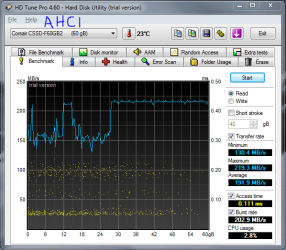
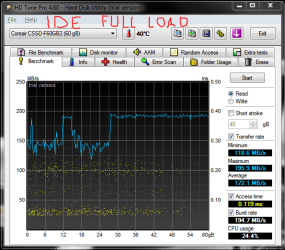
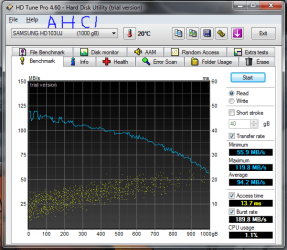
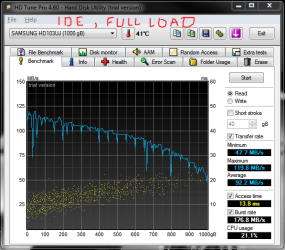
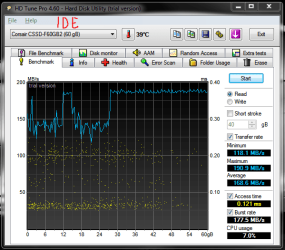
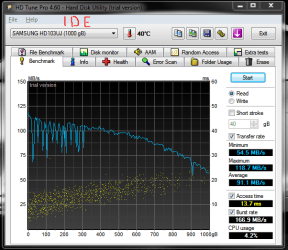
As far as the performance, take a look at the screenshots. I used HDTune to measure the read performance of my SSD and the HDD when I run the OS from HDD in IDE mode and also when I run from SSD in AHCI mode. The latter shows slightly better performance. The caveat is that in IDE mode the computer was also doing something else at the time.
 

Attachments

  • corsair_F60_ahci.png
    corsair_F60_ahci.png
    26.9 KB · Views: 135
  • corsair_F60_ssd_ide_full_load.png
    corsair_F60_ssd_ide_full_load.png
    27.4 KB · Views: 131
  • samsung_1tb_ahci.png
    samsung_1tb_ahci.png
    29 KB · Views: 118
  • samsung_1tb_ide_full_load.png
    samsung_1tb_ide_full_load.png
    27.8 KB · Views: 108

My Computer

Computer Manufacturer/Model Number
Dell Inspiron 530
OS
Windows 7 Ultimate (x64)
CPU
Q6600
Memory
8 GB
Graphics Card(s)
ATI Radeon HD 2600 XT
Monitor(s) Displays
Samsung Syncmaster P2450
Screen Resolution
1920x1080
Hard Drives
Samsung HD103UJ
Samsung HD501LJ
Internet Speed
25 Mb/s
Your caveat pretty much throws the comparisons out the window. I can't speak for SSDs, but for HDDs, the differences between IDE and AHCI aren't performance related.
 

My Computer

OS
Windows 7 Ultimate x64 SP1
CPU
Intel Core i7-2600
Motherboard
Gigabyte GA-P67A-UD3P-B3
Memory
12 GB Patriot Extreme DDR3-1333
Graphics Card(s)
Nvidia GTX 470
Monitor(s) Displays
Dell UltraSharp 2209WA
Hard Drives
OCZ Agility3 240 GB, WD5001AALS, WD7501AALS
PSU
OCZ ModStream 700W
Case
CoolerMaster HAF 912 Advanced
Cooling
CoolerMaster Hyper 212 Plus
Here's the data for IDE setting without anything running. Clearly, for the HDD the load is important, while AHCI vs IDE not so much. For the SSD AHCI provides a bit of a benefit. Also, in the IDE mode the SSD is not used in any way, that's how the PC is setup.
 

Attachments

  • corsair_F60_ide.png
    corsair_F60_ide.png
    28.1 KB · Views: 52
  • samsung_1tb_ide.png
    samsung_1tb_ide.png
    28.3 KB · Views: 49

My Computer

Computer Manufacturer/Model Number
Dell Inspiron 530
OS
Windows 7 Ultimate (x64)
CPU
Q6600
Memory
8 GB
Graphics Card(s)
ATI Radeon HD 2600 XT
Monitor(s) Displays
Samsung Syncmaster P2450
Screen Resolution
1920x1080
Hard Drives
Samsung HD103UJ
Samsung HD501LJ
Internet Speed
25 Mb/s
I have very little experience with SSDs, as I had one for a week and then sold it, but I was under the impression that some of them required the ports to be set as AHCI. I can certainly believe that AHCI would lend a benefit to those drives, and it is good to see that AHCI is offering something for SSDs, as I'm in the market for a 120-160 GB model.
 

My Computer

OS
Windows 7 Ultimate x64 SP1
CPU
Intel Core i7-2600
Motherboard
Gigabyte GA-P67A-UD3P-B3
Memory
12 GB Patriot Extreme DDR3-1333
Graphics Card(s)
Nvidia GTX 470
Monitor(s) Displays
Dell UltraSharp 2209WA
Hard Drives
OCZ Agility3 240 GB, WD5001AALS, WD7501AALS
PSU
OCZ ModStream 700W
Case
CoolerMaster HAF 912 Advanced
Cooling
CoolerMaster Hyper 212 Plus
I don't think any SSD driver requires AHCI. But I believe it is true, though there still may be some question, that in order to get TRIM support you need AHCI and not IDE. Maybe that is what you are thinking of.
 

My Computer

Computer type
PC/Desktop
Computer Manufacturer/Model Number
Home built (GeneO industries)/Model 4
OS
Windows 10 Pro. EFI boot partition, full EFI boot
CPU
i7 4770k 4.4GHz (44-44-43-43 turbo) @ 1.248V
Motherboard
ASUS Maximus VI Hero
Memory
16GB (8GBx2) @2200 MHz G.skill Sniper 10-11-10-30-1, 1.6V
Graphics Card(s)
MSI GTX 970 Gaming 4G
Sound Card
Onboard SupremeFX Audio
Monitor(s) Displays
NEC Spectraview 2490WUXi-SV
Screen Resolution
1920 x 1200
Hard Drives
Samsung 850 Pro 256GB (OS), Samsung 2x 128GB 840 Pro SSD in RAID0, 3x WD Blue 6Gb/s 1TB RAID0, WD 2TB Black external USB 3.0, 2TB WD20EARS Green external USB 3.0, 2x 500GB Seagate and 1 750 GB external USB, 1x 350GB external USB3
PSU
Seasonic X-850 (2012 KM3 model)
Case
Fractal Design Define R4
Cooling
NH-D14, NF-F12, NF-A15; NF-P14, NF-P12,NF-A14, S12A PWM
Keyboard
Cooler Master Storm Quickfire Rapid - Brown
Mouse
Logitech G602
Internet Speed
126.4 Mb/s down, 24.3 Mb/s up
Other Info
USB 3.0 x8 , SATA III x8, eSATA, USB 2.0 x6. Samsung DVD R/W drive.

WEI: CPU 7.8, Memory 7.9, Graphics 7.9, Disk 7.9
I have a Dell 580S. In BIOS under advanced chipset settings There is a listing for SATA controller. I can set that to AHCI.
I have 2 SSDs and it is not necessary to run them in AHCI, But you will get better performance and Trim with ahci. That is for most SSDs. I have heard that there are some SSDs that will run better in IDE mode.
 

My Computers

System One System Two

  • Computer type
    PC/Desktop
    Computer Manufacturer/Model Number
    ALWAYS UNDER CONSTRUCTION
    OS
    Windows 11 Pro
    CPU
    Ryzen 9 5900X
    Motherboard
    Asus X570 Crosshair Viii Hero
    Memory
    32GB G Skill DDR4-3600
    Graphics Card(s)
    EVGA RTX 3080 FTW 3 Ultra
    Sound Card
    On Board/Sennheiser PC37X Headset
    Monitor(s) Displays
    3 X Asus 27"
    Screen Resolution
    2560x1440
    Hard Drives
    2 X 1 TB NVME drives
    PSU
    EVGA 850
    Case
    Phanteks Eclipse P400A
    Cooling
    EVGA 280 AIO
    Keyboard
    Logitech G510s/ Logitech G13
    Mouse
    Logitech G502
    Internet Speed
    24/1
    Antivirus
    ESET/MBAM Pro/SAS Pro
    Browser
    Chrome/ Firefox/ Edge
  • Computer type
    Laptop
    System Manufacturer/Model Number
    Dell 16 Plus
    OS
    Windows 11 Pro
    CPU
    Intel Ultra 9 288V
    Memory
    32 GB LPDDR5X 8533
    Monitor(s) Displays
    16" Mini-LED HDR600 Touch 90 Hz
    Screen Resolution
    2560X1600
    Hard Drives
    1 TB NVME

My Computer

OS
Windows 7 Ultimate x64 SP1
CPU
Intel Core i7-2600
Motherboard
Gigabyte GA-P67A-UD3P-B3
Memory
12 GB Patriot Extreme DDR3-1333
Graphics Card(s)
Nvidia GTX 470
Monitor(s) Displays
Dell UltraSharp 2209WA
Hard Drives
OCZ Agility3 240 GB, WD5001AALS, WD7501AALS
PSU
OCZ ModStream 700W
Case
CoolerMaster HAF 912 Advanced
Cooling
CoolerMaster Hyper 212 Plus
Back
Top