Save page has changed

windsorlady

New member
Local time
10:05 PM
Messages
58
Dell Intel Core 2 Duo Processor E7500 Computer
Inspirion 545s 00
Windows 7 Home Premium 64-bit
6GB Memory
Antivirus: Avast; Spyware Prevention: Spybot, Spyware Blaster. MalwareBytes, CCleaner, and Super AntiSpyware

I'm not sure if this is a Windows situation or something with a program I use called Paint Shop Pro (PSP), but the page has changed that I view when saving a file within PSP. My apologies for posting if it's not windows related, but thought I'd try here first.

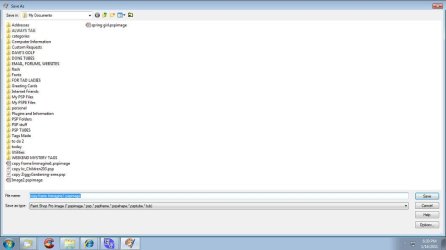
When I save a file, the page save dialog box comes up for me to tell it where to save it. It used to be that the page underneath that box would show the files and folders in the right pane, and in the left pane would be the Explore tree showing what's on computer. Now, when I save something in PSP, I only see the files and folders and not the tree.

If I save a Works document, I do see what I'm used to seeing, so that's what made me think it may just be a malfunction of my PSP program.

I have tried to resize the window as it comes up full screen and it will not let me grab any side to resize. The 2 small black arrows show up only on the left-hand side and won't appear on any other side of the page. However, even with that, it just won't budge.

It just started appearing in this format in the past week -- until then, I saw the Explore Tree as well. It's no biggie and I can live with it, but just wondered why it changed and if there was a way to get it back to what I was used to seeing.

Any ideas, please?

Thanks,

windsorlady
 

My Computer

Computer Manufacturer/Model Number
Dell Intel Core 2 Duo Processor E7500 Computer
OS
Windows 7
Memory
6GB
In the Save as dialog, click on Organize, Layout then check Navigation Pane.
 

My Computer

Computer type
PC/Desktop
Computer Manufacturer/Model Number
Lenovo IdeaCenter 450
OS
Windows 10 Pro X64
CPU
Intel Quad Core i7-4770 @ 3.4Ghz
Memory
16.0GB PC3-12800 DDR3 SDRAM 1600 MHz
Graphics Card(s)
Intel Integrated HD Graphics
Sound Card
Realtek HD Audio
Monitor(s) Displays
HP 22" LCD
Screen Resolution
1680 x 1050
Hard Drives
250GB Samsung EVO SATA-3 SSD
2TB Seagate ST2000DM001 SATA-2
1.5TB Seagate ST3150041AS SATA
Keyboard
Dell USB
Mouse
Lenovo USB
Internet Speed
Cable via Road Runner 3MB Upload, 30MB Download
Antivirus
Windows Defender, MBAM Pro, MBAE
Browser
Seamonkey
Other Info
UEFI/GPT
PLDS DVD-RW DH16AERSH
When saving from PSP, I do not have those options available. I do have those options and they are defaulted to that if saving something from Wordpad, Works, etc. If I could figure out how to attach a screen shot of what I get, I do have a .jpg of it, but don't know how to do that.

windsorlady
 

My Computer

Computer Manufacturer/Model Number
Dell Intel Core 2 Duo Processor E7500 Computer
OS
Windows 7
Memory
6GB
The file open/save dialogs can vary somewhat depending on the software in use, and any modifications one has made to the user interface, however, they are usually quite similar at least. You may have the option to "Hide Folders"; ( Outlined in red in the screen shot below),

If you click on this it will once again show your navigation tree pane.


Also, if you have the option "Organise" ( Highlighted red in the screen shot);


You can change the layout to show the navigation pane by clicking on it.

Regards....Mike Connor
 

My Computer

OS
Several, including Windows 7 x64 Ultimate

My Computer

Computer type
PC/Desktop
Computer Manufacturer/Model Number
Lenovo IdeaCenter 450
OS
Windows 10 Pro X64
CPU
Intel Quad Core i7-4770 @ 3.4Ghz
Memory
16.0GB PC3-12800 DDR3 SDRAM 1600 MHz
Graphics Card(s)
Intel Integrated HD Graphics
Sound Card
Realtek HD Audio
Monitor(s) Displays
HP 22" LCD
Screen Resolution
1680 x 1050
Hard Drives
250GB Samsung EVO SATA-3 SSD
2TB Seagate ST2000DM001 SATA-2
1.5TB Seagate ST3150041AS SATA
Keyboard
Dell USB
Mouse
Lenovo USB
Internet Speed
Cable via Road Runner 3MB Upload, 30MB Download
Antivirus
Windows Defender, MBAM Pro, MBAE
Browser
Seamonkey
Other Info
UEFI/GPT
PLDS DVD-RW DH16AERSH
THanks for the directions on this and the attachments. I'm not having problems when viewing the area you're showing me. It's just when I save it in PSP, it gives me this page. Up until today (and I've not made any changes - not even a windows update (LOL)), it appeared like image below, but the Explore tree appeared on the left. It's no biggie -- at least I can still save it where I need to.
 

Attachments

  • saveas-save-screenshot.jpg
    saveas-save-screenshot.jpg
    41.9 KB · Views: 8

My Computer

Computer Manufacturer/Model Number
Dell Intel Core 2 Duo Processor E7500 Computer
OS
Windows 7
Memory
6GB
That's a bit unusual, something has changed your dialog boxes. Have you installed any other software?

What do you get when you click on "options" at the lower right?

Regards....Mike Connor
 

My Computer

OS
Several, including Windows 7 x64 Ultimate
There is also an icon of a yellow folder with a wedge in it at the top. What options do you get if you click on that?
 

My Computer

Computer type
PC/Desktop
Computer Manufacturer/Model Number
Lenovo IdeaCenter 450
OS
Windows 10 Pro X64
CPU
Intel Quad Core i7-4770 @ 3.4Ghz
Memory
16.0GB PC3-12800 DDR3 SDRAM 1600 MHz
Graphics Card(s)
Intel Integrated HD Graphics
Sound Card
Realtek HD Audio
Monitor(s) Displays
HP 22" LCD
Screen Resolution
1680 x 1050
Hard Drives
250GB Samsung EVO SATA-3 SSD
2TB Seagate ST2000DM001 SATA-2
1.5TB Seagate ST3150041AS SATA
Keyboard
Dell USB
Mouse
Lenovo USB
Internet Speed
Cable via Road Runner 3MB Upload, 30MB Download
Antivirus
Windows Defender, MBAM Pro, MBAE
Browser
Seamonkey
Other Info
UEFI/GPT
PLDS DVD-RW DH16AERSH
Here is another variation of the "save" dialog, which is opened by another program, in this case "Photo Filtre";

It is similar to yours, but has other options;


I suppose that you should be able to reach the display options through one of the "extra" options you have in your screen shot.


QUOTE Oh gosh --- you can't even see that (LOL). I can zoom the attachment on my computer at my end. I've uploaded it here if that helps. UNQUOTE

Clicking on the attachment makes it large enough to see.

Regards....Mike Connor
 

My Computer

OS
Several, including Windows 7 x64 Ultimate
No re: other software being added. I did have an odd thing happen the other day with Avast. After getting a virus definition update, it would not let me open my psp files. Well, I shouldn't say that -- it would let me open 1 and no more. In order to open another, I had to do a restart. Then it would let me open it -- but again, only one. I could not open any other of the files. I uninstalled Avast and went and got a whole new program because the first one I got came from a link in the CNET tracker notificatoin.

Once getting it uninstalled and going to Avast and downloading one directly from the site and reinstalling, things were fine once again. I thought it was weird that AVAST could make a change like that, but it appears to have happened. No problems sense. Sorry to get off on that tangent, but it did tie to this re: your question about software. No software added - just updates.

As for the OPTIONS button on the screen I get now -- that is strictly for the PSP program -- it provides a method to save in versions that are compatible with each other. It has nothing to do with the screen for SaveAS or Save.

Up near the block that says MY DOCUMENT, there is a little black dropdown arrow which I can use to tell it where to go if I don't want it save in my documents. It defaults to MY DOCUMENTS in the LIBRARIES Documents folder but I just click on the arrow and tell it the User MY DOCUMENTS folder.

I figured out about clicking on the image in post and it enlarges --- that's good.

windsorlady
 

My Computer

Computer Manufacturer/Model Number
Dell Intel Core 2 Duo Processor E7500 Computer
OS
Windows 7
Memory
6GB
No re: other software being added. I did have an odd thing happen the other day with Avast. After getting a virus definition update, it would not let me open my psp files. Well, I shouldn't say that -- it would let me open 1 and no more. In order to open another, I had to do a restart. Then it would let me open it -- but again, only one. I could not open any other of the files. I uninstalled Avast and went and got a whole new program because the first one I got came from a link in the CNET tracker notificatoin.

Once getting it uninstalled and going to Avast and downloading one directly from the site and reinstalling, things were fine once again. I thought it was weird that AVAST could make a change like that, but it appears to have happened. No problems sense. Sorry to get off on that tangent, but it did tie to this re: your question about software. No software added - just updates.

As for the OPTIONS button on the screen I get now -- that is strictly for the PSP program -- it provides a method to save in versions that are compatible with each other. It has nothing to do with the screen for SaveAS or Save.

Up near the block that says MY DOCUMENT, there is a little black dropdown arrow which I can use to tell it where to go if I don't want it save in my documents. It defaults to MY DOCUMENTS in the LIBRARIES Documents folder but I just click on the arrow and tell it the User MY DOCUMENTS folder.

I figured out about clicking on the image in post and it enlarges --- that's good.

windsorlady

Actually, that sounds a bit ominous. If an antivirus program will not let you open files it usually means you have a problem. Many viruses and similar programs also alter the user interface.

Download this;

Malwarebytes

The free version, and run it. Let us know if it finds anything.

Regards....Mike Connor
 

My Computer

OS
Several, including Windows 7 x64 Ultimate
I use Malwarebytes already, along with the programs mentioned in my very first post. I ran both MBAM, Avast, Spybot, and Super Antispyware utilities just today and they all showed me clean as a whistle. Nothing showed up, not even tracking cookies; however, I ran CCleaner and did disk cleanup right before using those programs. I updated all those programs too before running them. I help teach computer classes for our local computer club so have been afforded more knowledge than the average user. I've done this since Windows 98SE and help teach XP and Vista, and now Windows 7. If you have any other thoughts, I would like hearing them. Thanks for all your help thus far.
 

My Computer

Computer Manufacturer/Model Number
Dell Intel Core 2 Duo Processor E7500 Computer
OS
Windows 7
Memory
6GB
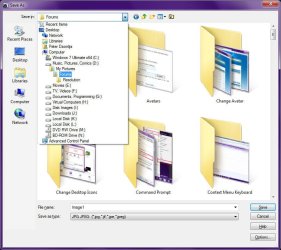
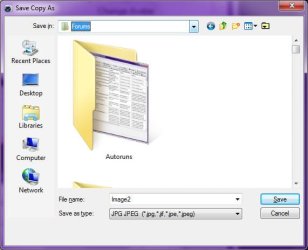
This is a bug withing Paint Shop Pro itself.

If you save a file using File|Save As, you get this dialog, which is resizable:
Image1.jpg

If you use File|Export|JPG Optimizer, you get this one, which is NOT resizable:
Image2.jpg

In either case, just click the down arrow next to the "Save In" display. Clicking the "Options" button does not help, as that only provides options related to the currently selected file type.

I scratched it up as nothing more than Corel not properly implementing the Windows Common Dialogs...
 

My Computer

Computer type
PC/Desktop
Computer Manufacturer/Model Number
Virtual Machine
OS
Windows 7 Professional 32-bit SP1
CPU
AMD A4/A6
Motherboard
Intel Corporation 440BX Desktop Reference Platform
Memory
3.00GB EDO
Graphics Card(s)
VMware SVGA 3D
Sound Card
High Definition Audio Device
Monitor(s) Displays
Generic Non-PnP Monitor on VMware SVGA 3D
Screen Resolution
1440x900
Hard Drives
1 x 60GB VMware Virtual SATA Hard Drive ATA Device
Antivirus
Kaspersky Total Security
I use Malwarebytes already, along with the programs mentioned in my very first post. I ran both MBAM, Avast, Spybot, and Super Antispyware utilities just today and they all showed me clean as a whistle. Nothing showed up, not even tracking cookies; however, I ran CCleaner and did disk cleanup right before using those programs. I updated all those programs too before running them. I help teach computer classes for our local computer club so have been afforded more knowledge than the average user. I've done this since Windows 98SE and help teach XP and Vista, and now Windows 7. If you have any other thoughts, I would like hearing them. Thanks for all your help thus far.

No Problem. I can't think of what else might be causing the dialog box to malfunction. If it worked before, then something must have changed it, but I can't imagine what. Many programs have varying implementations of the Windows dialogs.

Probably the Bug described by Dzomlija is the reason. But why it should "suddenly" appear, I don't know.

Regards....Mike Connor
 

My Computer

OS
Several, including Windows 7 x64 Ultimate
You might like to try this, it solves SOME problems with various dialog boxes;

Filebox eXtender download

<http://www.hyperionics.com/files/downloads.asp>

Make sure you get the 64 BIT version for your machine. It is now freeware.

Also, you should check that you have the latest updates, service packs, and patches for Paint Shop Pro;

http://www.corel.com/servlet/Satellite/gb/en/Content/1153321224268?pid=1259872271743

http://www.corel.com/servlet/Satellite/us/en/Content/1153321224268

Regards....Mike Connor
 
Last edited:

My Computer

OS
Several, including Windows 7 x64 Ultimate
  • Like
Reactions: JMH
Is it possible that the program has an automatic update feature, and that this new screen is just part of an updated version? Sometimes a call or email to the manufacturer can go a long way to answer a question and solve a problem. We don't usually do this unless we have a major, unfixable problem, but you know, if this is bugging you and you can't solve it, it couldn't hurt to ask if they have any information about what could be causing it. Who knows, this could be part of a bigger problem that could actually be causing a problem elsewhere as well.
 

My Computer

Computer Manufacturer/Model Number
HP Pavillion dv5t (generation 1)
OS
Vista 64 bit and 32 bit (SP2)
CPU
Intel(R) Core(TM)2 Duo Processor T9400 (2.53 GHz
Memory
4GB DDR2 System Memory (2 Dimm)
Graphics Card(s)
512 MB NVIDIA GeForce 9600M GT
Monitor(s) Displays
15.4" diagonal WSXGA+ High-Definition HP BrightView Widescre
Screen Resolution
1680 x 1050
Hard Drives
320GB 5400RPM SATA Hard Drive with HP ProtectSmart Hard Drive Protection
Keyboard
Built-in HP
Mouse
Built in - Synaptics TouchPad V6.5 on PS/2 Port
Internet Speed
Max
Other Info
~ Intel Next-Gen Wireless-N Mini-card w/Bluetooth ~ Blu-Ray ROM DVD+/-R/RW ~ Integ. HDTV Hybrid Tuner ~ 12 Cell Battery ~ MS Office (Home Premium) 2007 ~
Thank everyone for all the input re: my situation. Mike, especially thanks for going above and beyond re: Corel info. There are no automatic updates, and I do have an older version, but believe I can take it from here. Thanks for having this forum too -- it's chocked full of valuable info.

windsorlady
 

My Computer

Computer Manufacturer/Model Number
Dell Intel Core 2 Duo Processor E7500 Computer
OS
Windows 7
Memory
6GB
Thank everyone for all the input re: my situation. Mike, especially thanks for going above and beyond re: Corel info. There are no automatic updates, and I do have an older version, but believe I can take it from here. Thanks for having this forum too -- it's chocked full of valuable info.

windsorlady

De nada.

Older versions of various things can be rather problematic.

Please do let us know if you get it sorted out to your satisfaction.

Regards....Mike Connor
 

My Computer

OS
Several, including Windows 7 x64 Ultimate
Back
Top