Screen Auto Locks after 1min, Can't Disable

Chapp87

New member
Local time
11:30 PM
Messages
3
Location
Katy
Just recently my computer began auto locking after only 1 min of inactivity. I had my computer set so that the screen remained on until I locked it myself or turned it off. Just the other day it started auto locking and I haven't made any changes to it. Just to squash the basic solutions here is what I know it is not.

No, it is not the screen saver settings. The screen saver is off AND the check box is unchecked.

No, it is not the power settings. Everything is set to never turn off.

No, it is not my antivirus settings. There are no settings related to the screen lock.

This problem just started randomly and I cannot figure out how to turn it off. This has become quite annoying especially when the screen locks after only turning my back for a minute or stopping to send a text or take a call.

Oh, and normal programs that prevent the screen from locking like Media Player, Netflix, or a game still prevent the screen from locking.

Does anyone have a solution or know if there is a more hidden advanced option for the lock screen. Because we all know how Microsoft loves to make advanced settings near impossible to find.
 

My Computer

Computer Manufacturer/Model Number
Custom Built
OS
Windows 7 Professional x64
CPU
AMD Phenom II x4 940 3GHz
Motherboard
ASUS M4N82 Deluxe
Memory
8G DDR2
Graphics Card(s)
Dual NVIDIA GeForce GTX 285 SLI
Sound Card
Onboard Audio
Monitor(s) Displays
SAMSUNG SyncMaster SA300 24" LED
Screen Resolution
1920x1080
Hard Drives
1x 1TB Internal
1x 1TB External
Case
Antec 1200
Keyboard
Logitech G19
Mouse
Logitech G500
Internet Speed
15Mbps
Is there anyone else using your computer? Do you have Dekstop lock installed?
 

My Computer

Computer type
PC/Desktop
Computer Manufacturer/Model Number
Bruce ... somewhere in his 40's
OS
Windows 7 Ultimate 32bit SP1
CPU
Intel(R) Core(TM)2 Quad CPU @ 2.40GHz, 2400 MHz
Motherboard
INTEL/D975XBX2
Memory
4 GB
Graphics Card(s)
ATI Radeon HD 2600 Pro
Monitor(s) Displays
Samsung SyncMaster 914v
Screen Resolution
1280 x 1024
Hard Drives
2/500GB each ... ST3500630AS ATA Device.
One is not connected
PSU
Rocketfish 700 W
Case
G.Skill Gigabyte Chassis
Keyboard
Standard PS/2 Keyboard
Mouse
Microsoft PS/2 Mouse
Internet Speed
DSL
Antivirus
Avira Internet Security
Browser
IE 11
Other Info
ATI HDMI Audio
No. There is no one else using my computer and I don't have desktop lock installed.
 

My Computer

Computer Manufacturer/Model Number
Custom Built
OS
Windows 7 Professional x64
CPU
AMD Phenom II x4 940 3GHz
Motherboard
ASUS M4N82 Deluxe
Memory
8G DDR2
Graphics Card(s)
Dual NVIDIA GeForce GTX 285 SLI
Sound Card
Onboard Audio
Monitor(s) Displays
SAMSUNG SyncMaster SA300 24" LED
Screen Resolution
1920x1080
Hard Drives
1x 1TB Internal
1x 1TB External
Case
Antec 1200
Keyboard
Logitech G19
Mouse
Logitech G500
Internet Speed
15Mbps
See if using 'blank' screen saver and then set 9999 min time out, or how ever many minutes you want to put in the box. Mine is set for 120 min. Click apply, okay your way out.
 

My Computer

Computer type
PC/Desktop
Computer Manufacturer/Model Number
Bruce ... somewhere in his 40's
OS
Windows 7 Ultimate 32bit SP1
CPU
Intel(R) Core(TM)2 Quad CPU @ 2.40GHz, 2400 MHz
Motherboard
INTEL/D975XBX2
Memory
4 GB
Graphics Card(s)
ATI Radeon HD 2600 Pro
Monitor(s) Displays
Samsung SyncMaster 914v
Screen Resolution
1280 x 1024
Hard Drives
2/500GB each ... ST3500630AS ATA Device.
One is not connected
PSU
Rocketfish 700 W
Case
G.Skill Gigabyte Chassis
Keyboard
Standard PS/2 Keyboard
Mouse
Microsoft PS/2 Mouse
Internet Speed
DSL
Antivirus
Avira Internet Security
Browser
IE 11
Other Info
ATI HDMI Audio
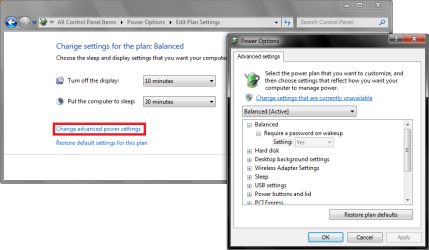
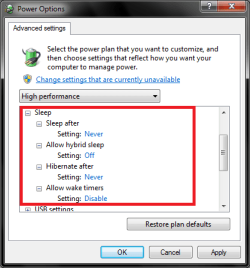
When you went to Power Options, did you try going to the Advanced Settings or just the Basic, you may also have Power Saver enabled:
 

Attachments

  • Power 1.png
    Power 1.png
    29.2 KB · Views: 142
  • Power 2.png
    Power 2.png
    12.2 KB · Views: 89

My Computer

Computer type
PC/Desktop
Computer Manufacturer/Model Number
Novatech iRush Pro
OS
Windows 7 Ultimate SP1 - 64 Bit
CPU
Intel Core i5 2500k
Motherboard
Foxconn H67M-S/H67M-V/H67
Memory
2x4GB DDR3 1333Hz
Graphics Card(s)
Ati Radeon 6770
Sound Card
None
Monitor(s) Displays
Samsung S22B150
Screen Resolution
1920x1080
Hard Drives
2x500GB
PSU
500W
Cooling
Fan
Keyboard
HP KU0316
Mouse
Wireless Logitech M185
Internet Speed
20MB/s
Antivirus
Avast Free
Browser
Google Chrome
Other Info
Logitech M185 Mouse
KU-M316 Keyboard
I did go to advanced options in the power settings and everything is set accordingly. I also double checked power saver and it is turned off as well. Honestly, I am completely baffled by this.
 

My Computer

Computer Manufacturer/Model Number
Custom Built
OS
Windows 7 Professional x64
CPU
AMD Phenom II x4 940 3GHz
Motherboard
ASUS M4N82 Deluxe
Memory
8G DDR2
Graphics Card(s)
Dual NVIDIA GeForce GTX 285 SLI
Sound Card
Onboard Audio
Monitor(s) Displays
SAMSUNG SyncMaster SA300 24" LED
Screen Resolution
1920x1080
Hard Drives
1x 1TB Internal
1x 1TB External
Case
Antec 1200
Keyboard
Logitech G19
Mouse
Logitech G500
Internet Speed
15Mbps
See if using 'blank' screen saver and then set 9999 min time out, or how ever many minutes you want to put in the box. Mine is set for 120 min. Click apply, okay your way out.
And did you try this too?
 

My Computer

Computer type
PC/Desktop
Computer Manufacturer/Model Number
Bruce ... somewhere in his 40's
OS
Windows 7 Ultimate 32bit SP1
CPU
Intel(R) Core(TM)2 Quad CPU @ 2.40GHz, 2400 MHz
Motherboard
INTEL/D975XBX2
Memory
4 GB
Graphics Card(s)
ATI Radeon HD 2600 Pro
Monitor(s) Displays
Samsung SyncMaster 914v
Screen Resolution
1280 x 1024
Hard Drives
2/500GB each ... ST3500630AS ATA Device.
One is not connected
PSU
Rocketfish 700 W
Case
G.Skill Gigabyte Chassis
Keyboard
Standard PS/2 Keyboard
Mouse
Microsoft PS/2 Mouse
Internet Speed
DSL
Antivirus
Avira Internet Security
Browser
IE 11
Other Info
ATI HDMI Audio
I am having the same problem with this one. Did anybody resolved this already?
If yes, please help me.
 

My Computer

Computer type
Laptop
Computer Manufacturer/Model Number
HP ProBook 4530s
OS
Windows 7 Professional x64
Browser
Google Chrome
Back
Top