Screen Corruption Troubleshooting

sgtaylor5

New member
Local time
9:57 AM
Messages
6
Hi,

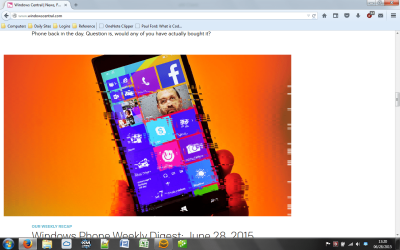
Been having a problem with my Dell Latitude E4200. See the screenshot.

I was running the newest build of Windows 10 Insider Preview and I thought Win 10 was too much for this laptop, so I reinstalled my Windows 7 image.

I have the newest Intel Mobile Series 4 drivers installed from Dell (8.15.10.2869). It doesn't happen on every program start; sometimes everything is perfect, and sometimes it shows up like the ss. I thought it was the interior heat. I can't get the onboard fan to run at full speed; I have A24 BIOS installed. This laptop may have a BIOS thermal table that disallows the fan to run fast.

I have taken apart the laptop fully and have applied new Arctic Silver thermal paste. (Boy, what a job tearing THIS one apart!)
I have an external 9" fan on the laptop about 6 inches away running at high speed; it's 109 degrees today, and it's still doing it.
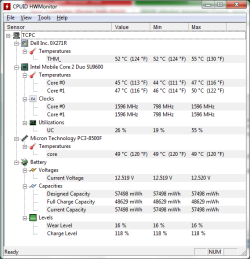
Current HW Monitor screenshot attached; those are normal temps.

Any Ideas? Or do I need to get a new motherboard?

System Specs:
Windows 7 Professional, fully patched.
ULV Core 2 Duo SU9600 @ 1.6 GHz
5 GB DDR3-8600 RAM (1 GB on-board)
128 GB microSATA SSD
Office 2007 Enterprise
QuickBooks Pro 2013
 

Attachments
  • Untitled.png
    Untitled.png
    197.8 KB · Views: 1
  • Untitled 2.png
    Untitled 2.png
    21 KB · Views: 8

My Computer

Computer type
Laptop
Computer Manufacturer/Model Number
Dell Latitude E4200
OS
Windows 10 Pro Technical Preview
CPU
C2D U9600 1.6 GHz
Motherboard
Dell
Memory
5 GB
Screen Resolution
1280 x 800
Antivirus
Microsoft Defender
Browser
Microsoft Spartan (Edge)/Firefox
Does it do this with IE too? If it was the hardware it would corrupt everywhere, no? Not just the picture.
 

My Computer

Computer type
PC/Desktop
Computer Manufacturer/Model Number
Custom Build
OS
Windows 7 Ultimate x64 SP1
CPU
AMD Phenom 2 1090T
Motherboard
Gigabyte GA-890FXA-UD5
Memory
2x8GB Kingston HyperX Fury Black 1600Mhz Unganged
Graphics Card(s)
MSI GTX 970 Gaming 4G
Sound Card
Realtek On-Board HD 7.1 Audio / Logitech G35
Monitor(s) Displays
3xAcer GD245HQ
Screen Resolution
1920x1080
Hard Drives
Samsung 850 Pro 512GB SSD - OS /
WD Caviar Black SATA 3 - 1 TBx2 - Dynamic RAID 0 /
WD Caviar Green SATA 2 - 640GBx2 - Dynamic RAID 0 /
WD Caviar Green SATA 2 - 640GB - Internal Backup /
Seagate Barracude SATA 3 - 3TB - External Backup/ Sync
PSU
HighPower 1000W
Case
Cooler Master HAF 932
Cooling
Noctua NH-D14
Keyboard
Logitech G19
Mouse
Logitech G500
Internet Speed
100/4 Mbit Cable (100GB quota)
Antivirus
ZoneAlarm Extreme Security / MBAM Pro / MBAE Free / SAS Free
Browser
IE 11 - Firefox - Chrome
Other Info
Logitech F710/ G27/ G940/ Z5500 // TrackIR 5 // Nvidia 3D Surround Vision
It does this with any program started. It did it with paint.net, too. The chrome of any program can be affected, as well.
 

My Computer

Computer type
Laptop
Computer Manufacturer/Model Number
Dell Latitude E4200
OS
Windows 10 Pro Technical Preview
CPU
C2D U9600 1.6 GHz
Motherboard
Dell
Memory
5 GB
Screen Resolution
1280 x 800
Antivirus
Microsoft Defender
Browser
Microsoft Spartan (Edge)/Firefox
Those are all web pages? Chrome of any program, I can't understand this. Does this happen if you browse your pictures, or in a GPU benchmark for example?

You can see if this is valid for you - How to Turn off Hardware Acceleration (with Pictures) - wikiHow.

Also check screen refresh rate: Screen resolution - Advanced settings - Monitor tab. It should be 60Hz.
 

My Computer

Computer type
PC/Desktop
Computer Manufacturer/Model Number
Custom Build
OS
Windows 7 Ultimate x64 SP1
CPU
AMD Phenom 2 1090T
Motherboard
Gigabyte GA-890FXA-UD5
Memory
2x8GB Kingston HyperX Fury Black 1600Mhz Unganged
Graphics Card(s)
MSI GTX 970 Gaming 4G
Sound Card
Realtek On-Board HD 7.1 Audio / Logitech G35
Monitor(s) Displays
3xAcer GD245HQ
Screen Resolution
1920x1080
Hard Drives
Samsung 850 Pro 512GB SSD - OS /
WD Caviar Black SATA 3 - 1 TBx2 - Dynamic RAID 0 /
WD Caviar Green SATA 2 - 640GBx2 - Dynamic RAID 0 /
WD Caviar Green SATA 2 - 640GB - Internal Backup /
Seagate Barracude SATA 3 - 3TB - External Backup/ Sync
PSU
HighPower 1000W
Case
Cooler Master HAF 932
Cooling
Noctua NH-D14
Keyboard
Logitech G19
Mouse
Logitech G500
Internet Speed
100/4 Mbit Cable (100GB quota)
Antivirus
ZoneAlarm Extreme Security / MBAM Pro / MBAE Free / SAS Free
Browser
IE 11 - Firefox - Chrome
Other Info
Logitech F710/ G27/ G940/ Z5500 // TrackIR 5 // Nvidia 3D Surround Vision
Chrome of any program: the windows decorations, the title bar, the min, max and close buttons, the scroll bars, the frame of the program.

It might do it in an file explorer window, but there only in the min max and the title bar. It will do it in Outlook 2007, especially in the frames of the folders, the messages, everywhere like that.

It'a an LCD, so 60 Hz is the only option available.

Trying the "No hardware Acceleration".
 

My Computer

Computer type
Laptop
Computer Manufacturer/Model Number
Dell Latitude E4200
OS
Windows 10 Pro Technical Preview
CPU
C2D U9600 1.6 GHz
Motherboard
Dell
Memory
5 GB
Screen Resolution
1280 x 800
Antivirus
Microsoft Defender
Browser
Microsoft Spartan (Edge)/Firefox
couldn't find hardware acceleration in my system, so uninstalled drivers and the driver software. rebooted and updated, solely with Windows Update inside of Device Manager. Am at 8.15.10.1855 07/28/2009. The driver interface is plain and blue and looks like it's 2009.

Dell's latest drivers are 8.15.10.2869 from 2012 and the driver interface looks modern. I know; I've used them before.

So far I have no problems. Still testing.
 

My Computer

Computer type
Laptop
Computer Manufacturer/Model Number
Dell Latitude E4200
OS
Windows 10 Pro Technical Preview
CPU
C2D U9600 1.6 GHz
Motherboard
Dell
Memory
5 GB
Screen Resolution
1280 x 800
Antivirus
Microsoft Defender
Browser
Microsoft Spartan (Edge)/Firefox
I have one final suggestion if hardware acceleration doesn't help either (do restart after setting it though, never know).

Try loading defaults in BIOS.

Edit: As a response to your last post, yes, newer systems don't have such an option. Hopefully, you can sort it out with your driver juggling.
 

My Computer

Computer type
PC/Desktop
Computer Manufacturer/Model Number
Custom Build
OS
Windows 7 Ultimate x64 SP1
CPU
AMD Phenom 2 1090T
Motherboard
Gigabyte GA-890FXA-UD5
Memory
2x8GB Kingston HyperX Fury Black 1600Mhz Unganged
Graphics Card(s)
MSI GTX 970 Gaming 4G
Sound Card
Realtek On-Board HD 7.1 Audio / Logitech G35
Monitor(s) Displays
3xAcer GD245HQ
Screen Resolution
1920x1080
Hard Drives
Samsung 850 Pro 512GB SSD - OS /
WD Caviar Black SATA 3 - 1 TBx2 - Dynamic RAID 0 /
WD Caviar Green SATA 2 - 640GBx2 - Dynamic RAID 0 /
WD Caviar Green SATA 2 - 640GB - Internal Backup /
Seagate Barracude SATA 3 - 3TB - External Backup/ Sync
PSU
HighPower 1000W
Case
Cooler Master HAF 932
Cooling
Noctua NH-D14
Keyboard
Logitech G19
Mouse
Logitech G500
Internet Speed
100/4 Mbit Cable (100GB quota)
Antivirus
ZoneAlarm Extreme Security / MBAM Pro / MBAE Free / SAS Free
Browser
IE 11 - Firefox - Chrome
Other Info
Logitech F710/ G27/ G940/ Z5500 // TrackIR 5 // Nvidia 3D Surround Vision
Oh, this is interesting. I was loading down the system (two email clients on and syncing, and Firefox running multiple pages. I saw the symptom happen, and then instantly correct itself. Still have the external fan running.
 

My Computer

Computer type
Laptop
Computer Manufacturer/Model Number
Dell Latitude E4200
OS
Windows 10 Pro Technical Preview
CPU
C2D U9600 1.6 GHz
Motherboard
Dell
Memory
5 GB
Screen Resolution
1280 x 800
Antivirus
Microsoft Defender
Browser
Microsoft Spartan (Edge)/Firefox
Spoke too soon. Outlook 2007 had it massively, all over the place.
 

My Computer

Computer type
Laptop
Computer Manufacturer/Model Number
Dell Latitude E4200
OS
Windows 10 Pro Technical Preview
CPU
C2D U9600 1.6 GHz
Motherboard
Dell
Memory
5 GB
Screen Resolution
1280 x 800
Antivirus
Microsoft Defender
Browser
Microsoft Spartan (Edge)/Firefox
Back
Top