Solved Screen goes black, safe mode comes up

It's dirty, but I've seem worst.
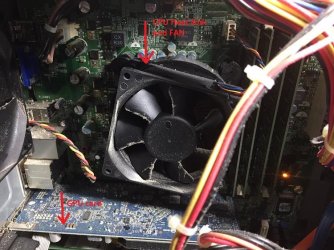
I wold like to see the GPU fan and heat sink.
- Shut down the computer.
- Unplug the power cord from the PS (Power supply)
- Open the left side of the case.
- With a Philips screw drive take off the screw that fix the GPU board to the back panel.
- On the mother board socket you may have a lock. Press or twist so the GPU board comes off the socket.
- Put it on a table and inspect it with a flash light thought the fan.
 

My Computers My Computers

  • At a glance

    Windows 7 HP 64i5 6600K - 800MHz to 4200MHz4+4G GSkill DDR4 3000IG - Intel 530
    Computer type
    PC/Desktop
    Computer Manufacturer/Model Number
    custom build
    OS
    Windows 7 HP 64
    CPU
    i5 6600K - 800MHz to 4200MHz
    Motherboard
    GA-Z170-HD3P
    Memory
    4+4G GSkill DDR4 3000
    Graphics Card(s)
    IG - Intel 530
    Monitor(s) Displays
    Samsung 226BW
    Screen Resolution
    1680x1050
    Hard Drives
    (1) -1 SM951 – 128GB M.2 AHCI PCIe SSD drive for Windows 7 and Lubuntu
    (2) -1 WD SATA 3 - 1T for Data
    (3) -1 WD SATA 3 - 1T for backup
    PSU
    Thermaltake 450W TR2 gold
    Keyboard
    Old and good Chicony mechanical keyboard
    Mouse
    Logitech mX performance - 9 buttons (had to disable some)
    Internet Speed
    500Mb/s
    Browser
    Firefox 64
    Other Info
    TinyWall firewall
  • At a glance

    Windows 7 Proi7-4500U 800MHz to 3.0GHz(4+4)G DDR3 1600IG intel 4400 + NVIDIA GeForce GT 745M
    Computer type
    Laptop
    System Manufacturer/Model Number
    Asus Q550LF
    OS
    Windows 7 Pro
    CPU
    i7-4500U 800MHz to 3.0GHz
    Motherboard
    Asus Q550LF
    Memory
    (4+4)G DDR3 1600
    Graphics Card(s)
    IG intel 4400 + NVIDIA GeForce GT 745M
    Sound Card
    Realtek
    Monitor(s) Displays
    LG Display LP156WF4-SPH1
    Screen Resolution
    1920 x 1080
    Hard Drives
    BX500 120G SSD for Windows and programs +
    1T HDD for data
    Internet Speed
    500 Mb/s
    Browser
    Firefox
    Other Info
    TinyWall firewall
I will print this off and have Mike take a look at it . thanks!!!
 

My Computer My Computer

At a glance

Windows 7 Home Premium 64bitIntel R Core (TM) i5M 450 @ 2.40GH 6GB (5.80 available
Computer type
PC/Desktop
Computer Manufacturer/Model Number
Dell
OS
Windows 7 Home Premium 64bit
CPU
Intel R Core (TM) i5
Memory
M 450 @ 2.40GH 6GB (5.80 available
Antivirus
Norton 360
Browser
Google Chrome
Here you go
 

Attachments

  • IMG_4191.JPG
    IMG_4191.JPG
    193.9 KB · Views: 0
  • IMG_4192.JPG
    IMG_4192.JPG
    301.7 KB · Views: 0
  • IMG_4193.JPG
    IMG_4193.JPG
    206.9 KB · Views: 10

My Computer My Computer

At a glance

Windows 7 Home Premium 64bitIntel R Core (TM) i5M 450 @ 2.40GH 6GB (5.80 available
Computer type
PC/Desktop
Computer Manufacturer/Model Number
Dell
OS
Windows 7 Home Premium 64bit
CPU
Intel R Core (TM) i5
Memory
M 450 @ 2.40GH 6GB (5.80 available
Antivirus
Norton 360
Browser
Google Chrome
You're NOT reading my instructions.

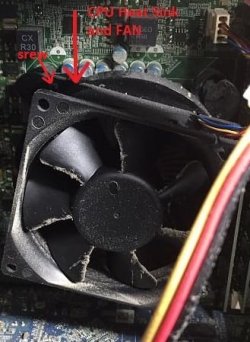
I said to take off the GPU card. You took off the CPU heat sink and fan.
Do you have thermal paste?

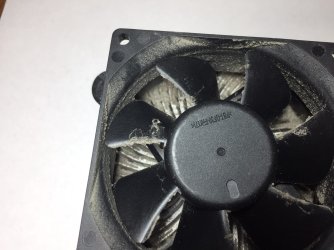
Now that CPU heat sink is off, take off the fan from the heat sink and clean the heatsink.
Be very careful with the fan. DON'T apply pressure on the blades or you may bend the axle.
 

My Computers My Computers

  • At a glance

    Windows 7 HP 64i5 6600K - 800MHz to 4200MHz4+4G GSkill DDR4 3000IG - Intel 530
    Computer type
    PC/Desktop
    Computer Manufacturer/Model Number
    custom build
    OS
    Windows 7 HP 64
    CPU
    i5 6600K - 800MHz to 4200MHz
    Motherboard
    GA-Z170-HD3P
    Memory
    4+4G GSkill DDR4 3000
    Graphics Card(s)
    IG - Intel 530
    Monitor(s) Displays
    Samsung 226BW
    Screen Resolution
    1680x1050
    Hard Drives
    (1) -1 SM951 – 128GB M.2 AHCI PCIe SSD drive for Windows 7 and Lubuntu
    (2) -1 WD SATA 3 - 1T for Data
    (3) -1 WD SATA 3 - 1T for backup
    PSU
    Thermaltake 450W TR2 gold
    Keyboard
    Old and good Chicony mechanical keyboard
    Mouse
    Logitech mX performance - 9 buttons (had to disable some)
    Internet Speed
    500Mb/s
    Browser
    Firefox 64
    Other Info
    TinyWall firewall
  • At a glance

    Windows 7 Proi7-4500U 800MHz to 3.0GHz(4+4)G DDR3 1600IG intel 4400 + NVIDIA GeForce GT 745M
    Computer type
    Laptop
    System Manufacturer/Model Number
    Asus Q550LF
    OS
    Windows 7 Pro
    CPU
    i7-4500U 800MHz to 3.0GHz
    Motherboard
    Asus Q550LF
    Memory
    (4+4)G DDR3 1600
    Graphics Card(s)
    IG intel 4400 + NVIDIA GeForce GT 745M
    Sound Card
    Realtek
    Monitor(s) Displays
    LG Display LP156WF4-SPH1
    Screen Resolution
    1920 x 1080
    Hard Drives
    BX500 120G SSD for Windows and programs +
    1T HDD for data
    Internet Speed
    500 Mb/s
    Browser
    Firefox
    Other Info
    TinyWall firewall
To detach the CPU fan from the heat sink, you have to take off the screws that are on the corners of the fan. I've seen also a plastic grip.
 

Attachments

  • fan.jpg
    fan.jpg
    29.8 KB · Views: 25

My Computers My Computers

  • At a glance

    Windows 7 HP 64i5 6600K - 800MHz to 4200MHz4+4G GSkill DDR4 3000IG - Intel 530
    Computer type
    PC/Desktop
    Computer Manufacturer/Model Number
    custom build
    OS
    Windows 7 HP 64
    CPU
    i5 6600K - 800MHz to 4200MHz
    Motherboard
    GA-Z170-HD3P
    Memory
    4+4G GSkill DDR4 3000
    Graphics Card(s)
    IG - Intel 530
    Monitor(s) Displays
    Samsung 226BW
    Screen Resolution
    1680x1050
    Hard Drives
    (1) -1 SM951 – 128GB M.2 AHCI PCIe SSD drive for Windows 7 and Lubuntu
    (2) -1 WD SATA 3 - 1T for Data
    (3) -1 WD SATA 3 - 1T for backup
    PSU
    Thermaltake 450W TR2 gold
    Keyboard
    Old and good Chicony mechanical keyboard
    Mouse
    Logitech mX performance - 9 buttons (had to disable some)
    Internet Speed
    500Mb/s
    Browser
    Firefox 64
    Other Info
    TinyWall firewall
  • At a glance

    Windows 7 Proi7-4500U 800MHz to 3.0GHz(4+4)G DDR3 1600IG intel 4400 + NVIDIA GeForce GT 745M
    Computer type
    Laptop
    System Manufacturer/Model Number
    Asus Q550LF
    OS
    Windows 7 Pro
    CPU
    i7-4500U 800MHz to 3.0GHz
    Motherboard
    Asus Q550LF
    Memory
    (4+4)G DDR3 1600
    Graphics Card(s)
    IG intel 4400 + NVIDIA GeForce GT 745M
    Sound Card
    Realtek
    Monitor(s) Displays
    LG Display LP156WF4-SPH1
    Screen Resolution
    1920 x 1080
    Hard Drives
    BX500 120G SSD for Windows and programs +
    1T HDD for data
    Internet Speed
    500 Mb/s
    Browser
    Firefox
    Other Info
    TinyWall firewall
Now back to the GPU card
- With a Philips screw drive take off the screw that fix the GPU board to the back panel.
- On the mother board socket you may have a lock. Press or twist so the GPU board comes off the socket.
- Put it on a table and inspect it with a flash light thought the fan.
 

Attachments

  • IMG_4188.JPG
    IMG_4188.JPG
    82 KB · Views: 25

My Computers My Computers

  • At a glance

    Windows 7 HP 64i5 6600K - 800MHz to 4200MHz4+4G GSkill DDR4 3000IG - Intel 530
    Computer type
    PC/Desktop
    Computer Manufacturer/Model Number
    custom build
    OS
    Windows 7 HP 64
    CPU
    i5 6600K - 800MHz to 4200MHz
    Motherboard
    GA-Z170-HD3P
    Memory
    4+4G GSkill DDR4 3000
    Graphics Card(s)
    IG - Intel 530
    Monitor(s) Displays
    Samsung 226BW
    Screen Resolution
    1680x1050
    Hard Drives
    (1) -1 SM951 – 128GB M.2 AHCI PCIe SSD drive for Windows 7 and Lubuntu
    (2) -1 WD SATA 3 - 1T for Data
    (3) -1 WD SATA 3 - 1T for backup
    PSU
    Thermaltake 450W TR2 gold
    Keyboard
    Old and good Chicony mechanical keyboard
    Mouse
    Logitech mX performance - 9 buttons (had to disable some)
    Internet Speed
    500Mb/s
    Browser
    Firefox 64
    Other Info
    TinyWall firewall
  • At a glance

    Windows 7 Proi7-4500U 800MHz to 3.0GHz(4+4)G DDR3 1600IG intel 4400 + NVIDIA GeForce GT 745M
    Computer type
    Laptop
    System Manufacturer/Model Number
    Asus Q550LF
    OS
    Windows 7 Pro
    CPU
    i7-4500U 800MHz to 3.0GHz
    Motherboard
    Asus Q550LF
    Memory
    (4+4)G DDR3 1600
    Graphics Card(s)
    IG intel 4400 + NVIDIA GeForce GT 745M
    Sound Card
    Realtek
    Monitor(s) Displays
    LG Display LP156WF4-SPH1
    Screen Resolution
    1920 x 1080
    Hard Drives
    BX500 120G SSD for Windows and programs +
    1T HDD for data
    Internet Speed
    500 Mb/s
    Browser
    Firefox
    Other Info
    TinyWall firewall
Honestly, it really doesn't look too bad. I have to open my case about once every 6 months to clean things up and my girl keeps a clean house.

Yes, you should clean the fans. You should also check to see if they're running. You can leave the cover off while the system is running to check that.

Normally, if the GPU is overheating, you will get a BSOD. Maybe you are and don't know since the screen is shutting off. You might go to the BSOD section of the forum and follow the procedure for getting the information. Then post the resulting .zip file here.
 

My Computer My Computer

At a glance

Windows 7 Pro SP1 64 bit8 GB
Computer type
Laptop
Computer Manufacturer/Model Number
Dell M6500 Precision Work Station
OS
Windows 7 Pro SP1 64 bit
Memory
8 GB
Screen Resolution
1920x
Internet Speed
30 Mbps
Antivirus
Norton Security
Browser
IE 11
I don't know what to say. I copied it and read it to Mike one line at a time and he thought he did what it said. Are you saying we broke something? Do not even know what thermal paste is. Where do we get it???I questioned Mike and it seems he was not sure about there being a lock on the motherboard. So did Mike take out the wrong fan??? Holy cow. I don't have all my stuff backed up yet. So we won't be able to get it put back together without the thermal paste? I will have Mike take a look at your message and pictures. Does he clean the fan with a soft brush, or air compressor? I was looking at your info page. You do realize we are mere mortals and you are an Electrical Engineer? Please tell me we can at least get this cleaned and put back together to get my computer running again if only to get my computer backed up. Too late tonight to try anything. Will have him take a look at it tomorrow. Thanks so much
 

My Computer My Computer

At a glance

Windows 7 Home Premium 64bitIntel R Core (TM) i5M 450 @ 2.40GH 6GB (5.80 available
Computer type
PC/Desktop
Computer Manufacturer/Model Number
Dell
OS
Windows 7 Home Premium 64bit
CPU
Intel R Core (TM) i5
Memory
M 450 @ 2.40GH 6GB (5.80 available
Antivirus
Norton 360
Browser
Google Chrome

My Computer My Computer

At a glance

Windows 7 Pro SP1 64 bit8 GB
Computer type
Laptop
Computer Manufacturer/Model Number
Dell M6500 Precision Work Station
OS
Windows 7 Pro SP1 64 bit
Memory
8 GB
Screen Resolution
1920x
Internet Speed
30 Mbps
Antivirus
Norton Security
Browser
IE 11
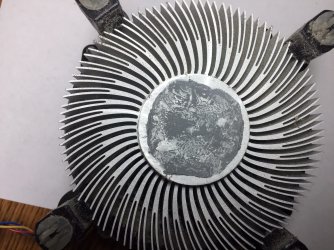
Now that the CPU fan and heat sink is off, take off the fan and clean the fins with a vacuum cleaner.

DON'T touch or clean the thermal paste on the CPU or on the heat sink. We will try to use it as it is.

After cleaning the heat sink, put the fan back as it was before.

Do you have acetone (you use to clean your nails)?
 

My Computers My Computers

  • At a glance

    Windows 7 HP 64i5 6600K - 800MHz to 4200MHz4+4G GSkill DDR4 3000IG - Intel 530
    Computer type
    PC/Desktop
    Computer Manufacturer/Model Number
    custom build
    OS
    Windows 7 HP 64
    CPU
    i5 6600K - 800MHz to 4200MHz
    Motherboard
    GA-Z170-HD3P
    Memory
    4+4G GSkill DDR4 3000
    Graphics Card(s)
    IG - Intel 530
    Monitor(s) Displays
    Samsung 226BW
    Screen Resolution
    1680x1050
    Hard Drives
    (1) -1 SM951 – 128GB M.2 AHCI PCIe SSD drive for Windows 7 and Lubuntu
    (2) -1 WD SATA 3 - 1T for Data
    (3) -1 WD SATA 3 - 1T for backup
    PSU
    Thermaltake 450W TR2 gold
    Keyboard
    Old and good Chicony mechanical keyboard
    Mouse
    Logitech mX performance - 9 buttons (had to disable some)
    Internet Speed
    500Mb/s
    Browser
    Firefox 64
    Other Info
    TinyWall firewall
  • At a glance

    Windows 7 Proi7-4500U 800MHz to 3.0GHz(4+4)G DDR3 1600IG intel 4400 + NVIDIA GeForce GT 745M
    Computer type
    Laptop
    System Manufacturer/Model Number
    Asus Q550LF
    OS
    Windows 7 Pro
    CPU
    i7-4500U 800MHz to 3.0GHz
    Motherboard
    Asus Q550LF
    Memory
    (4+4)G DDR3 1600
    Graphics Card(s)
    IG intel 4400 + NVIDIA GeForce GT 745M
    Sound Card
    Realtek
    Monitor(s) Displays
    LG Display LP156WF4-SPH1
    Screen Resolution
    1920 x 1080
    Hard Drives
    BX500 120G SSD for Windows and programs +
    1T HDD for data
    Internet Speed
    500 Mb/s
    Browser
    Firefox
    Other Info
    TinyWall firewall
I do have acetone. will get back to you .....
 

My Computer My Computer

At a glance

Windows 7 Home Premium 64bitIntel R Core (TM) i5M 450 @ 2.40GH 6GB (5.80 available
Computer type
PC/Desktop
Computer Manufacturer/Model Number
Dell
OS
Windows 7 Home Premium 64bit
CPU
Intel R Core (TM) i5
Memory
M 450 @ 2.40GH 6GB (5.80 available
Antivirus
Norton 360
Browser
Google Chrome
I'm so sorry but i bursted out laughing when I saw the big pictures of the wrong fan. Don't panic, removing computer fans and re applying thermal paste is a common and easy procedure and there is tons of tutorials with step by step pictures, you just need to keep your calm and read all the instructions.

About your original issue, my bois noticed earlier the unusual high temp of your Nvidia GT 220 ( normal temps being 47°c idle / 70°c full load ) and concluded this was causing the black screens but you mentioned graphic work. To be sure, after you finished cleaning and replacing CPU fan try to boot the computer without the graphic card.
Image will be ugly and you won't be able to do work, but at least you'll have access to your data to secure them on another device. Then you let the computer run for a couple hours, and if the black screen problem doesn't happen that will confirm the problem being the graphic card.

Now instead of trying to fix it, I strongly advice you to just get another one. Given the model, the date of purchase and your typical use it's totally normal to see a gt 220 dying after 10 years. Good news is your computer parts are quite common and can use a wide range of cheap graphic cards. Years ago I had the same problem with a similar model and I managed to find a replacement one on my local Craigslist for 20 bucks.
 

My Computer My Computer

At a glance

Windows 7 Home Premium 64bit
Computer type
Laptop
Computer Manufacturer/Model Number
Acer
OS
Windows 7 Home Premium 64bit
Antivirus
Nod32
Let me know when you finished cleaning the CPU heat sink and have assembled the fan back on the heat sink.

DON'T put it back on the computer. Wait for my instructions.
 

My Computers My Computers

  • At a glance

    Windows 7 HP 64i5 6600K - 800MHz to 4200MHz4+4G GSkill DDR4 3000IG - Intel 530
    Computer type
    PC/Desktop
    Computer Manufacturer/Model Number
    custom build
    OS
    Windows 7 HP 64
    CPU
    i5 6600K - 800MHz to 4200MHz
    Motherboard
    GA-Z170-HD3P
    Memory
    4+4G GSkill DDR4 3000
    Graphics Card(s)
    IG - Intel 530
    Monitor(s) Displays
    Samsung 226BW
    Screen Resolution
    1680x1050
    Hard Drives
    (1) -1 SM951 – 128GB M.2 AHCI PCIe SSD drive for Windows 7 and Lubuntu
    (2) -1 WD SATA 3 - 1T for Data
    (3) -1 WD SATA 3 - 1T for backup
    PSU
    Thermaltake 450W TR2 gold
    Keyboard
    Old and good Chicony mechanical keyboard
    Mouse
    Logitech mX performance - 9 buttons (had to disable some)
    Internet Speed
    500Mb/s
    Browser
    Firefox 64
    Other Info
    TinyWall firewall
  • At a glance

    Windows 7 Proi7-4500U 800MHz to 3.0GHz(4+4)G DDR3 1600IG intel 4400 + NVIDIA GeForce GT 745M
    Computer type
    Laptop
    System Manufacturer/Model Number
    Asus Q550LF
    OS
    Windows 7 Pro
    CPU
    i7-4500U 800MHz to 3.0GHz
    Motherboard
    Asus Q550LF
    Memory
    (4+4)G DDR3 1600
    Graphics Card(s)
    IG intel 4400 + NVIDIA GeForce GT 745M
    Sound Card
    Realtek
    Monitor(s) Displays
    LG Display LP156WF4-SPH1
    Screen Resolution
    1920 x 1080
    Hard Drives
    BX500 120G SSD for Windows and programs +
    1T HDD for data
    Internet Speed
    500 Mb/s
    Browser
    Firefox
    Other Info
    TinyWall firewall
Haven't done it yet. Grass cutting day. Hoping tonight. Mike is so not into this but I have to be able to download my files before we junk it. That's what I will have to do right? Just hoping to get it up and running again.

Thanks
 

My Computer My Computer

At a glance

Windows 7 Home Premium 64bitIntel R Core (TM) i5M 450 @ 2.40GH 6GB (5.80 available
Computer type
PC/Desktop
Computer Manufacturer/Model Number
Dell
OS
Windows 7 Home Premium 64bit
CPU
Intel R Core (TM) i5
Memory
M 450 @ 2.40GH 6GB (5.80 available
Antivirus
Norton 360
Browser
Google Chrome
When you finish and have your computer running you will say: That was easy.

Remember:
- Whatever we know, we learned from someone or by our own experience. So, if you need help, just ask.
- Nothing has "born" assembled. There was an order to join the parts. To disassemble you have to study and start from the last piece assembled to the fist one.
 

My Computers My Computers

  • At a glance

    Windows 7 HP 64i5 6600K - 800MHz to 4200MHz4+4G GSkill DDR4 3000IG - Intel 530
    Computer type
    PC/Desktop
    Computer Manufacturer/Model Number
    custom build
    OS
    Windows 7 HP 64
    CPU
    i5 6600K - 800MHz to 4200MHz
    Motherboard
    GA-Z170-HD3P
    Memory
    4+4G GSkill DDR4 3000
    Graphics Card(s)
    IG - Intel 530
    Monitor(s) Displays
    Samsung 226BW
    Screen Resolution
    1680x1050
    Hard Drives
    (1) -1 SM951 – 128GB M.2 AHCI PCIe SSD drive for Windows 7 and Lubuntu
    (2) -1 WD SATA 3 - 1T for Data
    (3) -1 WD SATA 3 - 1T for backup
    PSU
    Thermaltake 450W TR2 gold
    Keyboard
    Old and good Chicony mechanical keyboard
    Mouse
    Logitech mX performance - 9 buttons (had to disable some)
    Internet Speed
    500Mb/s
    Browser
    Firefox 64
    Other Info
    TinyWall firewall
  • At a glance

    Windows 7 Proi7-4500U 800MHz to 3.0GHz(4+4)G DDR3 1600IG intel 4400 + NVIDIA GeForce GT 745M
    Computer type
    Laptop
    System Manufacturer/Model Number
    Asus Q550LF
    OS
    Windows 7 Pro
    CPU
    i7-4500U 800MHz to 3.0GHz
    Motherboard
    Asus Q550LF
    Memory
    (4+4)G DDR3 1600
    Graphics Card(s)
    IG intel 4400 + NVIDIA GeForce GT 745M
    Sound Card
    Realtek
    Monitor(s) Displays
    LG Display LP156WF4-SPH1
    Screen Resolution
    1920 x 1080
    Hard Drives
    BX500 120G SSD for Windows and programs +
    1T HDD for data
    Internet Speed
    500 Mb/s
    Browser
    Firefox
    Other Info
    TinyWall firewall
I have acetone, didn't get the paste yet. Mike did not take the fan off the heat sink. It came off just like it looks in the pictures. Do you want him to put it back in the tower? He also saw the thermal paste but did not touch it.
What would you like him to do next?
 

My Computer My Computer

At a glance

Windows 7 Home Premium 64bitIntel R Core (TM) i5M 450 @ 2.40GH 6GB (5.80 available
Computer type
PC/Desktop
Computer Manufacturer/Model Number
Dell
OS
Windows 7 Home Premium 64bit
CPU
Intel R Core (TM) i5
Memory
M 450 @ 2.40GH 6GB (5.80 available
Antivirus
Norton 360
Browser
Google Chrome
You're not reading my posts.

I did't say that you need the paste. There is a workaround with acetone.

From post #45
To detach the CPU fan from the heat sink, you have to take off the screws that are on the corners of the fan. I've seen also a plastic grip.
408164d1557105090-screen-goes-black-safe-mode-comes-up-fan.jpg


From post #50
Now that the CPU fan and heat sink is off, take off the fan and clean the fins with a vacuum cleaner.

DON'T touch or clean the thermal paste on the CPU or on the heat sink. We will try to use it as it is.

After cleaning the heat sink, put the fan back on the heat sink as it was before.

Let me know when you're done.
 

My Computers My Computers

  • At a glance

    Windows 7 HP 64i5 6600K - 800MHz to 4200MHz4+4G GSkill DDR4 3000IG - Intel 530
    Computer type
    PC/Desktop
    Computer Manufacturer/Model Number
    custom build
    OS
    Windows 7 HP 64
    CPU
    i5 6600K - 800MHz to 4200MHz
    Motherboard
    GA-Z170-HD3P
    Memory
    4+4G GSkill DDR4 3000
    Graphics Card(s)
    IG - Intel 530
    Monitor(s) Displays
    Samsung 226BW
    Screen Resolution
    1680x1050
    Hard Drives
    (1) -1 SM951 – 128GB M.2 AHCI PCIe SSD drive for Windows 7 and Lubuntu
    (2) -1 WD SATA 3 - 1T for Data
    (3) -1 WD SATA 3 - 1T for backup
    PSU
    Thermaltake 450W TR2 gold
    Keyboard
    Old and good Chicony mechanical keyboard
    Mouse
    Logitech mX performance - 9 buttons (had to disable some)
    Internet Speed
    500Mb/s
    Browser
    Firefox 64
    Other Info
    TinyWall firewall
  • At a glance

    Windows 7 Proi7-4500U 800MHz to 3.0GHz(4+4)G DDR3 1600IG intel 4400 + NVIDIA GeForce GT 745M
    Computer type
    Laptop
    System Manufacturer/Model Number
    Asus Q550LF
    OS
    Windows 7 Pro
    CPU
    i7-4500U 800MHz to 3.0GHz
    Motherboard
    Asus Q550LF
    Memory
    (4+4)G DDR3 1600
    Graphics Card(s)
    IG intel 4400 + NVIDIA GeForce GT 745M
    Sound Card
    Realtek
    Monitor(s) Displays
    LG Display LP156WF4-SPH1
    Screen Resolution
    1920 x 1080
    Hard Drives
    BX500 120G SSD for Windows and programs +
    1T HDD for data
    Internet Speed
    500 Mb/s
    Browser
    Firefox
    Other Info
    TinyWall firewall
Alrighty then.....took it apart, no screws, some kind of spring loaded pins. NO dirt on the heat sink at all, some on the fan, all cleaned and snapped back together, next????
 

My Computer My Computer

At a glance

Windows 7 Home Premium 64bitIntel R Core (TM) i5M 450 @ 2.40GH 6GB (5.80 available
Computer type
PC/Desktop
Computer Manufacturer/Model Number
Dell
OS
Windows 7 Home Premium 64bit
CPU
Intel R Core (TM) i5
Memory
M 450 @ 2.40GH 6GB (5.80 available
Antivirus
Norton 360
Browser
Google Chrome
If you in doubt of any procedure described, ask before procedure.

Lets put the fan+ heat sink back over the CPU.

I'm asking you to put the case over a table, open side facing up.
To do it, you will have to disconnect all cables from the rear side. With a camera, take pictures of the sockets and cables so you will have a reference where to connect the cables afterwords.

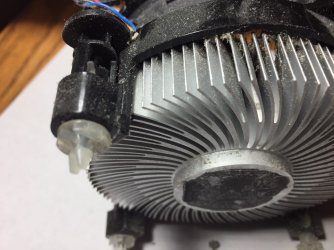
Look at the fan + heat sink. It has four pins that are inserted on the MB holes.
408163d1557099195-screen-goes-black-safe-mode-comes-up-img_4193.jpg
.
Make sure that the inner pin (that locks it in place) is pulled out
Seeing from the top, make sure the knobs button is counter clock wise.

This is the part where the acetone comes in. The thermal paste on the heat sink and on the CPU is completely dry.
Insert a small spoon handle into the acetone, take it off and let one or two drops fall over the center of the heat sink gray thermal paste and one or two drops over the center of the CPU gray thermal paste.

Put the fan + heat sink over the CPU and gently squeeze. Align and insert the pins on the MB holes. Press two buttons, one in diagonal to the other, (you will hear a click when you press the buttons) then the remaining two buttons. Now turn the button 1/4 clock wise to lock in place.
Inspect to see if all 4 pins are in the MB holes and that is well fixed.
Plug the fan connector to the MB socket.
Let me know when you've done.
 
Last edited:

My Computers My Computers

  • At a glance

    Windows 7 HP 64i5 6600K - 800MHz to 4200MHz4+4G GSkill DDR4 3000IG - Intel 530
    Computer type
    PC/Desktop
    Computer Manufacturer/Model Number
    custom build
    OS
    Windows 7 HP 64
    CPU
    i5 6600K - 800MHz to 4200MHz
    Motherboard
    GA-Z170-HD3P
    Memory
    4+4G GSkill DDR4 3000
    Graphics Card(s)
    IG - Intel 530
    Monitor(s) Displays
    Samsung 226BW
    Screen Resolution
    1680x1050
    Hard Drives
    (1) -1 SM951 – 128GB M.2 AHCI PCIe SSD drive for Windows 7 and Lubuntu
    (2) -1 WD SATA 3 - 1T for Data
    (3) -1 WD SATA 3 - 1T for backup
    PSU
    Thermaltake 450W TR2 gold
    Keyboard
    Old and good Chicony mechanical keyboard
    Mouse
    Logitech mX performance - 9 buttons (had to disable some)
    Internet Speed
    500Mb/s
    Browser
    Firefox 64
    Other Info
    TinyWall firewall
  • At a glance

    Windows 7 Proi7-4500U 800MHz to 3.0GHz(4+4)G DDR3 1600IG intel 4400 + NVIDIA GeForce GT 745M
    Computer type
    Laptop
    System Manufacturer/Model Number
    Asus Q550LF
    OS
    Windows 7 Pro
    CPU
    i7-4500U 800MHz to 3.0GHz
    Motherboard
    Asus Q550LF
    Memory
    (4+4)G DDR3 1600
    Graphics Card(s)
    IG intel 4400 + NVIDIA GeForce GT 745M
    Sound Card
    Realtek
    Monitor(s) Displays
    LG Display LP156WF4-SPH1
    Screen Resolution
    1920 x 1080
    Hard Drives
    BX500 120G SSD for Windows and programs +
    1T HDD for data
    Internet Speed
    500 Mb/s
    Browser
    Firefox
    Other Info
    TinyWall firewall
Mike says he will get on it tomorrow. He is in TV mode. IF he can do this will we be able to back things up??? I just can't thank you enough for all the hours you have spent trying to help me. I REALLY appreciate it.
 

My Computer My Computer

At a glance

Windows 7 Home Premium 64bitIntel R Core (TM) i5M 450 @ 2.40GH 6GB (5.80 available
Computer type
PC/Desktop
Computer Manufacturer/Model Number
Dell
OS
Windows 7 Home Premium 64bit
CPU
Intel R Core (TM) i5
Memory
M 450 @ 2.40GH 6GB (5.80 available
Antivirus
Norton 360
Browser
Google Chrome
Back
Top