Screen Resolution - Display Settings

How to Change the Screen Resolution in Windows 7


   Information
This will show you how to change the screen resolution in Windows 7 with the recommended native settings based on the monitor size.
   Note
The screen resolution setting determines how much information is displayed on the display screen. It is measured horizontally and vertically in pixels. At lower screen resolutions, such as 640 x 480, fewer items will fit on the screen, but they will be larger. At higher resolutions, such as 1600 x 1200, more items will fit on the screen but they will be smaller. The resolution options will vary with each computer based on the video card device, monitor size, and video & monitor drivers. If the screen looks distorted or fuzzy, then you may have an incorrect screen resolution size set for your monitor.
   Warning

  • Windows 7 does not allow for each user to have their own screen resolution. Changing the screen resolution in one user account will change it for all user accounts on the computer.
  • Make sure the Color Depth (Colors) is set to True Color (32 bit) to help have the best picture.


Here's How:

1. Do step 2 or 3 below for you would like to open the Screen Resolution window.

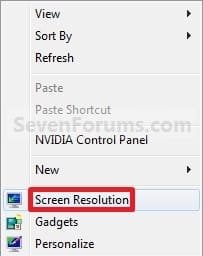
2. Right click on a empty space on the desktop and click on Screen Resolution. (See screenshot below)
138d1230590995-screen-resolution-display-settings-right_click.jpg


A) Go to step 4.

OR

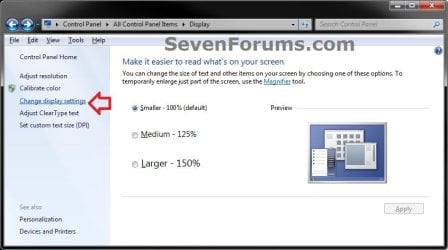
3. Open the Control Panel (icons view), and click on the Display icon. Next, click on the Change display settings link in the left pane. (see screenshot below)Display.jpg

A) Go to step 4.

4. Select the monitor Display you want to change the screen resolution for. (See screenshot below step 5B)
NOTE: You will only be able to select a different display if you have more than one monitor connected.

5. To Change only the Screen Resolution
A) Select an available screen Resolution. (See screenshot below step 5B)
NOTE: The native resolution will have (Recommended) next to it. See the tables below for common native screen resolutions of monitors based on their screen size.

Monitor SizeNative Resolution
14-15 inch1024x768
17-19 inch1280x1024
20-23 inch1600x1200
24 + inch1900x1200
17-18 inch Widescreen1280x800
19 inch Widescreen1440x900
20-23 inch Widescreen1680x1050
24-29 inch Widescreen1920x1080 to 1920x1200
30 + inch Widescreen1920x1080 to 2560x1600

Laptop Screen SizeNative Resolution
13-15 inch1400x1050
13-15 inch Widescreen1280x800
17 inch Widescreen1680x1050
Tablet screen1366x768


B) Click on the Apply button. (See screenshot below)
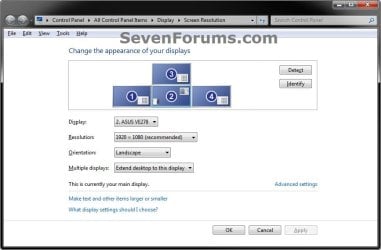
Display_Settings.jpg

C) Click on Keep changes to apply the screen resolution. (See screenshot below)
NOTE: Click on Revert to not accept the screen resolution from step 5A, and to select another screen resolution.
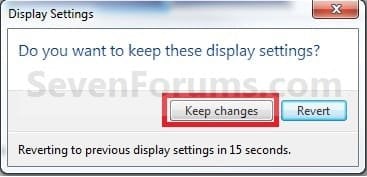
Keep.jpg

D) Go to step 6.[/INDENT]

6. To Select from a List of All Display ModesA) Click on the Advanced settings link. (See screenshot below step 5B)

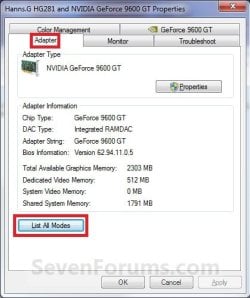
B) Click on the Adapter tab, and on the List All Modes button. (See screenshot below)Adapter1.jpg

C) Select the display mode with the screen resolution, color depth, and screen refresh rate that you want to use, and click on OK. (See screenshot below)
NOTE: It is recommended to use a native screen resolution with a True Color (32-bit) color depth.Adapter2.jpg

D) Click on OK. (See screenshot below step 6B)

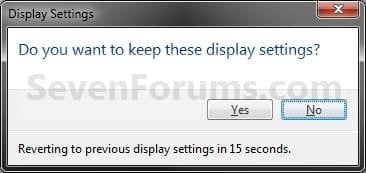
E) Click on Yes to confirm the change. (See screenshot below)Confirm.jpg


7. When finished, click on OK. (See screenshot below step 5B)


That's it,
Shawn Brink


Attachments

  • Right_Click.jpg
    Right_Click.jpg
    7.5 KB · Views: 499,051
Last edited:
Is there a way to disable the 15 second nag?
 

My Computer

OS
Windows 7 Ultimate
Hello Telboy, and welcome to Seven Forums.

Sorry, but the only way is to confirm the changes or not when asked (nagged). :(
 

My Computer

Computer type
PC/Desktop
Computer Manufacturer/Model Number
Self built custom
OS
64-bit Windows 11 Pro for Workstations
CPU
Intel i7-8700K OC'd to 5 GHz
Motherboard
ASUS ROG Maximus XI Formula Z390
Memory
64 GB (4x16GB) G.SKILL TridentZ RGB DDR4 3600 MHz
Graphics Card(s)
ASUS ROG-STRIX-GTX1080TI-O11G-GAMING
Sound Card
Integrated
Monitor(s) Displays
2 x Samsung Odyssey G7 27"
Screen Resolution
2560x1440
Hard Drives
1TB Samsung 990 PRO M.2,
4TB Samsung 990 PRO PRO M.2,
TerraMaster F8 SSD Plus NAS
PSU
Seasonic Prime Titanium 850W
Case
Thermaltake Core P3
Cooling
Corsair Hydro H115i
Keyboard
Logitech wireless K800
Mouse
Logitech MX Master 4
Internet Speed
2 Gb/s Download and 100 Mb/s Upload
Antivirus
Malwarebyte Anti-Malware Premium
Browser
Google Chrome
Other Info
Logitech Z625 speaker system,
Logitech BRIO 4K Pro webcam,
HP Color LaserJet Pro MFP M477fdn,
APC SMART-UPS RT 1000 XL - SURT1000XLI,
Galaxy S23 Plus phone
How can a user without administrativ rights change screen resolution.
Can I use Group Policy to give the use the rights to changes screen resolution?
 

My Computer

OS
windows 7
Hello Zulle, and welcome to Seven Forums.

When the screen resolution is changed it is changed for all users on the computer. Because of this, only a administrator will be able to change it. The only way to allow them to, is to make them an administrator. :(
 

My Computer

Computer type
PC/Desktop
Computer Manufacturer/Model Number
Self built custom
OS
64-bit Windows 11 Pro for Workstations
CPU
Intel i7-8700K OC'd to 5 GHz
Motherboard
ASUS ROG Maximus XI Formula Z390
Memory
64 GB (4x16GB) G.SKILL TridentZ RGB DDR4 3600 MHz
Graphics Card(s)
ASUS ROG-STRIX-GTX1080TI-O11G-GAMING
Sound Card
Integrated
Monitor(s) Displays
2 x Samsung Odyssey G7 27"
Screen Resolution
2560x1440
Hard Drives
1TB Samsung 990 PRO M.2,
4TB Samsung 990 PRO PRO M.2,
TerraMaster F8 SSD Plus NAS
PSU
Seasonic Prime Titanium 850W
Case
Thermaltake Core P3
Cooling
Corsair Hydro H115i
Keyboard
Logitech wireless K800
Mouse
Logitech MX Master 4
Internet Speed
2 Gb/s Download and 100 Mb/s Upload
Antivirus
Malwarebyte Anti-Malware Premium
Browser
Google Chrome
Other Info
Logitech Z625 speaker system,
Logitech BRIO 4K Pro webcam,
HP Color LaserJet Pro MFP M477fdn,
APC SMART-UPS RT 1000 XL - SURT1000XLI,
Galaxy S23 Plus phone
My monitor requires a 1600x900 setting, but I can't find one on the list. Is there any way I can set my own resolution?
 

My Computer

OS
Windows 7
Hello M.Lopez, and welcome to Seven Forums.

What brand and model number of monitor and graphics card do you have?

Could you also post a screenshot of the available screen resolutions that you have to see if something may standout?
 

My Computer

Computer type
PC/Desktop
Computer Manufacturer/Model Number
Self built custom
OS
64-bit Windows 11 Pro for Workstations
CPU
Intel i7-8700K OC'd to 5 GHz
Motherboard
ASUS ROG Maximus XI Formula Z390
Memory
64 GB (4x16GB) G.SKILL TridentZ RGB DDR4 3600 MHz
Graphics Card(s)
ASUS ROG-STRIX-GTX1080TI-O11G-GAMING
Sound Card
Integrated
Monitor(s) Displays
2 x Samsung Odyssey G7 27"
Screen Resolution
2560x1440
Hard Drives
1TB Samsung 990 PRO M.2,
4TB Samsung 990 PRO PRO M.2,
TerraMaster F8 SSD Plus NAS
PSU
Seasonic Prime Titanium 850W
Case
Thermaltake Core P3
Cooling
Corsair Hydro H115i
Keyboard
Logitech wireless K800
Mouse
Logitech MX Master 4
Internet Speed
2 Gb/s Download and 100 Mb/s Upload
Antivirus
Malwarebyte Anti-Malware Premium
Browser
Google Chrome
Other Info
Logitech Z625 speaker system,
Logitech BRIO 4K Pro webcam,
HP Color LaserJet Pro MFP M477fdn,
APC SMART-UPS RT 1000 XL - SURT1000XLI,
Galaxy S23 Plus phone
mlopez992 plz install your manifacturer video card drivers - Ati or nVidia and use their control panel. You will able to set your resolution from there :)
 

My Computer

OS
Windows Se7en Ultimate + Windows XP SP3
CPU
AMD Athlon64 X2 5200+
Motherboard
Gigabyte GA-MA770-DS3
Memory
CORSAIR DOMINATOR TWIN2X2048-8500C5D 2 GB
Graphics Card(s)
Ati Radeon HD3870
Monitor(s) Displays
Sony KDL32V4500
Screen Resolution
1920X1080X60Hz
Hard Drives
HITACHI 320GB SATA
HITACHI 80GB ATA
PSU
Point Of View 450 Watts
Internet Speed
20Mbits Cable Internet
I rechecked the specs on my video card, and it doesn't support a 16:9 resolution (the monitor was a gift, so I didn't check anything before I got it). I'm getting a new one shortly, but thanks for the help.
 

My Computer

OS
Windows 7
M.Lopez,

Oh, I'm sorry to hear that. Thank you for posting back with your findings. Enjoy your new monitor. :)
 

My Computer

Computer type
PC/Desktop
Computer Manufacturer/Model Number
Self built custom
OS
64-bit Windows 11 Pro for Workstations
CPU
Intel i7-8700K OC'd to 5 GHz
Motherboard
ASUS ROG Maximus XI Formula Z390
Memory
64 GB (4x16GB) G.SKILL TridentZ RGB DDR4 3600 MHz
Graphics Card(s)
ASUS ROG-STRIX-GTX1080TI-O11G-GAMING
Sound Card
Integrated
Monitor(s) Displays
2 x Samsung Odyssey G7 27"
Screen Resolution
2560x1440
Hard Drives
1TB Samsung 990 PRO M.2,
4TB Samsung 990 PRO PRO M.2,
TerraMaster F8 SSD Plus NAS
PSU
Seasonic Prime Titanium 850W
Case
Thermaltake Core P3
Cooling
Corsair Hydro H115i
Keyboard
Logitech wireless K800
Mouse
Logitech MX Master 4
Internet Speed
2 Gb/s Download and 100 Mb/s Upload
Antivirus
Malwarebyte Anti-Malware Premium
Browser
Google Chrome
Other Info
Logitech Z625 speaker system,
Logitech BRIO 4K Pro webcam,
HP Color LaserJet Pro MFP M477fdn,
APC SMART-UPS RT 1000 XL - SURT1000XLI,
Galaxy S23 Plus phone
hey there mr.brink,

I've just changed from windows XP to windows 7 and the 1st thing I noticed was the resolution problem ;(
I have a 37" LCD TV and I want to get a resolution of 1920x1080 on it but when ever I choose that, windows just takes it to 1600x1200...
I have an evga 8800 Ultra and I use to get 1920x1080 on winxp without any problems.
I tried the steps you posted but they did not work for me :(

plz help meh,
thanks !
 

My Computer

OS
Windows 7 Ultimate x64
CPU
Intel Core 2 Duo E6600 @ 2.4Ghz
Motherboard
Gigabyte 965P-DQ6
Memory
4x1GB OCZ
Graphics Card(s)
evga 8800 Ultra
PSU
OCZ GameXstreem
Case
Gigabyte Aurora 570
Cooling
Gigabyte Rocket 3D II
Yesterday I installed Windows 7 on my mother's computer which was running XP with service pack 2. The computer is Dell which about 5 years old, currently with a 80GB HDD and 1 GB of RAM. The monitor she is using is also a Dell 15" which came with the computer. She cannot afford another monitor or computer.

When setting up Windows 7 I couldn't get the screen resolution to change from anything but 640x480. When she was running XP it was at 1024x768. The graphics card in the computer is whatever Dell stuck in there. The only upgrades it has recieved is 512MB of RAM and Windows 7.

Any thoughts on what to do to get the resolution to at least something better tha 640x480?

Thanks.
 

My Computer

Computer Manufacturer/Model Number
HP Pavilion
OS
Windows 7 Home Premium 32bit
CPU
AMD Athlon 64x2 2.5GHz Dual Core Processor 4800+
Memory
4 GB DDR
Graphics Card(s)
Radeon X1300/X1550
Monitor(s) Displays
Sharp Aquos 37" LCD
Screen Resolution
1366x768
Hard Drives
Two WDC 500GB HDD
Keyboard
HP PS/2
Mouse
Logitech Optical
Internet Speed
Comcast Broadband
Hello SpyderGirl, and welcome to Seven Forums.

You may just need to install the latest video drivers if you haven't already.

Hope this helps,
Shawn
 

My Computer

Computer type
PC/Desktop
Computer Manufacturer/Model Number
Self built custom
OS
64-bit Windows 11 Pro for Workstations
CPU
Intel i7-8700K OC'd to 5 GHz
Motherboard
ASUS ROG Maximus XI Formula Z390
Memory
64 GB (4x16GB) G.SKILL TridentZ RGB DDR4 3600 MHz
Graphics Card(s)
ASUS ROG-STRIX-GTX1080TI-O11G-GAMING
Sound Card
Integrated
Monitor(s) Displays
2 x Samsung Odyssey G7 27"
Screen Resolution
2560x1440
Hard Drives
1TB Samsung 990 PRO M.2,
4TB Samsung 990 PRO PRO M.2,
TerraMaster F8 SSD Plus NAS
PSU
Seasonic Prime Titanium 850W
Case
Thermaltake Core P3
Cooling
Corsair Hydro H115i
Keyboard
Logitech wireless K800
Mouse
Logitech MX Master 4
Internet Speed
2 Gb/s Download and 100 Mb/s Upload
Antivirus
Malwarebyte Anti-Malware Premium
Browser
Google Chrome
Other Info
Logitech Z625 speaker system,
Logitech BRIO 4K Pro webcam,
HP Color LaserJet Pro MFP M477fdn,
APC SMART-UPS RT 1000 XL - SURT1000XLI,
Galaxy S23 Plus phone
Hello SpyderGirl, and welcome to Seven Forums.

You may just need to install the latest video drivers if you haven't already.

Hope this helps,
Shawn

Thanks Shawn. I can't remember if I did that or not while I was there.

I will have her try that and see what happens.
 

My Computer

Computer Manufacturer/Model Number
HP Pavilion
OS
Windows 7 Home Premium 32bit
CPU
AMD Athlon 64x2 2.5GHz Dual Core Processor 4800+
Memory
4 GB DDR
Graphics Card(s)
Radeon X1300/X1550
Monitor(s) Displays
Sharp Aquos 37" LCD
Screen Resolution
1366x768
Hard Drives
Two WDC 500GB HDD
Keyboard
HP PS/2
Mouse
Logitech Optical
Internet Speed
Comcast Broadband
Alright, so I come to find out that the video graphics card in her Dell is an Intel AGP 845G for which Intel does not offer a Win7 driver for.... SOO.... time to upgrade the graphics card (on a budget).

I am looking at having her install a GeForce FX5200 256MB PCI Graphics Card. The online reviews indicate that it works good with Win7, especially on older computers. I found the card for $39.99 on Amazon and NewEgg with a $10 mail in rebate.

Any thoughts or other recommendations? She has a Dell Dimension 2400 series.

Thanks.
 

My Computer

Computer Manufacturer/Model Number
HP Pavilion
OS
Windows 7 Home Premium 32bit
CPU
AMD Athlon 64x2 2.5GHz Dual Core Processor 4800+
Memory
4 GB DDR
Graphics Card(s)
Radeon X1300/X1550
Monitor(s) Displays
Sharp Aquos 37" LCD
Screen Resolution
1366x768
Hard Drives
Two WDC 500GB HDD
Keyboard
HP PS/2
Mouse
Logitech Optical
Internet Speed
Comcast Broadband

My Computer

Computer type
PC/Desktop
Computer Manufacturer/Model Number
Self built custom
OS
64-bit Windows 11 Pro for Workstations
CPU
Intel i7-8700K OC'd to 5 GHz
Motherboard
ASUS ROG Maximus XI Formula Z390
Memory
64 GB (4x16GB) G.SKILL TridentZ RGB DDR4 3600 MHz
Graphics Card(s)
ASUS ROG-STRIX-GTX1080TI-O11G-GAMING
Sound Card
Integrated
Monitor(s) Displays
2 x Samsung Odyssey G7 27"
Screen Resolution
2560x1440
Hard Drives
1TB Samsung 990 PRO M.2,
4TB Samsung 990 PRO PRO M.2,
TerraMaster F8 SSD Plus NAS
PSU
Seasonic Prime Titanium 850W
Case
Thermaltake Core P3
Cooling
Corsair Hydro H115i
Keyboard
Logitech wireless K800
Mouse
Logitech MX Master 4
Internet Speed
2 Gb/s Download and 100 Mb/s Upload
Antivirus
Malwarebyte Anti-Malware Premium
Browser
Google Chrome
Other Info
Logitech Z625 speaker system,
Logitech BRIO 4K Pro webcam,
HP Color LaserJet Pro MFP M477fdn,
APC SMART-UPS RT 1000 XL - SURT1000XLI,
Galaxy S23 Plus phone
I show that it has Vista drivers below, but not any for Windows 7. You might be able to install the Vista drivers though, but may need to use Compatibility Mode with the driver installation file.

32-bit Vista driver: ForceWare Release 95

64-bit Vista driver: ForceWare Release 95

Great, thanks for the links and the information!

Do you know of any other PCI video cards that would work in her PC and also work with Win7?
 

My Computer

Computer Manufacturer/Model Number
HP Pavilion
OS
Windows 7 Home Premium 32bit
CPU
AMD Athlon 64x2 2.5GHz Dual Core Processor 4800+
Memory
4 GB DDR
Graphics Card(s)
Radeon X1300/X1550
Monitor(s) Displays
Sharp Aquos 37" LCD
Screen Resolution
1366x768
Hard Drives
Two WDC 500GB HDD
Keyboard
HP PS/2
Mouse
Logitech Optical
Internet Speed
Comcast Broadband
It should be able to work with Windows 7 as well, but I do not think you'll find any PCI cards that will have Windows 7 drivers available for them though. You might try the card to see if the generic drivers Windows 7 installs for it may allow Aero to work. If not, then try the Vista drivers.


Here's a list of compatible graphic cards from Microsoft that you could look through to see if there might be some PCI cards listed in there.

Windows 7 Compatibility for Graphics Cards & Components: Graphics Cards Hardware: Download Device Drivers
 

My Computer

Computer type
PC/Desktop
Computer Manufacturer/Model Number
Self built custom
OS
64-bit Windows 11 Pro for Workstations
CPU
Intel i7-8700K OC'd to 5 GHz
Motherboard
ASUS ROG Maximus XI Formula Z390
Memory
64 GB (4x16GB) G.SKILL TridentZ RGB DDR4 3600 MHz
Graphics Card(s)
ASUS ROG-STRIX-GTX1080TI-O11G-GAMING
Sound Card
Integrated
Monitor(s) Displays
2 x Samsung Odyssey G7 27"
Screen Resolution
2560x1440
Hard Drives
1TB Samsung 990 PRO M.2,
4TB Samsung 990 PRO PRO M.2,
TerraMaster F8 SSD Plus NAS
PSU
Seasonic Prime Titanium 850W
Case
Thermaltake Core P3
Cooling
Corsair Hydro H115i
Keyboard
Logitech wireless K800
Mouse
Logitech MX Master 4
Internet Speed
2 Gb/s Download and 100 Mb/s Upload
Antivirus
Malwarebyte Anti-Malware Premium
Browser
Google Chrome
Other Info
Logitech Z625 speaker system,
Logitech BRIO 4K Pro webcam,
HP Color LaserJet Pro MFP M477fdn,
APC SMART-UPS RT 1000 XL - SURT1000XLI,
Galaxy S23 Plus phone
I figured as much. Thanks. She went ahead and purchased that GeForce FX5200.
 

My Computer

Computer Manufacturer/Model Number
HP Pavilion
OS
Windows 7 Home Premium 32bit
CPU
AMD Athlon 64x2 2.5GHz Dual Core Processor 4800+
Memory
4 GB DDR
Graphics Card(s)
Radeon X1300/X1550
Monitor(s) Displays
Sharp Aquos 37" LCD
Screen Resolution
1366x768
Hard Drives
Two WDC 500GB HDD
Keyboard
HP PS/2
Mouse
Logitech Optical
Internet Speed
Comcast Broadband
Ok. Please let us know how it went. :)
 

My Computer

Computer type
PC/Desktop
Computer Manufacturer/Model Number
Self built custom
OS
64-bit Windows 11 Pro for Workstations
CPU
Intel i7-8700K OC'd to 5 GHz
Motherboard
ASUS ROG Maximus XI Formula Z390
Memory
64 GB (4x16GB) G.SKILL TridentZ RGB DDR4 3600 MHz
Graphics Card(s)
ASUS ROG-STRIX-GTX1080TI-O11G-GAMING
Sound Card
Integrated
Monitor(s) Displays
2 x Samsung Odyssey G7 27"
Screen Resolution
2560x1440
Hard Drives
1TB Samsung 990 PRO M.2,
4TB Samsung 990 PRO PRO M.2,
TerraMaster F8 SSD Plus NAS
PSU
Seasonic Prime Titanium 850W
Case
Thermaltake Core P3
Cooling
Corsair Hydro H115i
Keyboard
Logitech wireless K800
Mouse
Logitech MX Master 4
Internet Speed
2 Gb/s Download and 100 Mb/s Upload
Antivirus
Malwarebyte Anti-Malware Premium
Browser
Google Chrome
Other Info
Logitech Z625 speaker system,
Logitech BRIO 4K Pro webcam,
HP Color LaserJet Pro MFP M477fdn,
APC SMART-UPS RT 1000 XL - SURT1000XLI,
Galaxy S23 Plus phone
Back
Top