Screen Resolution - Display Settings

How to Change the Screen Resolution in Windows 7


   Information
This will show you how to change the screen resolution in Windows 7 with the recommended native settings based on the monitor size.
   Note
The screen resolution setting determines how much information is displayed on the display screen. It is measured horizontally and vertically in pixels. At lower screen resolutions, such as 640 x 480, fewer items will fit on the screen, but they will be larger. At higher resolutions, such as 1600 x 1200, more items will fit on the screen but they will be smaller. The resolution options will vary with each computer based on the video card device, monitor size, and video & monitor drivers. If the screen looks distorted or fuzzy, then you may have an incorrect screen resolution size set for your monitor.
   Warning

  • Windows 7 does not allow for each user to have their own screen resolution. Changing the screen resolution in one user account will change it for all user accounts on the computer.
  • Make sure the Color Depth (Colors) is set to True Color (32 bit) to help have the best picture.


Here's How:

1. Do step 2 or 3 below for you would like to open the Screen Resolution window.

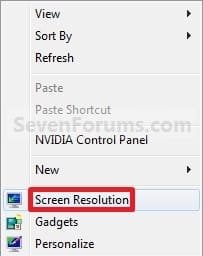
2. Right click on a empty space on the desktop and click on Screen Resolution. (See screenshot below)
138d1230590995-screen-resolution-display-settings-right_click.jpg


A) Go to step 4.

OR

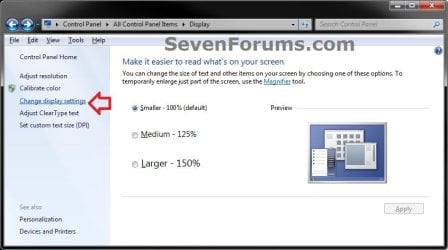
3. Open the Control Panel (icons view), and click on the Display icon. Next, click on the Change display settings link in the left pane. (see screenshot below)Display.jpg

A) Go to step 4.

4. Select the monitor Display you want to change the screen resolution for. (See screenshot below step 5B)
NOTE: You will only be able to select a different display if you have more than one monitor connected.

5. To Change only the Screen Resolution
A) Select an available screen Resolution. (See screenshot below step 5B)
NOTE: The native resolution will have (Recommended) next to it. See the tables below for common native screen resolutions of monitors based on their screen size.

Monitor SizeNative Resolution
14-15 inch1024x768
17-19 inch1280x1024
20-23 inch1600x1200
24 + inch1900x1200
17-18 inch Widescreen1280x800
19 inch Widescreen1440x900
20-23 inch Widescreen1680x1050
24-29 inch Widescreen1920x1080 to 1920x1200
30 + inch Widescreen1920x1080 to 2560x1600

Laptop Screen SizeNative Resolution
13-15 inch1400x1050
13-15 inch Widescreen1280x800
17 inch Widescreen1680x1050
Tablet screen1366x768


B) Click on the Apply button. (See screenshot below)
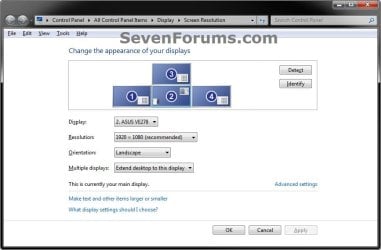
Display_Settings.jpg

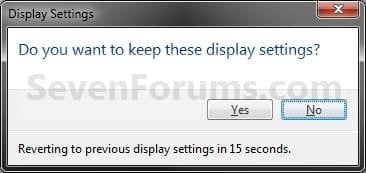
C) Click on Keep changes to apply the screen resolution. (See screenshot below)
NOTE: Click on Revert to not accept the screen resolution from step 5A, and to select another screen resolution.
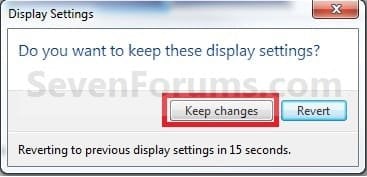
Keep.jpg

D) Go to step 6.[/INDENT]

6. To Select from a List of All Display ModesA) Click on the Advanced settings link. (See screenshot below step 5B)

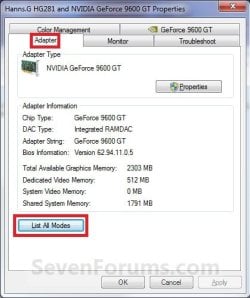
B) Click on the Adapter tab, and on the List All Modes button. (See screenshot below)Adapter1.jpg

C) Select the display mode with the screen resolution, color depth, and screen refresh rate that you want to use, and click on OK. (See screenshot below)
NOTE: It is recommended to use a native screen resolution with a True Color (32-bit) color depth.Adapter2.jpg

D) Click on OK. (See screenshot below step 6B)

E) Click on Yes to confirm the change. (See screenshot below)Confirm.jpg


7. When finished, click on OK. (See screenshot below step 5B)


That's it,
Shawn Brink


Attachments

  • Right_Click.jpg
    Right_Click.jpg
    7.5 KB · Views: 499,051
Last edited:
I can't really explain it and the picture is either too hard to recognize but 1600x1200 was too small and 1280x1024 was too big.
 

My Computer

Computer type
PC/Desktop
Computer Manufacturer/Model Number
Novatech iRush Pro
OS
Windows 7 Ultimate SP1 - 64 Bit
CPU
Intel Core i5 2500k
Motherboard
Foxconn H67M-S/H67M-V/H67
Memory
2x4GB DDR3 1333Hz
Graphics Card(s)
Ati Radeon 6770
Sound Card
None
Monitor(s) Displays
Samsung S22B150
Screen Resolution
1920x1080
Hard Drives
2x500GB
PSU
500W
Cooling
Fan
Keyboard
HP KU0316
Mouse
Wireless Logitech M185
Internet Speed
20MB/s
Antivirus
Avast Free
Browser
Google Chrome
Other Info
Logitech M185 Mouse
KU-M316 Keyboard
Yep, it needs to be set to 1440x900 then. It appears that the N19W is an OEM-only monitor, and that AOC doesn't provide support for it. There's alot on the internet for this same problem for this monitor. It's such an old monitor, I can't find the INF file (driver) for that monitor either.

Does your friend still happen to have the drivers disc that came with it that you might see if installing in compatibility mode for the Windows it came with may work, or selecting the INF file through Disk Management for the monitor?
 

My Computer

Computer type
PC/Desktop
Computer Manufacturer/Model Number
Self built custom
OS
64-bit Windows 11 Pro for Workstations
CPU
Intel i7-8700K OC'd to 5 GHz
Motherboard
ASUS ROG Maximus XI Formula Z390
Memory
64 GB (4x16GB) G.SKILL TridentZ RGB DDR4 3600 MHz
Graphics Card(s)
ASUS ROG-STRIX-GTX1080TI-O11G-GAMING
Sound Card
Integrated
Monitor(s) Displays
2 x Samsung Odyssey G7 27"
Screen Resolution
2560x1440
Hard Drives
1TB Samsung 990 PRO M.2,
4TB Samsung 990 PRO PRO M.2,
TerraMaster F8 SSD Plus NAS
PSU
Seasonic Prime Titanium 850W
Case
Thermaltake Core P3
Cooling
Corsair Hydro H115i
Keyboard
Logitech wireless K800
Mouse
Logitech MX Master 4
Internet Speed
2 Gb/s Download and 100 Mb/s Upload
Antivirus
Malwarebyte Anti-Malware Premium
Browser
Google Chrome
Other Info
Logitech Z625 speaker system,
Logitech BRIO 4K Pro webcam,
HP Color LaserJet Pro MFP M477fdn,
APC SMART-UPS RT 1000 XL - SURT1000XLI,
Galaxy S23 Plus phone
Yep, it needs to be set to 1440x900 then. It appears that the N19W is an OEM-only monitor, and that AOC doesn't provide support for it. There's alot on the internet for this same problem for this monitor. It's such an old monitor, I can't find the INF file (driver) for that monitor either.

Does your friend still happen to have the drivers disc that came with it that you might see if installing in compatibility mode for the Windows it came with may work, or selecting the INF file through Disk Management for the monitor?

It is actually my monitor, unfortunately I don't have the drivers as I did get it second hand.
 

My Computer

Computer type
PC/Desktop
Computer Manufacturer/Model Number
Novatech iRush Pro
OS
Windows 7 Ultimate SP1 - 64 Bit
CPU
Intel Core i5 2500k
Motherboard
Foxconn H67M-S/H67M-V/H67
Memory
2x4GB DDR3 1333Hz
Graphics Card(s)
Ati Radeon 6770
Sound Card
None
Monitor(s) Displays
Samsung S22B150
Screen Resolution
1920x1080
Hard Drives
2x500GB
PSU
500W
Cooling
Fan
Keyboard
HP KU0316
Mouse
Wireless Logitech M185
Internet Speed
20MB/s
Antivirus
Avast Free
Browser
Google Chrome
Other Info
Logitech M185 Mouse
KU-M316 Keyboard
I'm not sure what else you can do other than finding a resolution that looks best to you. :(
 

My Computer

Computer type
PC/Desktop
Computer Manufacturer/Model Number
Self built custom
OS
64-bit Windows 11 Pro for Workstations
CPU
Intel i7-8700K OC'd to 5 GHz
Motherboard
ASUS ROG Maximus XI Formula Z390
Memory
64 GB (4x16GB) G.SKILL TridentZ RGB DDR4 3600 MHz
Graphics Card(s)
ASUS ROG-STRIX-GTX1080TI-O11G-GAMING
Sound Card
Integrated
Monitor(s) Displays
2 x Samsung Odyssey G7 27"
Screen Resolution
2560x1440
Hard Drives
1TB Samsung 990 PRO M.2,
4TB Samsung 990 PRO PRO M.2,
TerraMaster F8 SSD Plus NAS
PSU
Seasonic Prime Titanium 850W
Case
Thermaltake Core P3
Cooling
Corsair Hydro H115i
Keyboard
Logitech wireless K800
Mouse
Logitech MX Master 4
Internet Speed
2 Gb/s Download and 100 Mb/s Upload
Antivirus
Malwarebyte Anti-Malware Premium
Browser
Google Chrome
Other Info
Logitech Z625 speaker system,
Logitech BRIO 4K Pro webcam,
HP Color LaserJet Pro MFP M477fdn,
APC SMART-UPS RT 1000 XL - SURT1000XLI,
Galaxy S23 Plus phone
I'm not sure what else you can do other than finding a resolution that looks best to you. :(

Hmm, the funny thing is about 2-3 months ago the monitor was running the perfect resolution with the same computer (the computer hasn't even been opened), no idea why it is not working now.
 

My Computer

Computer type
PC/Desktop
Computer Manufacturer/Model Number
Novatech iRush Pro
OS
Windows 7 Ultimate SP1 - 64 Bit
CPU
Intel Core i5 2500k
Motherboard
Foxconn H67M-S/H67M-V/H67
Memory
2x4GB DDR3 1333Hz
Graphics Card(s)
Ati Radeon 6770
Sound Card
None
Monitor(s) Displays
Samsung S22B150
Screen Resolution
1920x1080
Hard Drives
2x500GB
PSU
500W
Cooling
Fan
Keyboard
HP KU0316
Mouse
Wireless Logitech M185
Internet Speed
20MB/s
Antivirus
Avast Free
Browser
Google Chrome
Other Info
Logitech M185 Mouse
KU-M316 Keyboard
What changed since then?
 
Last edited:

My Computer

Computer type
PC/Desktop
Computer Manufacturer/Model Number
Self built custom
OS
64-bit Windows 11 Pro for Workstations
CPU
Intel i7-8700K OC'd to 5 GHz
Motherboard
ASUS ROG Maximus XI Formula Z390
Memory
64 GB (4x16GB) G.SKILL TridentZ RGB DDR4 3600 MHz
Graphics Card(s)
ASUS ROG-STRIX-GTX1080TI-O11G-GAMING
Sound Card
Integrated
Monitor(s) Displays
2 x Samsung Odyssey G7 27"
Screen Resolution
2560x1440
Hard Drives
1TB Samsung 990 PRO M.2,
4TB Samsung 990 PRO PRO M.2,
TerraMaster F8 SSD Plus NAS
PSU
Seasonic Prime Titanium 850W
Case
Thermaltake Core P3
Cooling
Corsair Hydro H115i
Keyboard
Logitech wireless K800
Mouse
Logitech MX Master 4
Internet Speed
2 Gb/s Download and 100 Mb/s Upload
Antivirus
Malwarebyte Anti-Malware Premium
Browser
Google Chrome
Other Info
Logitech Z625 speaker system,
Logitech BRIO 4K Pro webcam,
HP Color LaserJet Pro MFP M477fdn,
APC SMART-UPS RT 1000 XL - SURT1000XLI,
Galaxy S23 Plus phone

My Computer

Computer type
PC/Desktop
Computer Manufacturer/Model Number
Novatech iRush Pro
OS
Windows 7 Ultimate SP1 - 64 Bit
CPU
Intel Core i5 2500k
Motherboard
Foxconn H67M-S/H67M-V/H67
Memory
2x4GB DDR3 1333Hz
Graphics Card(s)
Ati Radeon 6770
Sound Card
None
Monitor(s) Displays
Samsung S22B150
Screen Resolution
1920x1080
Hard Drives
2x500GB
PSU
500W
Cooling
Fan
Keyboard
HP KU0316
Mouse
Wireless Logitech M185
Internet Speed
20MB/s
Antivirus
Avast Free
Browser
Google Chrome
Other Info
Logitech M185 Mouse
KU-M316 Keyboard

My Computer

Computer type
PC/Desktop
Computer Manufacturer/Model Number
Self built custom
OS
64-bit Windows 11 Pro for Workstations
CPU
Intel i7-8700K OC'd to 5 GHz
Motherboard
ASUS ROG Maximus XI Formula Z390
Memory
64 GB (4x16GB) G.SKILL TridentZ RGB DDR4 3600 MHz
Graphics Card(s)
ASUS ROG-STRIX-GTX1080TI-O11G-GAMING
Sound Card
Integrated
Monitor(s) Displays
2 x Samsung Odyssey G7 27"
Screen Resolution
2560x1440
Hard Drives
1TB Samsung 990 PRO M.2,
4TB Samsung 990 PRO PRO M.2,
TerraMaster F8 SSD Plus NAS
PSU
Seasonic Prime Titanium 850W
Case
Thermaltake Core P3
Cooling
Corsair Hydro H115i
Keyboard
Logitech wireless K800
Mouse
Logitech MX Master 4
Internet Speed
2 Gb/s Download and 100 Mb/s Upload
Antivirus
Malwarebyte Anti-Malware Premium
Browser
Google Chrome
Other Info
Logitech Z625 speaker system,
Logitech BRIO 4K Pro webcam,
HP Color LaserJet Pro MFP M477fdn,
APC SMART-UPS RT 1000 XL - SURT1000XLI,
Galaxy S23 Plus phone
Sounds like you lost the driver in the reinstall. You might see if making sure that step 3 in the tutorial below is set to see if Windows may be able to update the driver automatically and have it work properly again afterwards. It might take a few days though.

http://www.sevenforums.com/tutorials/2803-device-installation-settings.html

Oops, after reinstalling, forgot to run Windows Update and WEI, I'll try that first, then your tutorial.

Couldn't see any graphic related updates, but who knows.
 

My Computer

Computer type
PC/Desktop
Computer Manufacturer/Model Number
Novatech iRush Pro
OS
Windows 7 Ultimate SP1 - 64 Bit
CPU
Intel Core i5 2500k
Motherboard
Foxconn H67M-S/H67M-V/H67
Memory
2x4GB DDR3 1333Hz
Graphics Card(s)
Ati Radeon 6770
Sound Card
None
Monitor(s) Displays
Samsung S22B150
Screen Resolution
1920x1080
Hard Drives
2x500GB
PSU
500W
Cooling
Fan
Keyboard
HP KU0316
Mouse
Wireless Logitech M185
Internet Speed
20MB/s
Antivirus
Avast Free
Browser
Google Chrome
Other Info
Logitech M185 Mouse
KU-M316 Keyboard
Nope, problem persists :(
 

My Computer

Computer type
PC/Desktop
Computer Manufacturer/Model Number
Novatech iRush Pro
OS
Windows 7 Ultimate SP1 - 64 Bit
CPU
Intel Core i5 2500k
Motherboard
Foxconn H67M-S/H67M-V/H67
Memory
2x4GB DDR3 1333Hz
Graphics Card(s)
Ati Radeon 6770
Sound Card
None
Monitor(s) Displays
Samsung S22B150
Screen Resolution
1920x1080
Hard Drives
2x500GB
PSU
500W
Cooling
Fan
Keyboard
HP KU0316
Mouse
Wireless Logitech M185
Internet Speed
20MB/s
Antivirus
Avast Free
Browser
Google Chrome
Other Info
Logitech M185 Mouse
KU-M316 Keyboard
Infinite,

I'm not sure what else to suggest. :(
 

My Computer

Computer type
PC/Desktop
Computer Manufacturer/Model Number
Self built custom
OS
64-bit Windows 11 Pro for Workstations
CPU
Intel i7-8700K OC'd to 5 GHz
Motherboard
ASUS ROG Maximus XI Formula Z390
Memory
64 GB (4x16GB) G.SKILL TridentZ RGB DDR4 3600 MHz
Graphics Card(s)
ASUS ROG-STRIX-GTX1080TI-O11G-GAMING
Sound Card
Integrated
Monitor(s) Displays
2 x Samsung Odyssey G7 27"
Screen Resolution
2560x1440
Hard Drives
1TB Samsung 990 PRO M.2,
4TB Samsung 990 PRO PRO M.2,
TerraMaster F8 SSD Plus NAS
PSU
Seasonic Prime Titanium 850W
Case
Thermaltake Core P3
Cooling
Corsair Hydro H115i
Keyboard
Logitech wireless K800
Mouse
Logitech MX Master 4
Internet Speed
2 Gb/s Download and 100 Mb/s Upload
Antivirus
Malwarebyte Anti-Malware Premium
Browser
Google Chrome
Other Info
Logitech Z625 speaker system,
Logitech BRIO 4K Pro webcam,
HP Color LaserJet Pro MFP M477fdn,
APC SMART-UPS RT 1000 XL - SURT1000XLI,
Galaxy S23 Plus phone
I have a Fujitsu LifeBook running Win 7 Pro. when I change the display resolution as the admin all look well until I log in as the user it is fine for about 5 sec then screen goes black and comes back on with the original display resolution settings. Any suggestions on how to change the resolution and make it stay that way?
 

My Computer

OS
Min XP Pro and Win 7 Pro
Hello Dan, and welcome to Seven Forums.


That is odd. Here are some things to check to see if they may help: :)
  • See if you have updated your WEI score?
  • Do you have the latest video drivers installed?
  • What happens if you change the screen resolution from within the standard user account? Do they stick then?
 

My Computer

Computer type
PC/Desktop
Computer Manufacturer/Model Number
Self built custom
OS
64-bit Windows 11 Pro for Workstations
CPU
Intel i7-8700K OC'd to 5 GHz
Motherboard
ASUS ROG Maximus XI Formula Z390
Memory
64 GB (4x16GB) G.SKILL TridentZ RGB DDR4 3600 MHz
Graphics Card(s)
ASUS ROG-STRIX-GTX1080TI-O11G-GAMING
Sound Card
Integrated
Monitor(s) Displays
2 x Samsung Odyssey G7 27"
Screen Resolution
2560x1440
Hard Drives
1TB Samsung 990 PRO M.2,
4TB Samsung 990 PRO PRO M.2,
TerraMaster F8 SSD Plus NAS
PSU
Seasonic Prime Titanium 850W
Case
Thermaltake Core P3
Cooling
Corsair Hydro H115i
Keyboard
Logitech wireless K800
Mouse
Logitech MX Master 4
Internet Speed
2 Gb/s Download and 100 Mb/s Upload
Antivirus
Malwarebyte Anti-Malware Premium
Browser
Google Chrome
Other Info
Logitech Z625 speaker system,
Logitech BRIO 4K Pro webcam,
HP Color LaserJet Pro MFP M477fdn,
APC SMART-UPS RT 1000 XL - SURT1000XLI,
Galaxy S23 Plus phone
WEI Score is 5.7, this is a brand new machine so i would assume that it has the most recent drivers and the same thing happens when I change it as the user. Resolution stays fine but as soon as I log out and log back in it goes back the the recommended resolution. Also just so you know I am using the Win MMC console tool to lock out the users from accessing and changing anything on the laptop. (these will be going in Police patrol vehicles with multiple users) I have disabled the some setting so I could set them as the user for now.
 

My Computer

OS
Min XP Pro and Win 7 Pro
You might check to see if the laptop may came with any program that would reset the screen resolution, or allows a per user screen resolution. If so, you will need to either uninstall it, or set the screen resolution in it.

Depending on what graphics chip the laptop came with for the laptop's specific model number, it wouldn't hurt to update to the latest driver for it. It will usually be AMD, NVIDIA, or Intel graphics.
 

My Computer

Computer type
PC/Desktop
Computer Manufacturer/Model Number
Self built custom
OS
64-bit Windows 11 Pro for Workstations
CPU
Intel i7-8700K OC'd to 5 GHz
Motherboard
ASUS ROG Maximus XI Formula Z390
Memory
64 GB (4x16GB) G.SKILL TridentZ RGB DDR4 3600 MHz
Graphics Card(s)
ASUS ROG-STRIX-GTX1080TI-O11G-GAMING
Sound Card
Integrated
Monitor(s) Displays
2 x Samsung Odyssey G7 27"
Screen Resolution
2560x1440
Hard Drives
1TB Samsung 990 PRO M.2,
4TB Samsung 990 PRO PRO M.2,
TerraMaster F8 SSD Plus NAS
PSU
Seasonic Prime Titanium 850W
Case
Thermaltake Core P3
Cooling
Corsair Hydro H115i
Keyboard
Logitech wireless K800
Mouse
Logitech MX Master 4
Internet Speed
2 Gb/s Download and 100 Mb/s Upload
Antivirus
Malwarebyte Anti-Malware Premium
Browser
Google Chrome
Other Info
Logitech Z625 speaker system,
Logitech BRIO 4K Pro webcam,
HP Color LaserJet Pro MFP M477fdn,
APC SMART-UPS RT 1000 XL - SURT1000XLI,
Galaxy S23 Plus phone
Hi Brink,


I am hoping you can help me correct an error I made in the external monitor resolution for our laptop. We usually stream using the VGA port and I set the resolution to that capacity of the TV...FHD/1080p. I recently fat-fingered the incorrect resolution and I have been unable to restore use of the VGA port for streaming. I made some progress this evening while treating the software controls as if I were connecting an external projector and duplicating displays but, this success was limited and I was unable to correct the problem.


I thought connecting the laptop to another 108op monitor might help but, this did not carry over to an improvement in debugging the laptop settings while attached to the primary TV.


Any advise or insight you can offer?


Thanks,


RIck
 

My Computer

Computer type
Laptop
Computer Manufacturer/Model Number
Acer TMP645-MG-9419 ultrabook
OS
Win7 Pro 64-Bit
CPU
Core i7-4500U
Memory
8 GB
Graphics Card(s)
AMD Radeon HD 8750M, 2048 MB, Core: 670 MHz, Memory: 900 MHz
Sound Card
Soundcard Intel Lynx Point PCH - High Definition Audio Contr
Screen Resolution
1080p
Hard Drives
Toshiba HG5d THNSNH256GMCT, 256 GB
Antivirus
Microsoft Security Essentials
Browser
Firefox
Hello Rick, :-)

You might see if you may be able to boot into Safe Mode, and change the setting in it before booting back to normal mode.

:ar: Safe Mode
 

My Computer

Computer type
PC/Desktop
Computer Manufacturer/Model Number
Self built custom
OS
64-bit Windows 11 Pro for Workstations
CPU
Intel i7-8700K OC'd to 5 GHz
Motherboard
ASUS ROG Maximus XI Formula Z390
Memory
64 GB (4x16GB) G.SKILL TridentZ RGB DDR4 3600 MHz
Graphics Card(s)
ASUS ROG-STRIX-GTX1080TI-O11G-GAMING
Sound Card
Integrated
Monitor(s) Displays
2 x Samsung Odyssey G7 27"
Screen Resolution
2560x1440
Hard Drives
1TB Samsung 990 PRO M.2,
4TB Samsung 990 PRO PRO M.2,
TerraMaster F8 SSD Plus NAS
PSU
Seasonic Prime Titanium 850W
Case
Thermaltake Core P3
Cooling
Corsair Hydro H115i
Keyboard
Logitech wireless K800
Mouse
Logitech MX Master 4
Internet Speed
2 Gb/s Download and 100 Mb/s Upload
Antivirus
Malwarebyte Anti-Malware Premium
Browser
Google Chrome
Other Info
Logitech Z625 speaker system,
Logitech BRIO 4K Pro webcam,
HP Color LaserJet Pro MFP M477fdn,
APC SMART-UPS RT 1000 XL - SURT1000XLI,
Galaxy S23 Plus phone
Thank you for that! I thought this might be useful but, was uncertain. I will try this and let you know.


Rick
 
Last edited:

My Computer

Computer type
Laptop
Computer Manufacturer/Model Number
Acer TMP645-MG-9419 ultrabook
OS
Win7 Pro 64-Bit
CPU
Core i7-4500U
Memory
8 GB
Graphics Card(s)
AMD Radeon HD 8750M, 2048 MB, Core: 670 MHz, Memory: 900 MHz
Sound Card
Soundcard Intel Lynx Point PCH - High Definition Audio Contr
Screen Resolution
1080p
Hard Drives
Toshiba HG5d THNSNH256GMCT, 256 GB
Antivirus
Microsoft Security Essentials
Browser
Firefox
Back
Top