Screen Resolution - Display Settings

How to Change the Screen Resolution in Windows 7


   Information
This will show you how to change the screen resolution in Windows 7 with the recommended native settings based on the monitor size.
   Note
The screen resolution setting determines how much information is displayed on the display screen. It is measured horizontally and vertically in pixels. At lower screen resolutions, such as 640 x 480, fewer items will fit on the screen, but they will be larger. At higher resolutions, such as 1600 x 1200, more items will fit on the screen but they will be smaller. The resolution options will vary with each computer based on the video card device, monitor size, and video & monitor drivers. If the screen looks distorted or fuzzy, then you may have an incorrect screen resolution size set for your monitor.
   Warning

  • Windows 7 does not allow for each user to have their own screen resolution. Changing the screen resolution in one user account will change it for all user accounts on the computer.
  • Make sure the Color Depth (Colors) is set to True Color (32 bit) to help have the best picture.


Here's How:

1. Do step 2 or 3 below for you would like to open the Screen Resolution window.

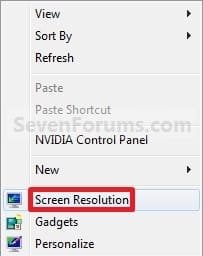
2. Right click on a empty space on the desktop and click on Screen Resolution. (See screenshot below)
138d1230590995-screen-resolution-display-settings-right_click.jpg


A) Go to step 4.

OR

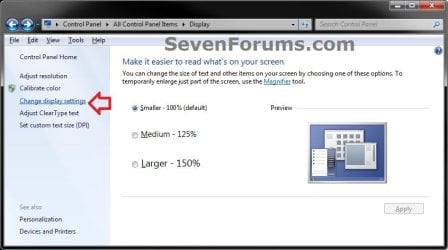
3. Open the Control Panel (icons view), and click on the Display icon. Next, click on the Change display settings link in the left pane. (see screenshot below)Display.jpg

A) Go to step 4.

4. Select the monitor Display you want to change the screen resolution for. (See screenshot below step 5B)
NOTE: You will only be able to select a different display if you have more than one monitor connected.

5. To Change only the Screen Resolution
A) Select an available screen Resolution. (See screenshot below step 5B)
NOTE: The native resolution will have (Recommended) next to it. See the tables below for common native screen resolutions of monitors based on their screen size.

Monitor SizeNative Resolution
14-15 inch1024x768
17-19 inch1280x1024
20-23 inch1600x1200
24 + inch1900x1200
17-18 inch Widescreen1280x800
19 inch Widescreen1440x900
20-23 inch Widescreen1680x1050
24-29 inch Widescreen1920x1080 to 1920x1200
30 + inch Widescreen1920x1080 to 2560x1600

Laptop Screen SizeNative Resolution
13-15 inch1400x1050
13-15 inch Widescreen1280x800
17 inch Widescreen1680x1050
Tablet screen1366x768


B) Click on the Apply button. (See screenshot below)
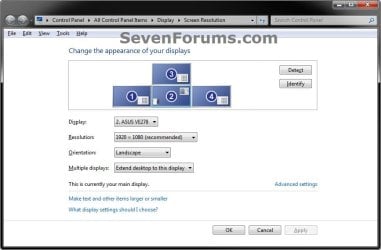
Display_Settings.jpg

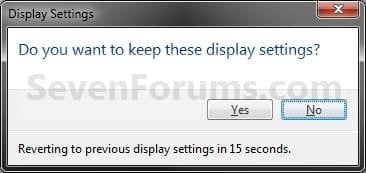
C) Click on Keep changes to apply the screen resolution. (See screenshot below)
NOTE: Click on Revert to not accept the screen resolution from step 5A, and to select another screen resolution.
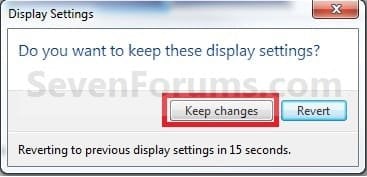
Keep.jpg

D) Go to step 6.[/INDENT]

6. To Select from a List of All Display ModesA) Click on the Advanced settings link. (See screenshot below step 5B)

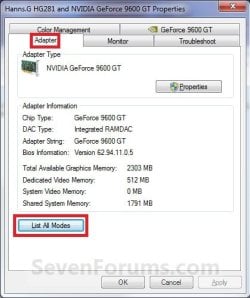
B) Click on the Adapter tab, and on the List All Modes button. (See screenshot below)Adapter1.jpg

C) Select the display mode with the screen resolution, color depth, and screen refresh rate that you want to use, and click on OK. (See screenshot below)
NOTE: It is recommended to use a native screen resolution with a True Color (32-bit) color depth.Adapter2.jpg

D) Click on OK. (See screenshot below step 6B)

E) Click on Yes to confirm the change. (See screenshot below)Confirm.jpg


7. When finished, click on OK. (See screenshot below step 5B)


That's it,
Shawn Brink


Attachments

  • Right_Click.jpg
    Right_Click.jpg
    7.5 KB · Views: 499,051
Last edited:
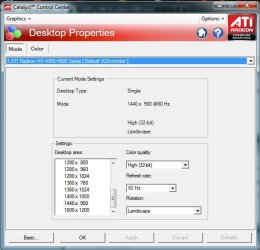
My monitor requires a 1600x900 setting, but I do not have that resolution shown in the list. My graphics card is ATI Radeon 4300/4500, and display monitor is Acer V203H (20").

res.jpg
 

My Computer

Computer Manufacturer/Model Number
Microsoft
OS
Windows 7 Ultimate 32-bit
CPU
Intel Celeron E1400 @ 2.00GHz
Motherboard
MICRO-STAR INTERNATIONAL CO.,LTD MS-7529 (CPU 1)
Memory
2.0GB Single-Channel DDR2 @ 403MHz (5-5-5-18)
Graphics Card(s)
ATI Radeon HD 4300/4500 Series
Sound Card
Realtek High Definition Audio
Monitor(s) Displays
ACER V203H
Hard Drives
244GB Western Digital WDC WD2500JS-00NCB1 ATA Device (IDE)

My Computer

Computer type
PC/Desktop
Computer Manufacturer/Model Number
Me
OS
Win 7 Ultimate x64
CPU
FX-8350 @ 4.6 GHz so far
Motherboard
Asus M5A97 EVO
Memory
ADATA XPG V1 Series Black 8GB DDR3 1600
Graphics Card(s)
Sapphire R9 270x Dual-X
Sound Card
Xonar DGX w/ Corsair Vengence 1300
Monitor(s) Displays
Acer S232HL Abid
Screen Resolution
1920x1080
Hard Drives
120 GB OCZ Vertex 3
500 GB Seagate 7200.12
PSU
Antec Earthwatts 650W Green
Case
Antec Three Hundred
Cooling
Cooler Master 212 EVO
Keyboard
Logitech G510
Mouse
Logitech G500s
Internet Speed
35000/3000
Now i filled in my system specs:) I looked in the box that came with the graphics card and my graphics card is the ATI Radeon HD 4350 (PCI-E)
 

My Computer

Computer Manufacturer/Model Number
Microsoft
OS
Windows 7 Ultimate 32-bit
CPU
Intel Celeron E1400 @ 2.00GHz
Motherboard
MICRO-STAR INTERNATIONAL CO.,LTD MS-7529 (CPU 1)
Memory
2.0GB Single-Channel DDR2 @ 403MHz (5-5-5-18)
Graphics Card(s)
ATI Radeon HD 4300/4500 Series
Sound Card
Realtek High Definition Audio
Monitor(s) Displays
ACER V203H
Hard Drives
244GB Western Digital WDC WD2500JS-00NCB1 ATA Device (IDE)

My Computer

Computer type
PC/Desktop
Computer Manufacturer/Model Number
Me
OS
Win 7 Ultimate x64
CPU
FX-8350 @ 4.6 GHz so far
Motherboard
Asus M5A97 EVO
Memory
ADATA XPG V1 Series Black 8GB DDR3 1600
Graphics Card(s)
Sapphire R9 270x Dual-X
Sound Card
Xonar DGX w/ Corsair Vengence 1300
Monitor(s) Displays
Acer S232HL Abid
Screen Resolution
1920x1080
Hard Drives
120 GB OCZ Vertex 3
500 GB Seagate 7200.12
PSU
Antec Earthwatts 650W Green
Case
Antec Three Hundred
Cooling
Cooler Master 212 EVO
Keyboard
Logitech G510
Mouse
Logitech G500s
Internet Speed
35000/3000
I have installed, but again no such resolution. is there still some way to fix the resolution?
 

My Computer

Computer Manufacturer/Model Number
Microsoft
OS
Windows 7 Ultimate 32-bit
CPU
Intel Celeron E1400 @ 2.00GHz
Motherboard
MICRO-STAR INTERNATIONAL CO.,LTD MS-7529 (CPU 1)
Memory
2.0GB Single-Channel DDR2 @ 403MHz (5-5-5-18)
Graphics Card(s)
ATI Radeon HD 4300/4500 Series
Sound Card
Realtek High Definition Audio
Monitor(s) Displays
ACER V203H
Hard Drives
244GB Western Digital WDC WD2500JS-00NCB1 ATA Device (IDE)
Hello Enco,

Have you installed your monitor driver as well? Here is the link below for it from Acer. Usually a monitor will work just fine with the generic drivers that Windows 7 uses by default, but sometimes (best to) you will need to install the drivers specific to that monitor for it's best operation.

(Select your V series monitor V203H, and Windows 7 32-bit for the OS)
Service & Support


Hope this helps,
Shawn
 

My Computer

Computer type
PC/Desktop
Computer Manufacturer/Model Number
Self built custom
OS
64-bit Windows 11 Pro for Workstations
CPU
Intel i7-8700K OC'd to 5 GHz
Motherboard
ASUS ROG Maximus XI Formula Z390
Memory
64 GB (4x16GB) G.SKILL TridentZ RGB DDR4 3600 MHz
Graphics Card(s)
ASUS ROG-STRIX-GTX1080TI-O11G-GAMING
Sound Card
Integrated
Monitor(s) Displays
2 x Samsung Odyssey G7 27"
Screen Resolution
2560x1440
Hard Drives
1TB Samsung 990 PRO M.2,
4TB Samsung 990 PRO PRO M.2,
TerraMaster F8 SSD Plus NAS
PSU
Seasonic Prime Titanium 850W
Case
Thermaltake Core P3
Cooling
Corsair Hydro H115i
Keyboard
Logitech wireless K800
Mouse
Logitech MX Master 4
Internet Speed
2 Gb/s Download and 100 Mb/s Upload
Antivirus
Malwarebyte Anti-Malware Premium
Browser
Google Chrome
Other Info
Logitech Z625 speaker system,
Logitech BRIO 4K Pro webcam,
HP Color LaserJet Pro MFP M477fdn,
APC SMART-UPS RT 1000 XL - SURT1000XLI,
Galaxy S23 Plus phone
when i want to install monitor driver, i go to option 'update driver', select folder with my Acer driver and it says:'Windows has determined the driver software for your device is up to date'! What now to do?? Can i uninstall monitor driver? i'm not sure if it work when uninstall it... whit my logic, monitor wont display picture when there is no driver...
 

My Computer

Computer Manufacturer/Model Number
Microsoft
OS
Windows 7 Ultimate 32-bit
CPU
Intel Celeron E1400 @ 2.00GHz
Motherboard
MICRO-STAR INTERNATIONAL CO.,LTD MS-7529 (CPU 1)
Memory
2.0GB Single-Channel DDR2 @ 403MHz (5-5-5-18)
Graphics Card(s)
ATI Radeon HD 4300/4500 Series
Sound Card
Realtek High Definition Audio
Monitor(s) Displays
ACER V203H
Hard Drives
244GB Western Digital WDC WD2500JS-00NCB1 ATA Device (IDE)
Windows 7 may have already installed your latest monitor driver through Windows Update then.

I noticed in your screenshot that is has (default VGA monitor) selected in the blue bar. Do you have another option in the drop down box to select your Acer V203H monitor? If you open Device Manager (devmgmt.msc) and expand Monitors, do you have the Acer V203H monitor listed?


When you right click on the deskop and click on Screen resolution, do you still only have the same options without the 1600x900? What does it show as your display there?
 

My Computer

Computer type
PC/Desktop
Computer Manufacturer/Model Number
Self built custom
OS
64-bit Windows 11 Pro for Workstations
CPU
Intel i7-8700K OC'd to 5 GHz
Motherboard
ASUS ROG Maximus XI Formula Z390
Memory
64 GB (4x16GB) G.SKILL TridentZ RGB DDR4 3600 MHz
Graphics Card(s)
ASUS ROG-STRIX-GTX1080TI-O11G-GAMING
Sound Card
Integrated
Monitor(s) Displays
2 x Samsung Odyssey G7 27"
Screen Resolution
2560x1440
Hard Drives
1TB Samsung 990 PRO M.2,
4TB Samsung 990 PRO PRO M.2,
TerraMaster F8 SSD Plus NAS
PSU
Seasonic Prime Titanium 850W
Case
Thermaltake Core P3
Cooling
Corsair Hydro H115i
Keyboard
Logitech wireless K800
Mouse
Logitech MX Master 4
Internet Speed
2 Gb/s Download and 100 Mb/s Upload
Antivirus
Malwarebyte Anti-Malware Premium
Browser
Google Chrome
Other Info
Logitech Z625 speaker system,
Logitech BRIO 4K Pro webcam,
HP Color LaserJet Pro MFP M477fdn,
APC SMART-UPS RT 1000 XL - SURT1000XLI,
Galaxy S23 Plus phone
In ATI CCC there is no 1600x900 resolution, same as in Screen Resolution, and in combo box list is only Default VGA Monitor. In device manager is only Generic Non-PnP Monitor, no ACER. How to add monitor in device manager? Maybe that will help.
 

My Computer

Computer Manufacturer/Model Number
Microsoft
OS
Windows 7 Ultimate 32-bit
CPU
Intel Celeron E1400 @ 2.00GHz
Motherboard
MICRO-STAR INTERNATIONAL CO.,LTD MS-7529 (CPU 1)
Memory
2.0GB Single-Channel DDR2 @ 403MHz (5-5-5-18)
Graphics Card(s)
ATI Radeon HD 4300/4500 Series
Sound Card
Realtek High Definition Audio
Monitor(s) Displays
ACER V203H
Hard Drives
244GB Western Digital WDC WD2500JS-00NCB1 ATA Device (IDE)
Using the drivers above, see if you may be able to "update" (Driver tab) the driver from within Device Manager. I would try the "Search automatically..." option to see if it may be able to find it for you. If not, then try the "Browse my computer...." option to then select the downloaded drivers to use to update with.
 

My Computer

Computer type
PC/Desktop
Computer Manufacturer/Model Number
Self built custom
OS
64-bit Windows 11 Pro for Workstations
CPU
Intel i7-8700K OC'd to 5 GHz
Motherboard
ASUS ROG Maximus XI Formula Z390
Memory
64 GB (4x16GB) G.SKILL TridentZ RGB DDR4 3600 MHz
Graphics Card(s)
ASUS ROG-STRIX-GTX1080TI-O11G-GAMING
Sound Card
Integrated
Monitor(s) Displays
2 x Samsung Odyssey G7 27"
Screen Resolution
2560x1440
Hard Drives
1TB Samsung 990 PRO M.2,
4TB Samsung 990 PRO PRO M.2,
TerraMaster F8 SSD Plus NAS
PSU
Seasonic Prime Titanium 850W
Case
Thermaltake Core P3
Cooling
Corsair Hydro H115i
Keyboard
Logitech wireless K800
Mouse
Logitech MX Master 4
Internet Speed
2 Gb/s Download and 100 Mb/s Upload
Antivirus
Malwarebyte Anti-Malware Premium
Browser
Google Chrome
Other Info
Logitech Z625 speaker system,
Logitech BRIO 4K Pro webcam,
HP Color LaserJet Pro MFP M477fdn,
APC SMART-UPS RT 1000 XL - SURT1000XLI,
Galaxy S23 Plus phone
Ok, now i solved problem with Acer diver (browse my comp... -> Let me pick a list... -> Have Disk, and selected folder where is Acer driver) BUT BUT BUT!!! THERE IS NO RESOLUTION 1600*900! What now???
 

My Computer

Computer Manufacturer/Model Number
Microsoft
OS
Windows 7 Ultimate 32-bit
CPU
Intel Celeron E1400 @ 2.00GHz
Motherboard
MICRO-STAR INTERNATIONAL CO.,LTD MS-7529 (CPU 1)
Memory
2.0GB Single-Channel DDR2 @ 403MHz (5-5-5-18)
Graphics Card(s)
ATI Radeon HD 4300/4500 Series
Sound Card
Realtek High Definition Audio
Monitor(s) Displays
ACER V203H
Hard Drives
244GB Western Digital WDC WD2500JS-00NCB1 ATA Device (IDE)
For enco

Ok, now i solved problem with Acer diver (browse my comp... -> Let me pick a list... -> Have Disk, and selected folder where is Acer driver) BUT BUT BUT!!! THERE IS NO RESOLUTION 1600*900! What now???
Hey enco i might have a solution for you my friend..
1) Right click on the desktop and open up the graphic card control panel(in my case its nvidia control panel).
2) Now look on the left side and select the "Change resolution" option.. now i know you cant find your resolution there because neither could I.
3) So now you will see a lot of resolution options but not the one you want so look down for an option saying "Customize".
4) Now another windows open up...Now look down again and you will find an option named "Create Custom Resolution", click on it.
5) Now you have the horozontal pixels, vertical pixels and stuff like that which you can fill up as you require.
6) Once you have filled all the information click "test" and when the test is over and the particular resolution is fitting your screen like a charm you will find that resolution on top of all those resolutions that you never wanted under the topic "custom".

I hope this helped you. :)
 

My Computer

OS
Windows 7 Ultimate 32bit
CPU
Inter Core 2 Duo CPU E4400 @ 2.00GHz
Motherboard
I dont know much about it but its Gigabyte Motherboard.
Memory
2GB DDR2 Ram
Graphics Card(s)
1GB Nvidia 8400GS
Sound Card
Realtek High Definition Audio
Monitor(s) Displays
19" Acer Monitor
Screen Resolution
1440X900
Hard Drives
150GB
Case
Matrix
Keyboard
Logitech
Mouse
Logitech
Internet Speed
1mb/s
hello there, I am a new member here......
I want to ask you something.....
how can in my laptop has no display setting?
 

My Computer

OS
windows7 32 bit
Hello Schyte, and welcome to Seven Forums.

It should. Could you post a screenshot of what you see when you right click on a empty space of your desktop, and when you click on Screen Resolution?
 

My Computer

Computer type
PC/Desktop
Computer Manufacturer/Model Number
Self built custom
OS
64-bit Windows 11 Pro for Workstations
CPU
Intel i7-8700K OC'd to 5 GHz
Motherboard
ASUS ROG Maximus XI Formula Z390
Memory
64 GB (4x16GB) G.SKILL TridentZ RGB DDR4 3600 MHz
Graphics Card(s)
ASUS ROG-STRIX-GTX1080TI-O11G-GAMING
Sound Card
Integrated
Monitor(s) Displays
2 x Samsung Odyssey G7 27"
Screen Resolution
2560x1440
Hard Drives
1TB Samsung 990 PRO M.2,
4TB Samsung 990 PRO PRO M.2,
TerraMaster F8 SSD Plus NAS
PSU
Seasonic Prime Titanium 850W
Case
Thermaltake Core P3
Cooling
Corsair Hydro H115i
Keyboard
Logitech wireless K800
Mouse
Logitech MX Master 4
Internet Speed
2 Gb/s Download and 100 Mb/s Upload
Antivirus
Malwarebyte Anti-Malware Premium
Browser
Google Chrome
Other Info
Logitech Z625 speaker system,
Logitech BRIO 4K Pro webcam,
HP Color LaserJet Pro MFP M477fdn,
APC SMART-UPS RT 1000 XL - SURT1000XLI,
Galaxy S23 Plus phone
Hi Brink, I am trying to fix someone's computer and did a Clean Install to repair registry, files and probably viruses however now the resolution is incorrect and I am unsure which one is the correct resolution, I do not know the monitor size (in inch) and am unaware which graphic card it has, would I need to manually go through each one to test, and if that doesn't help, try updating the Graphics?
 

My Computer

Computer type
PC/Desktop
Computer Manufacturer/Model Number
Novatech iRush Pro
OS
Windows 7 Ultimate SP1 - 64 Bit
CPU
Intel Core i5 2500k
Motherboard
Foxconn H67M-S/H67M-V/H67
Memory
2x4GB DDR3 1333Hz
Graphics Card(s)
Ati Radeon 6770
Sound Card
None
Monitor(s) Displays
Samsung S22B150
Screen Resolution
1920x1080
Hard Drives
2x500GB
PSU
500W
Cooling
Fan
Keyboard
HP KU0316
Mouse
Wireless Logitech M185
Internet Speed
20MB/s
Antivirus
Avast Free
Browser
Google Chrome
Other Info
Logitech M185 Mouse
KU-M316 Keyboard
Hello Infinite,

You'll need to at least know what graphics card or chip it has to be able to install the latest driver for it. You can look under "Display adapters" in Device Manager to help determine this though.

For the monitor size, you can measure the screen diagonally to know how many inches it is.
 

My Computer

Computer type
PC/Desktop
Computer Manufacturer/Model Number
Self built custom
OS
64-bit Windows 11 Pro for Workstations
CPU
Intel i7-8700K OC'd to 5 GHz
Motherboard
ASUS ROG Maximus XI Formula Z390
Memory
64 GB (4x16GB) G.SKILL TridentZ RGB DDR4 3600 MHz
Graphics Card(s)
ASUS ROG-STRIX-GTX1080TI-O11G-GAMING
Sound Card
Integrated
Monitor(s) Displays
2 x Samsung Odyssey G7 27"
Screen Resolution
2560x1440
Hard Drives
1TB Samsung 990 PRO M.2,
4TB Samsung 990 PRO PRO M.2,
TerraMaster F8 SSD Plus NAS
PSU
Seasonic Prime Titanium 850W
Case
Thermaltake Core P3
Cooling
Corsair Hydro H115i
Keyboard
Logitech wireless K800
Mouse
Logitech MX Master 4
Internet Speed
2 Gb/s Download and 100 Mb/s Upload
Antivirus
Malwarebyte Anti-Malware Premium
Browser
Google Chrome
Other Info
Logitech Z625 speaker system,
Logitech BRIO 4K Pro webcam,
HP Color LaserJet Pro MFP M477fdn,
APC SMART-UPS RT 1000 XL - SURT1000XLI,
Galaxy S23 Plus phone
I tried installing the driver ATI Radeon Xpress X1200 according to DevMgmt, the resolution is still default but it was from AMD AutoDetect which did detect it correctly, it did not work (I even tried in Compatibly Mode for Vista SP2 because that's what this is for I think).

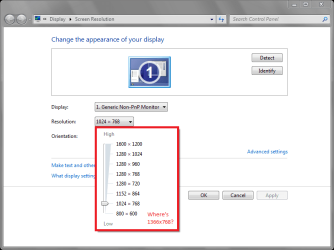
Edit, the monitor is 1366x768 I think, but that's not in the list
Example.png

It also skips a range of resolutions from List all modes.

The screenshot looks different because I saved the Screenshot, transferred to USB and went to my actual computer which has the normal resolution to actually edit/upload it. Strange :confused:
 

My Computer

Computer type
PC/Desktop
Computer Manufacturer/Model Number
Novatech iRush Pro
OS
Windows 7 Ultimate SP1 - 64 Bit
CPU
Intel Core i5 2500k
Motherboard
Foxconn H67M-S/H67M-V/H67
Memory
2x4GB DDR3 1333Hz
Graphics Card(s)
Ati Radeon 6770
Sound Card
None
Monitor(s) Displays
Samsung S22B150
Screen Resolution
1920x1080
Hard Drives
2x500GB
PSU
500W
Cooling
Fan
Keyboard
HP KU0316
Mouse
Wireless Logitech M185
Internet Speed
20MB/s
Antivirus
Avast Free
Browser
Google Chrome
Other Info
Logitech M185 Mouse
KU-M316 Keyboard
Do you know what brand and model # the monitor is? There should be a sticker or plate on the back somewhere indicating what it is.

What type of connection are you using?
 

My Computer

Computer type
PC/Desktop
Computer Manufacturer/Model Number
Self built custom
OS
64-bit Windows 11 Pro for Workstations
CPU
Intel i7-8700K OC'd to 5 GHz
Motherboard
ASUS ROG Maximus XI Formula Z390
Memory
64 GB (4x16GB) G.SKILL TridentZ RGB DDR4 3600 MHz
Graphics Card(s)
ASUS ROG-STRIX-GTX1080TI-O11G-GAMING
Sound Card
Integrated
Monitor(s) Displays
2 x Samsung Odyssey G7 27"
Screen Resolution
2560x1440
Hard Drives
1TB Samsung 990 PRO M.2,
4TB Samsung 990 PRO PRO M.2,
TerraMaster F8 SSD Plus NAS
PSU
Seasonic Prime Titanium 850W
Case
Thermaltake Core P3
Cooling
Corsair Hydro H115i
Keyboard
Logitech wireless K800
Mouse
Logitech MX Master 4
Internet Speed
2 Gb/s Download and 100 Mb/s Upload
Antivirus
Malwarebyte Anti-Malware Premium
Browser
Google Chrome
Other Info
Logitech Z625 speaker system,
Logitech BRIO 4K Pro webcam,
HP Color LaserJet Pro MFP M477fdn,
APC SMART-UPS RT 1000 XL - SURT1000XLI,
Galaxy S23 Plus phone

My Computer

Computer type
PC/Desktop
Computer Manufacturer/Model Number
Novatech iRush Pro
OS
Windows 7 Ultimate SP1 - 64 Bit
CPU
Intel Core i5 2500k
Motherboard
Foxconn H67M-S/H67M-V/H67
Memory
2x4GB DDR3 1333Hz
Graphics Card(s)
Ati Radeon 6770
Sound Card
None
Monitor(s) Displays
Samsung S22B150
Screen Resolution
1920x1080
Hard Drives
2x500GB
PSU
500W
Cooling
Fan
Keyboard
HP KU0316
Mouse
Wireless Logitech M185
Internet Speed
20MB/s
Antivirus
Avast Free
Browser
Google Chrome
Other Info
Logitech M185 Mouse
KU-M316 Keyboard
It looks like it should be set to 1440x900, but it's not listed for you. Do you have any monitor drivers for it?

How does it look at 1280x1024 or 1600x1200?
 

My Computer

Computer type
PC/Desktop
Computer Manufacturer/Model Number
Self built custom
OS
64-bit Windows 11 Pro for Workstations
CPU
Intel i7-8700K OC'd to 5 GHz
Motherboard
ASUS ROG Maximus XI Formula Z390
Memory
64 GB (4x16GB) G.SKILL TridentZ RGB DDR4 3600 MHz
Graphics Card(s)
ASUS ROG-STRIX-GTX1080TI-O11G-GAMING
Sound Card
Integrated
Monitor(s) Displays
2 x Samsung Odyssey G7 27"
Screen Resolution
2560x1440
Hard Drives
1TB Samsung 990 PRO M.2,
4TB Samsung 990 PRO PRO M.2,
TerraMaster F8 SSD Plus NAS
PSU
Seasonic Prime Titanium 850W
Case
Thermaltake Core P3
Cooling
Corsair Hydro H115i
Keyboard
Logitech wireless K800
Mouse
Logitech MX Master 4
Internet Speed
2 Gb/s Download and 100 Mb/s Upload
Antivirus
Malwarebyte Anti-Malware Premium
Browser
Google Chrome
Other Info
Logitech Z625 speaker system,
Logitech BRIO 4K Pro webcam,
HP Color LaserJet Pro MFP M477fdn,
APC SMART-UPS RT 1000 XL - SURT1000XLI,
Galaxy S23 Plus phone
Back
Top