Solved Screen Resolution on Radeon HD6770

WinchesterStoke

New member
Member
Local time
2:57 PM
Messages
49
Hi, I've just upgraded my graphics card to a XFX Radeon 6770.

Connecting it via the HDMI port to a Prolite E2407HDS and setting the resolution to 1920 by 1080 (which is recommended) - leaves about an 2cm border around the screen (which is black and not used).

If I set the resolution to 1680 by 1050 - the picture fills the screen correctly. Any ideas please?

Thanks!
 

My Computer My Computer

Computer Manufacturer/Model Number
Acer
OS
Windows x64 Premium
CPU
AMD Phenom II X6
Memory
4G
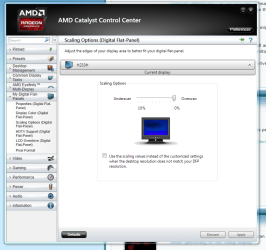
This is normal when using an HDMI connection and a Radeon card. The card defaults to underscan. You need to adjust your scaling options to overscan in the Catalyst Control Centre. In the older drivers at least, it's done by using this screen, like so:

Capture28.PNG

I'm not sure how it is with the new Crimson drivers, but there should be a setting to do it. Try the GPU scaling options in the Display tab in the Crimson drivers if you have them.
 

My Computer My Computer

Computer type
PC/Desktop
Computer Manufacturer/Model Number
Mellon Labs (custom build)
OS
Win 7 Pro x64/Win 10 Pro x64 dual boot
CPU
AMD FX 8350 Vishera @ 4200
Motherboard
ASUS M5A97 R2.0
Memory
16 GB Mushkin Blackline DDR3-2400 @ 1866 (9-10-10-10-31)
Graphics Card(s)
XFX Radeon R9 280 Double D Black Edition
Sound Card
Realtek HD Audio on MB. Sounds great.
Monitor(s) Displays
Acer 24", Acer 22"
Screen Resolution
3840 x 1080
Hard Drives
1 x Mushkin Chronos 120 GB SSD (Win 10)
1 x Samsung 850 EVO 250 GB SSD (Win 7)
1 x WD 1TB SATA Blue
1 x WD 1TB SATA Green
PSU
Corsair TX-750
Case
CoolerMaster HAF 912+
Cooling
Coolermaster Seidon 240M Liquid AIO. 6 case fans
Keyboard
Logitech G710+
Mouse
Logitech G500s
Internet Speed
Much better since I got fiber, but still way overpriced.
Antivirus
MSE, Malware Bytes for scanning
Browser
Firefox
Other Info
Corsair VOID USB headphones.

A Mellon Labs X-1 - LCD Smartie driven system status display.

Brought to you by the letter E
This is normal when using an HDMI connection and a Radeon card. The card defaults to underscan. You need to adjust your scaling options to overscan in the Catalyst Control Centre. In the older drivers at least, it's done by using this screen, like so:

View attachment 381121

I'm not sure how it is with the new Crimson drivers, but there should be a setting to do it. Try the GPU scaling options in the Display tab in the Crimson drivers if you have them.
Brilliant! Many thanks - sorted. :D
 

My Computer My Computer

Computer Manufacturer/Model Number
Acer
OS
Windows x64 Premium
CPU
AMD Phenom II X6
Memory
4G
Back
Top