Screen Saver - Change

How to Change the Screen Saver in Windows 7 and Windows 8

   Information
A screen Saver is a moving picture or pattern that appears on a computer screen when the mouse or keyboard has not been used for a specified period of time.

This tutorial will show you how to change the screen saver in Windows 7 and Windows 8 to another screen saver of your choice.

   Note
The default Screen Savers in Windows 7 and Windows 8 are located at:
NOTE: The Aurora, Windows Logo, and Windows Energy screen savers are no longer available, but can be added back.

Screen Saver | Location Bubbles.scr | C:\Windows\System32\Bubbles.scr
Mystify.scr | C:\Windows\System32\Mystify.scr
PhotoScreensaver.scr (Photos) | C:\Windows\System32\PhotoScreensaver.scr
Ribbons.scr | C:\Windows\System32\Ribbons.scr
scrnsave.scr (Blank) | C:\Windows\System32\scrnsave.scr
ssText3d.scr (3D Text) | C:\Windows\System32\ssText3d.scr

   Warning
If you cannot get the screen saver to work, then check these items:
  • Screen saver settings.
  • For the Photos (pictures) screensaver, remove any videos from the selected folder to keep it from freezing.
  • You may have downloaded a bad screen saver. Check by trying one that came with Vista above.
  • The .SCR file (screensaver) was not installed in the C:\Windows\System32 folder. They may sometimes get installed into the C:\Windows\SYSWOW32 or C:\Windows\SYSWOW64 folders by mistake instead.
   Tip
For free screen savers to install in Windows 7 and Windows 8 to add to the list below, see: WinCustomize: Screen Savers Gallery


OPTION ONE

To Change the Screen Saver in Windows 7 Starter and Home Basic

1. Open the Control Panel (icons view), and click on the Display icon.

2. In the left blue pane, click on the Change screen saver link. (see screenshot below) Starter_Basic-1.jpg
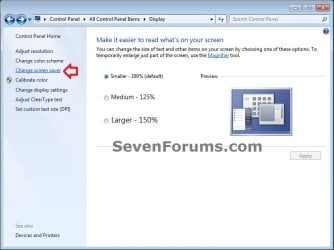
3. Close the Display window. (see screenshot above)

4. Go to step 4 in OPTION TWO below.


OPTION TWO

To Change the Screen Saver in "Personalization" Settings for Windows 8 and Windows 7 Home Premium, Professional, Ultimate, and Enterprise
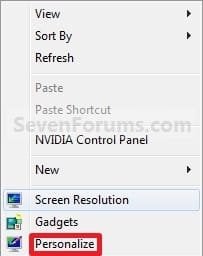
1. Right click or press an hold on an empty space on the desktop, and click/tap on Personalize. (see screenshot below) Right_Click.jpg
2. Click/tap on the Screen Saver link at the bottom of the window. (see screenshot below)
NOTE: Under Screen Saver is the name of the screen saver in gray used in your current theme. Personalization.jpg
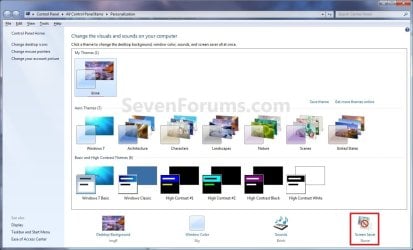
3. Close the Personalization window. (see screenshot above)

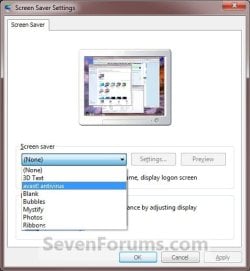
4. Under Screen saver, click/tap on the drop down menu and select a listed screen saver that you would like to use in your current theme, and click/tap on the Apply button. (see screenshots below)
NOTE: To create your own screen saver, select Photo and click/tap on the Settings button to browse to the image you want to use as the screen saver. Settings.jpg

Settings-2.jpg
5. To Change the Screen Saver Settings
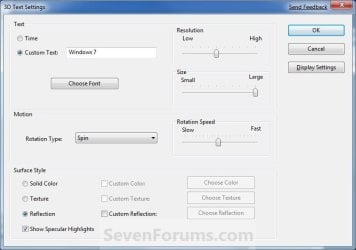
NOTE: Not all screen savers will have settings available for them. A) Click/tap on the Settings button and make the adjustments to the setting to what you like. (see screenshot below step 4)

B) If available, change the screen saver settings to how you want. (see right screenshot below)

C) Click/tap on OK. (see screenshots below) No-Options.jpg
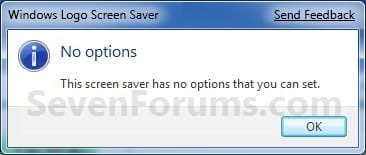
Options.jpg
6. To Preview a Screen Saver A) Click/tap on the Preview button to start the selected screen saver from step 4. (see screenshots below step 4)
NOTE: Just press a keyboard key or move the mouse to stop the screen saver preview.
7. Set your screen saver timeout period for how many minutes you want for how much idle time must elapse before the screen saver is launched.

8. Decide if you wanted to turn the screen saver password protection on or off (option one at link).

9. When finished, click/tap on OK. (see screenshots below step 4)


OPTION THREE

To Manually Change Screen Saver in Registry Editor for Windows 7 and Windows 8

1. Press the Windows + R keys to open the Run dialog, type regedit, and press Enter.

2. If prompted by UAC, then click/tap on Yes.

3. In regedit, navigate to the location below. (see screenshot below) HKEY_CURRENT_USER\Control Panel\Desktop
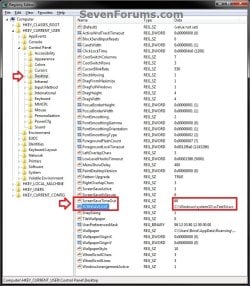
REG-1.jpg
4. In the right pane of the Desktop key in regedit, double click/tap on the SCRNSAVE.EXE string value to modify it. (see screenshot above)
NOTE: If the SCRNSAVE.EXE string value is not there, then right click on a empty space in the right pane of the Desktop key, click/tap on New and String Value, type SCRNSAVE.EXE, and press Enter.

5. Type in the full path of the .scr screen saver file that you want as your screen saver, and click/tap on OK. (see screenshot below)
NOTE: Be sure that the name of the .scr screen saver file does not contain any spaces in it. If it does, rename the .scr screen saver file first so that it doesn't. Reg-2.jpg
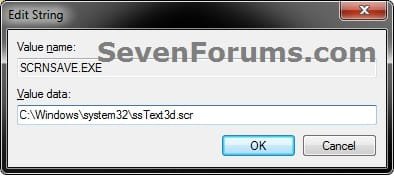
6. In the right pane of the Desktop key in regedit, double click/tap on the ScreenSaveTimeOut string value to modify it. (see screenshot above)
NOTE: If the ScreenSaveTimeOut string value is not there, then right click on a empty space in the right pane of the Desktop key, click/tap on New and String Value, type ScreenSaveTimeOut, and press Enter.

7. Type in how many seconds (ex: 300 for 5 minutes) in minute increments (60 seconds = 1 minute) that you want for how much idle time must elapse before the screen saver is launched, and click/tap on OK. (see screenshot below step 3)
NOTE: Be sure that the name of the .scr screen saver file does not contain any spaces in it. If it does, rename the .scr screen saver file first so that it doesn't. Reg-3.jpg
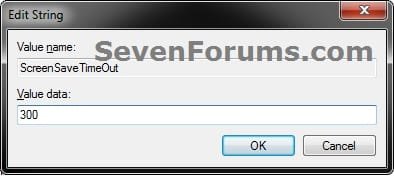
8. Close regedit.

9. log off and log on to apply.
That's it,
Shawn


Related Tutorials

 
Last edited:
3PlaneSoft screensavers in particular...

I got here originally through a google search for the terms "3planesoft screensaver" "Windows 7" "help". I saw you had a note suggesting this company's screensavers and so I assume you have some experience with them.

I have been trying to get these screensavers to run on my Windows 7 machine for a while now. They worked great on my old XP machine, but something seems to be screwing them up in 7. I moved the files to the System32 folder as you suggested, but that didn't seem to solve the problem.

The 3Planesoft screensaver manager will now recognize and allow me to preview the included-with-Windows screensavers also in the System32 folder, but won't allow me to change settings or preview (or view in any form) the 3Planesoft screensavers available for download. Do you have any ideas about why it might be that they won't initialize?

Thanks for any help.
 

My Computer

OS
Windows 7 Home 64-bit
Hello CaelanAegana, and welcome to Seven Forums.

Some 3rd party screen savers may only work properly if installed and used using their method (ex: 3Planesoft screensaver manager), and not all will offer settings that can be changed for them. :(
 

My Computer

Computer type
PC/Desktop
Computer Manufacturer/Model Number
Self built custom
OS
64-bit Windows 11 Pro for Workstations
CPU
Intel i7-8700K OC'd to 5 GHz
Motherboard
ASUS ROG Maximus XI Formula Z390
Memory
64 GB (4x16GB) G.SKILL TridentZ RGB DDR4 3600 MHz
Graphics Card(s)
ASUS ROG-STRIX-GTX1080TI-O11G-GAMING
Sound Card
Integrated
Monitor(s) Displays
2 x Samsung Odyssey G7 27"
Screen Resolution
2560x1440
Hard Drives
1TB Samsung 990 PRO M.2,
4TB Samsung 990 PRO PRO M.2,
TerraMaster F8 SSD Plus NAS
PSU
Seasonic Prime Titanium 850W
Case
Thermaltake Core P3
Cooling
Corsair Hydro H115i
Keyboard
Logitech wireless K800
Mouse
Logitech MX Master 4
Internet Speed
2 Gb/s Download and 100 Mb/s Upload
Antivirus
Malwarebyte Anti-Malware Premium
Browser
Google Chrome
Other Info
Logitech Z625 speaker system,
Logitech BRIO 4K Pro webcam,
HP Color LaserJet Pro MFP M477fdn,
APC SMART-UPS RT 1000 XL - SURT1000XLI,
Galaxy S23 Plus phone
Tutorial has been updated to add OPTION THREE for how to manually change the scree saver in registry editor for only your user accountin all editions of Windows 7.
smile.gif
 

My Computer

Computer type
PC/Desktop
Computer Manufacturer/Model Number
Self built custom
OS
64-bit Windows 11 Pro for Workstations
CPU
Intel i7-8700K OC'd to 5 GHz
Motherboard
ASUS ROG Maximus XI Formula Z390
Memory
64 GB (4x16GB) G.SKILL TridentZ RGB DDR4 3600 MHz
Graphics Card(s)
ASUS ROG-STRIX-GTX1080TI-O11G-GAMING
Sound Card
Integrated
Monitor(s) Displays
2 x Samsung Odyssey G7 27"
Screen Resolution
2560x1440
Hard Drives
1TB Samsung 990 PRO M.2,
4TB Samsung 990 PRO PRO M.2,
TerraMaster F8 SSD Plus NAS
PSU
Seasonic Prime Titanium 850W
Case
Thermaltake Core P3
Cooling
Corsair Hydro H115i
Keyboard
Logitech wireless K800
Mouse
Logitech MX Master 4
Internet Speed
2 Gb/s Download and 100 Mb/s Upload
Antivirus
Malwarebyte Anti-Malware Premium
Browser
Google Chrome
Other Info
Logitech Z625 speaker system,
Logitech BRIO 4K Pro webcam,
HP Color LaserJet Pro MFP M477fdn,
APC SMART-UPS RT 1000 XL - SURT1000XLI,
Galaxy S23 Plus phone
Hiyya Shawn - have a little problem with the laptop (one of many) the screen saver will not work and as per the tut pics has - none listed.

Am running Pro 64bit on a Toshiba L550 - i5 430m @2.27GHz and 4GB and it is quite maddening that it will not give me a saver and stays in the desktop screen at all times when not browsing of course . Any fixes please?
 

My Computer

Computer type
PC/Desktop
Computer Manufacturer/Model Number
Own build (new) Desk1 / Asus ROG Win 7 / Desk2 1st build
OS
Desk1 7 Home Prem / Desk2 10 Pro / Main lap Asus ROG 10 Pro 2 laptop Toshiba 7 Pro Asus P2520 7 & 10
CPU
Desk1 i5 3750K / Laptop i7 GTX 860M / Desk2 i5 2500
Motherboard
Desk1 Asus P877-V / Desk2 Gigabyte H67 UD3H / Laptop ?
Memory
Desk1 8GB (1866) / Desk2 16GB (1333) / Laptop 8Gb DDR3
Graphics Card(s)
Desk 1& 2NVidia GTX 650 & Laptops on board Intel
Sound Card
Desk 1 & 2 -XONAR DG Realtek High Def audio Laptop
Monitor(s) Displays
Desk 1 Benq HD 2450 / Desk2 Philips 24" / Laptop 17.5"
Screen Resolution
1920x1080 D1 & D2 & Laptop 1
Hard Drives
Desk1 Samsung 120GB 830 SSD
Asus ROG 256GB 850 Pro SSD
Desk2 Samsung 840 256 SSD
Toshiba 120GB EVO
PSU
Desk 1 Corsair HX 1050/ Laptop ? / Desk 2 Corsair HX 650
Case
Desk 1 Cooler HAF XM ? Toshiba laptop / Desk2 Coolermaster
Cooling
Fans on all Desk1 -2 Desk2 - all Coolermasters 5 Laptop ?
Keyboard
Desk 1 MS Sidewinder X6 Desk 2 MS Sidewinder X 4
Mouse
Desk 1&2 - Gigabyte MS 900 gamer - laptop - Logitec wireless
Internet Speed
ADSL2+
Other Info
One other Desktop (tester) and spare Toshba laptop both with SSD's
Running Kaspersky 2016 ISS on all machines config'd identically
Logitec audio stereo systems on each machine (x3)
Canon MG5250MFC
Router/modem TP-Link running WPA2SK
Hello John,

Are you able to select a screen saver?

Is the option to select a screen saver grayed out?
 

My Computer

Computer type
PC/Desktop
Computer Manufacturer/Model Number
Self built custom
OS
64-bit Windows 11 Pro for Workstations
CPU
Intel i7-8700K OC'd to 5 GHz
Motherboard
ASUS ROG Maximus XI Formula Z390
Memory
64 GB (4x16GB) G.SKILL TridentZ RGB DDR4 3600 MHz
Graphics Card(s)
ASUS ROG-STRIX-GTX1080TI-O11G-GAMING
Sound Card
Integrated
Monitor(s) Displays
2 x Samsung Odyssey G7 27"
Screen Resolution
2560x1440
Hard Drives
1TB Samsung 990 PRO M.2,
4TB Samsung 990 PRO PRO M.2,
TerraMaster F8 SSD Plus NAS
PSU
Seasonic Prime Titanium 850W
Case
Thermaltake Core P3
Cooling
Corsair Hydro H115i
Keyboard
Logitech wireless K800
Mouse
Logitech MX Master 4
Internet Speed
2 Gb/s Download and 100 Mb/s Upload
Antivirus
Malwarebyte Anti-Malware Premium
Browser
Google Chrome
Other Info
Logitech Z625 speaker system,
Logitech BRIO 4K Pro webcam,
HP Color LaserJet Pro MFP M477fdn,
APC SMART-UPS RT 1000 XL - SURT1000XLI,
Galaxy S23 Plus phone
Hello John,

Are you able to select a screen saver?

Is the option to select a screen saver grayed out?
Yes mate just it will not start after I set the screen saver I want and the time before the saver starts up. Even the machine will not go to sleep when set in the power settings to do that.

It has a mind of it's own it seems as I said it has been a problem child since day one.

I have had to do at least three factory defaults on it for other stuff and this problem is the last of a long line of same.

I am wondering if there is something amiss in the registry? I did a chkdsk last night as a hunch but it has not sorted the problem:confused:
 

My Computer

Computer type
PC/Desktop
Computer Manufacturer/Model Number
Own build (new) Desk1 / Asus ROG Win 7 / Desk2 1st build
OS
Desk1 7 Home Prem / Desk2 10 Pro / Main lap Asus ROG 10 Pro 2 laptop Toshiba 7 Pro Asus P2520 7 & 10
CPU
Desk1 i5 3750K / Laptop i7 GTX 860M / Desk2 i5 2500
Motherboard
Desk1 Asus P877-V / Desk2 Gigabyte H67 UD3H / Laptop ?
Memory
Desk1 8GB (1866) / Desk2 16GB (1333) / Laptop 8Gb DDR3
Graphics Card(s)
Desk 1& 2NVidia GTX 650 & Laptops on board Intel
Sound Card
Desk 1 & 2 -XONAR DG Realtek High Def audio Laptop
Monitor(s) Displays
Desk 1 Benq HD 2450 / Desk2 Philips 24" / Laptop 17.5"
Screen Resolution
1920x1080 D1 & D2 & Laptop 1
Hard Drives
Desk1 Samsung 120GB 830 SSD
Asus ROG 256GB 850 Pro SSD
Desk2 Samsung 840 256 SSD
Toshiba 120GB EVO
PSU
Desk 1 Corsair HX 1050/ Laptop ? / Desk 2 Corsair HX 650
Case
Desk 1 Cooler HAF XM ? Toshiba laptop / Desk2 Coolermaster
Cooling
Fans on all Desk1 -2 Desk2 - all Coolermasters 5 Laptop ?
Keyboard
Desk 1 MS Sidewinder X6 Desk 2 MS Sidewinder X 4
Mouse
Desk 1&2 - Gigabyte MS 900 gamer - laptop - Logitec wireless
Internet Speed
ADSL2+
Other Info
One other Desktop (tester) and spare Toshba laptop both with SSD's
Running Kaspersky 2016 ISS on all machines config'd identically
Logitec audio stereo systems on each machine (x3)
Canon MG5250MFC
Router/modem TP-Link running WPA2SK
John,

Ok, so you do have screen savers listed and selected without "none listed". ;)

Since this involves both sleep and screen saver, it sounds like something is running (ex: in the background) or connected that may be preventing your computer from actually being idle for it to go to sleep or run the screen saver. As a test, disconnect everthing that you are able to from the computer. Also test by temporarily disabling your AV program, security program(s), and anything else that may be running to see if any of them may be preventing your computer from being idle. Since your computer has become idle, the index may have started to run in the background to update itself and be preventing sleep and screen saver until it's finished and the appropriate idle time passes before they happen.
 

My Computer

Computer type
PC/Desktop
Computer Manufacturer/Model Number
Self built custom
OS
64-bit Windows 11 Pro for Workstations
CPU
Intel i7-8700K OC'd to 5 GHz
Motherboard
ASUS ROG Maximus XI Formula Z390
Memory
64 GB (4x16GB) G.SKILL TridentZ RGB DDR4 3600 MHz
Graphics Card(s)
ASUS ROG-STRIX-GTX1080TI-O11G-GAMING
Sound Card
Integrated
Monitor(s) Displays
2 x Samsung Odyssey G7 27"
Screen Resolution
2560x1440
Hard Drives
1TB Samsung 990 PRO M.2,
4TB Samsung 990 PRO PRO M.2,
TerraMaster F8 SSD Plus NAS
PSU
Seasonic Prime Titanium 850W
Case
Thermaltake Core P3
Cooling
Corsair Hydro H115i
Keyboard
Logitech wireless K800
Mouse
Logitech MX Master 4
Internet Speed
2 Gb/s Download and 100 Mb/s Upload
Antivirus
Malwarebyte Anti-Malware Premium
Browser
Google Chrome
Other Info
Logitech Z625 speaker system,
Logitech BRIO 4K Pro webcam,
HP Color LaserJet Pro MFP M477fdn,
APC SMART-UPS RT 1000 XL - SURT1000XLI,
Galaxy S23 Plus phone
Thanks Shawn will give them a go the AV may be doing it although it doesn't do it on my other two machines.:confused:
 

My Computer

Computer type
PC/Desktop
Computer Manufacturer/Model Number
Own build (new) Desk1 / Asus ROG Win 7 / Desk2 1st build
OS
Desk1 7 Home Prem / Desk2 10 Pro / Main lap Asus ROG 10 Pro 2 laptop Toshiba 7 Pro Asus P2520 7 & 10
CPU
Desk1 i5 3750K / Laptop i7 GTX 860M / Desk2 i5 2500
Motherboard
Desk1 Asus P877-V / Desk2 Gigabyte H67 UD3H / Laptop ?
Memory
Desk1 8GB (1866) / Desk2 16GB (1333) / Laptop 8Gb DDR3
Graphics Card(s)
Desk 1& 2NVidia GTX 650 & Laptops on board Intel
Sound Card
Desk 1 & 2 -XONAR DG Realtek High Def audio Laptop
Monitor(s) Displays
Desk 1 Benq HD 2450 / Desk2 Philips 24" / Laptop 17.5"
Screen Resolution
1920x1080 D1 & D2 & Laptop 1
Hard Drives
Desk1 Samsung 120GB 830 SSD
Asus ROG 256GB 850 Pro SSD
Desk2 Samsung 840 256 SSD
Toshiba 120GB EVO
PSU
Desk 1 Corsair HX 1050/ Laptop ? / Desk 2 Corsair HX 650
Case
Desk 1 Cooler HAF XM ? Toshiba laptop / Desk2 Coolermaster
Cooling
Fans on all Desk1 -2 Desk2 - all Coolermasters 5 Laptop ?
Keyboard
Desk 1 MS Sidewinder X6 Desk 2 MS Sidewinder X 4
Mouse
Desk 1&2 - Gigabyte MS 900 gamer - laptop - Logitec wireless
Internet Speed
ADSL2+
Other Info
One other Desktop (tester) and spare Toshba laptop both with SSD's
Running Kaspersky 2016 ISS on all machines config'd identically
Logitec audio stereo systems on each machine (x3)
Canon MG5250MFC
Router/modem TP-Link running WPA2SK
Thanks

Shawn, you're awesome. Many thanks
 

My Computer

Computer Manufacturer/Model Number
HP Pavilion dv7
OS
Win 7 Home Premium 32 bit
CPU
AMD Phenom II triple core
Motherboard
not sure
Memory
4 G
Graphics Card(s)
ATI Mobility Radeon HD 5470
Sound Card
ATI HDMI
Monitor(s) Displays
notebook
Hard Drives
NTFS 298 G
NTFS 275 G
PSU
not sure
Case
laptop
You're welcome Sepultado, and welcome to Seven Forums. :)
 

My Computer

Computer type
PC/Desktop
Computer Manufacturer/Model Number
Self built custom
OS
64-bit Windows 11 Pro for Workstations
CPU
Intel i7-8700K OC'd to 5 GHz
Motherboard
ASUS ROG Maximus XI Formula Z390
Memory
64 GB (4x16GB) G.SKILL TridentZ RGB DDR4 3600 MHz
Graphics Card(s)
ASUS ROG-STRIX-GTX1080TI-O11G-GAMING
Sound Card
Integrated
Monitor(s) Displays
2 x Samsung Odyssey G7 27"
Screen Resolution
2560x1440
Hard Drives
1TB Samsung 990 PRO M.2,
4TB Samsung 990 PRO PRO M.2,
TerraMaster F8 SSD Plus NAS
PSU
Seasonic Prime Titanium 850W
Case
Thermaltake Core P3
Cooling
Corsair Hydro H115i
Keyboard
Logitech wireless K800
Mouse
Logitech MX Master 4
Internet Speed
2 Gb/s Download and 100 Mb/s Upload
Antivirus
Malwarebyte Anti-Malware Premium
Browser
Google Chrome
Other Info
Logitech Z625 speaker system,
Logitech BRIO 4K Pro webcam,
HP Color LaserJet Pro MFP M477fdn,
APC SMART-UPS RT 1000 XL - SURT1000XLI,
Galaxy S23 Plus phone
What if I don't see the Screen Saver option?
 

My Computer

Computer type
Tablet
Computer Manufacturer/Model Number
Microsoft
OS
Windows RT 8.1
Hard Drives
C:
D:
Antivirus
Windows Defender
Browser
IE 11

My Computer

Computer type
PC/Desktop
Computer Manufacturer/Model Number
Self built custom
OS
64-bit Windows 11 Pro for Workstations
CPU
Intel i7-8700K OC'd to 5 GHz
Motherboard
ASUS ROG Maximus XI Formula Z390
Memory
64 GB (4x16GB) G.SKILL TridentZ RGB DDR4 3600 MHz
Graphics Card(s)
ASUS ROG-STRIX-GTX1080TI-O11G-GAMING
Sound Card
Integrated
Monitor(s) Displays
2 x Samsung Odyssey G7 27"
Screen Resolution
2560x1440
Hard Drives
1TB Samsung 990 PRO M.2,
4TB Samsung 990 PRO PRO M.2,
TerraMaster F8 SSD Plus NAS
PSU
Seasonic Prime Titanium 850W
Case
Thermaltake Core P3
Cooling
Corsair Hydro H115i
Keyboard
Logitech wireless K800
Mouse
Logitech MX Master 4
Internet Speed
2 Gb/s Download and 100 Mb/s Upload
Antivirus
Malwarebyte Anti-Malware Premium
Browser
Google Chrome
Other Info
Logitech Z625 speaker system,
Logitech BRIO 4K Pro webcam,
HP Color LaserJet Pro MFP M477fdn,
APC SMART-UPS RT 1000 XL - SURT1000XLI,
Galaxy S23 Plus phone
Last edited:

My Computer

OS
Windows 7 Pro SP 1 x64
Back
Top