Solved Screens freeze without BSOD, event id 10110 and 6008

Do you have a pagefile on the drive, and what size is it ? A crashdump requires a pagefile on [C].
 

My Computer My Computer

At a glance

Multi-Boot W7_Pro_x64 W8.1_Pro_x64 W10_Pro_x6...AMD Athlon II x4 6206GB GSkill DDR2 800AMD 4670 GPU + AMD 4200 IGP
Computer type
PC/Desktop
Computer Manufacturer/Model Number
home built
OS
Multi-Boot W7_Pro_x64 W8.1_Pro_x64 W10_Pro_x64 +Linux_VMs +Chromium_VM
CPU
AMD Athlon II x4 620
Motherboard
Gigabyte GA-MA785G-UD3H
Memory
6GB GSkill DDR2 800
Graphics Card(s)
AMD 4670 GPU + AMD 4200 IGP
Sound Card
on board Realtek ALC889A
Monitor(s) Displays
RCA 40" LCD TV, Insignia 32" LCD TV, HP 15" LCD monitor
Screen Resolution
1680 x 1050
Hard Drives
OCZ Vertex 3 120GB,
Samsung F3 1TB (3),
Several others - WD, Seagate, Hitachi, ...
PSU
Corsair 500 W
Case
Rosewill mid tower
Cooling
CM 90mm rifle
Keyboard
Gyration wireless, Logitech wireless, Dell USB wired
Mouse
Gyration wireless, Logitech wireless, V7 USB wired
Internet Speed
Spectrum - 100Mbps D / 10Mbps U
Antivirus
Avast, MBAM3, EMET, WinPatrol
Browser
Pale Moon, Firefox, IE
Other Info
2 multi-boot PC's
Mainly HTPC/Office/Gen purpose (no gaming).
Trendnet USB KVM.
LG DVD burner/Blue Ray Player.
Tray system for removable SATA backup drives.

Not currently OCd, under-volted.
I use Hybrid sleep, rarely re-boot or shutdown.

Hauppauge HD-PVR, Avermedia PCIe TV Tuner, Hauppauge PCI TV Tuner.
What is the exact site you are getting your games from?

Do you use any cleaners, tuneup or registry programs?

I noticed you have IOBit Advanced System Care. It can cause more problems that one can count.
 

My Computer My Computer

At a glance

Windows 10 Pro. 64/ version 1709 Windows 7 Pr...Intel i7-6800K @ 4.3Corsair Platinum 16 gig @2400EVGA GTX 1070 OC
Computer type
PC/Desktop
Computer Manufacturer/Model Number
Home made Desktop
OS
Windows 10 Pro. 64/ version 1709 Windows 7 Pro/64
CPU
Intel i7-6800K @ 4.3
Motherboard
ASUS X-99 Deluxe II
Memory
Corsair Platinum 16 gig @2400
Graphics Card(s)
EVGA GTX 1070 OC
Monitor(s) Displays
Asus 27" LED LCD/VE278Q
Screen Resolution
1920-1080 or 1280-720 HDMI
Hard Drives
INTEL SSD 730-240 Gb Sata 3.0/
PSU
EVGA Platium 1200W
Case
Phanteks Luxe Tempered Glass 8 fans/ one radiator
Cooling
XSPC/ Water Cooled CPU
Keyboard
Das 4 Professional
Mouse
Logitech M705/MX Anywhere 2-S
Internet Speed
100 mbits
Antivirus
Microsoft Security Essentials/ Malwarebytes Premium 3.0/ SAS
Browser
I.E. 11 default/Firefox/ ISP Time Warner Cable/Spectrum
Other Info
LG BluRay Burner/
Sound system-KLipsch-THX/
Icy Dock ssd Hot Swap bays.
Please try this:

1. Configure Windows to create (Small Memory Dumps) minidumps:
Dump Files - Configure Windows to Create on BSOD

2. Set the paging file on C: to be the same size as the physically installed RAM:
Virtual Memory Paging File - Change

3. Set the Windows Error Reporting service to MANUAL:
Services - Start or Disable

wol_error.gif
This image has been resized. Click this bar to view the full image. The original image is sized 715x414 and weights 83KB.
picture.php


4. Test to see that dump files are created:
- Open Windows Task Manager
- Navigate to the Processes tab
- Right-click on explorer.exe, and click Create Dump File

wol_error.gif
This image has been resized. Click this bar to view the full image. The original image is sized 800x501 and weights 244KB.
picture.php


- Note the location of the saved file

picture.php


- Check that location and confirm that explorer.dmp exists

wol_error.gif
This image has been resized. Click this bar to view the full image. The original image is sized 767x406 and weights 56KB.
picture.php
 

My Computers My Computers

  • At a glance

    Windows 11 ProRyzen 9 5900X32GB G Skill DDR4-3600EVGA RTX 3080 FTW 3 Ultra
    Computer type
    PC/Desktop
    Computer Manufacturer/Model Number
    ALWAYS UNDER CONSTRUCTION
    OS
    Windows 11 Pro
    CPU
    Ryzen 9 5900X
    Motherboard
    Asus X570 Crosshair Viii Hero
    Memory
    32GB G Skill DDR4-3600
    Graphics Card(s)
    EVGA RTX 3080 FTW 3 Ultra
    Sound Card
    On Board/Sennheiser PC37X Headset
    Monitor(s) Displays
    3 X Asus 27"
    Screen Resolution
    2560x1440
    Hard Drives
    2 X 1 TB NVME drives
    PSU
    EVGA 850
    Case
    Phanteks Eclipse P400A
    Cooling
    EVGA 280 AIO
    Keyboard
    Logitech G510s/ Logitech G13
    Mouse
    Logitech G502
    Internet Speed
    24/1
    Antivirus
    ESET/MBAM Pro/SAS Pro
    Browser
    Chrome/ Firefox/ Edge
  • At a glance

    Windows 11 ProIntel Ultra 9 288V32 GB LPDDR5X 8533
    Computer type
    Laptop
    System Manufacturer/Model Number
    Dell 16 Plus
    OS
    Windows 11 Pro
    CPU
    Intel Ultra 9 288V
    Memory
    32 GB LPDDR5X 8533
    Monitor(s) Displays
    16" Mini-LED HDR600 Touch 90 Hz
    Screen Resolution
    2560X1600
    Hard Drives
    1 TB NVME
Ok Tuckny lets go to a bit of basics and read my ditty and post back what you find

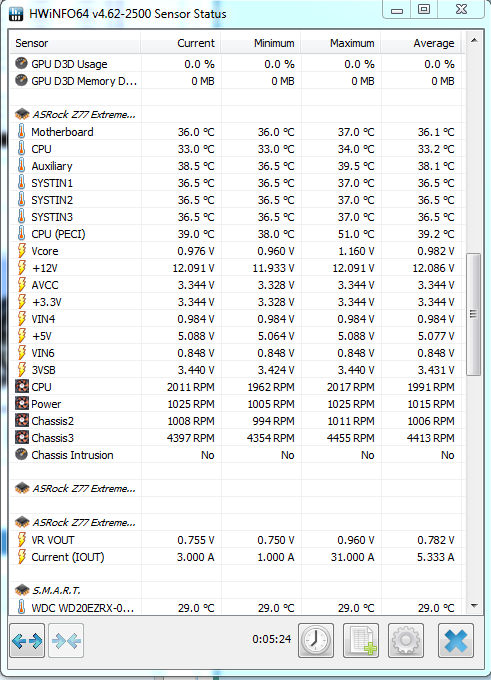
Using HW Info
PART A:
You can test the volts on the PSU with HW Info HWiNFO, HWiNFO32/64 - Download < download the right bit version and close the right hand window select Sensors and scroll down to the power section where you will see what the volts are doing see my pic. In my pic the section (Nuvoton) with VBATT or Vbatt is a dead give away you are in the section for the rail voltages. There are other section titles and one that pops up often is ITE
Now the voltage on the different rails have to be within 5% =+/- of what is required or the machine will not work properly if at all.
See this for the rail voltage info
http://www.tomshardware.com/reviews/power-supply-specifications-atx-reference,3061.html (Section 2.)
The original right hand window shows the machine running and is handy for that but for looking at the components in some detail close it and use the main left hand side panel
FOR OTHER COMPONENTS
PART B:
Open each small square with + in it on the section the components are in and then click on the individual component/s (it will highlight in blue) - in the right hand side will appear all sorts of details including brands speeds and other essential info that particular device. See pic for example.
 

My Computer My Computer

At a glance

Desk1 7 Home Prem / Desk2 10 Pro / Main lap A...Desk1 i5 3750K / Laptop i7 GTX 860M / Desk2 i...Desk1 8GB (1866) / Desk2 16GB (1333) / Laptop...Desk 1& 2NVidia GTX 650 & Laptops on board Intel
Computer type
PC/Desktop
Computer Manufacturer/Model Number
Own build (new) Desk1 / Asus ROG Win 7 / Desk2 1st build
OS
Desk1 7 Home Prem / Desk2 10 Pro / Main lap Asus ROG 10 Pro 2 laptop Toshiba 7 Pro Asus P2520 7 & 10
CPU
Desk1 i5 3750K / Laptop i7 GTX 860M / Desk2 i5 2500
Motherboard
Desk1 Asus P877-V / Desk2 Gigabyte H67 UD3H / Laptop ?
Memory
Desk1 8GB (1866) / Desk2 16GB (1333) / Laptop 8Gb DDR3
Graphics Card(s)
Desk 1& 2NVidia GTX 650 & Laptops on board Intel
Sound Card
Desk 1 & 2 -XONAR DG Realtek High Def audio Laptop
Monitor(s) Displays
Desk 1 Benq HD 2450 / Desk2 Philips 24" / Laptop 17.5"
Screen Resolution
1920x1080 D1 & D2 & Laptop 1
Hard Drives
Desk1 Samsung 120GB 830 SSD
Asus ROG 256GB 850 Pro SSD
Desk2 Samsung 840 256 SSD
Toshiba 120GB EVO
PSU
Desk 1 Corsair HX 1050/ Laptop ? / Desk 2 Corsair HX 650
Case
Desk 1 Cooler HAF XM ? Toshiba laptop / Desk2 Coolermaster
Cooling
Fans on all Desk1 -2 Desk2 - all Coolermasters 5 Laptop ?
Keyboard
Desk 1 MS Sidewinder X6 Desk 2 MS Sidewinder X 4
Mouse
Desk 1&2 - Gigabyte MS 900 gamer - laptop - Logitec wireless
Internet Speed
ADSL2+
Other Info
One other Desktop (tester) and spare Toshba laptop both with SSD's
Running Kaspersky 2016 ISS on all machines config'd identically
Logitec audio stereo systems on each machine (x3)
Canon MG5250MFC
Router/modem TP-Link running WPA2SK
Ok hmmm, I am currently doing ram tests, so far so good, I uninstalled iobit and so far the computer didn't crash. Although I have to say I didn't use it as much as normally.

Here's a screenshot of the program but i'm not too sure what you want me to do.

e0d156dbc87d8ea703023bba29fb974e.png
 

My Computer My Computer

At a glance

Windows 7 Home Premium 64-bit SP1i7-377016.0GB Dual-Channel DDR3 @ 799MHz (10-10-10-30)Geforce Gtx 770
Computer type
PC/Desktop
Computer Manufacturer/Model Number
Costum build
OS
Windows 7 Home Premium 64-bit SP1
CPU
i7-3770
Motherboard
ASRock Z77 Extreme3 (CPUSocket)
Memory
16.0GB Dual-Channel DDR3 @ 799MHz (10-10-10-30)
Graphics Card(s)
Geforce Gtx 770
Hard Drives
111GB KINGSTON SH103S3120G (SSD)
1863GB Western Digital WDC WD20EZRX-00D8PB0 (SATA)
Antivirus
eset nod32 antivirus
Browser
chrome
Often times when tweaking suites are used on such a featherlight OS that doesn't much tolerate them, the damage is already done even if uninstalled. We see this time and again. So if you don't have a system restore point or image to get before IoBit then I'd strongly consider doing a Clean Reinstall Windows 7 and this time stick with the tools and methods which have proven to work best with Win7.
 
Last edited:
Often times when tweaking suites are used on such a featherlight OS that doesn't much tolerate them, the damage is already done even if uninstalled. We see this time and again. So if you don't have a system restore point or image to get before IoBit then I'd strongly consider doing a Clean Reinstall Windows 7 and this time stick with the tools and methods which have proven for six years and thousands of installs to work perfectly with Win7.

If you're in doubt of the necessity of this then read over the tutorial to see how much it differs from what you have to know if there's much room for improvement. In cases like this if the hardware checks out, then the install is everything.

Let's say my machine stops crashing, should I still reinstall win7?
 

My Computer My Computer

At a glance

Windows 7 Home Premium 64-bit SP1i7-377016.0GB Dual-Channel DDR3 @ 799MHz (10-10-10-30)Geforce Gtx 770
Computer type
PC/Desktop
Computer Manufacturer/Model Number
Costum build
OS
Windows 7 Home Premium 64-bit SP1
CPU
i7-3770
Motherboard
ASRock Z77 Extreme3 (CPUSocket)
Memory
16.0GB Dual-Channel DDR3 @ 799MHz (10-10-10-30)
Graphics Card(s)
Geforce Gtx 770
Hard Drives
111GB KINGSTON SH103S3120G (SSD)
1863GB Western Digital WDC WD20EZRX-00D8PB0 (SATA)
Antivirus
eset nod32 antivirus
Browser
chrome
PSU checks out at least that is one less possible issue.:)

PS Meant o mention as Greg said about Iobits a lot of crap in my own view are there any remnants in the registry?? - HKEYS / LOCAL MACHINE -CURRENT USER > software listings
I see there is a dedicated uninstaller but I don't rely on them myself and always check the HKEYS

IObit Uninstaller, Uninstall Tool, Advanced Uninstaller - IObit
 

My Computer My Computer

At a glance

Desk1 7 Home Prem / Desk2 10 Pro / Main lap A...Desk1 i5 3750K / Laptop i7 GTX 860M / Desk2 i...Desk1 8GB (1866) / Desk2 16GB (1333) / Laptop...Desk 1& 2NVidia GTX 650 & Laptops on board Intel
Computer type
PC/Desktop
Computer Manufacturer/Model Number
Own build (new) Desk1 / Asus ROG Win 7 / Desk2 1st build
OS
Desk1 7 Home Prem / Desk2 10 Pro / Main lap Asus ROG 10 Pro 2 laptop Toshiba 7 Pro Asus P2520 7 & 10
CPU
Desk1 i5 3750K / Laptop i7 GTX 860M / Desk2 i5 2500
Motherboard
Desk1 Asus P877-V / Desk2 Gigabyte H67 UD3H / Laptop ?
Memory
Desk1 8GB (1866) / Desk2 16GB (1333) / Laptop 8Gb DDR3
Graphics Card(s)
Desk 1& 2NVidia GTX 650 & Laptops on board Intel
Sound Card
Desk 1 & 2 -XONAR DG Realtek High Def audio Laptop
Monitor(s) Displays
Desk 1 Benq HD 2450 / Desk2 Philips 24" / Laptop 17.5"
Screen Resolution
1920x1080 D1 & D2 & Laptop 1
Hard Drives
Desk1 Samsung 120GB 830 SSD
Asus ROG 256GB 850 Pro SSD
Desk2 Samsung 840 256 SSD
Toshiba 120GB EVO
PSU
Desk 1 Corsair HX 1050/ Laptop ? / Desk 2 Corsair HX 650
Case
Desk 1 Cooler HAF XM ? Toshiba laptop / Desk2 Coolermaster
Cooling
Fans on all Desk1 -2 Desk2 - all Coolermasters 5 Laptop ?
Keyboard
Desk 1 MS Sidewinder X6 Desk 2 MS Sidewinder X 4
Mouse
Desk 1&2 - Gigabyte MS 900 gamer - laptop - Logitec wireless
Internet Speed
ADSL2+
Other Info
One other Desktop (tester) and spare Toshba laptop both with SSD's
Running Kaspersky 2016 ISS on all machines config'd identically
Logitec audio stereo systems on each machine (x3)
Canon MG5250MFC
Router/modem TP-Link running WPA2SK
Maybe i missed your answers, but do you have a pagefile on configured as previously suggested ?
 

My Computer My Computer

At a glance

Multi-Boot W7_Pro_x64 W8.1_Pro_x64 W10_Pro_x6...AMD Athlon II x4 6206GB GSkill DDR2 800AMD 4670 GPU + AMD 4200 IGP
Computer type
PC/Desktop
Computer Manufacturer/Model Number
home built
OS
Multi-Boot W7_Pro_x64 W8.1_Pro_x64 W10_Pro_x64 +Linux_VMs +Chromium_VM
CPU
AMD Athlon II x4 620
Motherboard
Gigabyte GA-MA785G-UD3H
Memory
6GB GSkill DDR2 800
Graphics Card(s)
AMD 4670 GPU + AMD 4200 IGP
Sound Card
on board Realtek ALC889A
Monitor(s) Displays
RCA 40" LCD TV, Insignia 32" LCD TV, HP 15" LCD monitor
Screen Resolution
1680 x 1050
Hard Drives
OCZ Vertex 3 120GB,
Samsung F3 1TB (3),
Several others - WD, Seagate, Hitachi, ...
PSU
Corsair 500 W
Case
Rosewill mid tower
Cooling
CM 90mm rifle
Keyboard
Gyration wireless, Logitech wireless, Dell USB wired
Mouse
Gyration wireless, Logitech wireless, V7 USB wired
Internet Speed
Spectrum - 100Mbps D / 10Mbps U
Antivirus
Avast, MBAM3, EMET, WinPatrol
Browser
Pale Moon, Firefox, IE
Other Info
2 multi-boot PC's
Mainly HTPC/Office/Gen purpose (no gaming).
Trendnet USB KVM.
LG DVD burner/Blue Ray Player.
Tray system for removable SATA backup drives.

Not currently OCd, under-volted.
I use Hybrid sleep, rarely re-boot or shutdown.

Hauppauge HD-PVR, Avermedia PCIe TV Tuner, Hauppauge PCI TV Tuner.
Maybe i missed your answers, but do you have a pagefile on configured as previously suggested ?[/QUOTE] Yes, I went trough what "essenbe" posted, still waiting for the next crash to see if it works.
 

My Computer My Computer

At a glance

Windows 7 Home Premium 64-bit SP1i7-377016.0GB Dual-Channel DDR3 @ 799MHz (10-10-10-30)Geforce Gtx 770
Computer type
PC/Desktop
Computer Manufacturer/Model Number
Costum build
OS
Windows 7 Home Premium 64-bit SP1
CPU
i7-3770
Motherboard
ASRock Z77 Extreme3 (CPUSocket)
Memory
16.0GB Dual-Channel DDR3 @ 799MHz (10-10-10-30)
Graphics Card(s)
Geforce Gtx 770
Hard Drives
111GB KINGSTON SH103S3120G (SSD)
1863GB Western Digital WDC WD20EZRX-00D8PB0 (SATA)
Antivirus
eset nod32 antivirus
Browser
chrome
ok so it crashed again and when I hard reset it gave me a bluescreen and dumped a file in minidump.
 

My Computer My Computer

At a glance

Windows 7 Home Premium 64-bit SP1i7-377016.0GB Dual-Channel DDR3 @ 799MHz (10-10-10-30)Geforce Gtx 770
Computer type
PC/Desktop
Computer Manufacturer/Model Number
Costum build
OS
Windows 7 Home Premium 64-bit SP1
CPU
i7-3770
Motherboard
ASRock Z77 Extreme3 (CPUSocket)
Memory
16.0GB Dual-Channel DDR3 @ 799MHz (10-10-10-30)
Graphics Card(s)
Geforce Gtx 770
Hard Drives
111GB KINGSTON SH103S3120G (SSD)
1863GB Western Digital WDC WD20EZRX-00D8PB0 (SATA)
Antivirus
eset nod32 antivirus
Browser
chrome
You never did say if you moved the pagefile to , but i guess you now have a minidump file. Back to my popcorn :)
 

My Computer My Computer

At a glance

Multi-Boot W7_Pro_x64 W8.1_Pro_x64 W10_Pro_x6...AMD Athlon II x4 6206GB GSkill DDR2 800AMD 4670 GPU + AMD 4200 IGP
Computer type
PC/Desktop
Computer Manufacturer/Model Number
home built
OS
Multi-Boot W7_Pro_x64 W8.1_Pro_x64 W10_Pro_x64 +Linux_VMs +Chromium_VM
CPU
AMD Athlon II x4 620
Motherboard
Gigabyte GA-MA785G-UD3H
Memory
6GB GSkill DDR2 800
Graphics Card(s)
AMD 4670 GPU + AMD 4200 IGP
Sound Card
on board Realtek ALC889A
Monitor(s) Displays
RCA 40" LCD TV, Insignia 32" LCD TV, HP 15" LCD monitor
Screen Resolution
1680 x 1050
Hard Drives
OCZ Vertex 3 120GB,
Samsung F3 1TB (3),
Several others - WD, Seagate, Hitachi, ...
PSU
Corsair 500 W
Case
Rosewill mid tower
Cooling
CM 90mm rifle
Keyboard
Gyration wireless, Logitech wireless, Dell USB wired
Mouse
Gyration wireless, Logitech wireless, V7 USB wired
Internet Speed
Spectrum - 100Mbps D / 10Mbps U
Antivirus
Avast, MBAM3, EMET, WinPatrol
Browser
Pale Moon, Firefox, IE
Other Info
2 multi-boot PC's
Mainly HTPC/Office/Gen purpose (no gaming).
Trendnet USB KVM.
LG DVD burner/Blue Ray Player.
Tray system for removable SATA backup drives.

Not currently OCd, under-volted.
I use Hybrid sleep, rarely re-boot or shutdown.

Hauppauge HD-PVR, Avermedia PCIe TV Tuner, Hauppauge PCI TV Tuner.
Here's what the dump file says

Code:
BugCheck A, {0, 2, 0, fffff80002e7aea5}
*** WARNING: Unable to verify timestamp for MBfilt64.sys
*** ERROR: Module load completed but symbols could not be loaded for MBfilt64.sys
[COLOR=red]Probably caused by : MBfilt64.sys[/COLOR] ( MBfilt64+1817 )
Followup: MachineOwner

That is your Realtek HiDefinition Audio driver (file labelled as Creative Audio Driver) - Was found in the latest Win8 version available from Realtek on 07Sep2013. Try updating it from your Motherboard's web site ASRock > Z77 Extreme3

Your current driver is

Code:
MBfilt64
start             end                 module name
fffff880`06f80000 fffff880`06f8e000   MBfilt64 T (no symbols)           
    Loaded symbol image file: MBfilt64.sys
    Image path: MBfilt64.sys
    Image name: MBfilt64.sys
    Timestamp:        Thu Jul 30 22:40:32 2009 (4A7267B0)
    CheckSum:         0000FF02
    ImageSize:        0000E000
    Translations:     0000.04b0 0000.04e4 0409.04b0 0409.0
 

My Computers My Computers

  • At a glance

    Windows 11 ProRyzen 9 5900X32GB G Skill DDR4-3600EVGA RTX 3080 FTW 3 Ultra
    Computer type
    PC/Desktop
    Computer Manufacturer/Model Number
    ALWAYS UNDER CONSTRUCTION
    OS
    Windows 11 Pro
    CPU
    Ryzen 9 5900X
    Motherboard
    Asus X570 Crosshair Viii Hero
    Memory
    32GB G Skill DDR4-3600
    Graphics Card(s)
    EVGA RTX 3080 FTW 3 Ultra
    Sound Card
    On Board/Sennheiser PC37X Headset
    Monitor(s) Displays
    3 X Asus 27"
    Screen Resolution
    2560x1440
    Hard Drives
    2 X 1 TB NVME drives
    PSU
    EVGA 850
    Case
    Phanteks Eclipse P400A
    Cooling
    EVGA 280 AIO
    Keyboard
    Logitech G510s/ Logitech G13
    Mouse
    Logitech G502
    Internet Speed
    24/1
    Antivirus
    ESET/MBAM Pro/SAS Pro
    Browser
    Chrome/ Firefox/ Edge
  • At a glance

    Windows 11 ProIntel Ultra 9 288V32 GB LPDDR5X 8533
    Computer type
    Laptop
    System Manufacturer/Model Number
    Dell 16 Plus
    OS
    Windows 11 Pro
    CPU
    Intel Ultra 9 288V
    Memory
    32 GB LPDDR5X 8533
    Monitor(s) Displays
    16" Mini-LED HDR600 Touch 90 Hz
    Screen Resolution
    2560X1600
    Hard Drives
    1 TB NVME
Thanks Obi-Wan for your magic :)
Can't rep you right now :(
 

My Computer My Computer

At a glance

Multi-Boot W7_Pro_x64 W8.1_Pro_x64 W10_Pro_x6...AMD Athlon II x4 6206GB GSkill DDR2 800AMD 4670 GPU + AMD 4200 IGP
Computer type
PC/Desktop
Computer Manufacturer/Model Number
home built
OS
Multi-Boot W7_Pro_x64 W8.1_Pro_x64 W10_Pro_x64 +Linux_VMs +Chromium_VM
CPU
AMD Athlon II x4 620
Motherboard
Gigabyte GA-MA785G-UD3H
Memory
6GB GSkill DDR2 800
Graphics Card(s)
AMD 4670 GPU + AMD 4200 IGP
Sound Card
on board Realtek ALC889A
Monitor(s) Displays
RCA 40" LCD TV, Insignia 32" LCD TV, HP 15" LCD monitor
Screen Resolution
1680 x 1050
Hard Drives
OCZ Vertex 3 120GB,
Samsung F3 1TB (3),
Several others - WD, Seagate, Hitachi, ...
PSU
Corsair 500 W
Case
Rosewill mid tower
Cooling
CM 90mm rifle
Keyboard
Gyration wireless, Logitech wireless, Dell USB wired
Mouse
Gyration wireless, Logitech wireless, V7 USB wired
Internet Speed
Spectrum - 100Mbps D / 10Mbps U
Antivirus
Avast, MBAM3, EMET, WinPatrol
Browser
Pale Moon, Firefox, IE
Other Info
2 multi-boot PC's
Mainly HTPC/Office/Gen purpose (no gaming).
Trendnet USB KVM.
LG DVD burner/Blue Ray Player.
Tray system for removable SATA backup drives.

Not currently OCd, under-volted.
I use Hybrid sleep, rarely re-boot or shutdown.

Hauppauge HD-PVR, Avermedia PCIe TV Tuner, Hauppauge PCI TV Tuner.
Don't worry about the Rep. We'll just have to wait and see if that is the whole problem. It's always better, in my opinion, when you have several dumps. It gives you a better grasp of what is happening. Maybe that will work.
 

My Computers My Computers

  • At a glance

    Windows 11 ProRyzen 9 5900X32GB G Skill DDR4-3600EVGA RTX 3080 FTW 3 Ultra
    Computer type
    PC/Desktop
    Computer Manufacturer/Model Number
    ALWAYS UNDER CONSTRUCTION
    OS
    Windows 11 Pro
    CPU
    Ryzen 9 5900X
    Motherboard
    Asus X570 Crosshair Viii Hero
    Memory
    32GB G Skill DDR4-3600
    Graphics Card(s)
    EVGA RTX 3080 FTW 3 Ultra
    Sound Card
    On Board/Sennheiser PC37X Headset
    Monitor(s) Displays
    3 X Asus 27"
    Screen Resolution
    2560x1440
    Hard Drives
    2 X 1 TB NVME drives
    PSU
    EVGA 850
    Case
    Phanteks Eclipse P400A
    Cooling
    EVGA 280 AIO
    Keyboard
    Logitech G510s/ Logitech G13
    Mouse
    Logitech G502
    Internet Speed
    24/1
    Antivirus
    ESET/MBAM Pro/SAS Pro
    Browser
    Chrome/ Firefox/ Edge
  • At a glance

    Windows 11 ProIntel Ultra 9 288V32 GB LPDDR5X 8533
    Computer type
    Laptop
    System Manufacturer/Model Number
    Dell 16 Plus
    OS
    Windows 11 Pro
    CPU
    Intel Ultra 9 288V
    Memory
    32 GB LPDDR5X 8533
    Monitor(s) Displays
    16" Mini-LED HDR600 Touch 90 Hz
    Screen Resolution
    2560X1600
    Hard Drives
    1 TB NVME
It crashed again but didn't create a minidump file
 

My Computer My Computer

At a glance

Windows 7 Home Premium 64-bit SP1i7-377016.0GB Dual-Channel DDR3 @ 799MHz (10-10-10-30)Geforce Gtx 770
Computer type
PC/Desktop
Computer Manufacturer/Model Number
Costum build
OS
Windows 7 Home Premium 64-bit SP1
CPU
i7-3770
Motherboard
ASRock Z77 Extreme3 (CPUSocket)
Memory
16.0GB Dual-Channel DDR3 @ 799MHz (10-10-10-30)
Graphics Card(s)
Geforce Gtx 770
Hard Drives
111GB KINGSTON SH103S3120G (SSD)
1863GB Western Digital WDC WD20EZRX-00D8PB0 (SATA)
Antivirus
eset nod32 antivirus
Browser
chrome
Please check and make sure you are configured for Small Memory Dumps http://www.sevenforums.com/tutorials/174459-dump-files-configure-windows-create-bsod.html

Sometimes a BSOD can cause settings to get changed. Also, make sure you have a Folder named Minidump in C:/Windows

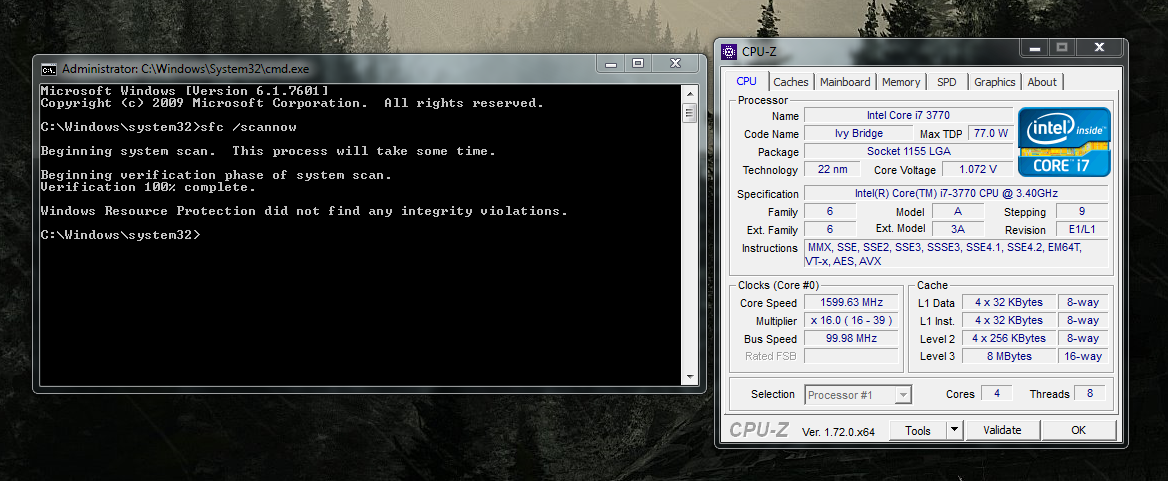
Also Please open an elevated command prompt ( click start, type cmd in the search box, right click on the cmd entry and select run as administrator) in the black box that opens, copy/paste sfc /scannow. If you decide to type it, notice the space between the sfc and the /. It is a system file checker which will scan your system files and attempt to correct any missing or corrupt files. What we want are the results to say windows found no integrity violations. If it says files were found but could not be repaired, close the box, reboot and run it again, after opening the administrative command prompt. You may have to reboot and run it three times for it to repair all system files. If it can't repair them after 3 reboots, let us know.

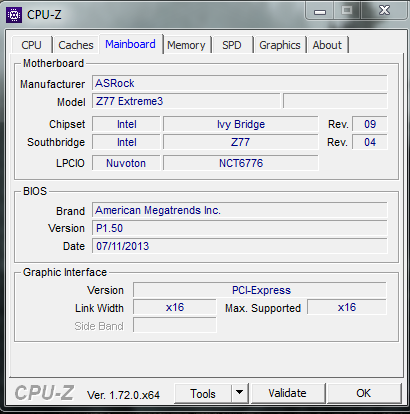
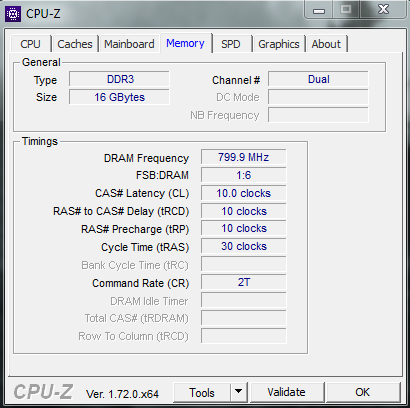
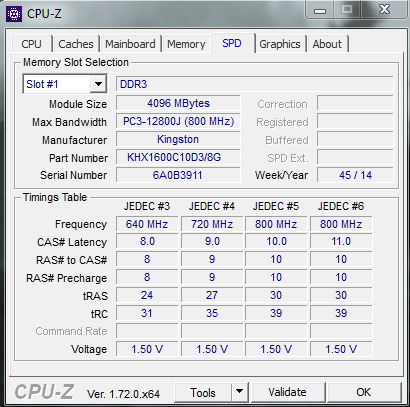
Also please download and install CPUz CPU-Z | Softwares | CPUID and post screenshots (http://www.sevenforums.com/tutorials/9733-screenshots-files-upload-post-seven-forums.html) of thwe CPU, Mainboard, Memory and SPD tabs. On the SPD tab, you can select each Dimm Slot. Just post the screenshots of the Dimm slots that have Ram installed in them.
 

My Computers My Computers

  • At a glance

    Windows 11 ProRyzen 9 5900X32GB G Skill DDR4-3600EVGA RTX 3080 FTW 3 Ultra
    Computer type
    PC/Desktop
    Computer Manufacturer/Model Number
    ALWAYS UNDER CONSTRUCTION
    OS
    Windows 11 Pro
    CPU
    Ryzen 9 5900X
    Motherboard
    Asus X570 Crosshair Viii Hero
    Memory
    32GB G Skill DDR4-3600
    Graphics Card(s)
    EVGA RTX 3080 FTW 3 Ultra
    Sound Card
    On Board/Sennheiser PC37X Headset
    Monitor(s) Displays
    3 X Asus 27"
    Screen Resolution
    2560x1440
    Hard Drives
    2 X 1 TB NVME drives
    PSU
    EVGA 850
    Case
    Phanteks Eclipse P400A
    Cooling
    EVGA 280 AIO
    Keyboard
    Logitech G510s/ Logitech G13
    Mouse
    Logitech G502
    Internet Speed
    24/1
    Antivirus
    ESET/MBAM Pro/SAS Pro
    Browser
    Chrome/ Firefox/ Edge
  • At a glance

    Windows 11 ProIntel Ultra 9 288V32 GB LPDDR5X 8533
    Computer type
    Laptop
    System Manufacturer/Model Number
    Dell 16 Plus
    OS
    Windows 11 Pro
    CPU
    Intel Ultra 9 288V
    Memory
    32 GB LPDDR5X 8533
    Monitor(s) Displays
    16" Mini-LED HDR600 Touch 90 Hz
    Screen Resolution
    2560X1600
    Hard Drives
    1 TB NVME
26a30059e95a68cb6a76079ededce113.png

c53cb7175a9ab00b76e3f3f7a3fe88e7.png

29c824dc168474cf8e2b205bb75588b9.png

03049f965d9164325aeced58ba9e78a6.png
 

My Computer My Computer

At a glance

Windows 7 Home Premium 64-bit SP1i7-377016.0GB Dual-Channel DDR3 @ 799MHz (10-10-10-30)Geforce Gtx 770
Computer type
PC/Desktop
Computer Manufacturer/Model Number
Costum build
OS
Windows 7 Home Premium 64-bit SP1
CPU
i7-3770
Motherboard
ASRock Z77 Extreme3 (CPUSocket)
Memory
16.0GB Dual-Channel DDR3 @ 799MHz (10-10-10-30)
Graphics Card(s)
Geforce Gtx 770
Hard Drives
111GB KINGSTON SH103S3120G (SSD)
1863GB Western Digital WDC WD20EZRX-00D8PB0 (SATA)
Antivirus
eset nod32 antivirus
Browser
chrome
Ok so It crashed while I alt-tabbed, still didn't create a dump file, I checked if it was setup to create a dump file and yes it is.
 

My Computer My Computer

At a glance

Windows 7 Home Premium 64-bit SP1i7-377016.0GB Dual-Channel DDR3 @ 799MHz (10-10-10-30)Geforce Gtx 770
Computer type
PC/Desktop
Computer Manufacturer/Model Number
Costum build
OS
Windows 7 Home Premium 64-bit SP1
CPU
i7-3770
Motherboard
ASRock Z77 Extreme3 (CPUSocket)
Memory
16.0GB Dual-Channel DDR3 @ 799MHz (10-10-10-30)
Graphics Card(s)
Geforce Gtx 770
Hard Drives
111GB KINGSTON SH103S3120G (SSD)
1863GB Western Digital WDC WD20EZRX-00D8PB0 (SATA)
Antivirus
eset nod32 antivirus
Browser
chrome
Back
Top