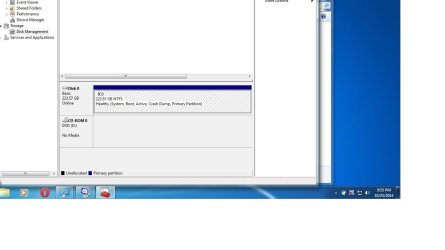
Screenshot showing one partition/ should i have another?

jonnyhillow

Banned
Local time
5:29 PM
Messages
637
Location
NJ native & NC
New SSD and not sure if it's wise to have two partitions instead of just one or does it matter?

Thanks
 

Attachments

  • Untitled.jpg
    Untitled.jpg
    54.5 KB · Views: 9

My Computer My Computer

At a glance

Microsoft Windows 7 Home Premium 64-bit 7601 ...Intel(R) Core(TM) i5-2430M CPU @ 2.40GHz6.00 GBIntel(R) HD Graphics 3000
Computer type
Laptop
Computer Manufacturer/Model Number
Asus laptop U56E
OS
Microsoft Windows 7 Home Premium 64-bit 7601 Multiprocessor Free Service Pack 1
CPU
Intel(R) Core(TM) i5-2430M CPU @ 2.40GHz
Motherboard
ASUSTeK Computer Inc. U56E
Memory
6.00 GB
Graphics Card(s)
Intel(R) HD Graphics 3000
Sound Card
(1) High Definition Audio Device (2) High Definition Audio
Screen Resolution
1366 x 768 x 32 bits (4294967296 colors) @ 60 Hz
Hard Drives
WDC WD6400BPVT-80HXZT3
New SSD and not sure if it's wise to have two partitions instead of just one or does it matter?
There is no need to partition. Partitions are really just for user convenience and in fact, can actually degrade performance on hard drives (though we're talking a few scant milliseconds).

What often happens, especially with smaller drives, is the user allocates too little for the boot partition and fails to consider the inevitable consumption of disk space due to Windows Updates, patches, driver updates, Page File usage, program installs, etc. So sometime down the road, the user is forced to start over, or attempt to resize the partitions - a risky procedure even with the best partition managers.

If that is a ~250 - 265Gb SSD then, if me, I would leave it as it is.
 

My Computer My Computer

At a glance

Windows 7 Profession 64-bitIntel Core i7-860 QuadMushkin 4x2Gb PC12800Gigabyte GTX260 896Mb
Computer Manufacturer/Model Number
BrightWorks Systems B4
OS
Windows 7 Profession 64-bit
CPU
Intel Core i7-860 Quad
Motherboard
Gigabyte P55-UD4P
Memory
Mushkin 4x2Gb PC12800
Graphics Card(s)
Gigabyte GTX260 896Mb
Sound Card
Integrated 7.1 HD Dolby
Monitor(s) Displays
2 Samsung 2220wm-HAS 22"
Screen Resolution
1680 x 1050 | 1680 x 1050
Hard Drives
WD HE 1Tb
PSU
Corsair TX-750W
Case
Ultra M998
Cooling
OEM
Keyboard
MS Wireless Comfort 5000
Mouse
MS Wireless 5000
Internet Speed
Cable and pretty darn fast
The big problem with multiple partitions is that no matter how much care was used in selecting the sizes one partition will often prove too small while others have space to spare. Even experts get this wrong. With folders the file system will distribute disk space as needed.

Many people have one partition for the OS and applications and another for data. The OS can then be reinstalled without touching your data. But if you maintain regular backups (as you should) that will not be a big issue anyway. But doing this requires that you make many decisions as to where specific data will be stored. Many people have created a secondary partition, accepted the defaults for everything when saving files, and find that the OS partition is almost full and the other nearly empty. It takes planning and self discipline to avoid this. People who do this successfully have learned from experience, making many mistakes along the way.

Most people are best served with a single partition. Many systems will have other partitions created during OS installation and I do not include these.

Also understand that before repartitioning a drive containing data you should have a full backup of everything on the drive in the event that something goes wrong. This is unusual but it does happen.

 

My Computer My Computer

At a glance

Windows 7 Pro 64 bitXeon W35208 GBNvidia Geforce 210
Computer type
PC/Desktop
Computer Manufacturer/Model Number
HP
OS
Windows 7 Pro 64 bit
CPU
Xeon W3520
Memory
8 GB
Graphics Card(s)
Nvidia Geforce 210
Most people are best served with a single partition.
I agree. If I need another partition, I usually just get another drive.
 

My Computer My Computer

At a glance

Windows 7 Profession 64-bitIntel Core i7-860 QuadMushkin 4x2Gb PC12800Gigabyte GTX260 896Mb
Computer Manufacturer/Model Number
BrightWorks Systems B4
OS
Windows 7 Profession 64-bit
CPU
Intel Core i7-860 Quad
Motherboard
Gigabyte P55-UD4P
Memory
Mushkin 4x2Gb PC12800
Graphics Card(s)
Gigabyte GTX260 896Mb
Sound Card
Integrated 7.1 HD Dolby
Monitor(s) Displays
2 Samsung 2220wm-HAS 22"
Screen Resolution
1680 x 1050 | 1680 x 1050
Hard Drives
WD HE 1Tb
PSU
Corsair TX-750W
Case
Ultra M998
Cooling
OEM
Keyboard
MS Wireless Comfort 5000
Mouse
MS Wireless 5000
Internet Speed
Cable and pretty darn fast
New SSD and not sure if it's wise to have two partitions instead of just one or does it matter?

Your screenshot is unusual in that you do not have a System Reserved partition. Most people do.

No problem. You apparently partitioned your drive manually before installing Windows, which will omit System Reserved---rather than letting Windows do the partitioning as part of the install process---which would create BOTH C and System Reserved.

All it means is that your boot files are on the C partition, rather than in a separate System Reserved.

I don't have a System Reserved either. Carry on. Nothing is wrong.
 

My Computer My Computer

At a glance

Windows 7 Home Premium SP1, 64-bitIntel Skylake i5-6600K, not overclocked8 GB HyperX DDR4-2666 (2 x 4 GB)none; graphics are integrated on CPU
Computer type
PC/Desktop
Computer Manufacturer/Model Number
Ignatz Special; 4 speed manual gearbox; factory air conditioning; one of one
OS
Windows 7 Home Premium SP1, 64-bit
CPU
Intel Skylake i5-6600K, not overclocked
Motherboard
AsRock Z170M Extreme 4, micro ATX
Memory
8 GB HyperX DDR4-2666 (2 x 4 GB)
Graphics Card(s)
none; graphics are integrated on CPU
Sound Card
onboard: Realtek ALC1150; external: USB Behringer UF0-202
Monitor(s) Displays
Dell S2340M 23 inch IPS
Screen Resolution
1600 x 900
Hard Drives
System: Crucial MX100 series SSD, 128 GB;
Data: Samsung Spinpoint 103SJ, 1 TB;
Backup: WD Caviar Green WD30EZRX-00D8PB0, 3 TB
PSU
Rosewill SilentNight 500 watt fanless, semi-modular
Case
Antec Solo II
Cooling
Noctua NH-U12S; Noctua F12 intake, Noctua S12A exhaust
Keyboard
Microsoft 200 6JH-00001 USB
Mouse
Dell or Microsoft optical wired; USB
Antivirus
Microsoft Security Essentials and Malwarebytes Premium
Browser
Pale Moon
Other Info
All fans PWM; speeds at idle: CPU circa 500 rpm; intake circa 600 rpm; exhaust circa 600 rpm; CPU temps 27 idle and 47 C load in a warm room (27 C/81 F) when running Intel Extreme Tuning Utility stress test.
So sorry i forgot about this and just found it , i very much appreciate everyones responses and am very grateful .

Sorry for the late response.
 

My Computer My Computer

At a glance

Microsoft Windows 7 Home Premium 64-bit 7601 ...Intel(R) Core(TM) i5-2430M CPU @ 2.40GHz6.00 GBIntel(R) HD Graphics 3000
Computer type
Laptop
Computer Manufacturer/Model Number
Asus laptop U56E
OS
Microsoft Windows 7 Home Premium 64-bit 7601 Multiprocessor Free Service Pack 1
CPU
Intel(R) Core(TM) i5-2430M CPU @ 2.40GHz
Motherboard
ASUSTeK Computer Inc. U56E
Memory
6.00 GB
Graphics Card(s)
Intel(R) HD Graphics 3000
Sound Card
(1) High Definition Audio Device (2) High Definition Audio
Screen Resolution
1366 x 768 x 32 bits (4294967296 colors) @ 60 Hz
Hard Drives
WDC WD6400BPVT-80HXZT3
Your screenshot is unusual in that you do not have a System Reserved partition. Most people do.
If you install the system into a predefined active partition, then there will be no system partition. The installer will always place the bootmgr into the first active partition that it finds.

You may recall the problem with an installation on a new SSD on a system that also has a HDD with an active partition. Then the bootmgr may end up on the HDD and not on the SSD. That's why we always recommend to disconnect the HDDs during such installation process.
 

My Computer My Computer

At a glance

Vista, Windows7, Mint Mate, Zorin, Windows 8from 1.6GHz Duo to i7
Computer Manufacturer/Model Number
HP, Dell, Gateway, Toshiba - 4 laptops and 2 desktops
OS
Vista, Windows7, Mint Mate, Zorin, Windows 8
CPU
from 1.6GHz Duo to i7
Monitor(s) Displays
2x HP w2207
Hard Drives
5x HDD, 7x SSD, 12x Externals
Keyboard
with trackball - no mices
Mouse
Trackball mice
Internet Speed
DSL 6000
Back
Top