
Script to Disable Touchpad?

Lady Fitzgerald

Senioritis Member
Guru
Gold Member
VIP
Local time
9:44 AM
Messages
9,540
Location
AZ, SSA (Squabbling States of America)
I have a Lenovo G570 notebook that I love except for one little detail. I hate, loathe, detest, and just don't like touchpads and there is no way to permanently turn the stupid thing off on this machine. I can turn it off after booting by hitting FN/F6 but, of course, I never remember to do so until I mess up whatever I'm typing by dragging my thumb or hand over the idiot touch pad. I've tried the usual "solutions" without any luck (leastwise, not the good kind).

What would be nice if there was some kind of script that would run during boot up that would, essentially, "press" the FN/F6 combination. Can anyone help me with that?
 

My Computer

Computer type
PC/Desktop
Computer Manufacturer/Model Number
Custom Build
OS
Win 7 Ultimate 64 bit
CPU
Intel i7-3930K
Motherboard
ASUS P9X79 WS
Memory
Kingston HyperX Genesis 32GB Kit (8x4GB Modules) 1600MHz DDR
Graphics Card(s)
MSI R7850 Twin Frozr 2GD5/OC Radeon HD 7850 2GB 256-bit GDDR
Sound Card
Asus Xonar Essence STX
Monitor(s) Displays
3x Asus VG248QE 24", Vizio 32" TV
Screen Resolution
1920 x 1080, ?
Hard Drives
Samsung 128GB 840 Pro SSD (1),
Samsung 4TB 850 EVO SSDs (4)
Samsung 4TB 850 EVO SSDs (16) external backup drives used in 2.5" hot swap bays in the computer.
PSU
Corsair HX750w
Case
Antec Two Hundred v2 (modified)
Cooling
Cooler Master GeminII S524 120mm (fan replaced with a 140mm)
Keyboard
Logitech G510s
Mouse
Logitech M525 (two in use)
Internet Speed
=< 32Mbps down, 8Mbps up
Antivirus
AVAST!, MBAM, SAS, Spybot S&D (all but MBAM free) Glary Util
Browser
IE11
Other Info
LSI 9211-8i HBA card (8 SATA III ports), 2.5" & 3.5" Hot Swap Bays, HooToo HT-CR001 PCI-E to USB 3.0 Internal Hub + 6 Slot Card Reader, and LG Model CH12LS28 BD-ROM Optical Drive. Also, ScanSnap S1500 ADF duplexing scanner, Canon 9000F flat bed scanner, Corsair SP2500 2.1 speakers, Samsung CLP 415nw laser color printer, Cyberpower PP2200SW UPS
Disable it in the device manager.
 

My Computer

Computer type
PC/Desktop
Computer Manufacturer/Model Number
Self Build
OS
Windows 7 Ultimate x64
CPU
Intel Core2 Quad Q8300 2.5Ghz
Motherboard
Asus P5QD Turbo
Memory
Kingston HyperX 4x1GB DDR2 1066Mhz
Graphics Card(s)
Asus/Nvidia 9500GT 1GB
Sound Card
On-Board HD
Monitor(s) Displays
22" Widescreen TFT
Screen Resolution
1920x1080
Hard Drives
2x 320Gb Seagate SATAII RAID 0
2x 80Gb Seagate SATAII RAID 0
1x 1tb hybrid (8gb ssd)
PSU
650w
Case
ATX
Cooling
140mm front, 120mm Rear, 80mm Chipset + stock CPU and GPU
Keyboard
Plastic one
Mouse
Plastic one
Internet Speed
4Mbps
Other Info
Laptop: HP Elitebook 2560p
i5 @2.7Ghz 4GB DDR3

My Computer

Computer type
PC/Desktop
Computer Manufacturer/Model Number
Custom Build
OS
Win 7 Ultimate 64 bit
CPU
Intel i7-3930K
Motherboard
ASUS P9X79 WS
Memory
Kingston HyperX Genesis 32GB Kit (8x4GB Modules) 1600MHz DDR
Graphics Card(s)
MSI R7850 Twin Frozr 2GD5/OC Radeon HD 7850 2GB 256-bit GDDR
Sound Card
Asus Xonar Essence STX
Monitor(s) Displays
3x Asus VG248QE 24", Vizio 32" TV
Screen Resolution
1920 x 1080, ?
Hard Drives
Samsung 128GB 840 Pro SSD (1),
Samsung 4TB 850 EVO SSDs (4)
Samsung 4TB 850 EVO SSDs (16) external backup drives used in 2.5" hot swap bays in the computer.
PSU
Corsair HX750w
Case
Antec Two Hundred v2 (modified)
Cooling
Cooler Master GeminII S524 120mm (fan replaced with a 140mm)
Keyboard
Logitech G510s
Mouse
Logitech M525 (two in use)
Internet Speed
=< 32Mbps down, 8Mbps up
Antivirus
AVAST!, MBAM, SAS, Spybot S&D (all but MBAM free) Glary Util
Browser
IE11
Other Info
LSI 9211-8i HBA card (8 SATA III ports), 2.5" & 3.5" Hot Swap Bays, HooToo HT-CR001 PCI-E to USB 3.0 Internal Hub + 6 Slot Card Reader, and LG Model CH12LS28 BD-ROM Optical Drive. Also, ScanSnap S1500 ADF duplexing scanner, Canon 9000F flat bed scanner, Corsair SP2500 2.1 speakers, Samsung CLP 415nw laser color printer, Cyberpower PP2200SW UPS
Do you have or know anyone with Visual Basic (or visual studio) I no longer have a licence since XP

You can make a SendKeys app to press that for you, put it in the startup folder and set it to run in compatibility mode for XP SP2 (or UAC kicks off)
 

My Computer

Computer type
PC/Desktop
Computer Manufacturer/Model Number
Self Build
OS
Windows 7 Ultimate x64
CPU
Intel Core2 Quad Q8300 2.5Ghz
Motherboard
Asus P5QD Turbo
Memory
Kingston HyperX 4x1GB DDR2 1066Mhz
Graphics Card(s)
Asus/Nvidia 9500GT 1GB
Sound Card
On-Board HD
Monitor(s) Displays
22" Widescreen TFT
Screen Resolution
1920x1080
Hard Drives
2x 320Gb Seagate SATAII RAID 0
2x 80Gb Seagate SATAII RAID 0
1x 1tb hybrid (8gb ssd)
PSU
650w
Case
ATX
Cooling
140mm front, 120mm Rear, 80mm Chipset + stock CPU and GPU
Keyboard
Plastic one
Mouse
Plastic one
Internet Speed
4Mbps
Other Info
Laptop: HP Elitebook 2560p
i5 @2.7Ghz 4GB DDR3
Do you have or know anyone with Visual Basic (or visual studio) I no longer have a licence since XP

You can make a SendKeys app to press that for you, put it in the startup folder and set it to run in compatibility mode for XP SP2 (or UAC kicks off)

Sorry. What you said is totally over my head.
 

My Computer

Computer type
PC/Desktop
Computer Manufacturer/Model Number
Custom Build
OS
Win 7 Ultimate 64 bit
CPU
Intel i7-3930K
Motherboard
ASUS P9X79 WS
Memory
Kingston HyperX Genesis 32GB Kit (8x4GB Modules) 1600MHz DDR
Graphics Card(s)
MSI R7850 Twin Frozr 2GD5/OC Radeon HD 7850 2GB 256-bit GDDR
Sound Card
Asus Xonar Essence STX
Monitor(s) Displays
3x Asus VG248QE 24", Vizio 32" TV
Screen Resolution
1920 x 1080, ?
Hard Drives
Samsung 128GB 840 Pro SSD (1),
Samsung 4TB 850 EVO SSDs (4)
Samsung 4TB 850 EVO SSDs (16) external backup drives used in 2.5" hot swap bays in the computer.
PSU
Corsair HX750w
Case
Antec Two Hundred v2 (modified)
Cooling
Cooler Master GeminII S524 120mm (fan replaced with a 140mm)
Keyboard
Logitech G510s
Mouse
Logitech M525 (two in use)
Internet Speed
=< 32Mbps down, 8Mbps up
Antivirus
AVAST!, MBAM, SAS, Spybot S&D (all but MBAM free) Glary Util
Browser
IE11
Other Info
LSI 9211-8i HBA card (8 SATA III ports), 2.5" & 3.5" Hot Swap Bays, HooToo HT-CR001 PCI-E to USB 3.0 Internal Hub + 6 Slot Card Reader, and LG Model CH12LS28 BD-ROM Optical Drive. Also, ScanSnap S1500 ADF duplexing scanner, Canon 9000F flat bed scanner, Corsair SP2500 2.1 speakers, Samsung CLP 415nw laser color printer, Cyberpower PP2200SW UPS
Visual Basic is used to write simple software, there is a command in VB6 that allows you to make key presses via a script (SendKeys) Unfortunately it not quite compatible with windows 7, but can be tweaked. I think there is software that does just that too, cant remember the name though, brb I will "Search Engine" it.
 

My Computer

Computer type
PC/Desktop
Computer Manufacturer/Model Number
Self Build
OS
Windows 7 Ultimate x64
CPU
Intel Core2 Quad Q8300 2.5Ghz
Motherboard
Asus P5QD Turbo
Memory
Kingston HyperX 4x1GB DDR2 1066Mhz
Graphics Card(s)
Asus/Nvidia 9500GT 1GB
Sound Card
On-Board HD
Monitor(s) Displays
22" Widescreen TFT
Screen Resolution
1920x1080
Hard Drives
2x 320Gb Seagate SATAII RAID 0
2x 80Gb Seagate SATAII RAID 0
1x 1tb hybrid (8gb ssd)
PSU
650w
Case
ATX
Cooling
140mm front, 120mm Rear, 80mm Chipset + stock CPU and GPU
Keyboard
Plastic one
Mouse
Plastic one
Internet Speed
4Mbps
Other Info
Laptop: HP Elitebook 2560p
i5 @2.7Ghz 4GB DDR3
I can find the code, and without VB it should run from a batch file, any key you can imagine except Fn!
 

My Computer

Computer type
PC/Desktop
Computer Manufacturer/Model Number
Self Build
OS
Windows 7 Ultimate x64
CPU
Intel Core2 Quad Q8300 2.5Ghz
Motherboard
Asus P5QD Turbo
Memory
Kingston HyperX 4x1GB DDR2 1066Mhz
Graphics Card(s)
Asus/Nvidia 9500GT 1GB
Sound Card
On-Board HD
Monitor(s) Displays
22" Widescreen TFT
Screen Resolution
1920x1080
Hard Drives
2x 320Gb Seagate SATAII RAID 0
2x 80Gb Seagate SATAII RAID 0
1x 1tb hybrid (8gb ssd)
PSU
650w
Case
ATX
Cooling
140mm front, 120mm Rear, 80mm Chipset + stock CPU and GPU
Keyboard
Plastic one
Mouse
Plastic one
Internet Speed
4Mbps
Other Info
Laptop: HP Elitebook 2560p
i5 @2.7Ghz 4GB DDR3
Is there nowhere in the software/mouse settings to disable touchpad if you have a mouse connected?
 

My Computer

Computer type
PC/Desktop
Computer Manufacturer/Model Number
Custom Built
OS
Windows 7 Professional 64bit SP1
CPU
Intel Core i5-3570K @ 4.5GHz
Motherboard
Asus Sabertooth Z77
Memory
Corsair Vengeance 16GB (4x4) @1866MHz CL 9-9-9-24 1T
Graphics Card(s)
EVGA GTX 750 Ti FTW
Sound Card
Onboard Audio
Monitor(s) Displays
Dell S2309W
Screen Resolution
1920x1080
Hard Drives
Samsung 830 128GB SSD - OS
(4) Seagate 5TB HDD
(1) Seagate 2TB HDD
PSU
Seasonic X750 80+ Gold Full Modular
Case
Antec Eleven Hundred Super Mid Tower
Cooling
Intel Liquid Cooler
Keyboard
Max Nighthawk X8 Mechanical keyboard
Mouse
Mionix Naos 7000
Internet Speed
50 Mbps Down / 10 Mbps Up
Antivirus
Microsoft Security Essentials/Malwarebytes Anti-Malware
Browser
Chrome/Firefox
Other Info
Klipsch ProMedia 2.1's
Asus RT-N66R Wireless Router
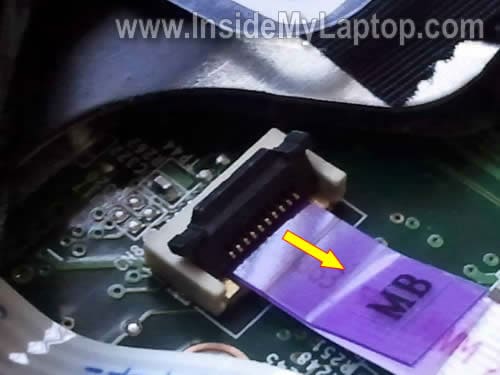
This is a bit extreme but you could take it to your local IT store and they could disconnect the small ribbon cable that's below the keyboard 5min job ;)

remove-laptop-parts-16.jpg
 

My Computer

Computer type
PC/Desktop
Computer Manufacturer/Model Number
Self Built
OS
Windows 7 Ultimate 64bit
CPU
AMD Phenom Quad core 9950 black edition
Motherboard
Gigabyte
Memory
16Gb
Graphics Card(s)
2x XFX Radeon 5850
Sound Card
PCI Express X-Fi Titanium / Logitech G35
Monitor(s) Displays
2x HP 2410i
Screen Resolution
1920x1080
Hard Drives
2x 500Gb Seagate
1x 300Gb Seagate
1x 1Tb Seagate
2x 1Tb Hitatchi
PSU
Jean Tech Storm 700W
Case
Cooler Master COSMOS S
Cooling
Akasa Evo Blue Pro
Keyboard
Logitech G15
Mouse
Mad Catz M.M.O. 7
Internet Speed
12mb
Hi there ... I think if you Uninstalled the Lenovo Energy Management .It would be possible to disable it. But i am sure you wont want to do that
 

My Computer

Computer Manufacturer/Model Number
W530-3630QM1
OS
windows 7 home 64bit
CPU
INTEL-CORE I7
Memory
16GB
Hard Drives
750GB
Browser
Chrome
Is there nowhere in the software/mouse settings to disable touchpad if you have a mouse connected?

No. Believe me, I've tried. The mouse settings say that you can disable the TP there but, as soon as you reboot, the *&^%$#@! POS is back!
 

My Computer

Computer type
PC/Desktop
Computer Manufacturer/Model Number
Custom Build
OS
Win 7 Ultimate 64 bit
CPU
Intel i7-3930K
Motherboard
ASUS P9X79 WS
Memory
Kingston HyperX Genesis 32GB Kit (8x4GB Modules) 1600MHz DDR
Graphics Card(s)
MSI R7850 Twin Frozr 2GD5/OC Radeon HD 7850 2GB 256-bit GDDR
Sound Card
Asus Xonar Essence STX
Monitor(s) Displays
3x Asus VG248QE 24", Vizio 32" TV
Screen Resolution
1920 x 1080, ?
Hard Drives
Samsung 128GB 840 Pro SSD (1),
Samsung 4TB 850 EVO SSDs (4)
Samsung 4TB 850 EVO SSDs (16) external backup drives used in 2.5" hot swap bays in the computer.
PSU
Corsair HX750w
Case
Antec Two Hundred v2 (modified)
Cooling
Cooler Master GeminII S524 120mm (fan replaced with a 140mm)
Keyboard
Logitech G510s
Mouse
Logitech M525 (two in use)
Internet Speed
=< 32Mbps down, 8Mbps up
Antivirus
AVAST!, MBAM, SAS, Spybot S&D (all but MBAM free) Glary Util
Browser
IE11
Other Info
LSI 9211-8i HBA card (8 SATA III ports), 2.5" & 3.5" Hot Swap Bays, HooToo HT-CR001 PCI-E to USB 3.0 Internal Hub + 6 Slot Card Reader, and LG Model CH12LS28 BD-ROM Optical Drive. Also, ScanSnap S1500 ADF duplexing scanner, Canon 9000F flat bed scanner, Corsair SP2500 2.1 speakers, Samsung CLP 415nw laser color printer, Cyberpower PP2200SW UPS
Is there any software that the mouse uses that you may have disabled on startup? I'm reaching, but I have to ask because I've seen it before. Sometimes if you disable the software the mouse uses, it will still work, but some functionality, such as the computer recognizing there is a mouse plugged up on startup might not work.
 

My Computer

Computer type
PC/Desktop
Computer Manufacturer/Model Number
Custom Built
OS
Windows 7 Professional 64bit SP1
CPU
Intel Core i5-3570K @ 4.5GHz
Motherboard
Asus Sabertooth Z77
Memory
Corsair Vengeance 16GB (4x4) @1866MHz CL 9-9-9-24 1T
Graphics Card(s)
EVGA GTX 750 Ti FTW
Sound Card
Onboard Audio
Monitor(s) Displays
Dell S2309W
Screen Resolution
1920x1080
Hard Drives
Samsung 830 128GB SSD - OS
(4) Seagate 5TB HDD
(1) Seagate 2TB HDD
PSU
Seasonic X750 80+ Gold Full Modular
Case
Antec Eleven Hundred Super Mid Tower
Cooling
Intel Liquid Cooler
Keyboard
Max Nighthawk X8 Mechanical keyboard
Mouse
Mionix Naos 7000
Internet Speed
50 Mbps Down / 10 Mbps Up
Antivirus
Microsoft Security Essentials/Malwarebytes Anti-Malware
Browser
Chrome/Firefox
Other Info
Klipsch ProMedia 2.1's
Asus RT-N66R Wireless Router
Is there any software that the mouse uses that you may have disabled on startup? I'm reaching, but I have to ask because I've seen it before. Sometimes if you disable the software the mouse uses, it will still work, but some functionality, such as the computer recognizing there is a mouse plugged up on startup might not work.

Nope.
 

My Computer

Computer type
PC/Desktop
Computer Manufacturer/Model Number
Custom Build
OS
Win 7 Ultimate 64 bit
CPU
Intel i7-3930K
Motherboard
ASUS P9X79 WS
Memory
Kingston HyperX Genesis 32GB Kit (8x4GB Modules) 1600MHz DDR
Graphics Card(s)
MSI R7850 Twin Frozr 2GD5/OC Radeon HD 7850 2GB 256-bit GDDR
Sound Card
Asus Xonar Essence STX
Monitor(s) Displays
3x Asus VG248QE 24", Vizio 32" TV
Screen Resolution
1920 x 1080, ?
Hard Drives
Samsung 128GB 840 Pro SSD (1),
Samsung 4TB 850 EVO SSDs (4)
Samsung 4TB 850 EVO SSDs (16) external backup drives used in 2.5" hot swap bays in the computer.
PSU
Corsair HX750w
Case
Antec Two Hundred v2 (modified)
Cooling
Cooler Master GeminII S524 120mm (fan replaced with a 140mm)
Keyboard
Logitech G510s
Mouse
Logitech M525 (two in use)
Internet Speed
=< 32Mbps down, 8Mbps up
Antivirus
AVAST!, MBAM, SAS, Spybot S&D (all but MBAM free) Glary Util
Browser
IE11
Other Info
LSI 9211-8i HBA card (8 SATA III ports), 2.5" & 3.5" Hot Swap Bays, HooToo HT-CR001 PCI-E to USB 3.0 Internal Hub + 6 Slot Card Reader, and LG Model CH12LS28 BD-ROM Optical Drive. Also, ScanSnap S1500 ADF duplexing scanner, Canon 9000F flat bed scanner, Corsair SP2500 2.1 speakers, Samsung CLP 415nw laser color printer, Cyberpower PP2200SW UPS
Then I am beyond useless lol......that's all the bright ideas I had and was pretty certain you had already checked for that. I'll keep looking around for a solution.
 

My Computer

Computer type
PC/Desktop
Computer Manufacturer/Model Number
Custom Built
OS
Windows 7 Professional 64bit SP1
CPU
Intel Core i5-3570K @ 4.5GHz
Motherboard
Asus Sabertooth Z77
Memory
Corsair Vengeance 16GB (4x4) @1866MHz CL 9-9-9-24 1T
Graphics Card(s)
EVGA GTX 750 Ti FTW
Sound Card
Onboard Audio
Monitor(s) Displays
Dell S2309W
Screen Resolution
1920x1080
Hard Drives
Samsung 830 128GB SSD - OS
(4) Seagate 5TB HDD
(1) Seagate 2TB HDD
PSU
Seasonic X750 80+ Gold Full Modular
Case
Antec Eleven Hundred Super Mid Tower
Cooling
Intel Liquid Cooler
Keyboard
Max Nighthawk X8 Mechanical keyboard
Mouse
Mionix Naos 7000
Internet Speed
50 Mbps Down / 10 Mbps Up
Antivirus
Microsoft Security Essentials/Malwarebytes Anti-Malware
Browser
Chrome/Firefox
Other Info
Klipsch ProMedia 2.1's
Asus RT-N66R Wireless Router
Thanks!
 

My Computer

Computer type
PC/Desktop
Computer Manufacturer/Model Number
Custom Build
OS
Win 7 Ultimate 64 bit
CPU
Intel i7-3930K
Motherboard
ASUS P9X79 WS
Memory
Kingston HyperX Genesis 32GB Kit (8x4GB Modules) 1600MHz DDR
Graphics Card(s)
MSI R7850 Twin Frozr 2GD5/OC Radeon HD 7850 2GB 256-bit GDDR
Sound Card
Asus Xonar Essence STX
Monitor(s) Displays
3x Asus VG248QE 24", Vizio 32" TV
Screen Resolution
1920 x 1080, ?
Hard Drives
Samsung 128GB 840 Pro SSD (1),
Samsung 4TB 850 EVO SSDs (4)
Samsung 4TB 850 EVO SSDs (16) external backup drives used in 2.5" hot swap bays in the computer.
PSU
Corsair HX750w
Case
Antec Two Hundred v2 (modified)
Cooling
Cooler Master GeminII S524 120mm (fan replaced with a 140mm)
Keyboard
Logitech G510s
Mouse
Logitech M525 (two in use)
Internet Speed
=< 32Mbps down, 8Mbps up
Antivirus
AVAST!, MBAM, SAS, Spybot S&D (all but MBAM free) Glary Util
Browser
IE11
Other Info
LSI 9211-8i HBA card (8 SATA III ports), 2.5" & 3.5" Hot Swap Bays, HooToo HT-CR001 PCI-E to USB 3.0 Internal Hub + 6 Slot Card Reader, and LG Model CH12LS28 BD-ROM Optical Drive. Also, ScanSnap S1500 ADF duplexing scanner, Canon 9000F flat bed scanner, Corsair SP2500 2.1 speakers, Samsung CLP 415nw laser color printer, Cyberpower PP2200SW UPS
Take a look in "Services", it may be there.
 

My Computer

Computer type
PC/Desktop
Computer Manufacturer/Model Number
Bruce ... somewhere in his 40's
OS
Windows 7 Ultimate 32bit SP1
CPU
Intel(R) Core(TM)2 Quad CPU @ 2.40GHz, 2400 MHz
Motherboard
INTEL/D975XBX2
Memory
4 GB
Graphics Card(s)
ATI Radeon HD 2600 Pro
Monitor(s) Displays
Samsung SyncMaster 914v
Screen Resolution
1280 x 1024
Hard Drives
2/500GB each ... ST3500630AS ATA Device.
One is not connected
PSU
Rocketfish 700 W
Case
G.Skill Gigabyte Chassis
Keyboard
Standard PS/2 Keyboard
Mouse
Microsoft PS/2 Mouse
Internet Speed
DSL
Antivirus
Avira Internet Security
Browser
IE 11
Other Info
ATI HDMI Audio
I don't like the gawd awful things either! Maybe you've been there, in Device Manager there should be a listing for the touchpad, ex. Synaptics. Can you/did you disable it from there? I did this with my old Dell, circa 2007, and it stayed off.
 

My Computer

Computer type
PC/Desktop
Computer Manufacturer/Model Number
Home Built Desktop By DataTech
OS
Windows 7 Ultimate X64 SP1
CPU
Intel i5-2550K, Differing ~4.4-4.8GHz No built in GPU
Motherboard
ASUS P8Z68-V PRO/GEN3
Memory
16GB G.Skill Sniper 1866MHz @ 2133MHz 2x8GB
Graphics Card(s)
ASUS GTX650TIB-DC2OC-2GD5, (650TI Boost)
Sound Card
Onboard Realtek 5-1
Monitor(s) Displays
Samsung P2570HD
Screen Resolution
1920x1080
Hard Drives
Samsung 840 Pro 256GB SSD for OS, 500GB Seagate Constellation (Enterprise drive) for Data
PSU
Corsair HX650W
Case
Inwin Dragon Rider
Cooling
Hyper 212 EVO w/two Noctua fans, push-pull, @1300 RPM
Keyboard
E-Z Eyes, bright yellow keys with large characters
Mouse
steelseries SENSEI Laser Pro Gaming
Internet Speed
48-51Mbs Mbs down, 11 Mbs up Xfinity Cable
Antivirus
Norton Internet Security 2013
Browser
IE 10, Opera, Pale Moon if needed
Other Info
4 case fans, LG BluRay-RE, ASUS DVD-RW, Mr. Fusion power supply, 1.21 gigawatts.
Lady F what type of touchpad do you have, synaptic or alps?
 

My Computer

Computer type
PC/Desktop
Computer Manufacturer/Model Number
Gateway DX4831-01e (Mid-Tower Desktop)
OS
Originally Win 7 Hm Prem x64 Ver 6.1.7600 Build 7601-SP1 | Upgraded to Windows 10 December 14, 2019
CPU
Intel i3 530 2.93GHz, 2933MHz 2 Cores 4 Logical Processors
Motherboard
Gateway H57M01 133 megahertz
Memory
6GB of 1,333MHz DDR3 SDRAM
Graphics Card(s)
32MB Intel Graphics Media Accelerator HD IGChip
Sound Card
Realtek High Definition Audio
Monitor(s) Displays
Gateway HX2000 20inch TFT active matrix TN
Screen Resolution
1600 x 900 x 59 hertz
Hard Drives
WDC WD10EADS-00M2B0 [HDD] (1000.20 GB) -- drive 0,
HL-DT-ST DVDRAM GH41N [CD-ROM dr]
Four card readers, and Four USB 2.0
PSU
300watts.
Case
Mid-Tower Desktop
Cooling
Stock from Gateway
Keyboard
Natural Ergonomic Keyboard 4000, see Other Info
Mouse
Orig. Gateway wore out now using Insignia USB wired optical
Internet Speed
Vz FIOS 10ms png 57.64Mbps down 65.53Mbps up Speedtest.org
Antivirus
Zamana Anti-logger with Anti-malware, MSE, Windows Firewall,
Browser
IE11.0.9600.19399-Upd ver11.0.135, Firefox 68.0.1 x64
Other Info
System Specs by Belarc.

BIOS: American Megatrends Inc. P01-A0 11/17/2009

Replaced the MS 'Natural' Standard PS/2 Enhanced 101-102 Keyboard with a new Natural Ergonomic Keyboard 4000 on August 1st 2014.

Canon Pixma MG3222 Printer.

Updated to IE11 on 12102015 | Fios Quantum Router g1100

Additional AV: SpywareBlaster, manual Mbam, SAS

My Computer

Computer type
PC/Desktop
Computer Manufacturer/Model Number
Self Built
OS
Win 10 Pro x64
CPU
Intel I5-2500K @3.3GHz
Motherboard
Asrock P67 Extreme4
Memory
16GB G.Skill Ripjaws X (4x4GB)
Graphics Card(s)
EVGA GeForce 750 Ti SC 2GB
Sound Card
ASUS Xonar DG 5.1 Channels 24-bit 96KHz PCI Interface Sound
Monitor(s) Displays
auria eq2367
Screen Resolution
1920 x 1080
Hard Drives
250GB Samsung 850 EVO SSD
1TB WD Blue
1TB Hitachi
PSU
SeaSonic X 650W 80 Plus Gold
Case
Corsair Obsidian 750D
Cooling
Corsair H60, Three 140mm case fans
Keyboard
Logitech Wireless Keyboard K520
Mouse
Logitech Wireless Mouse M310
Internet Speed
Wave Broadband ~ 100 dn 5 up
Antivirus
Windows Defender, Malwarebytes Premium
Browser
Edge, IE11, Chrome
Other Info
Laptop specs: HP g7-1365dx /
CPU: AMD A6-3420M APU with Radeon(tm) HD Graphics /
RAM: Crucial 8Gb (2x4Gb) /
SSD: Crucial M4-CT128M4SSD2 ATA Device/ FW 000F /
GFX: AMD Radeon HD 6520G /
OS: Windows 10 Pro x64
I don't like the gawd awful things either! Maybe you've been there, in Device Manager there should be a listing for the touchpad, ex. Synaptics. Can you/did you disable it from there? I did this with my old Dell, circa 2007, and it stayed off.

Tried that, no joy.
 

My Computer

Computer type
PC/Desktop
Computer Manufacturer/Model Number
Custom Build
OS
Win 7 Ultimate 64 bit
CPU
Intel i7-3930K
Motherboard
ASUS P9X79 WS
Memory
Kingston HyperX Genesis 32GB Kit (8x4GB Modules) 1600MHz DDR
Graphics Card(s)
MSI R7850 Twin Frozr 2GD5/OC Radeon HD 7850 2GB 256-bit GDDR
Sound Card
Asus Xonar Essence STX
Monitor(s) Displays
3x Asus VG248QE 24", Vizio 32" TV
Screen Resolution
1920 x 1080, ?
Hard Drives
Samsung 128GB 840 Pro SSD (1),
Samsung 4TB 850 EVO SSDs (4)
Samsung 4TB 850 EVO SSDs (16) external backup drives used in 2.5" hot swap bays in the computer.
PSU
Corsair HX750w
Case
Antec Two Hundred v2 (modified)
Cooling
Cooler Master GeminII S524 120mm (fan replaced with a 140mm)
Keyboard
Logitech G510s
Mouse
Logitech M525 (two in use)
Internet Speed
=< 32Mbps down, 8Mbps up
Antivirus
AVAST!, MBAM, SAS, Spybot S&D (all but MBAM free) Glary Util
Browser
IE11
Other Info
LSI 9211-8i HBA card (8 SATA III ports), 2.5" & 3.5" Hot Swap Bays, HooToo HT-CR001 PCI-E to USB 3.0 Internal Hub + 6 Slot Card Reader, and LG Model CH12LS28 BD-ROM Optical Drive. Also, ScanSnap S1500 ADF duplexing scanner, Canon 9000F flat bed scanner, Corsair SP2500 2.1 speakers, Samsung CLP 415nw laser color printer, Cyberpower PP2200SW UPS
Back
Top